
Prometheus 自动发现
简介
在实际的配置中,经常会遇到增加或者减少监控主机的状况,如果每次都需要修改
prometheus.yml配置文件,实在是太麻烦了。
此时就需要配置自动发现,而prometheus只是很多种的自动发现
支持:
- 基于公有云
- 基于私有云
- 基于文件,file的自动发现
- 基于DNS 的自动发现,分为SRV解析自动发现和A记录解析的自动发现
........等等,有很多类型,本文中介绍基于静态文件 和 DNS 的自动发现
环境说明
增加一台 10.0.20.12 node_export 主机及DNS使用的是bind9
如需bind9 文档,点击这里是bind9文档
以下的所有演示都是案例,可根据自己的情况做变更。
静态配置
简单讲解下直接修改prometheus.yml主配置文件中的静态配置。
修改配置如下:
[root@es01 config]# cat prometheus.yml

global:

  scrape_interval:     15s

  evaluation_interval: 15s

alerting:

  alertmanagers:

  - static_configs:

    - targets:

rule_files:

scrape_configs:

  - job_name: 'prometheus'

    static_configs:

    - targets: ['localhost:9090']

  - job_name: 'node'                # 增加一个节点,取名为 node

    metrics_path: '/metrics'        # 获取数据的路径 http://10.0.20.12:9100/metrics

    static_configs:

    - targets: ['10.0.20.12:9100']  # 静态配置 node 节点的地址
重新加载配置文件
检查配置文件,并重新加载
# 检查配置文件

[root@es01 config]# /opt/prometheus-2.14/bin/promtool check config /opt/prometheus-2.14/config/prometheus.yml

Checking /opt/prometheus-2.14/config/prometheus.yml

  SUCCESS: 0 rule files found

# 重新加载配置文件

[root@es01 config]# curl -X POST httP://10.0.20.11:9090/-/reload

[root@es01 config]#
再次访问效果如下
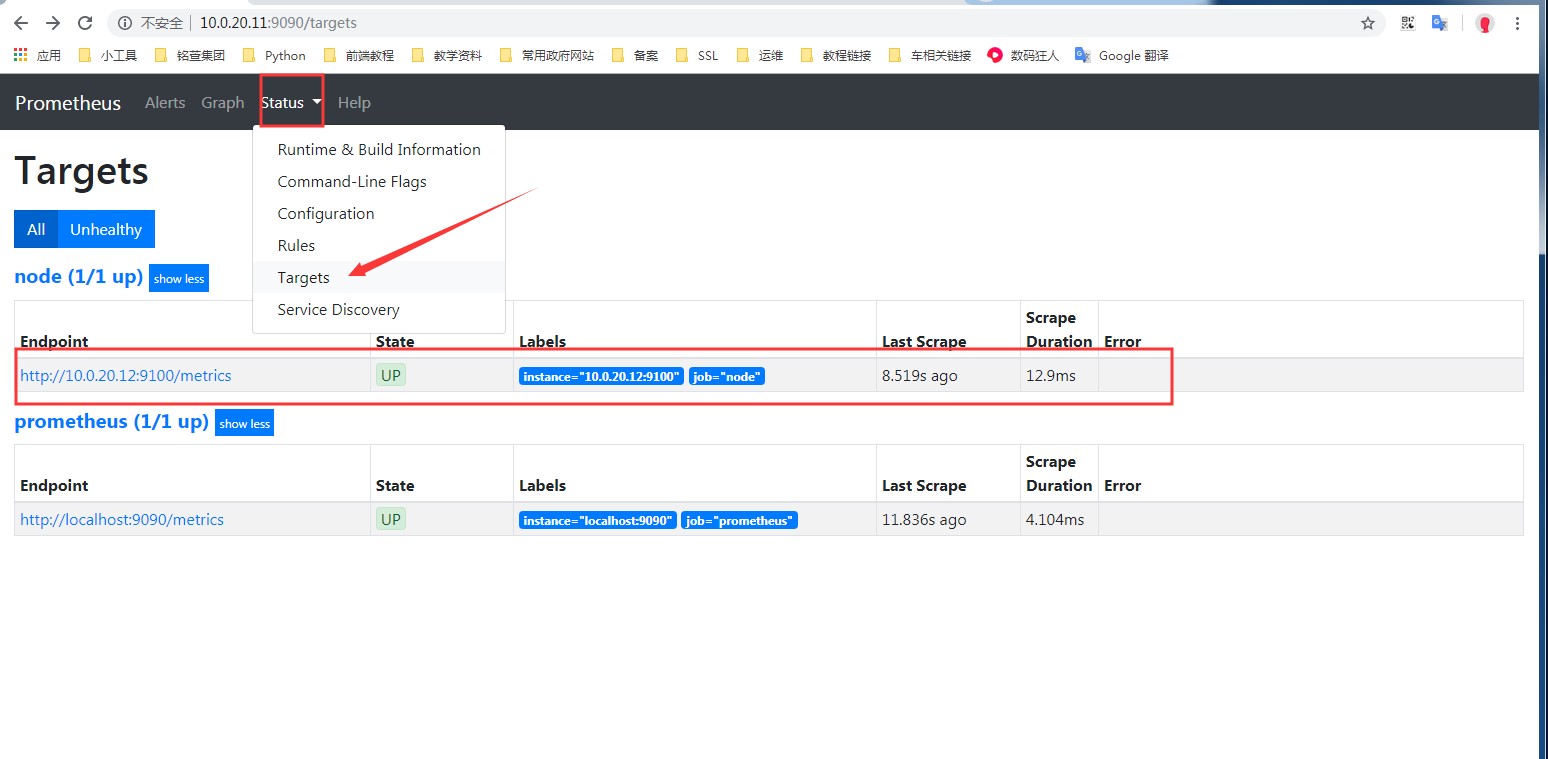
基于文件发现配置
创建对应的目录
[root@es01 config]# pwd

/opt/prometheus-2.14/config

# 创建targets目录,并且创建对应的子目录,用于存放相应的配置文件自动发现

[root@es01 config]# mkdir targets/{docker,nodes}

[root@es01 config]# ls targets/

docker  nodes
在创建好的nodes目录下创建 nodes.json文件,并写入下面内容
[root@es01 config]# cat targets/nodes/nodes.json

[{

  "targets": [

    "10.0.20.12:9100"           # 指定node_export链接地址

  ],

  "labels": {

    "server": "node_export01"   # 添加一个标签

  }

}]
修改配置文件如下:
[root@es01 config]# cat prometheus.yml

global:

  scrape_interval:     15s

  evaluation_interval: 15s

alerting:

  alertmanagers:

  - static_configs:

    - targets:

rule_files:

scrape_configs:

  - job_name: 'prometheus'

    static_configs:             # 这个配置表示 静态发现

    - targets: ['localhost:9090']

  - job_name: 'node'            # 增加一个节点,取名为 node

    metrics_path: "/metrics"    # 获取数据的路径 http://10.0.20.12:9100/metrics

    file_sd_configs:            # 这个配置表示通过文件发现

    - files:

      - targets/nodes/*.json    # 读取目录下的所有json结尾的文件

      refresh_interval: 1m      # 刷新频率,1 分钟
重新加载配置文件
检查配置文件,并重新加载
# 检查配置文件

[root@es01 config]# /opt/prometheus-2.14/bin/promtool check config /opt/prometheus-2.14/config/prometheus.yml

Checking /opt/prometheus-2.14/config/prometheus.yml

  SUCCESS: 0 rule files found

# 重新加载配置文件

[root@es01 config]# curl -X POST httP://10.0.20.11:9090/-/reload

[root@es01 config]#
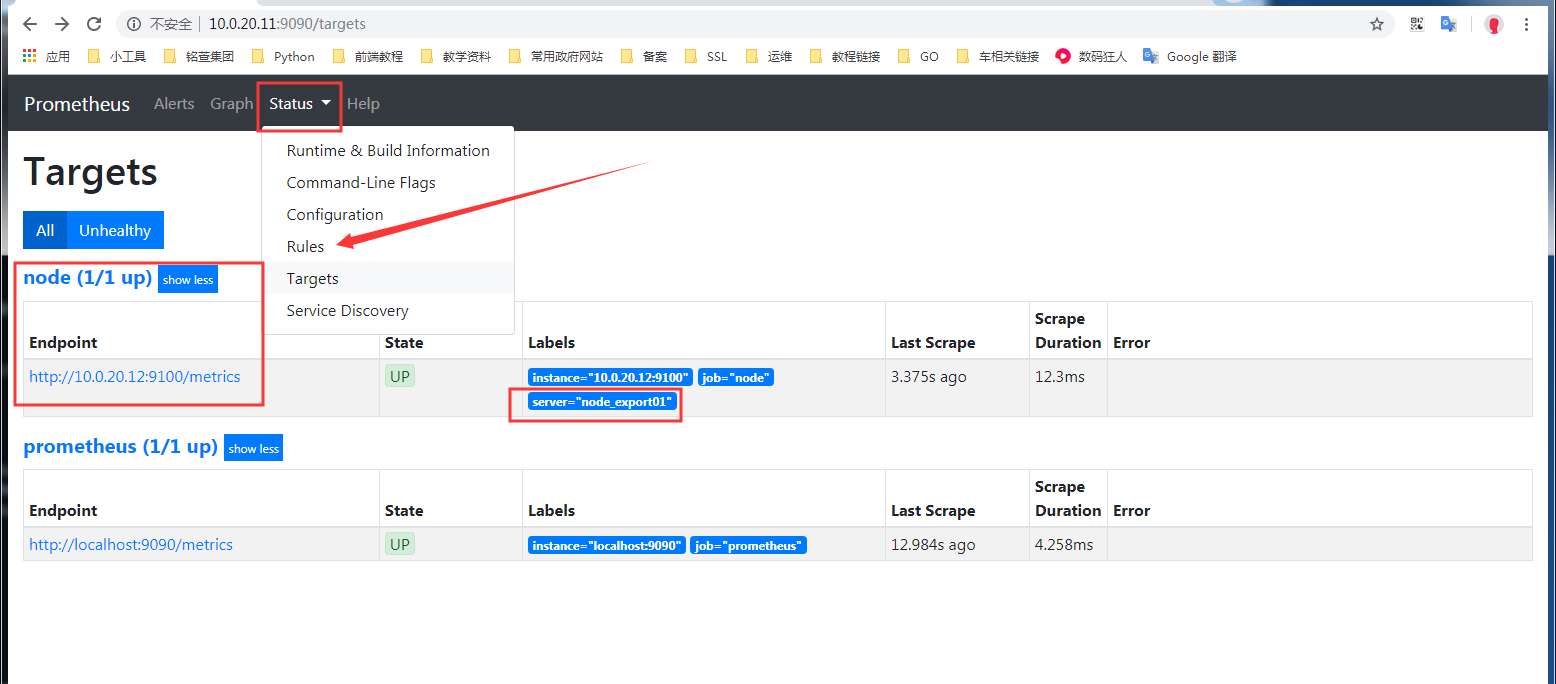
可以看到,获取到了主机监控,并且能看到增加标签
添加主机测试
在配置文件 targets/nodes/nodes.json 中添加一台主机。
在前面的文档中,prometheus 主机也部署了node_export ,这里添加测试
[{

  "targets": [

    "10.0.20.11:9100",

    "10.0.20.12:9100"

  ],

  "labels": {

    "server": "node_export01"

  }

}]
当编辑文件 targets/nodes/nodes.json 后保存,再次访问页面时,新增加的主机已经自动加入
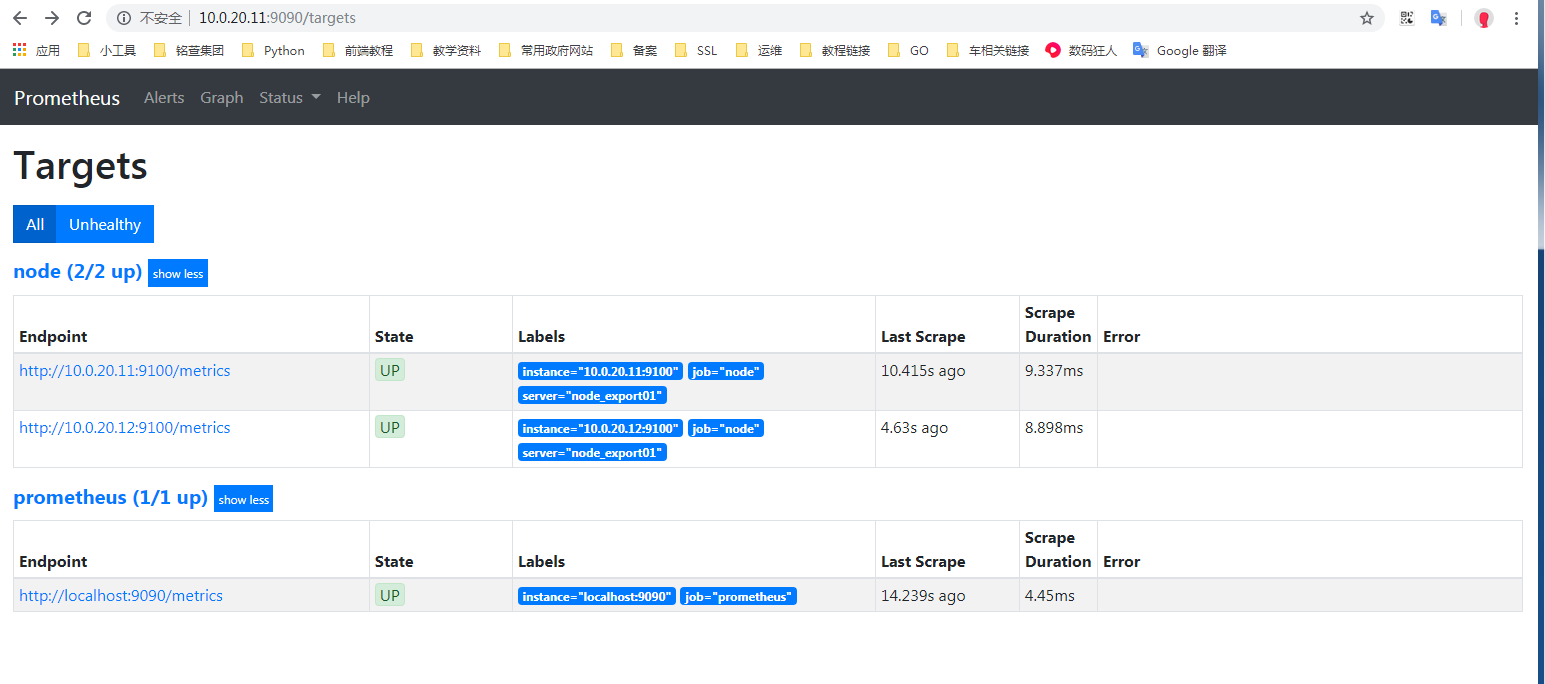
简单总结: 定义好对应的主配置文件prometheus.yml后,后续要添加新的node节点监控进来,只需要增加node.json内容即可,也不需要重载prometheus服务,相对比较简单的基于文件的自动发现。
基于DNS的A记录
首先要在内网DNS上添加A记录解析:
[root@es01 config]# nslookup es01.k8s.com

Server:		192.168.1.122

Address:	192.168.1.122#53

Name:	es01.k8s.com

Address: 10.0.20.11         # 解析后的地址

[root@es01 config]# nslookup es02.k8s.com

Server:		192.168.1.122

Address:	192.168.1.122#53

Name:	es02.k8s.com

Address: 10.0.20.12         # 解析后的地址
这里添加了两条A记录
修改配置文件
[root@es01 config]# cat prometheus.yml

global:

  scrape_interval:     15s

  evaluation_interval: 15s

alerting:

  alertmanagers:

  - static_configs:

    - targets:

rule_files:

scrape_configs:

  - job_name: 'prometheus'

    static_configs:

    - targets: ['localhost:9090']

  - job_name: 'node-A'                  # 名称

    metrics_path: "/metrics"            # 获取数据的路径 http://10.0.20.12:9100/metrics

    dns_sd_configs:

    - names: ["es01.k8s.com", "es02.k8s.com"]   # 这里填写A记录

      type: A                                   # 解析类型 A记录

      port: 9100                                # 端口
重新加载配置文件
检查配置文件,并重新加载
# 检查配置文件

[root@es01 config]# /opt/prometheus-2.14/bin/promtool check config /opt/prometheus-2.14/config/prometheus.yml

Checking /opt/prometheus-2.14/config/prometheus.yml

  SUCCESS: 0 rule files found

# 重新加载配置文件

[root@es01 config]# curl -X POST httP://10.0.20.11:9090/-/reload

[root@es01 config]#
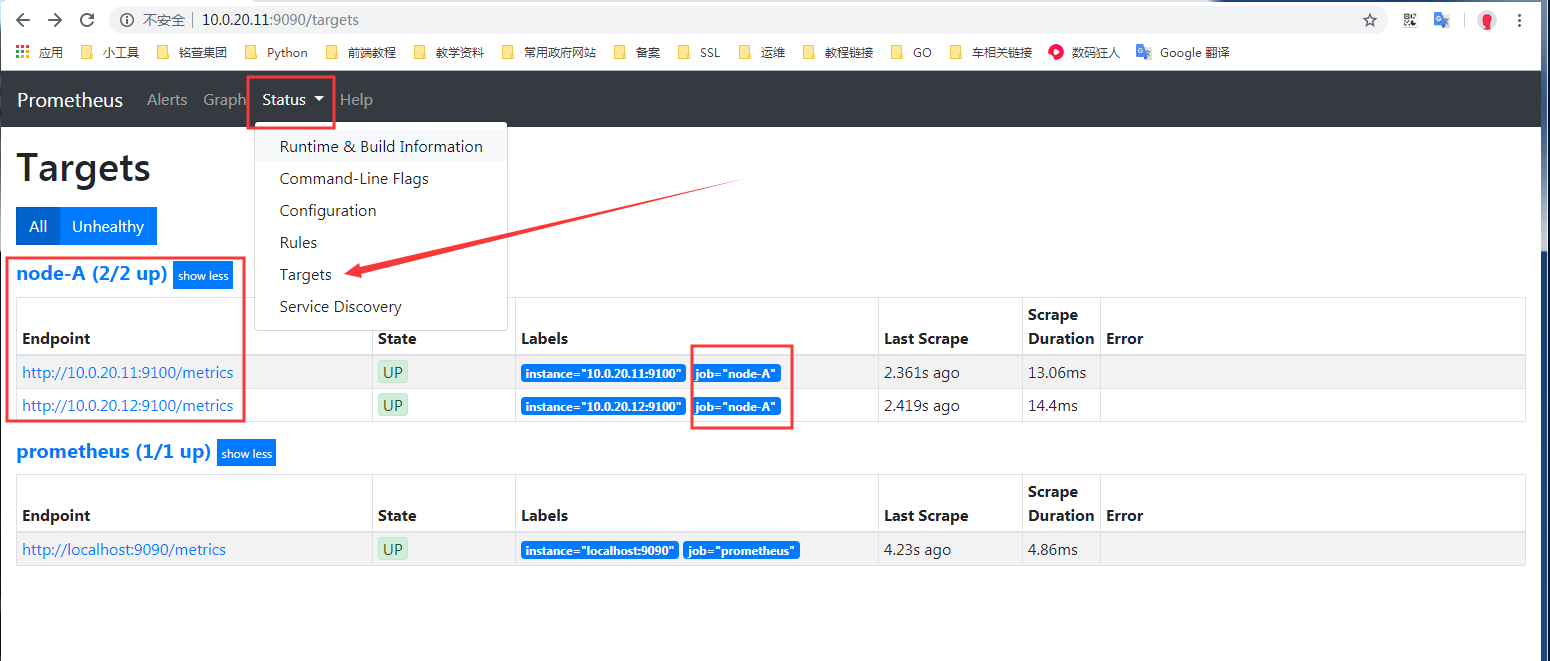
通过上图可以看出添加成功。
基于DNS的SRV记录自动发现
需要在DNS中添加SRV解析记录,下面演示在bind9中添加后测试
首先要在内网DNS上添加A记录解析:
[root@es01 config]# nslookup es01.k8s.com

Server:		192.168.1.122

Address:	192.168.1.122#53

Name:	es01.k8s.com

Address: 10.0.20.11         # 解析后的地址
然后添加SRV记录:
[root@bind named]# cat k8s.com.zone

es01    IN      A       10.0.20.11

_prometheus._tcp.k8s.com.       IN      SRV     10      10      9100    es01
上述是在bind中添加的对应的A记录和SRV记录
解析SRV记录测试
[root@es01 config]# dig @192.168.1.122 +noall +answer SRV _prometheus._tcp.k8s.com

_prometheus._tcp.k8s.com. 86400	IN	SRV	10 10 9100 es01.k8s.com.
能够解析到上述内容,则表示SRV记录添加正常
注意,先添加es01,之后测试添加SRV后,prometheus能否动态添加进监控
修改配置文件
[root@es01 config]# cat prometheus.yml

global:

  scrape_interval:     15s

  evaluation_interval: 15s

alerting:

  alertmanagers:

  - static_configs:

    - targets:

rule_files:

scrape_configs:

  - job_name: 'prometheus'

    static_configs:

    - targets: ['localhost:9090']

  - job_name: 'node_srv'                # 名称

    metrics_path: "/metrics"            # 获取数据的路径 http://10.0.20.12:9100/metrics

    dns_sd_configs:                     # 配置使用DNS解析

    - names: ['_prometheus._tcp.k8s.com']   # 配置SRV对应的解析地址
重新加载配置文件
检查配置文件,并重新加载
# 检查配置文件

[root@es01 config]# /opt/prometheus-2.14/bin/promtool check config /opt/prometheus-2.14/config/prometheus.yml

Checking /opt/prometheus-2.14/config/prometheus.yml

  SUCCESS: 0 rule files found

# 重新加载配置文件

[root@es01 config]# curl -X POST httP://10.0.20.11:9090/-/reload

[root@es01 config]#
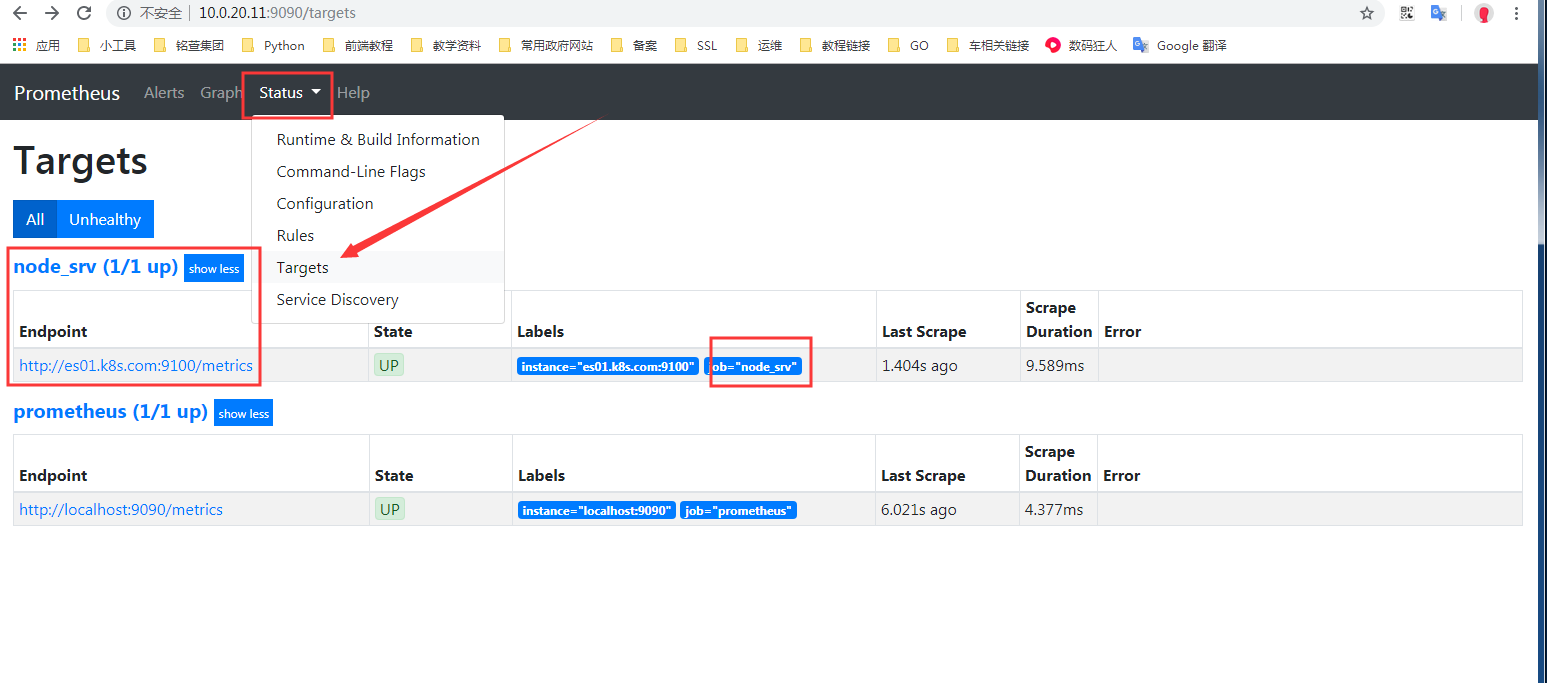
动态添加解析测试
上面通过SRV已经可以监控了,这里再次测试下,添加一条SRV记录后,prometheus是否能够自动添加
添加记录并测试
首先要在内网DNS上添加A记录解析:
[root@es01 config]# nslookup es01.k8s.com

Server:		192.168.1.122

Address:	192.168.1.122#53

Name:	es01.k8s.com

Address: 10.0.20.11         # 解析后的地址

[root@es01 config]# nslookup es02.k8s.com

Server:		192.168.1.122

Address:	192.168.1.122#53

Name:	es02.k8s.com

Address: 10.0.20.12         # 解析后的地址
然后添加SRV记录:
[root@bind named]# cat k8s.com.zone

es01    IN      A       10.0.20.11

es02    IN      A       10.0.20.12

_prometheus._tcp.k8s.com.       IN      SRV     10      10      9100    es01

_prometheus._tcp.k8s.com.       IN      SRV     10      10      9100    es02
上述是在bind中添加的对应的A记录和SRV记录
解析SRV记录测试
[root@es01 config]# dig @192.168.1.122 +noall +answer SRV _prometheus._tcp.k8s.com

_prometheus._tcp.k8s.com. 86400	IN	SRV	10 10 9100 es01.k8s.com.

_prometheus._tcp.k8s.com. 86400	IN	SRV	10 10 9100 es02.k8s.com.
添加SRV解析成功后访问测试:
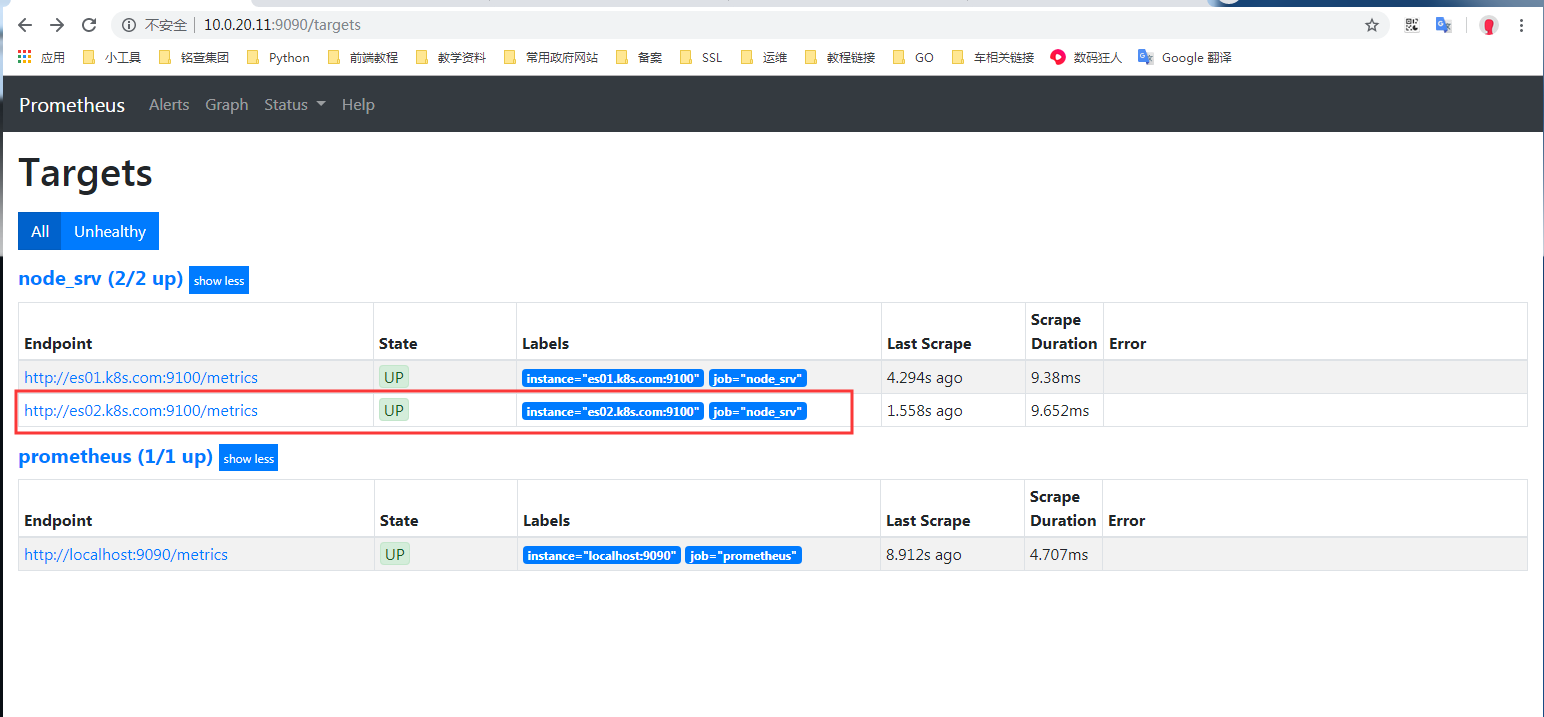
上图中展示,已自动添加成功。
Prometheus 自动发现的更多相关文章
- Prometheus基于consul自动发现监控对象 https://www.iloxp.com/archive/11/
Prometheus 监控目标为什么要自动发现 频繁对Prometheus配置文件进行修改,无疑给运维人员带来很大的负担,还有可能直接变成一个“配置小王子”,即使是配置小王子也会存在人为失误的情况 ...
- Prometheus监控神技--自动发现配置
一.自动发现类型 在上一篇文中留了一个坑: 监控某个statefulset服务的时候,我在service文件中定义了个EP,然后把pod的ip写死在配置文件中,这样,当pod重启后,IP地址变化,就监 ...
- Prometheus Operator 自动发现和持久化
Prometheus Operator 自动发现和持久化 之前在 Prometheus Operator 下面自定义一个监控选项,以及自定义报警规则的使用.那么我们还能够直接使用前面课程中的自动发现功 ...
- prometheus(5)之consul服务自动发现及pushgetway
pushgetway(push上传metric数据) Pushgateway简介 Pushgateway是prometheus的一个组件,prometheus server默认是通过exporter主 ...
- zabbix自动发现功能实现批量web url监控
需求: 现在有大量url需要监控,形式如http://www.baidu.com ,要求url状态不为200即报警. 需求详细分析: 大量的url,且url经常变化,现在监控用的是zabbix,如果手 ...
- zabbix_server的自动发现,实现批量添加主机,并链接到模板
一.需求 zabbix 服务器可以手动加入zabbix-agent客户端,对于少量的机器,这没有什么.但到了线上,我们有大量的服务器需要监控时,如果再一个个的手动加的话,工作量势必会增加很多.这时,z ...
- zabbix自动发现监控url
1.在监控客户机上 web_site_code_status.sh: #!/bin/bash UrlFile="/opt/scripts/WEB.txt" IFS=$'\n' we ...
- 【面试题】如何让C语言自动发现泄漏的内存
1. 题目 改造malloc和free函数,使C语言能自动发现泄漏的内存,在程序退出时打印中遗漏的内存地址和大小. 2. 思路 用一个链表来记录已经分配的内存地址.在malloc时,把分配的内存地址和 ...
- Docker集群实验环境布署--swarm【3 注册服务监控与自动发现组件--consul】
参考官网集群配置方式 https://hub.docker.com/r/progrium/consul/ 集群中需要manager与node能通信consul的发现服务,不然,管理节点选举不了,无 ...
随机推荐
- Splash API 调用
render.html render.html 接口用于获取 JavaScript 渲染的页面的 HTML 代码,接口地址就是 Splash 的运行地址加此接口名称,例如http://localhos ...
- Python中使用字典的几个小技巧
1 解包 所谓解包,就是将字典通过 ** 操作符转为 Key=Value 的形式,这种形式可以直接传给函数作为关键字参数. 说说适用的几种情况. 1.1 搜索拼接条件 当应用中使用类似 SQLAlch ...
- Scrapy爬虫day1——环境配置
安装 Scrapy pip install scrapy 配置虚拟环境 mkvirtualenv Spider 创建项目 在Spider的虚拟环境中运行 scrapy startproject Boo ...
- Flink中发送端反压以及Credit机制(源码分析)
上一篇<Flink接收端反压机制>说到因为Flink每个Task的接收端和发送端是共享一个bufferPool的,形成了天然的反压机制,当Task接收数据的时候,接收端会根据积压的数据量以 ...
- 「CF630C」Lucky Numbers
更好的阅读体验 Portal Portal1: Codeforces Portal2: Luogu Description The numbers of all offices in the new ...
- 一种logging封装方法,不会产生重复log
在调试logging的封装的时候,发现已经调用了logging封装的函数,在被其它函数再调用时,会出现重复的logging.原因是不同的地方创建了不同的handler,所以会重复,可以使用暴力方法解决 ...
- 源码学习系列之SpringBoot自动配置(篇二)
源码学习系列之SpringBoot自动配置(篇二)之HttpEncodingAutoConfiguration 源码分析 继上一篇博客源码学习系列之SpringBoot自动配置(篇一)之后,本博客继续 ...
- F#周报2019年第46期
新闻 使用Pulumi和.NET Core创建现代云应用 宣告.NET Core 3.1预览版3 ML.NET模型构建器升级 .NET Framework修复工具 Mac上的Visual Studio ...
- 破解微擎安装,免费搭建微擎,免费破解微擎,微擎破解版本,最新版本V2.1.2,一键安装!!
微擎是一款基于WEB2.0(PHP+Mysql)技术架构,免费开源的公众平台管理系统,一款致力于将小程序和公众号商业化.智慧化.场景化的自助引擎.微擎提供公众号.微信小程序.支付宝小程序.百度熊掌 ...
- cn_windows虚拟机配置
1.打开“VMware”,点击“主页”,点“创建新的虚拟机”: 2.会弹出一个“新建虚拟机向导”,类型选择“典型”,点击“下一步”: 3.选择“稍后安装操作系统”,点击“下一步”: 4.选择“Micr ...