
easyui 扩展 datagrid 数据网格视图
效果如图:
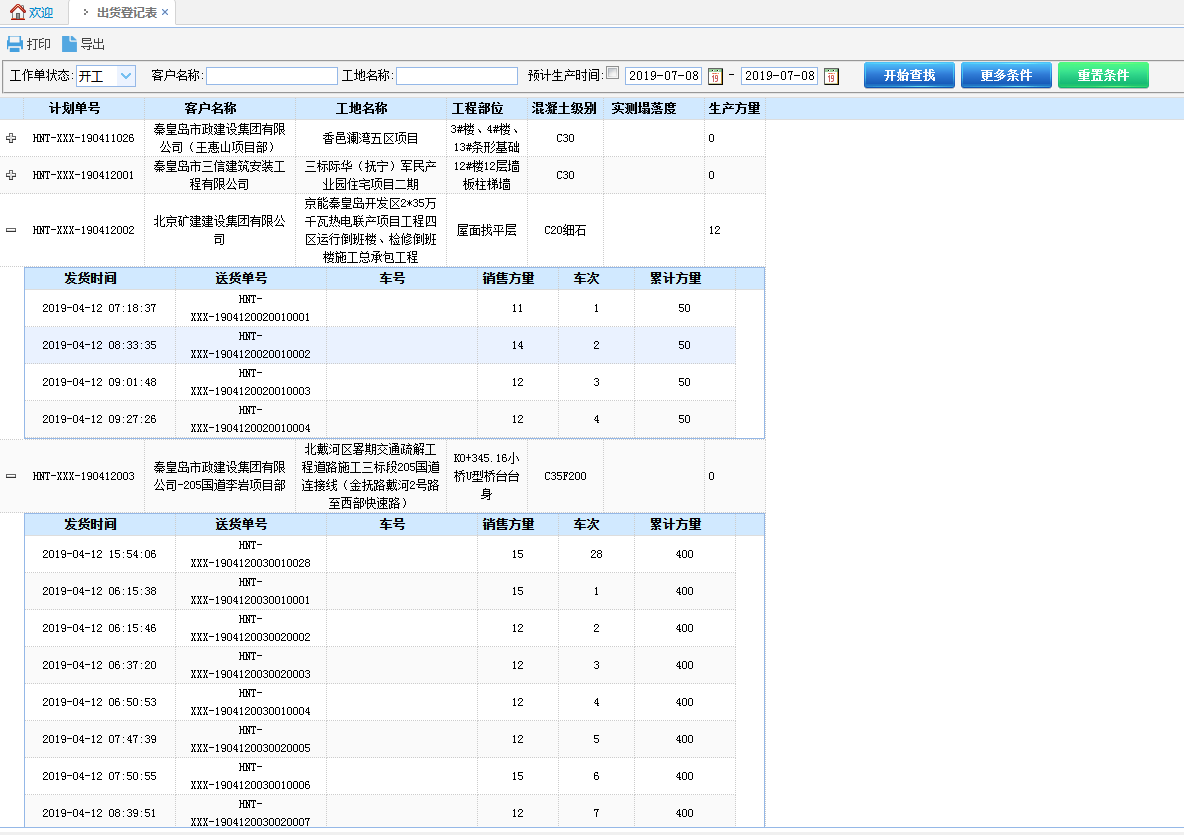
js代码:
$("#tdg").datagrid({
width: 200,
url: "/Laboratory/ShipmentRegister/LoadData",
queryParams: {
auvp: 'r',
condition: " and State='0' "
},
striped: true,
remoteSort: false,
singleSelect: true,
nowrap: false,
fitColumns: false,
columns: [[
//{ field: 'ck', checkbox: true },
{ field: 'JobNo', align: 'center', title: '计划单号', width: '120' },
{ field: 'CustomerName', align: 'center', title: '客户名称', width: '150' },
{ field: 'SiteName', align: 'center', title: '工地名称', width: '150' },
{ field: 'Project', align: 'center', title: '工程部位', width: '80' },
{ field: 'Cgrade', align: 'center', title: '混凝土级别', width: '75' },
{ field: 'ActSlumpName', align: 'center', title: '实测塌落度', width: '100' },
{ field: 'Volume', align: 'left', title: '生产方量', width: '60' },
]],
fit: true,
view: detailview,
detailFormatter: function (rowIndex, rowData) {
return '<div><table id="tt_' + rowData.Autoid + '"></table></div>';
},
onExpandRow: function (index, row) {
$("#tt_" + row.Autoid).datagrid({
width: 'auto',
height: 'auto',
url: "/Laboratory/ShipmentRegister/LoadProdData",
queryParams: {
JobNo: row.JobNo
},
striped: true,
remoteSort: false,
singleSelect: true,
nowrap: false,
fitColumns: false,
columns: [[
{ field: 'PDate', align: 'center', title: '发货时间', width: '150' },
{ field: 'DocketNo', align: 'center', title: '送货单号', width: '150' },
{ field: 'TruckName', align: 'center', title: '车号', width: '150' },
{ field: 'Volume', align: 'center', title: '销售方量', width: '80' },
{ field: 'TruckCount', align: 'center', title: '车次', width: '75' },
{ field: 'Total', align: 'center', title: '累计方量', width: '100' }
]],
//fit: true, //自适应大小,填充容器 如果fit为true,则视图显示不出来。所以此处把fit属性注释起来
onResize: function () {
$('#tdg').datagrid('fixDetailRowHeight', index);
}, onLoadSuccess: function (data) {
//此处必须有否则第一次展开时"+"号不会跟着移动
setTimeout(function () {
$('#tdg').datagrid('fixDetailRowHeight', index);
},0);
}
});
$('#tdg').datagrid('fixDetailRowHeight', index);
},
onCollapseRow: function (index, row) {
//alert(index);
}
})
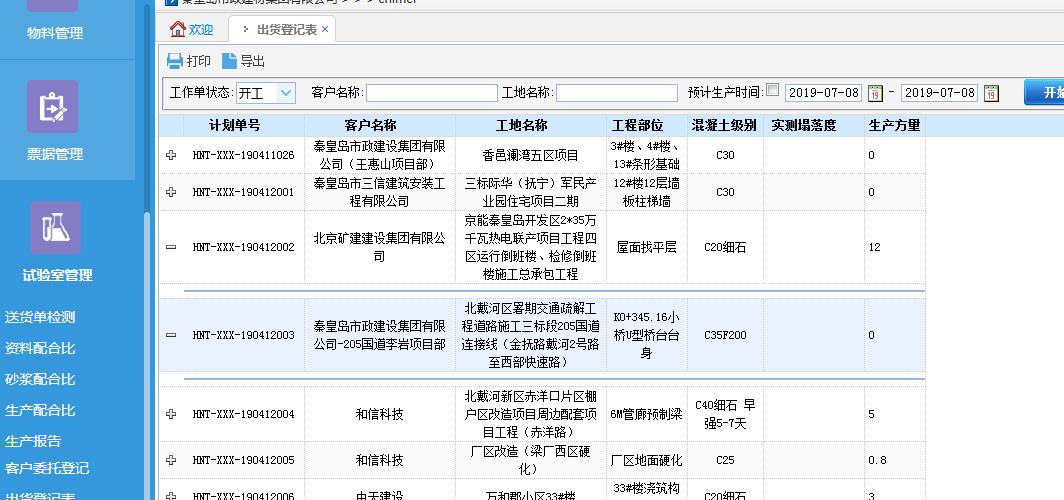
当属性fit: true时,展开视图会变成如下图所示的效果:
easyui 扩展 datagrid 数据网格视图的更多相关文章
- 数据网格和树-EasyUI Datagrid 数据网格、EasyUI Propertygrid 属性网格、EasyUI Tree 树、EasyUI Treegrid 树形网格
EasyUI Datagrid 数据网格 扩展自 $.fn.panel.defaults.通过 $.fn.datagrid.defaults 重写默认的 defaults. 数据网格(datagrid ...
- 第二百二十二节,jQuery EasyUI,DataGrid(数据表格)组件
jQuery EasyUI,DataGrid(数据表格)组件 学习要点: 1.加载方式 2.分页功能 本节课重点了解 EasyUI 中 DataGrid(数据表格)组件的使用方法,这个组件依赖于 Pa ...
- EasyUI:datagrid数据汇总
EasyUI:datagrid数据汇总 js代码: var total=0;//全局变量 $(function(){ $('#tablebudgetdata').datagrid({ title:' ...
- easyui数据网格视图(Datagrid View)的简单应用
下面介绍datagrid的数据网格详细视图和数据网格的分组视图 1.先引用的js和css文件 1)包含eauyui必备的四个文件easyui.css,icon.css, jquery-min.js.j ...
- jquery Easy UI Datagrid(数据网格)学习心德,附API
第一步,引入主要的css样式和js文件 <meta http-equiv="Content-Type" content="text/html; charset=ut ...
- 利用Aspose.Cells完成easyUI中DataGrid数据的Excel导出功能
我准备在项目中实现该功能之前,google发现大部分代码都是利用一般处理程序HttpHandler实现的服务器端数据的Excel导出,但是这样存在的问题是ashx读取的数据一般都是数据库中视图的数据, ...
- EasyUI Datagrid 数据网格
前端用easyUI开发时,官方给的文档指导太少,网上找的又很慢,因此,我总结了一个后台返回数据后,用easyUI生成表格的方法,可编辑可分页: 1 function paginationTable(i ...
- easyui datagrid数据网格
EasyUI是一组基于jQuery的UI插件集合,它的目标就是帮助web开发者更轻松的打造出功能丰富并且美观的UI界面.它的许多控件让我们不必写很复杂的javascript,从而极大地提高了开发效率. ...
- EasyUI Datagrid 数据网格 点击选中行 再次单击取消选中行
适用于jquery-easyui-1.9.15版本: 在项目中全局搜索: opts.singleSelect==true 或者在jquery.easyui.min.js中搜索: opts.single ...
随机推荐
- django中're_path'的用法
1.re_path和path的作用是一样的.只不过're_path'是在写url的时候可以用正则表达式,功能更加强大.2.写正则表达式都推荐使用原生字符串.也就是以‘r’开头的字符串:r'move/' ...
- Java生鲜电商平台-深入订单拆单架构与实战
Java生鲜电商平台-深入订单拆单架构与实战 Java生鲜电商中在做拆单的需求,细思极恐,思考越深入,就会发现里面涉及的东西越来越多,要想做好订单拆单的功能,还是相当有难度, 因此总结了一下拆单功能细 ...
- DataGridView中实现点击单元格Cell动态添加自定义控件
场景 鼠标点击DataGridView的某个单元格时,此单元格添加一个自定义的控件,这里以 添加下拉框为例 效果 注: 博客主页: https://blog.csdn.net/badao_liuman ...
- 如何开发优质的 Flutter App:Flutter App 软件测试指南
继上一场GitChat文章发布之后,博主又为朋友们带来另一场Chat.这一次我们主要聊一聊Flutter App的测试环节. 众所周知,应用的功能越多,手动测试的难度就越大.一套完整的自动化测试将帮助 ...
- C/S与B/S架构
目录 软件开发架构 C/S架构 数据放在服务端和客户端的利弊: B/S架构 软件开发架构 开发软件,必须要开发一套 客户端 和 服务端 服务端与客户端的作用 服务端:24小时不间断提供服务 客户端:享 ...
- 在C++工程上添加CUDA编译环境
1.直接在新建工程的时候选择CUDA,这样的工程既能编译C++也能编译CU 2.在已有的C++工程上添加CUDA编译环境 右键工程-->生成依赖项-->生成自定义-->勾选CUDA ...
- 源码编译Kubeadm二进制文件
kubeadm是Kubernetes官方提供的用于快速安装Kubernetes集群的工具,伴随Kubernetes每个版本的发布都会同步更新,kubeadm会对集群配置方面的一些实践做调整,通过实验k ...
- nignx环境搭建
国产化 环境可以支持,中标麒麟 龙芯 银河麒麟
- 智能指针类模板(中)——Qt中的智能指针
Qt中的智能指针-QPointer .当其指向的对象被销毁时,它会被自动置空 .析构时不会自动销毁所指向的对象-QSharedPointer .引用计数型智能指针 .可以被自由的拷贝和赋值 .当引用计 ...
- Html学习之十(CSS选择器的使用--伪类选择器)
伪类选择器 一.基于a标签. 1.:hover 选择鼠标滑过的超链接元素 2.:active 选择鼠标单击中的超链接元素 3.:link 选择未被访问的超链接元素 4.:visited 选择已经被访问 ...