
ajax技术实现登录判断用户名是否重复以及利用xml实现二级下拉框联动,还有从数据库中获得
今天学了ajax技术,特地在此写下来作为复习。
一、什么是ajax?
客户端(特指PC浏览器)与服务器,可以在【不必刷新整个浏览器】的情况下,与服务器进行异步通讯的技术 即,AJAX是一个【局部刷新】的【异步】通讯技术,
说白了就是局部刷新。
二、ajax的原理如下图
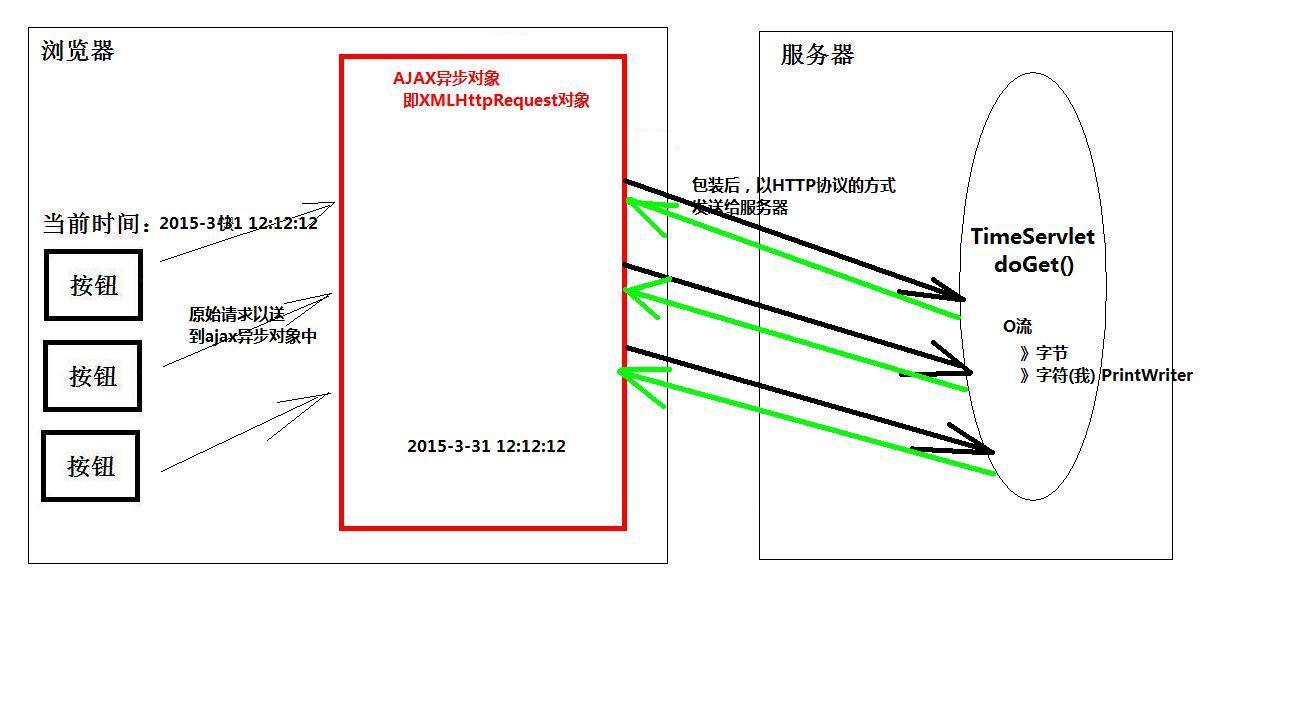
附上ajax与服务器之间的几种状态,但 4是所有浏览器都支持的的

三、ajax包含的技术如下图

四、ajax开发步骤
步一:创建ajax对象,例如:ajax = createAjax();
步二:开启异步对象:例如:ajax.open(method,url)
步三:如果是POST请求则要设置请求头,例如:ajax.setRequestHeader("content-type","application/x-www-form-urlencoded");这句话的作用是转码,如果遇到中文,将会自动转成UTF-8编码;
步四:发送请求:例如:如果是GET请求,ajax.send(null),因为GET请求的数据在请求头中就已经被发送了,即地址栏后的用?username=""
如果是POST请求,content一般写成这种形式,content = "username="+username; ajax.send(content);
步五:AJAX不断的监听服务端响应的状态变化,例如:ajax.onreadystatechange,后面写一个无名处理函数
步六:在无名处理函数中,获取AJAX的数据后,按照DOM规则,用JS语言来操作Web页面
五、ajax的应用例子,以用户登录为例,
1)使用GET方式,要注意IE浏览器,使用下面这条语句,防止IE自动缓存相同内容不刷新,
var url = "${pageContext.request.contextPath}/AjaxUserServlet?username="+username+"&time="+new Date().getTime();
jsp代码:
<%@ page language="java" import="java.util.*" pageEncoding="UTF-8"%>

<%

String path = request.getContextPath();

String basePath = request.getScheme()+"://"+request.getServerName()+":"+request.getServerPort()+path+"/";

%>

<!DOCTYPE HTML PUBLIC "-//W3C//DTD HTML 4.01 Transitional//EN">

<html>

  <head>

    <base href="<%=basePath%>">

    <title>通过使用GET,POST方式来使用ajax验证用户名是否重复</title>

    <meta http-equiv="pragma" content="no-cache">

    <meta http-equiv="cache-control" content="no-cache">

    <meta http-equiv="expires" content="0">

    <meta http-equiv="keywords" content="keyword1,keyword2,keyword3">

    <meta http-equiv="description" content="This is my page">

    <!--

    <link rel="stylesheet" type="text/css" href="styles.css">

    -->

  </head>

  <body>

    用户名:

        <input type="text" id="username" maxlength="4"/> <span id="rsID"></span>

        <hr/>

       <!-- ajax对象 -->

       <script type="text/javascript">

           function createAjax()

           {

               var ajax =null;

               try{

                   ajax = new ActiveXObject("microsoft.xmlhttp");

               }catch(e1)

               {

                   try{

                       ajax = new XMLHttpRequest();

                   }catch(e2)

                   {

                       alert("你的浏览器不支持AJAX异步对象");

                   }

               }

               return ajax;

           }

       </script>

       <script type="text/javascript">

            document.getElementById("username").onblur = function()

            {

                var username = this.value;

                if(username.length == 0)

                   {

                    document.getElementById("rsID").innerHTML="用户名不能为空";

                   }

                else

                   {

                       //对汉字进行编码

                       username = encodeURI(username);

                       //1)首先创建Ajax对象

                       var ajax = createAjax();

                       //2)打开连接

                       var method = "GET";

                       var url = "${pageContext.request.contextPath}/AjaxUserServlet?username="+username+"&time="+new Date().getTime();

                       ajax.open(method,url);

                       //3)真正发送数据

                       ajax.send(null);

                       //4)Ajax对象不断监听服务器响应的状态

                       ajax.onreadystatechange = function()

                       {

                           if(ajax.readyState == 4)

                           {

                           //5)响应码是200的话,从ajax对象中取出数据

                               if(ajax.status == 200)

                               {

                                   var rsText = ajax.responseText;

                                   document.getElementById("rsID").innerHTML=rsText;

                               }

                           }

                       }

                   }

            }

       </script>

  </body>

</html>
java后台代码:在ajax与java后台之间使用流来传递数据的
package cn.itcast.js.user;

import java.io.IOException;

import java.io.PrintWriter;

import javax.servlet.AsyncContext;

import javax.servlet.ServletException;

import javax.servlet.http.HttpServlet;

import javax.servlet.http.HttpServletRequest;

import javax.servlet.http.HttpServletResponse;

public class AjaxUserServlet extends HttpServlet {

    /**

     * The doGet method of the servlet. <br>

     *

     * This method is called when a form has its tag value method equals to get.

     *

     * @param request the request send by the client to the server

     * @param response the response send by the server to the client

     * @throws ServletException if an error occurred

     * @throws IOException if an error occurred

     */

    public void doGet(HttpServletRequest request, HttpServletResponse response)

            throws ServletException, IOException {

        String username = request.getParameter("username");

        byte [] buf = username.getBytes("ISO8859-1");

        username = new String(buf,"UTF-8");

        String tip = "<font color='green'>可以注册</font>";

        if("杰克".equals(username))

        {

            tip = "<font color='red'>该用户已注册</font>";

        }

        System.out.println(username);

        response.setContentType("text/html;charset=UTF-8");

        PrintWriter pw = response.getWriter();

        pw.write(tip);

        pw.flush();

        pw.close();

    }

}
GET实现效果:


2)、POST方式实现ajax登录验证
<%@ page language="java" import="java.util.*" pageEncoding="UTF-8"%>

<%

String path = request.getContextPath();

String basePath = request.getScheme()+"://"+request.getServerName()+":"+request.getServerPort()+path+"/";

%>

<!DOCTYPE HTML PUBLIC "-//W3C//DTD HTML 4.01 Transitional//EN">

<html>

  <head>

    <base href="<%=basePath%>">

    <title>通过使用GET,POST方式来使用ajax验证用户名是否重复</title>

    <meta http-equiv="pragma" content="no-cache">

    <meta http-equiv="cache-control" content="no-cache">

    <meta http-equiv="expires" content="0">

    <meta http-equiv="keywords" content="keyword1,keyword2,keyword3">

    <meta http-equiv="description" content="This is my page">

    <!--

    <link rel="stylesheet" type="text/css" href="styles.css">

    -->

  </head>

  <body>

    用户名:

        <input type="text" id="username" maxlength="4"/>

        <span id="rsID">

            <!--

             -->

        </span>

        <hr/>

       <!-- 引入外部js文件 -->

       <script type="text/javascript" src="js/ajax.js"> </script>

       <script type="text/javascript">

           document.getElementById("username").onblur = function()

           {

               var username = this.value;

               //1)

               var ajax = createAjax();

               //2)

               method = "POST";

               url = "${pageContext.request.contextPath}/AjaxUserServlet?time="+new Date().getTime();

               ajax.open(method,url);

               //post方式提交要设置请求头自动将中文转换为UTF-8

               ajax.setRequestHeader("content-type","application/x-www-form-urlencoded");

               //3)

               var content = "username="+username;

               ajax.send(content);

               //on ready state change

               ajax.onreadystatechange = function()

               {

                   if(ajax.readyState == 4)

                   {

                       if(ajax.status == 200)

                       {

                           //5)

                           var tip = ajax.responseText;

                           //6)创建img标签

                           var imgElement = document.createElement("img");

                           //设置img标签的src/width/height

                           imgElement.src = tip;

                           imgElement.style.width = "12px";

                           imgElement.style.height = "12px";

                           //定位span标签

                           var spanElement = document.getElementById("rsID");

                           //清空span标签的内容,防止重复出现图片

                           spanElement.innerHTML = "";

                           //将img标签加入到span标签

                           spanElement.appendChild(imgElement);

                       }

                   }

               }

           }

       </script>

  </body>

</html>
外部js代码:
//外部js文件

function createAjax()

{

    var ajax =null;

    try{

        ajax = new ActiveXObject("microsoft.xmlhttp");

    }catch(e1)

    {

        try{

            ajax = new XMLHttpRequest();

        }catch(e2)

        {

            alert("你的浏览器不支持AJAX异步对象");

        }

    }

    return ajax;

}
java后台代码:
package cn.itcast.js.user;
import java.io.IOException;
import java.io.PrintWriter;
import javax.servlet.AsyncContext;
import javax.servlet.ServletException;
import javax.servlet.http.HttpServlet;
import javax.servlet.http.HttpServletRequest;
import javax.servlet.http.HttpServletResponse;
public class AjaxUserServlet extends HttpServlet {
public void doPost(HttpServletRequest req, HttpServletResponse resp)
throws ServletException, IOException {
req.setCharacterEncoding("UTF-8");
String username = req.getParameter("username");
String tip = "images/MsgSent.gif";
if("杰克".equals(username))
{
tip = "images/MsgError.gif";
}
System.out.println(username);
resp.setContentType("text/html;charset=UTF-8");
PrintWriter pw = resp.getWriter();
pw.write(tip);
pw.flush();
pw.close();
}
}
}
}
PSOT实现效果:

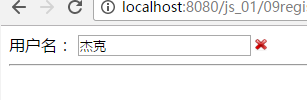
六、除了这种方式,当然后续还会利用xml实现验证二级下拉框联动
注意:使用xml传输数据和使用html传输数据相应的response设置也不一样,
xml:response.setContentType("text/xml;charset=UTF-8");
xml:response.setContentType("text/html;charset=UTF-8");
jsp代码如下:
<%@ page language="java" import="java.util.*" pageEncoding="UTF-8"%>

<%

String path = request.getContextPath();

String basePath = request.getScheme()+"://"+request.getServerName()+":"+request.getServerPort()+path+"/";

%>

<!DOCTYPE HTML PUBLIC "-//W3C//DTD HTML 4.01 Transitional//EN">

<html>

  <head>

    <base href="<%=basePath%>">

    <title>通过使用GET,POST方式来使用ajax验证用户名是否重复</title>

    <meta http-equiv="pragma" content="no-cache">

    <meta http-equiv="cache-control" content="no-cache">

    <meta http-equiv="expires" content="0">

    <meta http-equiv="keywords" content="keyword1,keyword2,keyword3">

    <meta http-equiv="description" content="This is my page">

    <!--

    <link rel="stylesheet" type="text/css" href="styles.css">

    -->

  </head>

  <body>

    用户名:

        <select id="provinceID" style="width:111px">

            <option>请选择省份</option>

            <option>湖北</option>

            <option>广东</option>

        </select>

        <select id="cityID" style="width:111px">

            <option>请选择城市</option>

        </select>

        <hr/>

       <!-- 引入外部js文件 -->

       <script type="text/javascript" src="js/ajax.js"> </script>

       <script type="text/javascript">

           document.getElementById("provinceID").onchange = function()

           {

               //清除下拉列框之前的内容,第一项除外

               var cityElement = document.getElementById("cityID");

               cityElement.options.length = 1;

               //获取选中省份的名字

               var index = this.selectedIndex;

               var optionElement = this[index];

               var province = optionElement.innerHTML;

               //去掉提示"请选择省份"

               if("请选择省份" != province)

               {

                   //NO1)

                   var ajax = createAjax();

                   //NO2)

                   var method = "POST";

                   var url = "${pageContext.request.contextPath}/ProvinceCityServlet?time="+new Date().getTime();

                   ajax.open(method,url);

                   //设置请求头

                   ajax.setRequestHeader("content-type", "application/x-www-form-urlencoded");

                   //NO3)

                   var content = "province="+province;

                   ajax.send(content);

                   //NO4)

                   ajax.onreadystatechange = function()

                   {

                       if(ajax.readyState == 4)

                       {

                           if(ajax.status == 200)

                           {

                               //NO5)从ajax异步对象中获取服务器XML数据

                               var xmlDocument = ajax.responseXML;

                               //N06)按照DOM规则,解析xml数据

                               var cityElementArray = xmlDocument.getElementsByTagName("city");

                               var size = cityElementArray.length;

                               for(var i=0;i<size;i++)

                               {

                                   //innerHTML只能用在html标签中

                                   var city = cityElementArray[i].innerHTML;

                                   //<option></option>

                                   var optionElement = document.createElement("option");

                                   //<option>深圳</option>

                                   optionElement.innerHTML = city;

                                   //<select><option>广东</option></select>

                                   //appendeChild()不会去除之前的内容

                                   cityElement.appendChild(optionElement);

                               }

                           }

                       }

                   }

               }

           }

       </script>

  </body>

</html>
外部js代码:
//外部js文件

function createAjax()

{

    var ajax =null;

    try{

        ajax = new ActiveXObject("microsoft.xmlhttp");

    }catch(e1)

    {

        try{

            ajax = new XMLHttpRequest();

        }catch(e2)

        {

            alert("你的浏览器不支持AJAX异步对象");

        }

    }

    return ajax;

}
java代码实现
package cn.itcast.js.province;

import java.io.IOException;

import java.io.PrintWriter;

import javax.servlet.ServletException;

import javax.servlet.http.HttpServlet;

import javax.servlet.http.HttpServletRequest;

import javax.servlet.http.HttpServletResponse;

public class ProvinceCityServlet extends HttpServlet {

    /**

     * The doPost method of the servlet. <br>

     *

     * This method is called when a form has its tag value method equals to post.

     *

     * @param request the request send by the client to the server

     * @param response the response send by the server to the client

     * @throws ServletException if an error occurred

     * @throws IOException if an error occurred

     */

    public void doPost(HttpServletRequest request, HttpServletResponse response)

            throws ServletException, IOException {

        request.setCharacterEncoding("UTF-8");

        String province = request.getParameter("province");

        System.out.println(province);

        String city = "";

        if("广东".equals(province))

        {

            city="<city>广州</city>"+"<city>深圳</city>"+"<city>惠州</city>";

        }else if("湖北".equals(province))

        {

            city = "<city>武汉</city>"+"<city>黄冈</city>"+"<city>宜昌</city>";

        }

        response.setContentType("text/xml;charset=utf-8");

        PrintWriter pw = response.getWriter();

        pw.write("<?xml version='1.0' encoding='UTF-8'?>");

        pw.write("<root>");

        pw.write(city);

        pw.write("</root>");

        pw.flush();

        pw.close();

    }

//需求实现从数据库中读取数据并添加到xml文件中

}
最后实现效果:


七、最后一点根据省份从数据库中取出对应的城市数据,话不多说直接上代码
package cn.itcast.js.province;

import java.io.IOException;

import java.io.PrintWriter;

import java.sql.Connection;

import java.sql.DriverManager;

import java.sql.PreparedStatement;

import java.sql.ResultSet;

import java.sql.SQLException;

import java.util.ArrayList;

import java.util.LinkedList;

import java.util.List;

import javax.servlet.ServletException;

import javax.servlet.http.HttpServlet;

import javax.servlet.http.HttpServletRequest;

import javax.servlet.http.HttpServletResponse;

public class ProvinceCityServlet extends HttpServlet {

    private static PreparedStatement pst = null;

    private static Connection con = null;

    private static ResultSet rs = null;

    String sql = "";

    //首先要指定ArrayList初始化

    private List<String> list = new ArrayList<String>();

    /**

     * The doPost method of the servlet. <br>

     *

     * This method is called when a form has its tag value method equals to post.

     *

     * @param request the request send by the client to the server

     * @param response the response send by the server to the client

     * @throws ServletException if an error occurred

     * @throws IOException if an error occurred

     */

    public void doPost(HttpServletRequest request, HttpServletResponse response)

            throws ServletException, IOException {

        request.setCharacterEncoding("UTF-8");

        //十分重要,清除之前存在的数据

        list.clear();

        String province = request.getParameter("province");

        //System.out.println(province);

        //String city = "";

        //从数据库中查询获得

        try {

            Class.forName("com.microsoft.sqlserver.jdbc.SQLServerDriver");

            con = DriverManager.getConnection("jdbc:sqlserver://localhost:1433;DatabaseName=Employee","sa","*******");

            //从两个表中去查找

            sql = "select c.cName from t_city c,t_province p where p.pName =? and c.pName = p.pName";

            pst = con.prepareStatement(sql);

            //下标从1开始,设置占位符必须在con.prepareStatement(sql);语句之后

            pst.setString(1, province);

            rs = pst.executeQuery();

            while(rs.next())

            {

                //System.out.println(rs.getString(1));

                list.add(rs.getString(1));

            }

        } catch (Exception e) {

            // TODO Auto-generated catch block

            e.printStackTrace();

        }finally{

            if(con != null)

            try {

                con.close();

            } catch (SQLException e) {

                // TODO Auto-generated catch block

                e.printStackTrace();

            }

            if(pst != null)

                try{

                    pst.close();

                } catch (SQLException e) {

                    // TODO Auto-generated catch block

                    e.printStackTrace();

                }

            if(rs != null)

                try {

                    rs.close();

                } catch (SQLException e) {

                    // TODO Auto-generated catch block

                    e.printStackTrace();

                }

        }

        /**if("广东".equals(province))

        {

            //city="<city>广州</city>"+"<city>深圳</city>"+"<city>惠州</city>";

        }else if("湖北".equals(province))

        {

            city = "<city>武汉</city>"+"<city>黄冈</city>"+"<city>宜昌</city>";

        }*/

        response.setContentType("text/xml;charset=utf-8");

        PrintWriter pw = response.getWriter();

        pw.write("<?xml version='1.0' encoding='UTF-8'?>");

        pw.write("<root>");

        for(int i=0;i<list.size();i++)

        {

            pw.write("<city>"+list.get(i)+"</city>");

        }

//        pw.write(city);

        pw.write("</root>");

        pw.flush();

        pw.close();

    }

//需求实现从数据库中读取数据并添加到xml文件中

}
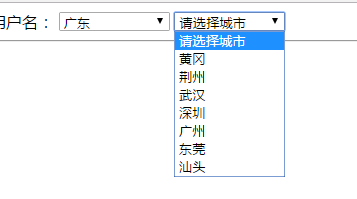
jsp文件同上,这里出了两个问题,一是rs.getString("pName");会报错,原因是写错了rs.getString("cName");或者rs.getString(1);下标从一开始,第二个就是list集合元素要清空,如果不清空就会出现下面这种情况
,
ajax技术实现登录判断用户名是否重复以及利用xml实现二级下拉框联动,还有从数据库中获得的更多相关文章
- jQuery Ajax MVC 下拉框联动
无刷新下拉框联动方法: Controllers代码 public JsonResult DH_Change(string DH_ID) { List<SelectListItem> Tea ...
- Ajax jQuery下拉框联动案例
需求: 使用ajax和jQuery实现下拉框联动. 注意:需要加入jquery-2.1.1.min.js 前台 <!DOCTYPE html> <html> <head& ...
- SSM框架,在Html界面利用ajax,json,jQuery实现省市区下拉框联动
1.先生成省市区表格 2.建立实体类 3.在html画出下拉框 <select id="province"> <option value="" ...
- AJAX下拉框联动
function getProvince() { var ProName = $("#dvProv").val(); LoadProvince(ProName); } functi ...
- SpringMVC之ajax+select下拉框交互常用方式
<!DOCTYPE html> <html> <head> <meta charset="UTF-8"> <title> ...
- 高仿QQ即时聊天软件开发系列之三登录窗口用户选择下拉框
上一篇高仿QQ即时聊天软件开发系列之二登录窗口界面写了一个大概的布局和原理 这一篇详细说下拉框的实现原理 先上最终效果图 一开始其实只是想给下拉框加一个placeholder效果,让下拉框在未选择未输 ...
- AJAX二级下拉联动【XML方式】
AJAX二级下拉联动案例 我们在购物的时候,常常需要我们来选择自己的收货地址,先选择省份,再选择城市- 有没有发现:当我们选择完省份的时候,出现的城市全部都是根据省份来给我们选择的.这是怎么做到的呢? ...
- Select下拉框使用ajax异步绑定数据
<!--前端样式--> <style> #searchs { width: 200px; position: absolute; border-top: none; margi ...
- ajax 多级联动 下拉框 Demo
写了ajax实现级联下拉框,考虑常用,并且级联个数随不同业务个数不同,于是就整理了一下,实现了 ajax + N级联动 下拉框的效果 效果图 HTML 代码 <h2> 省级联动</h ...
随机推荐
- Collection集合与Map集合的知识点梳理
在Java中集合分为单列集合(Collection)与双列集合(Map),本文主要对两种集合的常用实现类作一介绍,如果有不足,恳请指教更正. 1.前言 说到集合肯定要介绍下集合的概念与特点:集合是一个 ...
- Keras(一)Sequential与Model模型、Keras基本结构功能
keras介绍与基本的模型保存 思维导图 1.keras网络结构 2.keras网络配置 3.keras预处理功能 模型的节点信息提取 config = model.get_config() 把mod ...
- 【管理学】PDCA
- P2518 [HAOI2010]计数 类似数位dp
题意 你有一组非零数字(不一定唯一),你可以在其中插入任意个0,这样就可以产生无限个数.比如说给定{1,2},那么可以生成数字12,21,102,120,201,210,1002,1020,等等. 现 ...
- hihocoder #1616 : 是二叉搜索树吗?(模拟题)
题目链接:http://hihocoder.com/problemset/problem/1616 题解:就是简单的模拟一下至于如何判断是不是二叉搜索树可以通过中序遍历将每个点存下来看是不是递增的如果 ...
- codeforces 755D. PolandBall and Polygon(线段树+思维)
题目链接:http://codeforces.com/contest/755/problem/D 题意:一个n边形,从1号点开始,每次走到x+k的位置如果x+k>n则到x+k-n的位置,问每次留 ...
- 2014 北京区域赛 dp
Matt has N friends. They are playing a game together. Each of Matt’s friends has a magic number. In ...
- MAC下安装REDIS和REDIS可视化工具RDM并连接REDIS
实验环境:一台mac V:10.13.6 一.安装redis brew install redis 二.安装RDM 直接下载安装rdm dmg文件 链接: https://pan.baidu.com/ ...
- Spring的事件监听机制
最近公司在重构广告系统,其中核心的打包功能由广告系统调用,即对apk打包的调用和打包完成之后的回调,需要提供相应的接口给广告系统.因此,为了将apk打包的核心流程和对接广告系统的业务解耦,利用了spr ...
- 适合C++のOIer平日写题的开场模板
上面的#define还是较充足的,快读模板也有,freopen也提前打好了,比较适合OIer(C++)平时刷题和考试的开场. (纯原版仅供SJZEZのORZ队&AFO队使用) (您老把开头的注 ...