
闲来无事写了一套 Jenkins 主题样式:刀锋
背景
Jenkins 的前端 CSS 样式坚挺了这么多年已经觉得腻的不行了,于是想换个风格缓解一下视觉疲劳,便有了这个项目。由于本人不是前端,所以很多只是随便改改,有些复杂的需求也实现不了,但是总的来说,使用还是将就能用。当然,由于新版本项目还是热乎的,所以肯定会有很多兼容性的问题,也欢迎有机会的人能够在评论区或者其他方式给我提出来。
2019-12-02:新增部分页面手机适配
配置 Jenkins 自定义 CSS 样式
做这个之前,首先需要安装一个插件:Simple Theme Plugin

安装完成后重启 Jenkins,此时在系统配置里面:

可以找到我们安装的插件:
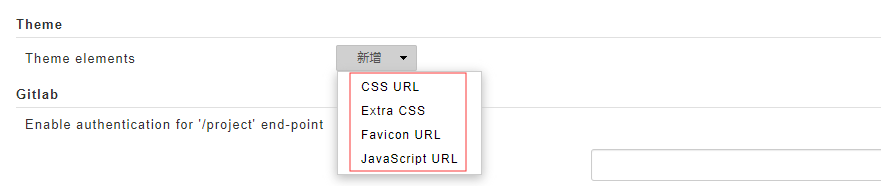
第一种方式:
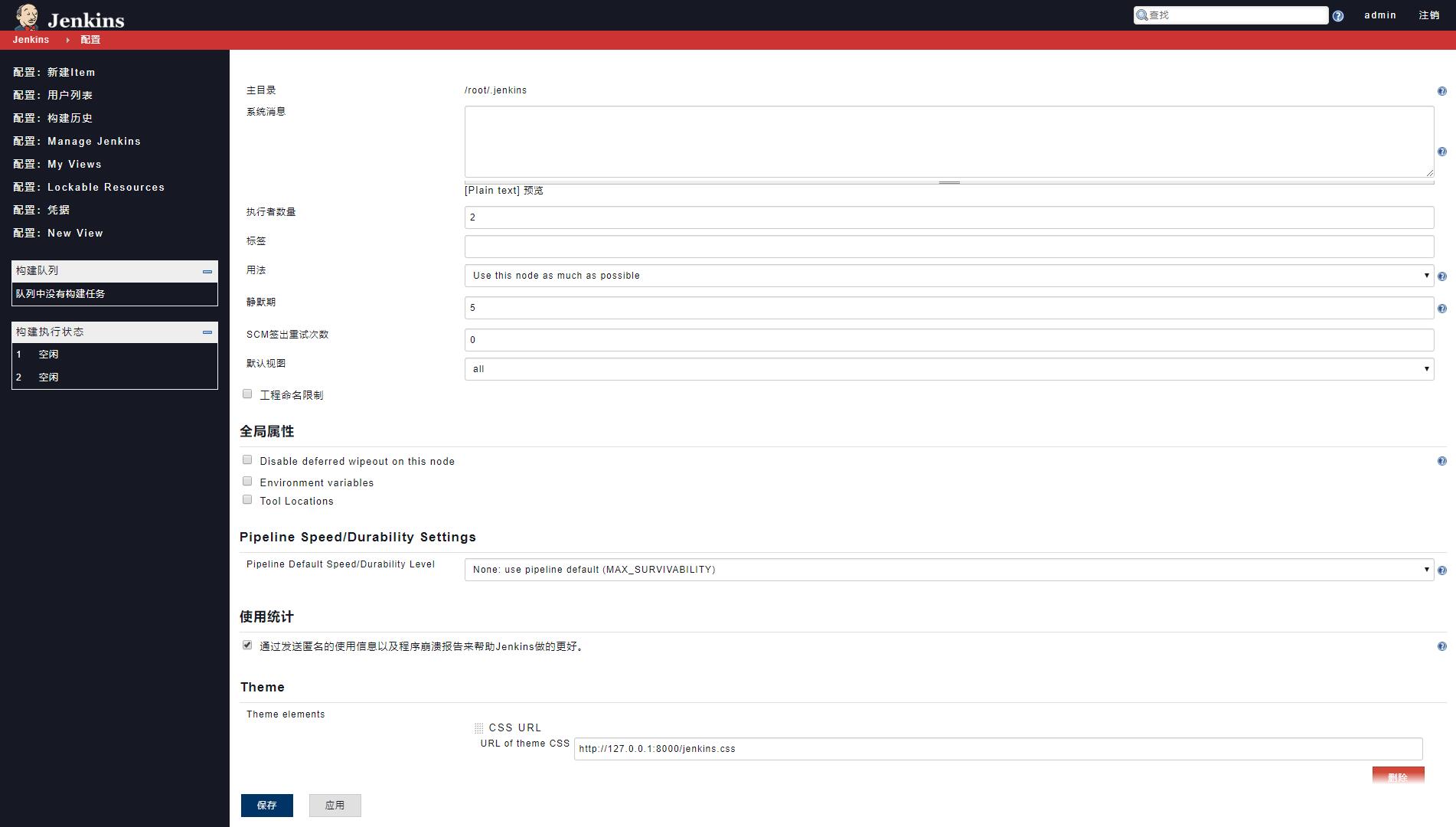
我们可以通过 CSS URL 的形式导入样式:
https://github.com/KU4NG/Jenkins-Theme/blob/master/css/jenkins.css
这样你能保证代码是最新的,但是问题就是 github 可能不是很稳定,当然你可以可以下载下来本地部署,然后填写改 css 的地址。
另外一个也是我比较推荐的,使用 Extra CSS 选项,将 CSS 文件内容粘贴到这里保存:

第一版内容如下,可以直接用:
*{font-size:13px;font-weight:normal;color:#161823!important;letter-spacing:1px}div{border-radius:0!important}a{text-decoration:none!important}a:link{text-decoration:none!important}a:visited{text-decoration:none!important}a:hover{text-decoration:none!important;color:red!important}a:active{text-decoration:none!important}body,table,form,input,td,th,p,textarea,select,#tasks .task{font-size:12px!important}#header{background-color:#161823}#header #visible-am-container a{color:#fff!important}#header .login a{color:#fff!important;font-size:12px}#header .login b{color:#fff!important;font-size:12px}#header #visible-am-button{background-color:#c33}#header #jenkins-name-icon{left:40px;bottom:-3px;height:30px;width:120px}#header .searchbox{padding:8px 11px}#breadcrumbBar a{color:#fff!important;font-size:12px!important}#breadcrumbBar .top-sticker-inner{background-color:#c33}#breadcrumb-menu-target a{color:#161823!important}#breadcrumbs{border-bottom-width:0!important}#breadcrumbs{height:25px!important;line-height:25px!important}#breadcrumbs LI{height:25px!important;line-height:25px!important}#breadcrumbs LI:hover{background-color:#036!important}#breadcrumbs .mouseIsOverMenuSelector{background-color:transparent!important}@media(min-width:1170px){body.two-column #side-panel{width:300px}body.two-column #main-panel{margin-left:300px}}#side-panel{position:absolute;top:65px;bottom:;background-color:#161823}#side-panel a,b{color:#fff!important;font-size:13px;letter-spacing:2px}#side-panel #tasks .task{position:relative;left:-15px;width:300px;max-width:300px;margin-bottom:;height:30px;line-height:30px;padding-left:13px}#side-panel #tasks .task a::before{content:"配置:"}#side-panel #tasks .task:hover{background-color:#c33}#side-panel .task-icon-link{display:none}#side-panel .col-xs-24{padding:5px 5px 5px 5px!important}#side-panel .pane-header{font-size:13px;font-weight:normal;color:#161823;border-radius:}#side-panel .pane-header a{font-size:13px;font-weight:normal;color:#161823!important}#side-panel .pane-frame{border:solid 1px #f0f0f0;border-radius:}#side-panel td{font-size:9px!important;color:#fff!important;padding:5px 2px 5px 5px;text-align:left!important}#side-panel td a{font-size:10px!important}#main-panel{padding:10px 10px 20px 10px}#main-panel b{color:#161823!important}#main-panel #description{display:none}#main-panel .tabBar{background-color:#161823}#main-panel .tabBar .tab:first-child{margin-left:}#main-panel .tabBar [type=radio]:checked~a{border:;background:;color:#fff!important}#main-panel .tabBar .tab a.addTab{color:#fff!important;border:}#main-panel .tabBar .tab a{color:#fff!important;font-weight:normal;border:}#main-panel .tabBar .tab a:hover{background:;color:red!important}#main-panel .tabBar .tab a.addTab:hover{background:;color:red!important}#main-panel table.stripped-odd tr:nth-child(odd){background:#f4f4f4}#main-panel .bigtable th a{font-weight:bold!important;font-size:13px!important}#main-panel .icon-xlg{width:26px!important;height:26px!important}#main-panel .icon-md{width:24px!important;height:24px!important}#main-panel .icon-sm{width:12px!important;height:12px!important}#main-panel h1 img{width:26px!important;height:26px!important}#main-panel .bigtable td{padding:7px}#main-panel .bigtable td,a{font-size:12px}#main-panel table.stripped tr:hover,table.stripped-even tr:hover,table.stripped-odd tr:hover{background:#ebebeb!important}#main-panel table.stripped tr:hover td,table.stripped-even tr:hover td,table.stripped-odd tr:hover td{color:#fff!important}#main-panel table.stripped tr:hover td a,table.stripped-even tr:hover td a,table.stripped-odd tr:hover td a{color:#fff!important}#rss-bar span a{font-size:12px}footer{background-color:transparent;border-top:;border-bottom:}footer a,span{font-size:12px}#add-item-panel .add-item-name{padding:20px 10px}#add-item-panel .add-item-name label{font-size:18px}#add-item-panel input{background-color:#fff;padding:5px 10px;border:1px solid #999;min-width:300px;border-radius:3px;line-height:1.4em;font-size:14px}#add-item-panel .setting-input{width:50%}#add-item-panel .icon:before{border:none!important;background:none!important}#add-item-panel .icon{border:none!important;background:none!important}#add-item-panel .icon img{height:40px!important;width:40px!important}#add-item-panel .categories.flat .category:first-child{padding:}#add-item-panel .categories.flat .category:last-child{padding:}.j-item-options li.active{background-color:#c33;border:;box-shadow:none}.j-item-options li{border-radius:;border:}.j-item-options li:hover{background:#c33}.j-item-options li.active .desc{color:#fff!important}.j-item-options li.active span{color:#fff!important}.j-item-options li:hover .desc{color:#fff!important}.j-item-options li:hover span{color:#fff!important}#add-item-panel .item-copy p.description{font-size:13px}#buildHistory .pane-footer{display:none}table.stripped tr:nth-child(even){background:#161823}table.stripped tr:hover,table.stripped-even tr:hover,table.stripped-odd tr:hover{background:#161823!important}

#buildHistory .build-row-cell a{font-size:10px}.build-row.model-link-active{background:#161823!important}#jenkins .yui-button.primary .btn,#jenkins .yui-button.primary button{background-color:#036;color:#eee!important;border:1px solid #036}#jenkins .yui-button .btn,#jenkins .yui-button button{padding:2px 20px;border-radius:;font-weight:normal}#add-item-panel form>.footer .btn-decorator button[type=submit]{padding:0 30px;background-color:#036;color:#eee!important;border:1px solid #036;border-radius:;font-weight:normal;font-size:12px;line-height:25px}#add-item-panel form>.footer .btn-decorator{padding:10px 50px}.call-to-action a,.call-to-action a:visited{font-size:18px}.danger button{color:#fff!important}.yui-button{vertical-align:middle!important}.section-header{font-size:17px;padding-top:20px!important;padding-bottom:10px!important}h1{font-size:17px;font-weight:bolder}.manage-option dl dt{font-size:14px;line-height:24px}dt{font-weight:normal}.manage-option dl dd{font-size:10px}#visible-am-container div#visible-am-list{padding:10px!important;border-radius:0!important}#visible-am-container div#visible-am-list a{color:#c33!important}#visible-am-container .am-message{margin-bottom:0!important}td.progress-bar-done{padding:2px!important;height:5px}td.progress-bar-left{padding:2px!important;height:5px}@media(max-width:970px){a{cursor:pointer!important}body{margin:;padding:}#header{position:relative;margin:5px 5px;width:calc(100% - 10px)!important;overflow-y:hidden!important}#breadcrumbBar{display:none}#page-body{width:100%}#side-panel{position:relative;width:calc(100% - 10px)!important;top:-1px;bottom:auto;padding:5px;margin:5px}#side-panel #tasks{width:100%}#main-panel{padding:5px}#side-panel #tasks .task{width:100%;max-width:100%;left:;padding-left:}#main-panel a,td{font-size:10px!important}#main-panel #projectstatus .header{display:none}#main-panel .col-md-20{padding-left:;padding-right:}#main-panel .pane-frame table{display:inline}.jenkins-config-widgets{display:none}.jenkins-config{border-top:1px solid #ccc!important}table.pane{border:}.pane-frame{border:}#projectstatus tbody tr:last-child td:first-child{border:;border-bottom-left-radius:}#add-item-panel .setting-input{width:100%}#add-item-panel input{min-width:200px;width:100%}#add-item-panel .j-item-options li .desc{display:none}#add-item-panel .icon img{width:20px!important;height:20px!important}#add-item-panel .j-item-options li{min-height:auto}#add-item-panel .col-md-20{padding:}#add-item-panel form>.footer .btn-decorator{padding:10px;width:100%;height:80px;position:initial;border:;bottom:auto}#add-item-panel .icon:before{display:none}#add-item-panel form>.footer .btn-decorator button{width:100%}#add-item-panel .add-item-copy .icon{display:none}#add-item-panel .item-copy .add-item-copy{padding-left:}#add-item-panel .item-copy{padding:5px}#add-item-panel form>.footer{height:80px;position:initial}footer{display:none}}
保存就能看到效果!当然,最新代码可以查看我的 GITHUB:
https://github.com/KU4NG
效果展示
1. 主页

2. 新建项目
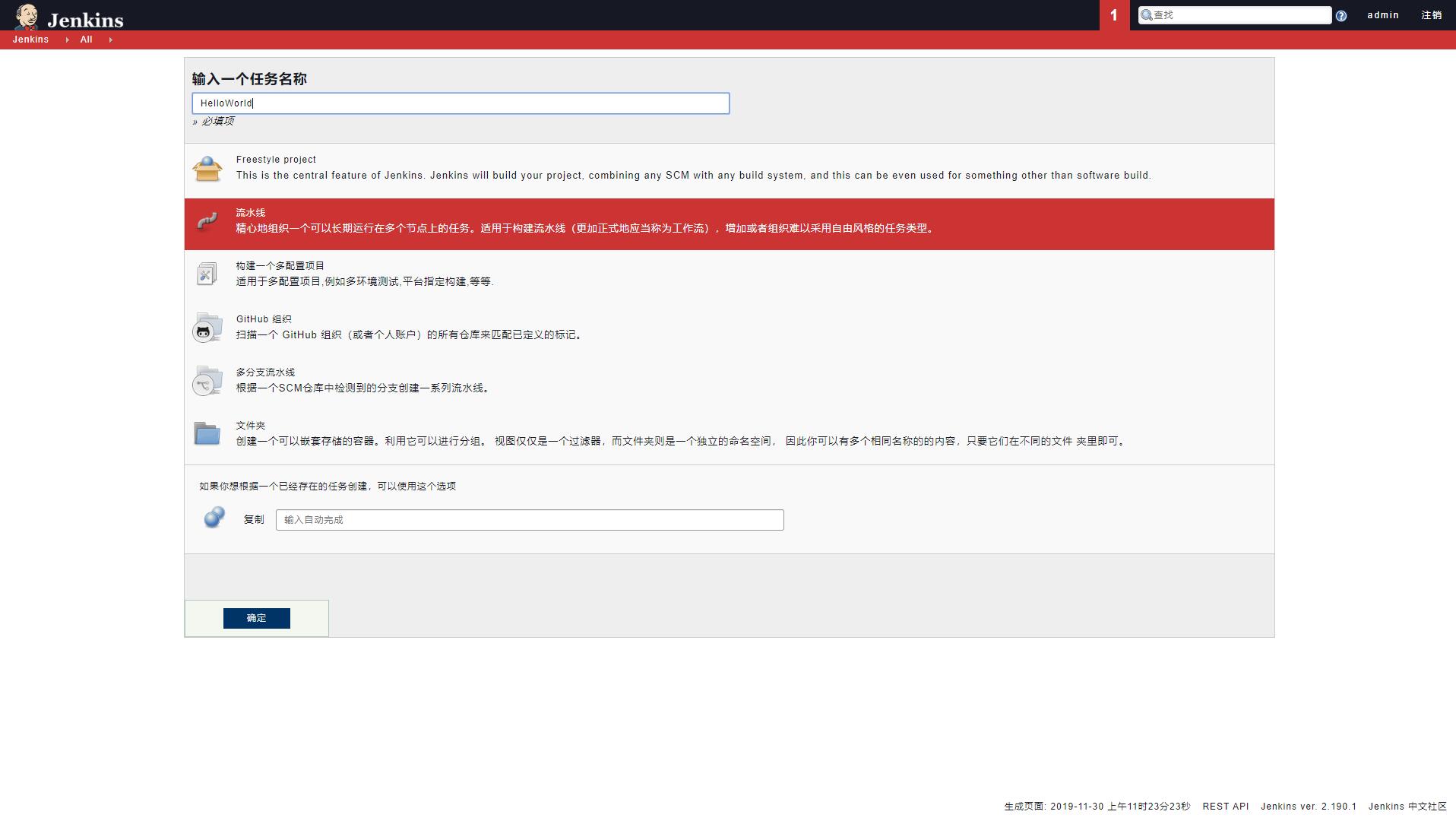
3. 系统配置

4. 配置详情
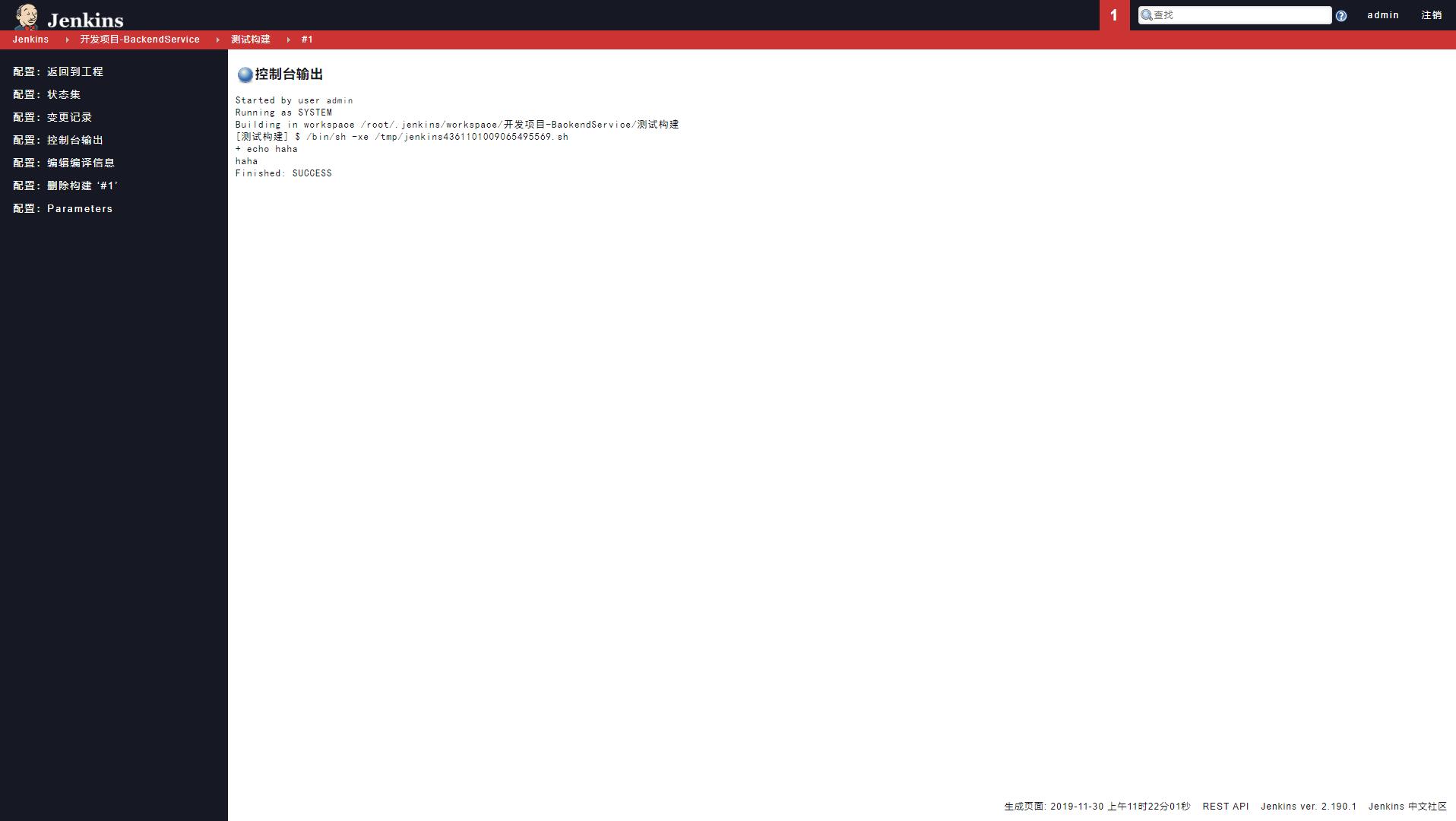
5. 控制台输出
6. 手机主页:
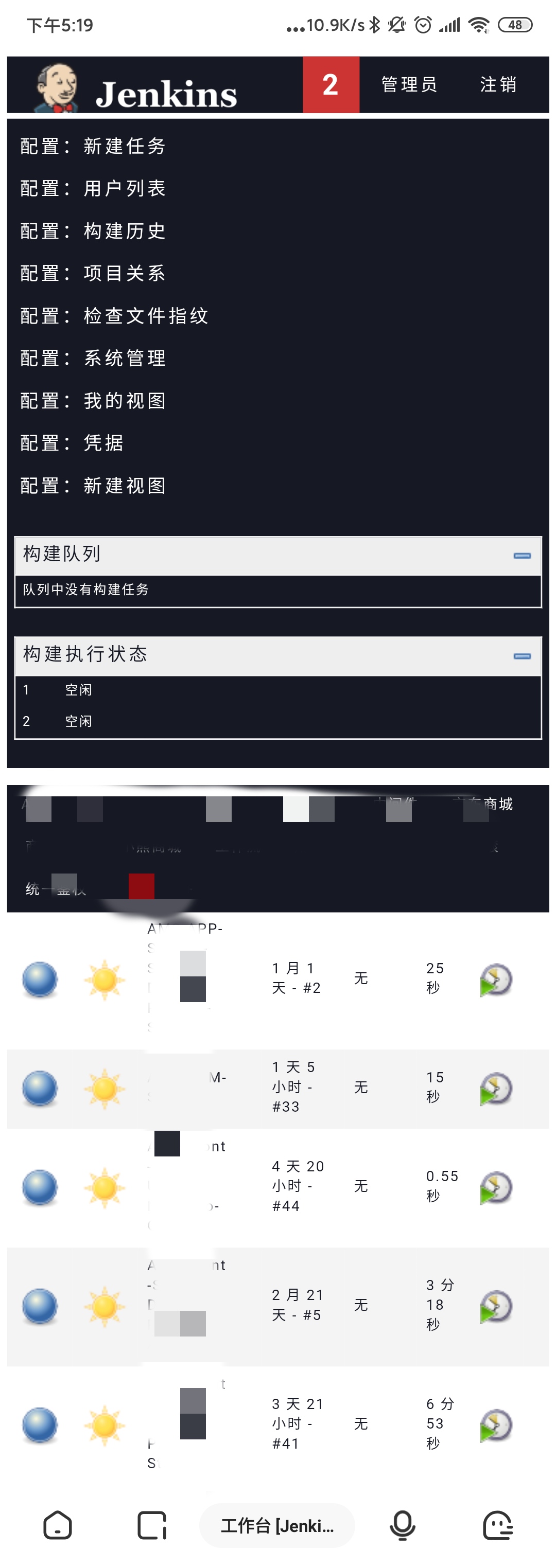
7. 手机新建:

特别说明
项目刚写完,肯定有很多 BUG,欢迎大家反馈!
闲来无事写了一套 Jenkins 主题样式:刀锋的更多相关文章
- Jenkins 主题分享
写在前面的话 Jenkins 现在是我使用的最多的 CI/CD 工具,但是一直无法接受他的前端,于是闲暇之余查了一些关于 Jenkins 更换样式的方法,于是自己给他写了个套子,感兴趣的老哥以下是项目 ...
- Jenkins 主题:jenkins-theme-v2
说明 本次样式是基于 Jenkins ver. 2.235.1 写的,所有对于之前的版本可能样式不兼容,好像变化挺大的.个人测试了在用的 Jenkins ver. 2.190.1,完全不行,所有建议想 ...
- sencha touch 扩展篇之使用sass自定义主题样式 (下)通过css修改官方组件样式以及自定义图标
上一讲我们讲解了如何使用官方的api来修改主题样式,这讲我们继续讲解sass的样式修改, 编译官方自带的主题包 在生成的项目以及官方sdk的目录下,自带了一些主题sass包,我们也可以通过修改sas ...
- sencha touch 扩展篇之使用sass自定义主题样式 (上)使用官方的api修改主题样式
大家知道,sencha touch是通过我们写的js代码来动态渲染单页面生成一个个div+css的html页面来模拟app应用,那么既然是div+css结构的,我们就可以通过修改css样式来自定义我们 ...
- UI的考核方式之【主题颜色 + 主题字体 + 主题样式】
首先,项目中的颜色需要怎么管理呢? 宏?常量? 宏的值可以被改变,不用宏.那就用常量.那常量的名字怎么去起名呢? WSFConstants_Color_0xCCCCCC? WSFConstants_C ...
- 修改Markdown神器[Typora]的主题样式
修改Markdown神器[Typora]的主题样式 Typora是一款专注写作的工具,基于markdown标记语言来完成写作.出于以下原因决定替换主题样式: 1.自带的样式比较low,想替换一款高大上 ...
- typora 基本使用和漂亮的主题样式
以下是使用博客园的markdown的效果: typora 基本使用和漂亮的主题样式 一.typora 基本使用 ps:文字排版,使用markdown nice 可以一键复制到公众号.知乎:https: ...
- Android 标签的主题样式
Android平台定义的主题样式: android:theme="@android:style/Theme.Dialog" 将一个Activity显示为对话框模式 •andro ...
- odoo12主题样式模块
odoo12主题样式模块 图标形式显示菜单目录的结构 odoo12图标形式显示菜单:https://apps.odoo.com/apps/themes/12.0/backend_theme_v12/ ...
随机推荐
- 关于ESET占用CPU严重 的解决方案||ESET CPU 100%||用迅雷时ESET占用CPU(6月22日再次更新)
关于ESET占用CPU严重 的解决方案 本文根据原帖有适量删改. ESET 的杀毒软件历来以占用资源少,CPU消耗少著称,可是很多朋友(特别是中国大陆的朋友)反应ESS & EAV 间歇性占用 ...
- The value for the useBean class attribute is invalied
JSP: The value for the useBean class attribute XXX is ...
- VS无法新建项目
问题描述:VS无法新建项目,确定Button呈灰色状态 原因:本机未安装Framework的环境,避免此类现象,在装VS之前,先安装好Framework,再安装VS. 解决方案: 1.点击图中< ...
- presto-mysql/elasticsearch6.0.0安装部署测试,异种数据源关联查询入门实践
本文简单记录一次实践使用过程,涉及presto-mysql,presto-elasticsearch,文中参数未做注释,请参考官方文档,希望能帮到大家 1 下载安装 presto-0.228 < ...
- Spring AOP 知识整理
通过一个多月的 Spring AOP 的学习,掌握了 Spring AOP 的基本概念.AOP 是面向切面的编程(Aspect-Oriented Programming),是基于 OOP(面向对象的编 ...
- SpringCloud之Hystrix-Dashboard监控,以及踩的坑...
前言: 最近刚入职,公司使用了SpringCloud,之前有了解过SpringCloud,但是长时间不去搭建不去使用很容易就忘了,因此空闲时间重新复习一下SpringCloud.但是之前开的Sprin ...
- MongoDB自学------(1)MongoDB4.0安装
一.环境 操作系统 安装包 安装方式 Ubuntu18.04 mongodb4.0 apt安装 Ubuntu18.04 mongodb4.0 docker安装 二.apt安装 sudo apt-key ...
- 8*8LED点阵
基础认识 1.5英寸LED点阵管数码管8*8红色16pin 有如下两种型号: 共阳1588BS 共阴1588AS 共阴1588AS 共阳1588BS 编程导向 共阴和共阳其编程思路基本类似,只是对应I ...
- 『题解』洛谷P4016 负载平衡问题
title: categories: tags: - mathjax: true --- Problem Portal Portal1:Luogu Portal2: LibreOJ Descripti ...
- [转载]1.3 UiPath变量的介绍和使用
一.变量 变量主要用于存储数据,它在RPA中扮演重要的数据传递角色,是RPA编程不可或缺的一部分.它包括变量名称和变量的值,变量的值支持多种数据类型,包括从通用值,文本,数字,数据表,时间和日期,Ui ...