
基于HTML的购物车模型的代码设计
HTML代码
<html lang="en"> <head> <meta charset="UTF-8"> <link rel="stylesheet" href="css/style.css" /> <script type="text/javascript" src="js/script.js" ></script> </head> <body> <th id="header"><h1>欢迎来到此网站,请尽情购物吧</h1></th> <tr id="head"> <th width="100px">商品</th> <th width="200px">商品描述</th> <th width="200px">单价</th> <th width="200px">规格</th> <th width="200px">操作</th> </tr> <tr> <td class="goods"></td> <td class="describe">【12期免息】Huawei/华为Mate 30 Pro 5G麒麟990徕卡四摄5G芯片智能手机mate30pro5g官方旗舰店</td> <td class="price">7899.00</td> <td> <option value="4GB+64GB">4GB+64GB</option> <option value="8GB+64GB">8GB+64GB</option> <option value="4GB+128GB">4GB+128GB</option> <option value="8GB+128GB">8GB+128GB</option> </select> </td> <td class="total"> 加入购物车 </td> </tr> <tr> <td class="goods"></td> <td class="describe">保时捷Panamera S 威利原厂1:18 帕拉梅拉四门合金仿真汽车模型蓝</td> <td class="price">299.00</td> <td> <select class="select"> <option value="蓝色 Panamera蓝色">蓝色 Panamera蓝色</option> <option value="911 GT-3 白色">911 GT-3 白色</option> <option value="黑色 Cayenne黑色">黑色 Cayenne黑色</option> </select> </td> <td class="total"> 加入购物车 </td> </tr> <tr> <td class="goods"></td> <td class="describe">海贼海贼王 超大王拼图1000片木质成年路飞卡通包邮</td> <td class="price">49.99</td> <td> <option value="海贼王全家福">海贼王全家福</option> <option value="两年后9人集结">两年后9人集结</option> <option value="少年初长成">少年初长成</option> </select> </td> <td class="total"> 加入购物车 </td> </tr> <tr> <td class="goods"></td> <td class="describe">ThinkPad E490 2UCD/2XCD英特尔酷睿i5 14英寸联想笔记本电脑商务办公轻薄便携官方旗舰店2019款笔记本</td> <td class="price">7899.00</td> <td> <option value="2XCD:i5/8G/128GB+1TB/2G独显">2XCD:i5/8G/128GB+1TB/2G独显</option> <option value="2UCD:i5/8G/ 256GB/ 2G独显">2UCD:i5/8G/ 256GB/ 2G独显</option> </select> </td> <td class="total"> 加入购物车 </td> </tr> </table> <th id="header"><h1>已加入购物车的宝贝</h1></th> <thead id="head"> <th width="100px">商品</th> <th width="200px">商品描述</th> <th width="100px">单价</th> <th width="200px">规格</th> <th width="100px">数量</th> <th width="100px">金额</th> <th width="100px">删除</th> </thead> <tbody id="goods"></tbody> <tfoot> <td colspan="5" align="center">总计</td> <td id="total"></td> <td>元</td> </tfoot> </table> </div> </body> </html> JS代码
//增加购物车列表中的行 function addr(button){ //从商品列表中获取元素 var tr = button.parentNode.parentNode; var td = tr.getElementsByTagName("td"); var goods = td[0].innerHTML; var des = td[1].innerHTML; var price = td[2].innerHTML; var sele = td[3].innerHTML; //使用insertRow()函数增加行 var tbody=document.getElementById("goods"); var row=tbody.insertRow(); //将获取的对应的元素放入新增加的行中 row.innerHTML = "<td>"+goods+"</td>"+ "<td>"+des+"</td>"+ "<td>"+price+"</td>"+ "<td>"+sele+"</td>"+ "<td align='center'>"+ "<input type='button' value=' - ' id='jian' onclick=jian(this)>"+ "<input id='text' type='text' size='1' value='1' />"+ "<input type='button' value=' + ' id='add' onclick=add(this)>"+"</td>"+ "<td>"+price+"</td>"+ "<td align='center'>"+ "<input type='button' value='删除' class='add1' onclick=dele(this)>"+ "</td>" //计算总价函数 total(); } //删除函数 function dele(dele){ dele.parentNode.parentNode.remove(); total(); } //数量减少函数 function jian(jian){ //获取jian父节点的所有input标签 var inputs = jian.parentNode.getElementsByTagName("input"); //取出放在第二列的数量 amount = inputs[1].value; //转换为整型 var amount1 = parseInt(amount); //最小数量为1 if(amount1 == 1){ return; } inputs[1].value=amount1-1; //根据数量的变化,计算出当前数量对应的金额 var tr = jian.parentNode.parentNode; var tds = tr.getElementsByTagName("td"); var price = parseFloat(tds[2].innerHTML); var sum = price*amount1; tds[5].innerHTML=sum-price; total(); } function add(add){ var inputs = add.parentNode.getElementsByTagName("input"); amount = inputs[1].value; var amount1 = parseInt(amount); inputs[1].value=amount1+1; var tr = add.parentNode.parentNode; var tds = tr.getElementsByTagName("td"); var price = parseFloat(tds[2].innerHTML); var sum = price*amount1; tds[5].innerHTML=sum+price; total(); } //计算总价函数 function total() { var tbody = document.getElementById("goods"); //取出tbody中所有tr标签 var trs = tbody.getElementsByTagName("tr"); var sum = 0; //遍历trs数组,并计算每一个tr标签中金额的总和 for(var i = 0; i < trs.length; i++) { var tds = trs[i].getElementsByTagName("td"); var m = tds[5].innerHTML; sum += parseFloat(m); } var total = document.getElementById("total"); total.innerHTML = sum; } function prepareGallery() { if (!document.getElementsByTagName) return false; if (!document.getElementById) return false; if (!document.getElementById("shopping")) return false; var gallery = document.getElementById("shopping"); var links = gallery.getElementsByTagName("button"); for ( var i=0; i < links.length; i++) { links[i].onclick = function() { return addr(this); } } } function addLoadEvent(func) { var oldonload = window.onload; if (typeof window.onload != 'function') { window.onload = func; } else { window.onload = function() { oldonload(); func(); } } } addLoadEvent(prepareGallery); CSS样式表
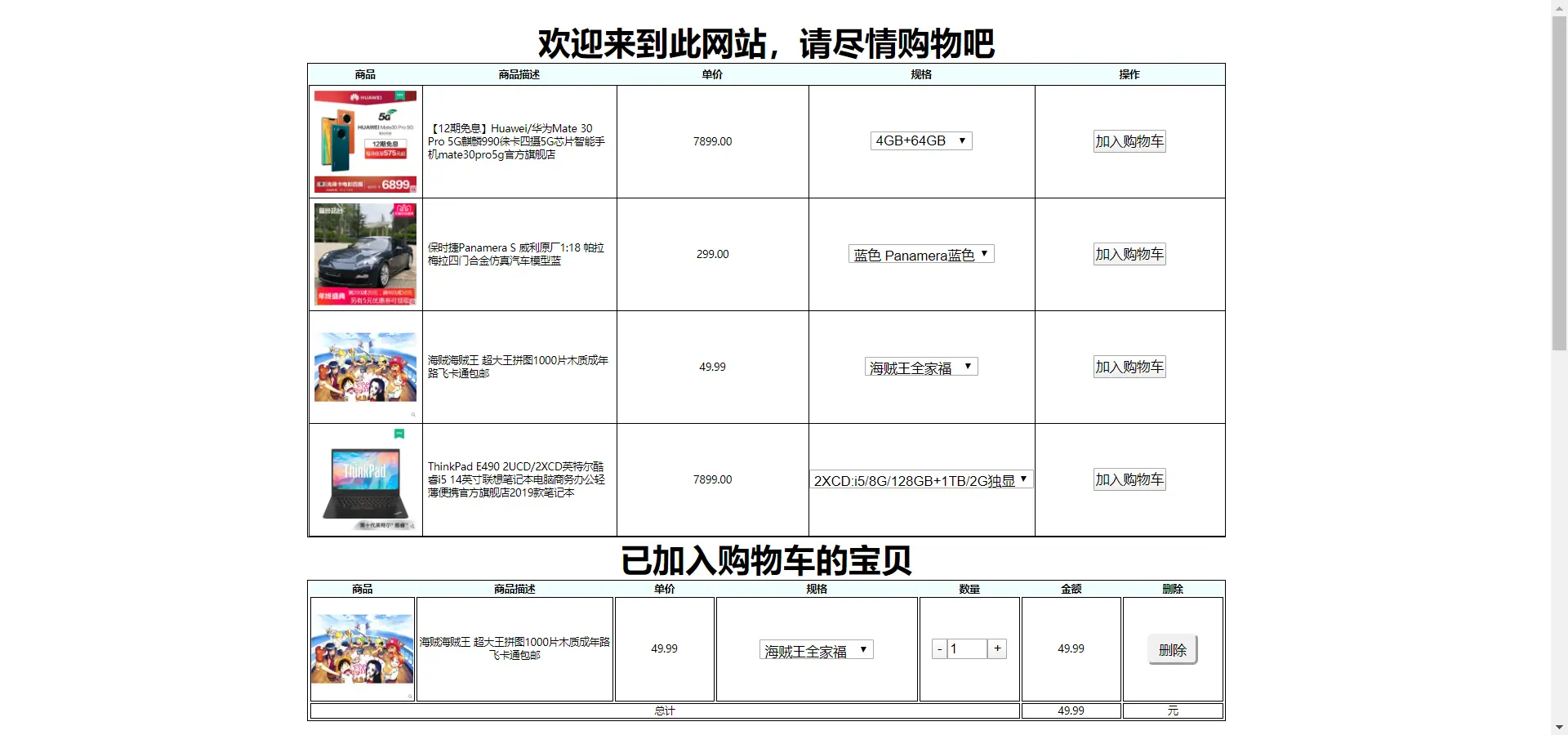
* { margin: 0px; padding: 0px; } body{ text-align: center; } table, td, td { border: 1px solid #000000; font-size: 10px; } table { display: block; } img { float: left; } tr { text-align: center; } #box { width: 900px; height: 1500px; border: 1px solid white; margin-top: 20px; margin-left: 300px; } #shopping { float: left; text-align: center; border-collapse: collapse; } #head { height: 20px; background: #F0FFFF; } #header{ color: gold; letter-spacing: 0; text-shadow: 0px 1px 0px #999, 0px 2px 0px #888, 0px 3px 0px #777, 0px 4px 0px #666, 0px 5px 0px #555, 0px 6px 0px #444, 0px 7px 0px #333, 0px 8px 7px #001135 } } .add{ height: 30px; text-align: center; width: 100px; border-radius: 5px; cursor: pointer; } .add:hover{ -webkit-border-radius: 25px; -moz-border-radius: 25px; border-radius: 25px; } .add1{ height: 30px; text-align: center; width: 50px; border-radius: 5px; cursor: pointer; } .add1:hover{ -webkit-border-radius: 25px; -moz-border-radius: 25px; border-radius: 25px; } .select{ cursor: pointer; } .photos{ height: 100px; width: 100px; } .describe{ padding: 5px; text-align: left; } .goods { padding: 5px; text-align: left; } .total { color: #ff0000; font-weight: 700; } 运行后的样式如下图
基于HTML的购物车模型的代码设计的更多相关文章
- 基于RBAC模型的权限设计:如何设计系统权限体系?
一.什么是RABC RBAC(基于角色的权限控制)模型的核心是在用户和权限之间引入了角色的概念.取消了用户和权限的直接关联,改为通过用户关联角色.角色关联权限的方法来间接地赋予用户权限(如下图),从而 ...
- 基于UDP的客户端和服务器端的代码设计
实验平台 linux 实验内容 编写UDP服务器和客户端程序,客户端发送消息,服务器接收消息,并打印客户端的IP地址和端口号. 实验原理 UDP是无需连接的通信,其主要实现过程如下: 同样,我们可以按 ...
- 浅谈PHP代码设计结构
浅谈PHP代码设计结构 您的评价: 还行 收藏该经验 coding多年,各种代码日夜相伴,如何跟代码友好的相处,不光成为职业生涯的一种回应,也是编写者功力的直接显露. 如何看 ...
- 基于jQuery加入购物车飞入动画特效
基于jQuery加入购物车飞入动画特效.这是一款电商购物网站常用的把商品加入购物车代码.效果图如下: 在线预览 源码下载 实现的代码. html代码: <div id="main& ...
- 基于ESP32的智能家居管理系统的设计与实现
基于ESP32的智能家居管理系统的设计与实现 ESP32的智能家居管理系统访问链接: https://www.cnblogs.com/easyidea/p/13101165.html 一.需求分析 1 ...
- .NET - 基于事件的异步模型
注:这是大概四年前写的文章了.而且我离开.net领域也有四年多了.本来不想再发表,但是这实际上是Active Object模式在.net中的一种重要实现方法,因此我把它掏出来发布一下.如果该模型有新的 ...
- 基于 Angularjs&Node.js 云编辑器架构设计及开发实践
基于 Angularjs&Node.js 云编辑器架构设计及开发实践 一.产品背景 二.总体架构 1. 前端架构 a.前端层次 b.核心基础模块设计 c.业务模块设计 2. Node.js端设 ...
- 基于特定领域国土GIS应用框架设计及应用
基于特定领域国土GIS应用框架 设计及应用 何仕国 2012年8月16日 摘要: 本文首先讲述了什么是框架和特定领域框架,以及与国土GIS 这个特定领 ...
- word2vec 中的数学原理具体解释(五)基于 Negative Sampling 的模型
word2vec 是 Google 于 2013 年开源推出的一个用于获取 word vector 的工具包,它简单.高效,因此引起了非常多人的关注. 因为 word2vec 的作者 Tomas ...
随机推荐
- Navicat Premium 12连接ubuntu18 ,Mysql 5.7.27-0
1,搭建好mysql服务器,cd /etc/mysql/mysql.conf.d,进入mysql配置目录,vim mysqld.cnf 2,注释掉,bind-address =127.0.0.1 , ...
- 使用FastReport报表工具生成图片格式文档
之前我在随笔<使用FastReport报表工具生成报表PDF文档>介绍过使用FastReport.Net来根据报表模板进行生成PDF,以及随笔<使用FastReport报表工具生成标 ...
- [学习笔记] [数据分析] 01.Python入门
1.安装Python与环境配置 ① ② 安装pip以及利用pip安装Python库 2.Anaconda安装 conda list 要在root环境下 3.常用数据分析库 ① Numpy 安装:con ...
- Qt之高DPI显示器(一) - 解决方案整理
目录 DPI发展 1.PPI 2.DPI 一.Win自适应系统 二.Qt机制 1.Windows系统DWM缩放 2. Qt适配高DPI 3.适配DPI结论 三.Qt适配 四.自己适配 1.窗口大小 2 ...
- Tensorflow Serving Docker compose 部署服务细节(Ubuntu)
[摘要] Tensorflow Serving 是tf模型持久化的重要工具,本篇介绍如何通过Docker compose搭建并调试TensorFlow Serving TensorFlow Servi ...
- 在华为云ECS上手工通过Docker部署tomcat
本文介绍了如何在华为云上ECS上手工通过Docker部署tomcat,并提供了Docker常用操作 一.环境准备 ECS:操作系统版本: CentOS Linux release 7.6.181 ...
- 如何在Android手机上进行自动化测试(上)
版权声明:允许转载,但转载必须保留原链接:请勿用作商业或者非法用途 前言 通过阅读本节教程,你将了解到以下内容: 如何在脚本代码中.运行脚本时指定手机 如何填写--device Android:/// ...
- 15 个优秀开源的 Spring Boot 学习项目,一网打尽!
Spring Boot 算是目前 Java 领域最火的技术栈了,松哥年初出版的 <Spring Boot + Vue 全栈开发实战>迄今为止已经加印了 8 次,Spring Boot 的受 ...
- React-Native项目在Android真机上调试
目录 1.确保你的设备已经成功连接.可以终端输入adb devices来查看: 2.终端运行npm start 开启本地服务,成功后运行react-native run-android来在设备上安装并 ...
- react-native scrollview触摸滚动事件
目录 1.几个已知的滑动或者滑动开始结束的方法: 2.还有其他的一些事件如下 3.下面就这些方法的顺序做个简单的介绍: 4.android上的时间分为两种,一个是滑动一次,一个是连续滑动两次甚至多次, ...