
java的poi技术读取Excel数据到MySQL
这篇blog是介绍java中的poi技术读取Excel数据,然后保存到MySQL数据中。
你也可以在 : java的poi技术读取和导入Excel了解到写入Excel的方法信息
使用JXL技术可以在 :java的jxl技术导入Excel
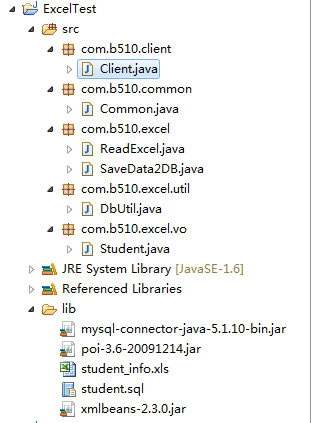
项目结构:
Excel中的测试数据:

数据库结构:
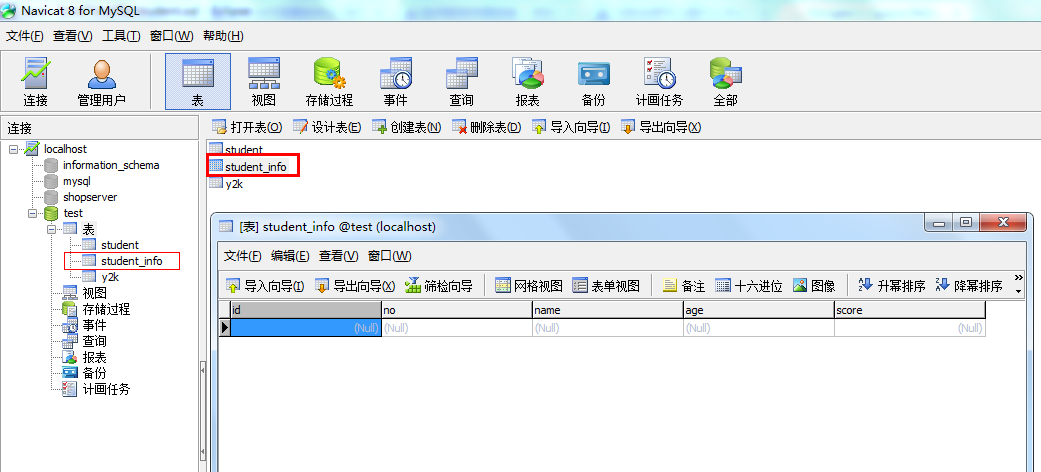
对应的SQL:
 CREATE TABLE `student_info` (

   `id` int(11) NOT NULL AUTO_INCREMENT,

   `no` varchar(20) DEFAULT NULL,

   `name` varchar(20) DEFAULT NULL,

   `age` varchar(10) DEFAULT NULL,

   `score` float DEFAULT '',

   PRIMARY KEY (`id`)

 ) ENGINE=InnoDB DEFAULT CHARSET=utf8;
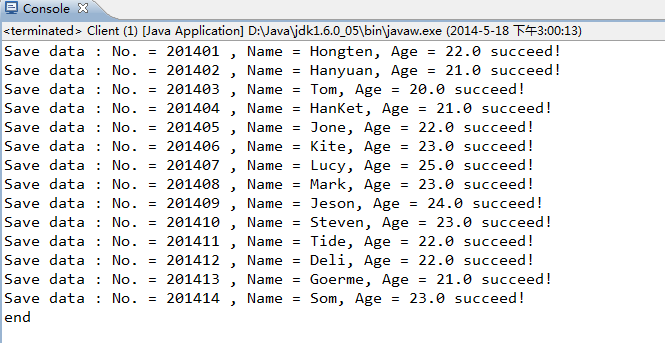
插入数据成功:
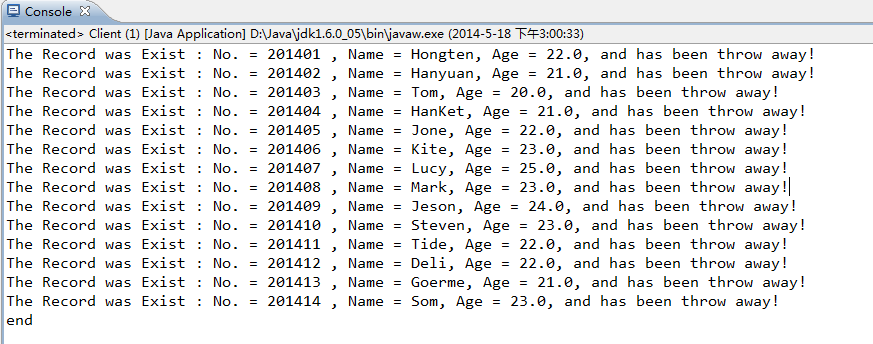
如果重复数据,则丢掉:
=============================================
源码部分:
=============================================
/ExcelTest/src/com/b510/client/Client.java
 /**

  *

  */

 package com.b510.client;

 import java.io.IOException;

 import java.sql.SQLException;

 import com.b510.excel.SaveData2DB;

 /**

  * @author Hongten

  * @created 2014-5-18

  */

 public class Client {

     public static void main(String[] args) throws IOException, SQLException {

         SaveData2DB saveData2DB = new SaveData2DB();

         saveData2DB.save();

         System.out.println("end");

     }

 }
/ExcelTest/src/com/b510/common/Common.java
 /**

  *

  */

 package com.b510.common;

 /**

  * @author Hongten

  * @created 2014-5-18

  */

 public class Common {

     // connect the database

     public static final String DRIVER = "com.mysql.jdbc.Driver";

     public static final String DB_NAME = "test";

     public static final String USERNAME = "root";

     public static final String PASSWORD = "root";

     public static final String IP = "192.168.1.103";

     public static final String PORT = "3306";

     public static final String URL = "jdbc:mysql://" + IP + ":" + PORT + "/" + DB_NAME;

     // common

     public static final String EXCEL_PATH = "lib/student_info.xls";

     // sql

     public static final String INSERT_STUDENT_SQL = "insert into student_info(no, name, age, score) values(?, ?, ?, ?)";

     public static final String UPDATE_STUDENT_SQL = "update student_info set no = ?, name = ?, age= ?, score = ? where id = ? ";

     public static final String SELECT_STUDENT_ALL_SQL = "select id,no,name,age,score from student_info";

     public static final String SELECT_STUDENT_SQL = "select * from student_info where name like ";

 }
/ExcelTest/src/com/b510/excel/ReadExcel.java
 /**

  *

  */

 package com.b510.excel;

 import java.io.FileInputStream;

 import java.io.IOException;

 import java.io.InputStream;

 import java.util.ArrayList;

 import java.util.List;

 import org.apache.poi.hssf.usermodel.HSSFCell;

 import org.apache.poi.hssf.usermodel.HSSFRow;

 import org.apache.poi.hssf.usermodel.HSSFSheet;

 import org.apache.poi.hssf.usermodel.HSSFWorkbook;

 import com.b510.common.Common;

 import com.b510.excel.vo.Student;

 /**

  * @author Hongten

  * @created 2014-5-18

  */

 public class ReadExcel {

     public List<Student> readXls() throws IOException {

         InputStream is = new FileInputStream(Common.EXCEL_PATH);

         HSSFWorkbook hssfWorkbook = new HSSFWorkbook(is);

         Student student = null;

         List<Student> list = new ArrayList<Student>();

         // 循环工作表Sheet

         for (int numSheet = 0; numSheet < hssfWorkbook.getNumberOfSheets(); numSheet++) {

             HSSFSheet hssfSheet = hssfWorkbook.getSheetAt(numSheet);

             if (hssfSheet == null) {

                 continue;

             }

             // 循环行Row

             for (int rowNum = 1; rowNum <= hssfSheet.getLastRowNum(); rowNum++) {

                 HSSFRow hssfRow = hssfSheet.getRow(rowNum);

                 if (hssfRow != null) {

                     student = new Student();

                     HSSFCell no = hssfRow.getCell(0);

                     HSSFCell name = hssfRow.getCell(1);

                     HSSFCell age = hssfRow.getCell(2);

                     HSSFCell score = hssfRow.getCell(3);

                     student.setNo(getValue(no));

                     student.setName(getValue(name));

                     student.setAge(getValue(age));

                     student.setScore(Float.valueOf(getValue(score)));

                     list.add(student);

                 }

             }

         }

         return list;

     }

      @SuppressWarnings("static-access")

     private String getValue(HSSFCell hssfCell) {

             if (hssfCell.getCellType() == hssfCell.CELL_TYPE_BOOLEAN) {

                 // 返回布尔类型的值

                 return String.valueOf(hssfCell.getBooleanCellValue());

             } else if (hssfCell.getCellType() == hssfCell.CELL_TYPE_NUMERIC) {

                 // 返回数值类型的值

                 return String.valueOf(hssfCell.getNumericCellValue());

             } else {

                 // 返回字符串类型的值

                 return String.valueOf(hssfCell.getStringCellValue());

             }

         }

 }
/ExcelTest/src/com/b510/excel/SaveData2DB.java
 /**

  *

  */

 package com.b510.excel;

 import java.io.IOException;

 import java.sql.SQLException;

 import java.util.List;

 import com.b510.common.Common;

 import com.b510.excel.util.DbUtil;

 import com.b510.excel.vo.Student;

 /**

  * @author Hongten

  * @created 2014-5-18

  */

 public class SaveData2DB {

     @SuppressWarnings({ "rawtypes" })

     public void save() throws IOException, SQLException {

         ReadExcel xlsMain = new ReadExcel();

         Student student = null;

         List<Student> list = xlsMain.readXls();

         for (int i = 0; i < list.size(); i++) {

             student = list.get(i);

             List l = DbUtil.selectOne(Common.SELECT_STUDENT_SQL + "'%" + student.getName() + "%'", student);

             if (!l.contains(1)) {

                 DbUtil.insert(Common.INSERT_STUDENT_SQL, student);

             } else {

                 System.out.println("The Record was Exist : No. = " + student.getNo() + " , Name = " + student.getName() + ", Age = " + student.getAge() + ", and has been throw away!");

             }

         }

     }

 }
/ExcelTest/src/com/b510/excel/util/DbUtil.java
 /**

  *

  */

 package com.b510.excel.util;

 import java.sql.Connection;

 import java.sql.DriverManager;

 import java.sql.PreparedStatement;

 import java.sql.ResultSet;

 import java.sql.SQLException;

 import java.util.ArrayList;

 import java.util.List;

 import com.b510.common.Common;

 import com.b510.excel.vo.Student;

 /**

  * @author Hongten

  * @created 2014-5-18

  */

 public class DbUtil {

     /**

      * @param sql

      */

     public static void insert(String sql, Student student) throws SQLException {

         Connection conn = null;

         PreparedStatement ps = null;

         try {

             Class.forName(Common.DRIVER);

             conn = DriverManager.getConnection(Common.URL, Common.USERNAME, Common.PASSWORD);

             ps = conn.prepareStatement(sql);

             ps.setString(1, student.getNo());

             ps.setString(2, student.getName());

             ps.setString(3, student.getAge());

             ps.setString(4, String.valueOf(student.getScore()));

             boolean flag = ps.execute();

             if(!flag){

                 System.out.println("Save data : No. = " + student.getNo() + " , Name = " + student.getName() + ", Age = " + student.getAge() + " succeed!");

             }

         } catch (Exception e) {

             e.printStackTrace();

         } finally {

             if (ps != null) {

                 ps.close();

             }

             if (conn != null) {

                 conn.close();

             }

         }

     }

     @SuppressWarnings({ "unchecked", "rawtypes" })

     public static List selectOne(String sql, Student student) throws SQLException {

         Connection conn = null;

         PreparedStatement ps = null;

         ResultSet rs = null;

         List list = new ArrayList();

         try {

             Class.forName(Common.DRIVER);

             conn = DriverManager.getConnection(Common.URL, Common.USERNAME, Common.PASSWORD);

             ps = conn.prepareStatement(sql);

             rs = ps.executeQuery();

             while(rs.next()){

                 if(rs.getString("no").equals(student.getNo()) || rs.getString("name").equals(student.getName())|| rs.getString("age").equals(student.getAge())){

                     list.add(1);

                 }else{

                     list.add(0);

                 }

             }

         } catch (Exception e) {

             e.printStackTrace();

         } finally {

             if (rs != null) {

                 rs.close();

             }

             if (ps != null) {

                 ps.close();

             }

             if (conn != null) {

                 conn.close();

             }

         }

         return list;

     }

     public static ResultSet selectAll(String sql) throws SQLException {

         Connection conn = null;

         PreparedStatement ps = null;

         ResultSet rs = null;

         try {

             Class.forName(Common.DRIVER);

             conn = DriverManager.getConnection(Common.URL, Common.USERNAME, Common.PASSWORD);

             ps = conn.prepareStatement(sql);

             rs = ps.executeQuery();

         } catch (Exception e) {

             e.printStackTrace();

         } finally {

             if (rs != null) {

                 rs.close();

             }

             if (ps != null) {

                 ps.close();

             }

             if (conn != null) {

                 conn.close();

             }

         }

         return rs;

     }

 }
/ExcelTest/src/com/b510/excel/vo/Student.java
 /**

  *

  */

 package com.b510.excel.vo;

 /**

  * Student

  *

  * @author Hongten

  * @created 2014-5-18

  */

 public class Student {

     /**

      * id

      */

     private Integer id;

     /**

      * 学号

      */

     private String no;

     /**

      * 姓名

      */

     private String name;

     /**

      * 学院

      */

     private String age;

     /**

      * 成绩

      */

     private float score;

     public Integer getId() {

         return id;

     }

     public void setId(Integer id) {

         this.id = id;

     }

     public String getNo() {

         return no;

     }

     public void setNo(String no) {

         this.no = no;

     }

     public String getName() {

         return name;

     }

     public void setName(String name) {

         this.name = name;

     }

     public String getAge() {

         return age;

     }

     public void setAge(String age) {

         this.age = age;

     }

     public float getScore() {

         return score;

     }

     public void setScore(float score) {

         this.score = score;

     }

 }
源码下载:http://files.cnblogs.com/hongten/ExcelTest.zip
========================================================
多读一些书,英语很重要。
More reading,and english is important.
I'm Hongten
========================================================
java的poi技术读取Excel数据到MySQL的更多相关文章
- java的poi技术读取Excel数据
这篇blog主要是讲述java中poi读取excel,而excel的版本包括:2003-2007和2010两个版本, 即excel的后缀名为:xls和xlsx. 读取excel和MySQL相关: ja ...
- java的poi技术读取Excel[2003-2007,2010]
这篇blog主要是讲述java中poi读取excel,而excel的版本包括:2003-2007和2010两个版本, 即excel的后缀名为:xls和xlsx. 读取excel和MySQL相关: ja ...
- java的poi技术读取Excel[2003-2007,2010]
这篇blog主要是讲述java中poi读取excel,而excel的版本包括:2003-2007和2010两个版本, 即excel的后缀名为:xls和xlsx. 读取excel和MySQL相关: ja ...
- java的poi技术写Excel的Sheet
在这之前写过关于java读,写Excel的blog如下: Excel转Html java的poi技术读,写Excel[2003-2007,2010] java的poi技术读取Excel[2003-20 ...
- jxl读写excel, poi读写excel,word, 读取Excel数据到MySQL
这篇blog是介绍: 1. java中的poi技术读取Excel数据,然后保存到MySQL数据中. 2. jxl读写excel 你也可以在 : java的poi技术读取和导入Excel了解到写入Exc ...
- java的poi技术读取和导入Excel实例
本篇文章主要介绍了java的poi技术读取和导入Excel实例,报表输出是Java应用开发中经常涉及的内容,有需要的可以了解一下. 报表输出是Java应用开发中经常涉及的内容,而一般的报表往往缺乏通用 ...
- php+phpspreadsheet读取Excel数据存入mysql
先生成Excel模板,然后导入Excel数据到mysql,每条数据对应图片上传到阿里云 <?php /** * Created by PhpStorm. * User: Administrato ...
- java的poi技术读取和导入Excel
项目结构: http://www.cnblogs.com/hongten/gallery/image/111987.html 用到的Excel文件: http://www.cnblogs.com/h ...
- java的poi技术下载Excel模板上传Excel读取Excel中内容(SSM框架)
使用到的jar包 JSP: client.jsp <%@ page language="java" contentType="text/html; charset= ...
随机推荐
- In-Memory:内存数据库
在逝去的2016后半年,由于项目需要支持数据的快速更新和多用户的高并发负载,我试水SQL Server 2016的In-Memory OLTP,创建内存数据库实现项目的负载需求,现在项目接近尾声,系统 ...
- SQL Server 2014 新特性——内存数据库
SQL Server 2014 新特性——内存数据库 目录 SQL Server 2014 新特性——内存数据库 简介: 设计目的和原因: 专业名词 In-Memory OLTP不同之处 内存优化表 ...
- Laravel Composer and ServiceProvider
Composer and: 创建自定义类库时,按命名空间把文件夹结构组织好 composer.json>autoload>classmap>psr-4 composer dump-a ...
- ASP.NET 5 RC1 升级 ASP.NET Core 1.0 RC2 记录
升级文档: Migrating from DNX to .NET Core Migrating from ASP.NET 5 RC1 to ASP.NET Core 1.0 RC2 Migrating ...
- winform异步加载数据到界面
做一个学习记录. 有两个需求: 1.点击按钮,异步加载数据,不卡顿UI. 2.把获取的数据加载到gridview上面. 对于需求1,2,代码如下: public delegate void ShowD ...
- EF上下文对象线程内唯一性与优化
在一次请求中,即一个线程内,若是用到EF数据上下文对象,就创建一个,这也加是很多人的代码中习惯在使用上下文对象时,习惯将对象建立在using中,也是为了尽早释放上下文对象, 但是如果有一个业务逻辑调用 ...
- FreeMarker:怎么使用
第一个FreeMarker程序 1. 建立一个普通的java项目:testFreeMarker 2. 引入freemarker.jar包 3. 在项目目录下建立模板目录:templates 4. 在t ...
- eclipse — 导入android项目后识别成java项目的问题及解决
最近在eclipse导入android项目的时候遇到了奇葩问题,再此记录 遇到的问题就是:将完好的android项目导入到eclipse的时候,原本这是一个很容易的事情,但是导入成功后发现,,,靠ec ...
- jQuery标准的AJAX模板
$('#saveInformationTemplate_button').on('click', function(){ if(isEmpty($("#name").val())) ...
- 监控 SQL Server (2005/2008) 的运行状况
Microsoft SQL Server 2005 提供了一些工具来监控数据库.方法之一是动态管理视图.动态管理视图 (DMV) 和动态管理函数 (DMF) 返回的服务器状态信息可用于监控服务器实例的 ...