
Spring Security笔记:自定义登录页
以下内容参考了 http://www.mkyong.com/spring-security/spring-security-form-login-example/
接上回,在前面的Hello World示例中,Spring Security为我们自动生成了默认登录页,对于大多数项目而言,如此简单的登录页并不能满足实际需求,接下来,我们看看如何自定义登录页
一、项目结构
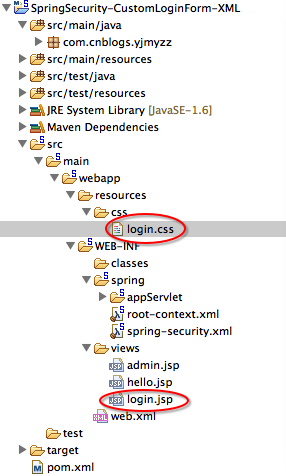
与前一个示例相比较,只是多了一个css样式以及登录页login.jsp,这二个文件具体的内容如下:
 @CHARSET "UTF-8";

 .error {

     padding: 15px;

     margin-bottom: 20px;

     border: 1px solid transparent;

     border-radius: 4px;

     color: #a94442;

     background-color: #f2dede;

     border-color: #ebccd1;

 }

 .msg {

     padding: 15px;

     margin-bottom: 20px;

     border: 1px solid transparent;

     border-radius: 4px;

     color: #31708f;

     background-color: #d9edf7;

     border-color: #bce8f1;

 }

 #login-box {

     width: 300px;

     padding: 20px;

     margin: 100px auto;

     background: #fff;

     -webkit-border-radius: 2px;

     -moz-border-radius: 2px;

     border: 1px solid #000;

 }
login.css
 <%@ page language="java" contentType="text/html; charset=UTF-8"

     pageEncoding="UTF-8"%>

 <%@ taglib prefix="c" uri="http://java.sun.com/jsp/jstl/core"%>

 <!DOCTYPE html PUBLIC "-//W3C//DTD HTML 4.01 Transitional//EN" "http://www.w3.org/TR/html4/loose.dtd">

 <html>

 <head>

 <meta http-equiv="Content-Type" content="text/html; charset=UTF-8">

 <title>Login Page</title>

 <link rel="Stylesheet" type="text/css" href="${pageContext.request.contextPath}/resources/css/login.css" />

 </head>

 <body onload='document.loginForm.username.focus();'>

     <h1>Spring Security Custom Login Form (XML)</h1>

     <div id="login-box">

         <h3>Login with Username and Password</h3>

         <c:if test="${not empty error}">

             <div class="error">${error}</div>

         </c:if>

         <c:if test="${not empty msg}">

             <div class="msg">${msg}</div>

         </c:if>

         <form name='loginForm'

             action="<c:url value='j_spring_security_check' />" method='POST'>

             <table>

                 <tr>

                     <td>User:</td>

                     <td><input type='text' name='username' value=''></td>

                 </tr>

                 <tr>

                     <td>Password:</td>

                     <td><input type='password' name='password' /></td>

                 </tr>

                 <tr>

                     <td colspan='2'><input name="submit" type="submit"

                         value="submit" /></td>

                 </tr>

             </table>

             <input type="hidden" name="${_csrf.parameterName}"

                 value="${_csrf.token}" />

         </form>

     </div>

 </body>

 </html>
login.jsp
有几个地方解释一下:
第9行,css静态资源的引用方式,如果对Spring MVC不熟悉的人,可借此示例学习一下
15-20行,用了一个if标签来判断登录验证是否有错,如果验证失败,则显示错误信息,其中error,msg这二个变量,是从Controller里返回的信息(后面马上会讲到)
23行form表单的action地址留意一下,这个不能改,这是Spring Security的约定
38-39行的隐藏域_csrf,这是用来防止跨站提交攻击的,如果看不懂,可暂时无视。
二、Controller
 package com.cnblogs.yjmyzz;

 import org.springframework.stereotype.Controller;

 import org.springframework.web.bind.annotation.RequestMapping;

 import org.springframework.web.bind.annotation.RequestMethod;

 import org.springframework.web.bind.annotation.RequestParam;

 import org.springframework.web.servlet.ModelAndView;

 @Controller

 public class HelloController {

     @RequestMapping(value = { "/", "/welcome" }, method = RequestMethod.GET)

     public ModelAndView welcome() {

         ModelAndView model = new ModelAndView();

         model.addObject("title", "Spring Security Custom Login Form");

         model.addObject("message", "This is welcome page!");

         model.setViewName("hello");

         return model;

     }

     @RequestMapping(value = "/admin", method = RequestMethod.GET)

     public ModelAndView admin() {

         ModelAndView model = new ModelAndView();

         model.addObject("title", "Spring Security Custom Login Form");

         model.addObject("message", "This is protected page!");

         model.setViewName("admin");

         return model;

     }

     //新增加的Action方法,映射到

     // 1. /login 登录页面的常规显示

     // 2. /login?error 登录验证失败的展示

     // 3. /login?logout 注销登录的处理

     @RequestMapping(value = "/login", method = RequestMethod.GET)

     public ModelAndView login(

             @RequestParam(value = "error", required = false) String error,

             @RequestParam(value = "logout", required = false) String logout) {

         ModelAndView model = new ModelAndView();

         if (error != null) {

             model.addObject("error", "Invalid username and password!");

         }

         if (logout != null) {

             model.addObject("msg", "You've been logged out successfully.");

         }

         model.setViewName("login");

         return model;

     }

 }
HelloController
增加了一个login方法,映射到登录的三种情况(常规显示,出错展示,注销登录)
三、spring-security.xml
 <beans:beans xmlns="http://www.springframework.org/schema/security"

     xmlns:beans="http://www.springframework.org/schema/beans" xmlns:xsi="http://www.w3.org/2001/XMLSchema-instance"

     xsi:schemaLocation="http://www.springframework.org/schema/beans

     http://www.springframework.org/schema/beans/spring-beans-3.0.xsd

     http://www.springframework.org/schema/security

     http://www.springframework.org/schema/security/spring-security-3.2.xsd">

     <http auto-config="true">

         <intercept-url pattern="/admin" access="ROLE_USER" />

         <form-login login-page="/login" default-target-url="/welcome"

             authentication-failure-url="/login?error" username-parameter="username"

             password-parameter="password" />

         <logout logout-success-url="/login?logout" />

         <!-- enable csrf protection -->

         <csrf />

     </http>

     <authentication-manager>

         <authentication-provider>

             <user-service>

                 <user name="yjmyzz" password="123456" authorities="ROLE_USER" />

             </user-service>

         </authentication-provider>

     </authentication-manager>

 </beans:beans>
spring-security.xml
注意8-16行的变化,一看即懂,就不多做解释了
运行效果:
登录页正常显示的截图

登录失败的截图
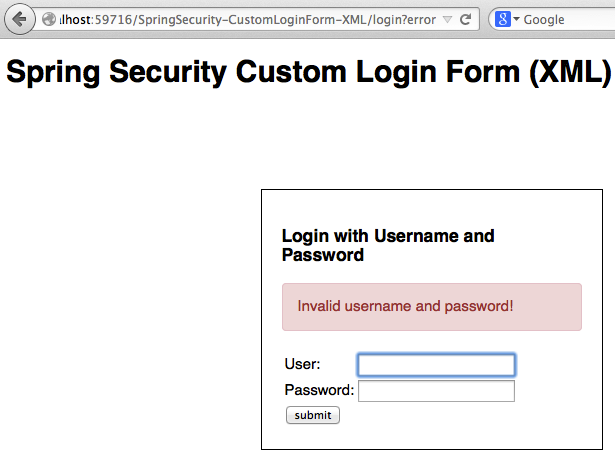
有兴趣的还可以看下对应的html源代码

防跨站提交攻击的_csrf隐藏域,会生成一个随机的类似guid字符串来做校验,以确定本次http post确实是从本页面发起的,这跟asp.net里mac ViewState的思路一致。
最后附示例源代码下载:SpringSecurity-CustomLoginForm-XML(0717).zip
Spring Security笔记:自定义登录页的更多相关文章
- spring security采用自定义登录页和退出功能
更新... 首先采用的是XML配置方式,请先查看 初识Spring security-添加security 在之前的示例中进行代码修改 项目结构如下: 一.修改spring-security.xml ...
- spring security之 默认登录页源码跟踪
spring security之 默认登录页源码跟踪 2021年的最后2个月,立个flag,要把Spring Security和Spring Security OAuth2的应用及主流程源码研究透 ...
- spring security使用自定义登录界面后,不能返回到之前的请求界面的问题
昨天因为集成spring security oauth2,所以对之前spring security的配置进行了一些修改,然后就导致登录后不能正确跳转回被拦截的页面,而是返回到localhost根目录. ...
- Spring Security笔记:登录尝试次数限制
今天在前面一节的基础之上,再增加一点新内容,默认情况下Spring Security不会对登录错误的尝试次数做限制,也就是说允许暴力尝试,这显然不够安全,下面的内容将带着大家一起学习如何限制登录尝试次 ...
- spring security 之自定义表单登录源码跟踪
上一节我们跟踪了security的默认登录页的源码,可以参考这里:https://www.cnblogs.com/process-h/p/15522267.html 这节我们来看看如何自定义单表认 ...
- Spring Security笔记:使用数据库进行用户认证(form login using database)
在前一节,学习了如何自定义登录页,但是用户名.密码仍然是配置在xml中的,这样显然太非主流,本节将学习如何把用户名/密码/角色存储在db中,通过db来实现用户认证 一.项目结构 与前面的示例相比,因为 ...
- Spring-Security自定义登录页&inMemoryAuthentication验证
Spring Security是为基于Spring的应用程序提供声明式安全保护的安全性框架.框架下内容比较多,可以做到按照角色权限对请求路径进行限制.今天主要验证自定义登录页,在内存用户存储中进行请求 ...
- Spring Security 的注册登录流程
Spring Security 的注册登录流程 数据库字段设计 主要数据库字段要有: 用户的 ID 用户名称 联系电话 登录密码(非明文) UserDTO对象 需要一个数据传输对象来将所有注册信息发送 ...
- Spring Security笔记:HTTP Basic 认证
在第一节 Spring Security笔记:Hello World 的基础上,只要把Spring-Security.xml里改一个位置 <http auto-config="true ...
随机推荐
- WPF学习之路(一) 初识WPF
参考<葵花宝典-WPF自学手册> VS2012 先创建第一个WPF小程序 1.创建WPF程序 2.查看Solution,WPF中xaml文件和cs文件经常成对出现 两个主要的类:APP(W ...
- 什么是Java实例初始化块
在本篇文章,我将会使用一个例子展示什么是实例变量初始化块,实例初始化块和静态初始化块,然后说明在Java中实例初始化块是如何工作的. 执行顺序 查看下面的代码,你知道哪个先执行吗? package s ...
- BIEE11G常用函数及使用说明
BIEE常用函数使用手册 1.AGGREGATE AT 此函数根据指定的级别聚合列.使用AGGREGATE AT 可确保始终在关键字AT 之后指定的级别执行度量聚合,而无论WHERE 子句如何. 语法 ...
- 如何把报表放到网页中显示(Web页面与报表简单集成例子)
1.问题描述 现在用户开发的系统基本上趋向于BS架构的浏览器/服务器模式,这些系统可能由不同的语言开发,如HTML.ASP.JSP.PHP等,因此需要将制作好的报表嵌入到这些页面中. FineRepo ...
- java报表工具FineReport的JS编辑框和URL地址栏语法简介
JS编辑框: 1.FineReport的js. 作为一款BS产品,browser端的JavaScript是必不可少的. FineReport中的js是已经调用了finereport.js的. 大家知道 ...
- html5新增及删除标签
一.新增标签 有一种划分为,功能性标签[html5新增,如canvas,旧浏览器没有]和语义性标签[如header等只是增强语义,没有新功能].下面按照分几个小类来说. 1.结构标签 新增的结构标签, ...
- plain framework 1 参考手册 入门指引之 许可协议
许可 介绍 Apache2 License 介绍 使用非常友好的阿帕奇2许可协议,你可以应用到你想用的任何应用上,如需修改源码,请保留原作者信息. Apache2 License Apache Lic ...
- HDU2639Bone Collector II[01背包第k优值]
Bone Collector II Time Limit: 5000/2000 MS (Java/Others) Memory Limit: 32768/32768 K (Java/Others ...
- 第8章 用户模式下的线程同步(1)_Interlocked系列函数
8.1 原子访问:Interlocked系列函数(Interlock英文为互锁的意思) (1)原子访问的原理 ①原子访问:指的是一线程在访问某个资源的同时,能够保证没有其他线程会在同一时刻访问该资源. ...
- 01 Hibernate错题分析
解析: 此题目考查的是对Hibernate中交叉连接的理解.HQL支持SQL风格的交叉连接查询,交叉连接适用于两个类之间没有定义任何关联时.在where字句中,通过属性作为筛选条件,如统计报表数据.使 ...