
CSS魔法堂:你真的懂text-align吗?
前言
也许提及text-align你会想起水平居中,但除了这个你对它还有多少了解呢?本篇打算和大家一起来跟text-align来一次负距离的交往,你准备好了吗?
text-align属性详解
The 'text-align' CSS property describes how inline content like text and inline-level element etc. is aligned in its parent block element.Does not control the alignment of block elements, only their inline content.
'text-align'
Value: left | right | center | justify | justify-all | start | end | <string> | match-parent | inherit
Initial: start, or a nameless value that acts as 'left' if 'direction' is 'ltr', 'right' if 'direction' is 'rtl'
Applies to: block containers
Inherited: yes
Percentages: N/A
Media: visual
Computed value: the initial value or as specified, except for the match-parent value which is calculated against its parent's direction value and results in a computed value of either left or right
CSS2中的属性值:
left: Align the text to the left side of the line box.
right: Align the text to the right side of the line box.
center: Align the text to the middle of the line box.
justify: Align the text so that the first and last characters or inline-level element are aligned with the left and right line box edge.
示例:
<style type="text/css">

p{

  width: 200px;

  border: dotted 1px #000;

}

.ltr{direction:ltr;}

.rtl{direction:rtl;}

.left{text-align:left;}

.right{text-align:right;}

.center{text-align:center;}

.justify{text-align:justify;}

</style>

<p class="ltr">

direction left:As most young candidates for the pains and penalties

</p>

<p class="rtl">

direction right:As most young candidates for the pains and penalties

</p>

<p class="left">

left:As most young candidates for the pains and penalties

</p>

<p class="right">

right:As most young candidates for the pains and penalties

</p>

<p class="center">

center:As most young candidates for the pains and penalties

</p>

<p class="justify">

justify:As most young candidates for the pains and penalties

</p>
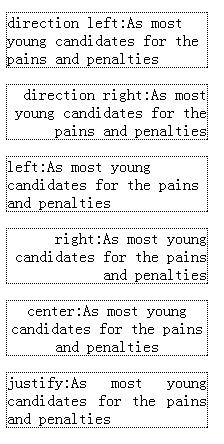
这里我们要注意一下,text-align所设置的是以inline-level box所在的line box作为参考系来进行水平排列对齐,而不是block container所生成的containing block,就更不是以viewport为参考系。CSSRec中写道
A block of text is a stack of line boxes. In the case of 'left', 'right' and 'center', this property specifies how the inline-level boxes within each line box align with respect to the line box's left and right sides; alignment is not with respect to the viewport.
另外对于属性值justify而言,CSS REC中特别说明
In the case of 'justify', this property specifies that the inline-level boxes are to be made flush with both sides of the line box if possible, by expanding or contracting the contents of inline boxes, else aligned as for the initial value. (See also 'letter-spacing' and 'word-spacing'.)
If an element has a computed value for 'white-space' of 'pre' or 'pre-wrap', then neither the glyphs of that element's text content nor its white space may be altered for the purpose of justification.
在此我们先要打个岔,先理解letter-spacing,word-spacing,不然无法真正理解text-align:justify的原理。
字形、单词间的水平距离
letter-spacing干嘛了?
letter-spacing就是用于定义两个字形间的水平距离。
'letter-spacing'
Value: normal | <length> | inherit
Initial: normal
Applies to: all elements
Inherited: yes
Percentages: N/A
Media: visual
Computed value: 'normal' or absolute length
normal:根据当前字体和字体大小,由UA自定义的水平距离。
<length>:可正可负,字形间最终的水平距离 = UA自定义的水平距离 + length值
word-spacing干嘛了?
word-spacing就是用于定义两个单词间的水平距离。
'word-spacing'
Value: normal | <length> | inherit
Initial: normal
Applies to: all elements
Inherited: yes
Percentages: N/A
Media: visual
Computed value: for 'normal' the value '0'; otherwise the absolute length
normal:根据当前字体和字体大小,由UA自定义的水平距离。
<length>:可正可负,单词间最终的水平距离 = UA自定义的水平距离 + length值
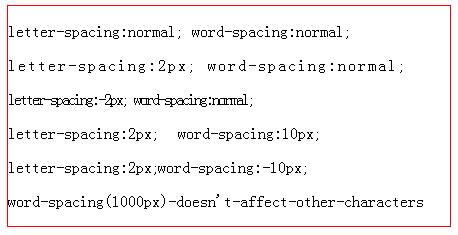
注意:word-spacing作用于word-separator characters。而定义的word-separator characters有<SP>(普通空格符,U+0020)和<NBSP>(非断行空格符,U+00A0)两种。word-spacing所指定的距离会紧跟在word-separator characters后面。其他字符均不受word-spacing的影响。——也就是说word-spacing的单词间距只是我们日常当中的“单词间距”的子集而已。
<p>letter-spacing:normal; word-spacing:normal;</p>

<p style="letter-spacing:2px;word-spacing:normal;">letter-spacing:2px; word-spacing:normal;</p>

<p style="letter-spacing:-2px;word-spacing:normal;">letter-spacing:-2px; word-spacing:normal;</p>

<p style="letter-spacing:normal;word-spacing:10px;">letter-spacing:2px; word-spacing:10px;</p>

<p style="letter-spacing:normal;word-spacing:-10px;">letter-spacing:2px; word-spacing:-10px;</p>

<p style="word-spacing:1000px;">word-spacing(1000px)-doesn't-affect-other-characters</p>
深入text-align:justify
<p style="width:150px;border:dotted 1px #000;word-wrap:break-word;text-align:auto;">

pure alphanumeric 123 432112 12313123124123

</p>

<p style="width:150px;border:dotted 1px #000;word-wrap:break-word;text-align:justify;">

pure alphanumeric 123 432112 12313123124123

</p>

<p style="width:170px;border:dotted 1px #000;word-wrap:break-word;letter-spacing:100px;">

本届集团公司党委由公司党委由

</p>

<p style="width:170px;border:dotted 1px #000;word-wrap:break-word;text-align:justify;">

本届集团公司党委由公司党委由

</p>

<p style="width:160px;border: dotted 1px #000;">

ภ า ษ า ไ ท ย ภ า ษ า ไ ท ย ภ า ษ า ไ ท ย

</p>

<p style="width:160px;border: dotted 1px #000;word-wrap:break-word;text-align:justify;">

ภ า ษ า ไ ท ย ภ า ษ า ไ ท ย ภ า ษ า ไ ท ย

</p>
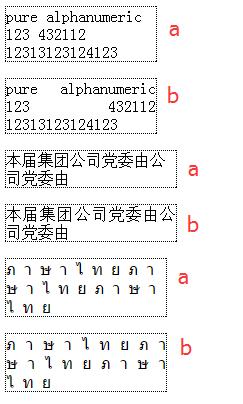
a组均是text-align:start,而b组则是text-align:justify。可以看到text-align:justify有两个特点:
- 通过调整字符或单词间的距离,实现第一个/最后一个inline-level boxes与line box的左右边框对齐;
- 最后一个line box内的inline-level boxes采用的不是
text-align:justify。而是采用text-align:start。
第1点说到"字符或单词间的距离",自然会联想到上面所说的letter-spacing和word-spacing属性,但只要采用text-align:justify,那么上述两者之一的属性值将失效。若调整的是"字符间的距离"则letter-spacing失效,若调整的是"单词间的距离"则是word-spacing失效。
那问题来了,到底什么时候是"字符间的距离"什么时候是"单词间的距离"呢?
CSS3中引入了新属性text-justify:auto|none|inter-word|inter-ideograph|inter-cluster|distribute|kashida用于对text-align:justify具体的对齐算法作调整,虽然现在仅仅IE支持该属性,但不妨外我们通过它来了解具体的对齐算法规则。
inter-word: 采用增加/减少单词间的距离。chrome下英文、泰文等的默认对齐方式,IE5.5~9下CJK的默认对齐方式;
inter-ideograph: 等同于inter-letter,采用增加/减少象形文字间的距离。chrome下CJK(中日韩文)等的默认对齐方式;
而text-align:justify的默认方式text-justify:auto: 则是对英文、泰文采用inter-word方式,对CJK采用inter-ideograph方式。
注意:具体对哪类语言采用哪种方式是由浏览器决定!
而第2点说到"最后一个line box内的inline-level box采用的是text-align:start",这个我们也可以参考CSS3的新属性text-align-last。当text-align:justify且text-align-last:auto时,最后一个line box或forced line break后的第一个line box均采用text-align:start。
这里由引入另一个问题了,什么是forced line break呢?首先我们来说说line break吧!line break其实就是原来位于一个line box的inline-level boxes,由于某些原因导致inline-level boxes分散到多个line boxes中,有甚者将某个inline-level box拆分为多个并分布到多个相邻的line box中。而line break中又分为forecd line break和soft wrap break两种。
forecd line break具体就是通过<br/>或block-level box实现。
soft wrap break具体是有line box空间不足所导致的line break。对于soft wrap break而言,还有一个概念是soft wrap opportunity(abbr. SWO),就是可拆分的点。这个涉及到white-space、word-wrap和word-break的具体属性值了。采用normal默认值时,对于英文、泰语、老挝语等以单词划分(word boundary)为SWO,而对于CJK则以音节划分(syllable boundary)为SWO,其实即是以字符划分作为SWO。
另外值得注意的是word boundary不包含标点符号,仅仅包含<SP>(普通空格符,U+0020)和<NBSP>(非断行空格符,U+00A0)两种。
而对于replaced element、display:inline-block等atomic inline-level element而言,它们和CJK一致的SWO。
还有一点是out-of-flow的元素不会引发line break的哦!
更多line break信息可参考line-breaking
CSS3中新增的属性值
justify-all: Same as justify, but also forces the last line to be justified.
start: The same as left if direction of block container is left-to-right and right if that is right-to-left.
end: The same as right if direction of block container is left-to-right and left if that is right-to-left.
match-parent: This value behaves the same as inherit (computes to its parent’s computed value) except that an inherited start or end keyword is interpreted against its parent’s direction value and results in a computed value of either left or right.
理解了justify后自然就理解justify-all了,可惜现在还没有浏览器实现了justify-all属性值。那有没有办法pollyfill呢?必须有的,虽然实现起来有些蛋疼:(
<style type="text/css">

 /* polyfill 4 justify-all*/

 .justify-all{

   text-align:justify;

   line-height:0;

 }

 .justify-all .content{

   line-height:normal;

 }

 .justify-all .polyfill{

   display:inline-block;

   *display:inline;

   zoom:1;

   width:100%;

   vertical-align:top;

 }

</style>

<p style="width:150px;border:dotted 1px blue;text-align:justify;">

  Hi there, welcome 2 fsjohnhuang's blog! Enjoy FE pls. cu.

</p>

<p style="width:150px;border:dotted 1px red;" class="justify-all">

  <span class="content">Hi there, welcome 2 fsjohnhuang's blog! Enjoy FE pls. cu.</span><i class="polyfill"></i>

</p>
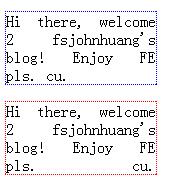
具体原理请结合CSS魔法堂:深入理解line-height和vertical-align理解吧。
另外@张鑫旭老师还妙用text-align:justify了一回,请看display:inline-block/text-align:justify下列表的两端对齐布局
总结
上述内容若有纰漏请各位指正,谢谢!
尊重原创,转载请注明来自:http://www.cnblogs.com/fsjohnhuang/p/5316591.html_肥子John
感谢
CSS text-align 属性
text-align
CSS3 text-justify 属性
CSS Text Module Level 2
CSS Text Module Level 3
CSS direction属性简介与实际应用
CSS魔法堂:你真的懂text-align吗?的更多相关文章
- CSS魔法堂:重拾Border之——更广阔的遐想
前言 当CSS3推出border-radius属性时我们是那么欣喜若狂啊,一想到终于不用再添加额外元素来模拟圆角了,但发现border-radius还分水平半径和垂直半径,然后又发现border-t ...
- CSS魔法堂:重拾Border之——不仅仅是圆角
前言 当CSS3推出border-radius属性时我们是那么欣喜若狂啊,一想到终于不用再添加额外元素来模拟圆角了,但发现border-radius还分水平半径和垂直半径,然后又发现border-t ...
- CSS魔法堂:重拾Border之——图片作边框
前言 当CSS3推出border-radius属性时我们是那么欣喜若狂啊,一想到终于不用再添加额外元素来模拟圆角了,但发现border-radius还分水平半径和垂直半径,然后又发现border-t ...
- CSS魔法堂:重拾Border之——解构Border
前言 当CSS3推出border-radius属性时我们是那么欣喜若狂啊,一想到终于不用再添加额外元素来模拟圆角了,但发现border-radius还分水平半径和垂直半径,然后又发现border-t ...
- CSS魔法堂:"那不是bug,是你不懂我!" by inline-block
前言 每当来个需要既要水平排版又要设置固定高宽时,我就会想起display:inline-block,还有为了支持IE5.5/6/7的hack*display:inline;*zoom:1;.然后发 ...
- CSS魔法堂:说说Float那个被埋没的志向
前言 定位系统中第一难理解就是Normal flow,而第二就非Float莫属了,而Float难理解的原因有俩,1. 一开头我们就用错了:2. 它跟Normal flow靠得太近了.本文尝试理清Fl ...
- CSS魔法堂:深入理解line-height和vertical-align
前言 一直听说line-height是指两行文本的基线间的距离,然后又说行高等于行距,最近还听说有个叫行间距的家伙,@张鑫旭还说line-height和vertical-align基情四射,贵圈真乱啊 ...
- CSS魔法堂:Box-Shadow没那么简单啦:)
前言 说起box-shadow那第一个想法当然就是用来实现阴影,其实它还能用于实现其他好玩的效果的,本篇就打算说说box-shadow的那些事. 二话不说看效果 3D小球 <style typ ...
- CSS魔法堂:你一定误解过的Normal flow
前言 刚接触CSS时经常听到看到一个词"文档流",那到底什么是"文档流"呢?然后会看到"绝对定位和浮动定位能脱离文档流",从这句可以看到文 ...
随机推荐
- 在Nifi 里 把 HDFS Json 为csv 格式
import org.apache.commons.io.IOUtilsimport java.nio.charset.*import java.text.SimpleDateFormatimport ...
- HTML5+flash打造兼容各浏览器的文件上传方案
上一篇文章介绍了HTML5版的文件上传插件,相比flash,采用HTML5的新技术无疑可以提升程序的加载速度.但是在目前的情况看来,HTML5的特性支持度不高,插件的可用性范围确实比较窄.例如,我在插 ...
- java提高篇(十一)-----强制类型转换
在java中强制类型转换分为基本数据类型和引用数据类型两种,这里我们讨论的后者,也就是引用数据类型的强制类型转换. 在Java中由于继承和向上转型,子类可以非常自然地转换成父类,但是父类转换成子类则需 ...
- [异常解决] ubuntu上安装虚拟机遇到的问题(vmware坑了,virtual-box简单安装,在virtual-box中安装精简版win7)
利用周末时间将整个电脑格式化,换成了ubuntu系统- 所谓:扫清屋子再请客! 但是有些软件只在win上有,于是还是考虑装个虚拟机来个——逐步过度策略,一点点地从win上转移到linux上 我的系统是 ...
- 3、CC2541芯片中级教程-OSAL操作系统(ADC光敏电阻和修改串口波特率)
本文根据一周CC2541笔记汇总得来—— 适合概览和知识快速索引—— 全部链接: 中级教程-OSAL操作系统\OSAL操作系统-实验01 OSAL初探 [插入]SourceInsight-工程建立方法 ...
- as3 Loader 加载资源后内存泄露无法释放的问题。
本人用Loader加载外部一个swf.之后unloadAndStop,Flash概要分析发现,内存没有被释放. 网上搜了一大堆文章,要么就是加载bitmapdata之后,自己dispose,要么就是加 ...
- Atitit 图像处理 常用8大滤镜效果 Jhlabs 图像处理类库 java常用图像处理类库
Atitit 图像处理 常用8大滤镜效果 Jhlabs 图像处理类库 java常用图像处理类库1.1. 5种常用的Photoshop滤镜,分别针对照片的曝光.风格色调.黑白照片处理.锐利度.降噪这五大 ...
- Servlet Filter
Filter : Java中的Filter 并不是一个标准的Servlet ,它不能处理用户请求,也不能对客户端生成响应. 主要用于对HttpServletRequest 进行预处理,也可以对Http ...
- SQLServer性能分析
SQLServer性能分析 当数据库出现性能问题,应用出现运行缓慢的时候,下面这个东东能让你如获至宝 create table #sp_who2 ( SPID int ,status varchar( ...
- 玩转Django的POST请求 CSRF
玩转Django的POST请求 CSRF 不少麻油们玩django都会碰到这个问题,POST请求莫名其妙的返回 403 foribidden,希望这篇博文能解答所有问题 三种方法 To enable ...