
Windows Azure Service Bus (6) 中继(Relay On) 使用VS2013开发Service Bus Relay On
《Windows Azure Platform 系列文章目录》
注意:本文介绍的是国内由世纪互联运维的Windows Azure服务。
项目文件请在这里下载。
我们在使用Azure平台的时候,经常会遇到本地应用和云端应用进行互通互连的情况。
在这种混合云的场景下,我们可以通过以下方式解决:
一.Point-To-Site VPN
将本地的一台设备(Point),与云端的网络(Site)进行互通互联。
- 这里的Point指的就是企业内网的一台主机(VPN客户端)
- 这里的Site是指Azure Virtual Network的网络
- 这样可以实现将企业内网的一台主机与云端网络互通互联,同时通过VPN保证网络的安全性
企业内网的主机需要安装VPN客户端
支持以下客户端操作系统:
Windows 7 (32位和64位)
Windows Server 2008 R2(仅支持64位)
Windows 8(32位和64位)
Windows Server 2012(仅支持64位)
Point-to-Site VPN是使用SSTP VPN协议
有兴趣的读者可以参考笔者之前的文章:
Windows Azure Virtual Network (8) 创建Azure Point-to-Site点到站点 VPN
二.Site-To-Site VPN
将本地的网络(Site)与云端的Azure虚拟网络(Site)进行互通互联。
Site-To-Site VPN的前提要求:
- 企业本地网络需要固定的公网IPV4地址
- 需要微软认证的VPN设备 or Windows Server 2012 RRAS
设备列表请参考:https://msdn.microsoft.com/en-us/library/azure/jj156075.aspx
- VPN设备必须在NAT设备的前面
Site-to-Site VPN是使用IPSec VPN协议
这篇文章我回头再写 :)
以上的方法都可以看出,Azure Virtual Network VPN的方式,都是基于TCP/IP网络协议的。
在很多场景下,实现Point-To-Site和Site-To-Site并不是非常容易。例如以下场景:
- 企业没有固定的公网IPV4地址
- 企业的IT策略,不允许设置Azure Site-To-Site VPN
在这种情况下,就可以使用Azure Service Bus Relay On实现应用层的混合云了。
Azure Service Bus Relay On技术:
- 不依赖于固定公网IPV4或者VPN设备
- 可以穿透NAT和防火墙设备
- 只需要本地数据中心打开HTTP 80端口或HTTPS 443端口
如下图:
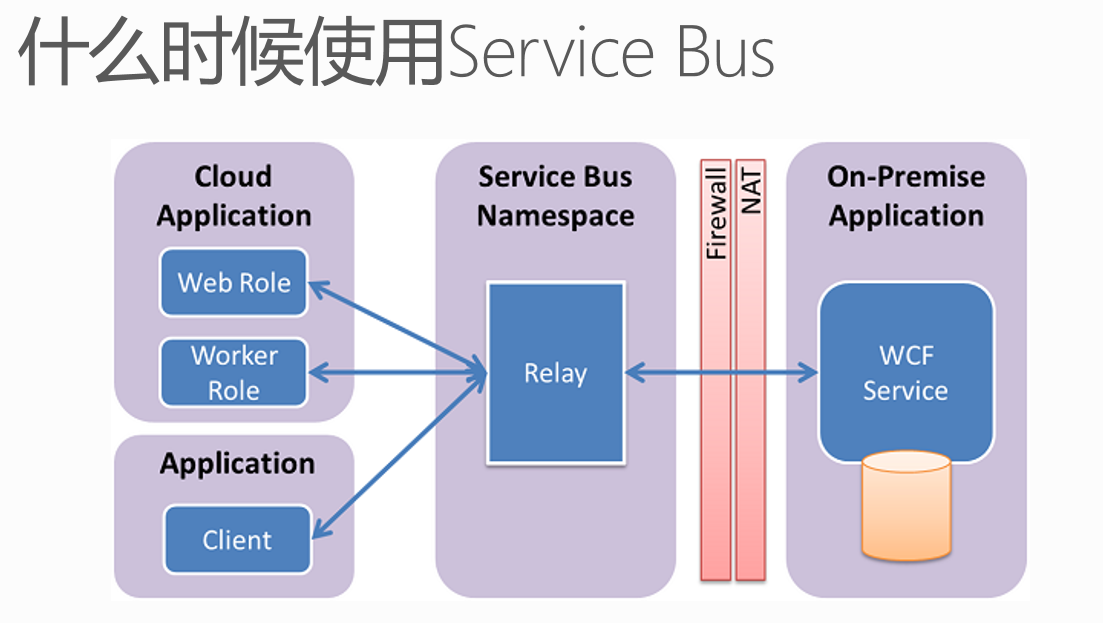
Azure Service Bus Relay On是通过HTTP, HTTPS实现应用的混合云。假设当需要把企业内网WCF应用服务发布到公网,被其他客户端进行调用的时候,只需要在企业内网允许HTTP需要80端口,或者HTTPS需要的443端口即可。
另外,企业内网的WCF应用服务,和客户端(外网)应用服务之间,不是直接调用的。而是首先需要将WCF服务,在Azure Service Bus Relay On进行注册,客户端(外网)应用才能调用被注册的Azure Service Bus Relay On。Azure Service Relay On概念上类似于代理服务器。

注意:Azure Service Bus在企业内网的应用目前只能支持WCF服务。
前面的介绍完了,现在进入Demo演示阶段。笔者模拟以下场景:
1.在企业内网中,有一台Web Service,上面部署了WCF服务
2.通过Azure Service Bus Relay On,将WCF注册到Service Bus上。
3.从Internet上的另外一台客户端机器,通过验证Service Bus的SAS验证方式,来调用Azure Service Bus Relay On上的服务。
以下项目分为三类:
- 使用PowerShell,创建Azure Service Bus Relay On
- 服务器端,将WCF服务注册到Azure Service Bus。因为WCF项目执行的时候,需要宿主,本项目以Windows Console为宿主。
- 客户端,Internet上的机器,调用Azure Service Bus注册的WCF服务
一.使用PowerShell,创建Azure Service Bus Relay On
请读者注意,Azure Service Bus Relay On只能通过PowerShell来创建。如何读者已经通过Management Portal,创建了Azure Service的话,是不能正常使用Relay On功能的。需要删除,然后通过PowerShell重建。
1.我们使用管理员身份,运行Azure PowerShell
2.假设读者有多个Azure订阅的情况下,切换当前订阅
Select-AzureSubscription '[YourSubscriptionName]' -current
3.执行以下代码:
New-AzureSBNamespace -Name '[YourServiceBusName]' -NamespaceType 'Messaging' -Location '[YourLocation]'
例如笔者想创建的Service Bus名称为leiservicebus,位于China East数据中心
New-AzureSBNamespace -Name 'leizhangservicebus' -NamespaceType 'Messaging' -Location 'China East'
以下为执行结果截图:
4.可以在Azure Management Portal查看到创建结果。我们还可以查看Service Bus的连接字符串,如下图:

注意:客户端是否可以连接Azure Service Bus Relay是通过上面的连接字符串来验证的。
以上,创建Azure Service Bus Relay On的工作就完成了。
二.服务器端,将WCF服务注册到Azure Service Bus
接下来,我们使用管理员身份,运行Visual Studio 2013。创建一个新的项目,重名为SBRelay。
1.增加Windows Console Library,命名为SBRelayServer
2.在Program.cs增加以下代码:
using System;

using System.Collections.Generic;

using System.Linq;

using System.Text;

using System.Threading.Tasks;

using System.ServiceModel;

using Foundation;

using Microsoft.ServiceBus;

using System.ServiceModel.Description;

namespace SBRelayServer

{

    class Program

    {

        static void Main(string[] args)

        {

            var tokenProvider = TokenProvider.CreateSharedAccessSignatureTokenProvider("RootManageSharedAccessKey", "+LSd5njWikUZEi+RY/NpkkR/GL3PlpVRGCv23gwKrM0=");

            var serviceHost = new ServiceHost(typeof(EchoService));

            var serviceEndpoint = serviceHost.AddServiceEndpoint(

                typeof(IEcho),

                new NetTcpRelayBinding(),

                "sb://leizhangservicebus.servicebus.chinacloudapi.cn/echo");

            serviceEndpoint.Behaviors.Add(new TransportClientEndpointBehavior(tokenProvider));

            serviceHost.Open();

            Console.WriteLine("Press ENTER to close");

            Console.ReadLine();

            serviceHost.Close();

        }

    }

}
注意:上图的TokenProvider为我们的SAS密钥。
上面的应用程序中,会将本地的WCF注册到云端的Azure Service Bus,地址为sb://leizhangservicebus.servicebus.chinacloudapi.cn/echo
3.记得在项目文件中,使用NuGet,下载Azure Service Bus Package,如下图所示

4.在SBRelayServer项目中,增加EchoService.cs,输入以下代码:
using Foundation;

using System;

using System.Collections.Generic;

using System.Linq;

using System.Text;

using System.Threading.Tasks;

namespace SBRelayServer

{

    class EchoService : IEcho

    {

        public string GetValue()

        {

            return "Hello World!";

        }

    }

}
服务器端会返回给客户端字符串,内容为Hello World!
三.客户端,从客户端调用
1.增加Windows Console Library,命名为SBRelayClient
2.在Program.cs中,增加如下代码:
using Microsoft.ServiceBus;

using System;

using System.Collections.Generic;

using System.Linq;

using System.ServiceModel;

using System.Text;

using System.Threading.Tasks;

using Foundation;

using System.Diagnostics;

namespace SBRelayClient

{

    class Program

    {

        static void Main(string[] args)

        {

            var binding = new NetTcpRelayBinding();

            var channelFactory = new ChannelFactory<IEchoChannel>

            (

               binding,

               new EndpointAddress("sb://leizhangservicebus.servicebus.chinacloudapi.cn/echo")

           );

            channelFactory.Endpoint.EndpointBehaviors.Add(new TransportClientEndpointBehavior { TokenProvider = TokenProvider.CreateSharedAccessSignatureTokenProvider("RootManageSharedAccessKey", "+LSd5njWikUZEi+RY/NpkkR/GL3PlpVRGCv23gwKrM0=") });

            using (var ch = channelFactory.CreateChannel())

            {

                Stopwatch sw = new Stopwatch();

                sw.Start();

                string returnValue = ch.GetValue();

                sw.Stop();

                Console.WriteLine("Get {0} From WCF Server", returnValue);

            }

            Console.ReadLine();

        }

    }

}
上面的代码中,会从服务器读取GetValue方法,返回给客户端字符串。
如何执行该代码?
1.编译项目文件
2.执行服务器端项目,SBRelayServer项目下的SBRelayServer.exe。
3.等到服务器端项目,SBRelayServer.exe命令行显示Press ENTER to close,请不要关闭SBRelayServer.exe
4.执行客户端项目,SBRelayClient项目下的SBRelayClient.exe
5.下图中,左侧为服务器端命令行界面,右侧为客户端命令行结果,其中的Hello World即为服务器的返回值。

本博-三石Blog(下文简称本博),在本博客文章结尾处右下脚未注明转载、来源、出处的作品(内容)均为本博原创,本站对于原创作品内容对其保留版权,请勿随意转载,如若真有需要的朋友可以发Mail联系我;转载本博原创作品(内容)也必须遵循“署名-非商业用途-保持一致”的创作共用协议,请务必以文字链接的形式标明或保留文章原始出处和博客作者(Lei Zhang)的信息,关于本博摄影作品请务必注意保留(www.cnblog.com/threestone)等相关水印版权信息,否则视为侵犯原创版权行为;本博谢绝商业网站转载。版权所有,禁止一切有违中华人民共和国著作权保护法及相关法律和本博(法律)声明的非法及恶意抄袭。
Windows Azure Service Bus (6) 中继(Relay On) 使用VS2013开发Service Bus Relay On的更多相关文章
- Windows Azure Service Bus (3) 队列(Queue) 使用VS2013开发Service Bus Queue
<Windows Azure Platform 系列文章目录> 在之前的Azure Service Bus中,我们已经介绍了Service Bus 队列(Queue)的基本概念. 在本章中 ...
- Windows Azure Service Bus (5) 主题(Topic) 使用VS2013开发Service Bus Topic
<Windows Azure Platform 系列文章目录> 项目文件,请在这里下载 在笔者之前的文章中Windows Azure Service Bus (1) 基础 介绍了Servi ...
- Windows Azure HandBook (5) Azure混合云解决方案
<Windows Azure Platform 系列文章目录> 在很多情况下,我们都会遇到本地私有云和公有云做互通互联的混合云场景.对于这种混合云的场景,微软的Windows Azure会 ...
- Windows Azure Service Bus (4) Service Bus Queue和Storage Queue的区别
<Windows Azure Platform 系列文章目录> 熟悉笔者文章的读者都了解,Azure提供两种不同方式的Queue消息队列: 1.Azure Storage Queue 具体 ...
- Windows Azure Cloud Service (11) PaaS之Web Role, Worker Role(上)
<Windows Azure Platform 系列文章目录> 本文是对Windows Azure Platform (六) Windows Azure应用程序运行环境内容的补充. 我们知 ...
- [Windows Azure] Building worker role B (email sender) for the Windows Azure Email Service application - 5 of 5.
Building worker role B (email sender) for the Windows Azure Email Service application - 5 of 5. This ...
- [Windows Azure] Building worker role A (email scheduler) for the Windows Azure Email Service application - 4 of 5.
Building worker role A (email scheduler) for the Windows Azure Email Service application - 4 of 5. T ...
- [Windows Azure] Windows Azure Web Sites, Cloud Services, and VMs: When to use which?
This document provides guidance on how to make an informed decision in choosing between Windows Azur ...
- [Windows Azure] Windows Azure Execution Models
Windows Azure Execution Models Windows Azure provides different execution models for running applica ...
随机推荐
- bootstrap-sidebar,后台边栏折叠功能
http://www.solutiisoft.com/bootstrap-sidebar/index.php
- static关键字作用总结
之前讲到final关键字的作用是每次面试的时候我必问求职者的两个问题之一,另外一个问题就是文本会写到的static.final和static一样,都是一个小问题可以看到一个人的基础是否扎实以及平时是否 ...
- 一个简单的通用Makefile实现
一个简单的通用Makefile实现 Makefile是Linux下程序开发的自动化编译工具,一个好的Makefile应该准确的识别编译目标与源文件的依赖关系,并且有着高效的编译效率,即每次重新ma ...
- Unity3D使用经验总结 优点篇
09年还在和其它小伙伴开发引擎的时候,Unity3D就初露头角. 当时就对这种基于组件式的设计结构很不理解. 觉得拆分过于细致,同时影响效率. 而时至今日,UNITY3D已经成为了众多团队的首选3D引 ...
- JS中的闭包
在复习JS高程的过程中,在第七章闭包那节,发现自己看不太明白了.之前看高程的时候,都弄得挺清楚了,怎么现在反而又看不懂了. 嗯,也许更深层次的东西涉及到编译原理的知识了.嗯,在研究完SPA后就开始学习 ...
- nginx负载下站点错误响应会导致其他节点重复响应问题的解决过程
目录 前言 问题来了 问题又来了 问题分析 困惑 转机 后续 前言: 这是我上周工作过程中的一次解决问题的过程.解决的是nginx负载下站点错误响应导致其他节点重复响应. 我在整理这个记叙文时,在给这 ...
- Atitit usbQb212 oo 面向对象封装的标准化与规范解决方案java c# php js
Atitit usbQb212 oo 面向对象封装的标准化与规范解决方案java c# php js 1.1. 封装性是面象对象编程中的三大特性之一 三个基本的特性:封装.继承与多态1 1.2. 魔 ...
- Atitit 数据处理查询 中的异常标准化草案 jpa jdbc hb oql规范attilax总结
Atitit 数据处理查询 中的异常标准化草案 jpa jdbc hb oql规范attilax总结 Javaee6 与net 异常规范1 Jpa规范 JPA全称Java Persistence A ...
- 设置easyui input默认值
/*设置input 焦点*/ $(function () { //集体调用 $(".formTextBoxes input").each(function () { $(this) ...
- 练习3:修改withdraw 方法 练习目标-使用有返回值的方法:在本练习里,将修改withdraw方法以返回一个布尔值来指示交易是否成功。
boolean withdraw(double get){ if(get<=balance) { System.out.println("取钱"+get+"元,当余 ...