
从netty-example分析Netty组件续
上文我们从netty-example的Discard服务器端示例分析了netty的组件,今天我们从另一个简单的示例Echo客户端分析一下上个示例中没有出现的netty组件。
1. 服务端的连接处理,读写处理
echo客户端代码:
/**

 * Sends one message when a connection is open and echoes back any received

 * data to the server.  Simply put, the echo client initiates the ping-pong

 * traffic between the echo client and server by sending the first message to

 * the server.

 */

public final class EchoClient {

    static final boolean SSL = System.getProperty("ssl") != null;

    static final String HOST = System.getProperty("host", "127.0.0.1");

    static final int PORT = Integer.parseInt(System.getProperty("port", "8007"));

    static final int SIZE = Integer.parseInt(System.getProperty("size", "256"));

    public static void main(String[] args) throws Exception {

        // Configure SSL.git

        final SslContext sslCtx;

        if (SSL) {

            sslCtx = SslContextBuilder.forClient()

                .trustManager(InsecureTrustManagerFactory.INSTANCE).build();

        } else {

            sslCtx = null;

        }

        // Configure the client.

        EventLoopGroup group = new NioEventLoopGroup();

        try {

            Bootstrap b = new Bootstrap();

            b.group(group)

             .channel(NioSocketChannel.class)

             .option(ChannelOption.TCP_NODELAY, true)

             .handler(new ChannelInitializer<SocketChannel>() {

                 @Override

                 public void initChannel(SocketChannel ch) throws Exception {

                     ChannelPipeline p = ch.pipeline();

                     if (sslCtx != null) {

                         p.addLast(sslCtx.newHandler(ch.alloc(), HOST, PORT));

                     }

                     //p.addLast(new LoggingHandler(LogLevel.INFO));

                     p.addLast(new EchoClientHandler());

                 }

             });

            // Start the client.

            ChannelFuture f = b.connect(HOST, PORT).sync();

            // Wait until the connection is closed.

            f.channel().closeFuture().sync();

        } finally {

            // Shut down the event loop to terminate all threads.

            group.shutdownGracefully();

        }

    }

}
从上面的代码可以看出,discard的服务端代码和echo的客户端代码基本相似,不同的是一个使用ServerBootStrap,另一个使用BootStrap而已。先看一下连接过程
NioEventLoop处理key的过程,
 private static void processSelectedKey(SelectionKey k, AbstractNioChannel ch) {

        final AbstractNioChannel.NioUnsafe unsafe = ch.unsafe();

        if (!k.isValid()) {

            // close the channel if the key is not valid anymore

            unsafe.close(unsafe.voidPromise());

            return;

        }

        try {

            int readyOps = k.readyOps();

            // Also check for readOps of 0 to workaround possible JDK bug which may otherwise lead

            // to a spin loop

            if ((readyOps & (SelectionKey.OP_READ | SelectionKey.OP_ACCEPT)) != 0 || readyOps == 0) {

                unsafe.read();

                if (!ch.isOpen()) {

                    // Connection already closed - no need to handle write.

                    return;

                }

            }

            if ((readyOps & SelectionKey.OP_WRITE) != 0) {

                // Call forceFlush which will also take care of clear the OP_WRITE once there is nothing left to write

                ch.unsafe().forceFlush();

            }

            if ((readyOps & SelectionKey.OP_CONNECT) != 0) {

                // remove OP_CONNECT as otherwise Selector.select(..) will always return without blocking

                // See https://github.com/netty/netty/issues/924

                int ops = k.interestOps();

                ops &= ~SelectionKey.OP_CONNECT;

                k.interestOps(ops);

                unsafe.finishConnect();

            }

        } catch (CancelledKeyException ignored) {

            unsafe.close(unsafe.voidPromise());

        }

    }
2.1 连接流程
调用AbstractNioByteChannel的finishConnect()方法
        @Override

        public final void finishConnect() {

            // Note this method is invoked by the event loop only if the connection attempt was

            // neither cancelled nor timed out.

            assert eventLoop().inEventLoop();

            try {

                boolean wasActive = isActive();

                doFinishConnect();

                fulfillConnectPromise(connectPromise, wasActive);

            } catch (Throwable t) {

                fulfillConnectPromise(connectPromise, annotateConnectException(t, requestedRemoteAddress));

            } finally {

                // Check for null as the connectTimeoutFuture is only created if a connectTimeoutMillis > 0 is used

                // See https://github.com/netty/netty/issues/1770

                if (connectTimeoutFuture != null) {

                    connectTimeoutFuture.cancel(false);

                }

                connectPromise = null;

            }

        }
触发channelActive操作:
        private void fulfillConnectPromise(ChannelPromise promise, boolean wasActive) {

            if (promise == null) {

                // Closed via cancellation and the promise has been notified already.

                return;

            }

            // trySuccess() will return false if a user cancelled the connection attempt.

            boolean promiseSet = promise.trySuccess();

            // Regardless if the connection attempt was cancelled, channelActive() event should be triggered,

            // because what happened is what happened.

            if (!wasActive && isActive()) {

                pipeline().fireChannelActive();

            }

            // If a user cancelled the connection attempt, close the channel, which is followed by channelInactive().

            if (!promiseSet) {

                close(voidPromise());

            }

        }
2.2 读操作流程
调用AbstractNioByteChannel的read()方法,
典型的autoRead流程如下:
1. 当socket建立连接时,Netty触发一个inbound事件channelActive,然后提交一个read()请求给本身(参考DefaultChannelPipeline.fireChannelActive())
2. 接收到read()请求后,Netty从socket读取消息。
3. 当读取到消息时,Netty触发channelRead()。
4. 当读取不到消息后,Netty触发ChannelReadCompleted().
5. Netty提交另外一个read()请求来继续从socket中读取消息。
@Override

        public final void read() {

            final ChannelConfig config = config();

            if (!config.isAutoRead() && !isReadPending()) {

                // ChannelConfig.setAutoRead(false) was called in the meantime

                removeReadOp();

                return;

            }

            final ChannelPipeline pipeline = pipeline();

            final ByteBufAllocator allocator = config.getAllocator();

            final RecvByteBufAllocator.Handle allocHandle = recvBufAllocHandle();

            allocHandle.reset(config);

            ByteBuf byteBuf = null;

            try {

                boolean needReadPendingReset = true;

                do {

                    byteBuf = allocHandle.allocate(allocator);

                    allocHandle.lastBytesRead(doReadBytes(byteBuf));

                    if (allocHandle.lastBytesRead() <= 0) {

                        // nothing was read. release the buffer.

                        byteBuf.release();

                        byteBuf = null;

                        break;

                    }

                    allocHandle.incMessagesRead(1);

                    if (needReadPendingReset) {

                        needReadPendingReset = false;

                        setReadPending(false);

                    }

                    pipeline.fireChannelRead(byteBuf);

                    byteBuf = null;

                } while (allocHandle.continueReading());

                allocHandle.readComplete();

                pipeline.fireChannelReadComplete();

                if (allocHandle.lastBytesRead() < 0) {

                    closeOnRead(pipeline);

                }

            } catch (Throwable t) {

                handleReadException(pipeline, byteBuf, t, allocHandle.lastBytesRead() < 0, allocHandle);

            } finally {

                // Check if there is a readPending which was not processed yet.

                // This could be for two reasons:

                // * The user called Channel.read() or ChannelHandlerContext.read() in channelRead(...) method

                // * The user called Channel.read() or ChannelHandlerContext.read() in channelReadComplete(...) method

                //

                // See https://github.com/netty/netty/issues/2254

                if (!config.isAutoRead() && !isReadPending()) {

                    removeReadOp();

                }

            }

        }

    }
触发读操作
    @Override

    public ChannelHandlerContext fireChannelRead(Object msg) {

        AbstractChannelHandlerContext next = findContextInbound();

        next.invoker().invokeChannelRead(next, pipeline.touch(msg, next));

        return this;

    }
读完触发完成事件
    @Override

    public ChannelPipeline fireChannelReadComplete() {

        head.fireChannelReadComplete();

        if (channel.config().isAutoRead()) {

            read();

        }

        return this;

    }

   @Override

    public ChannelHandlerContext fireChannelReadComplete() {

        AbstractChannelHandlerContext next = findContextInbound();

        next.invoker().invokeChannelReadComplete(next);

        return this;

    }
2.3 写操作流程
写操作
 @SuppressWarnings("deprecation")

        protected void flush0() {

            if (inFlush0) {

                // Avoid re-entrance

                return;

            }

            final ChannelOutboundBuffer outboundBuffer = this.outboundBuffer;

            if (outboundBuffer == null || outboundBuffer.isEmpty()) {

                return;

            }

            inFlush0 = true;

            // Mark all pending write requests as failure if the channel is inactive.

            if (!isActive()) {

                try {

                    if (isOpen()) {

                        outboundBuffer.failFlushed(NOT_YET_CONNECTED_EXCEPTION, true);

                    } else {

                        // Do not trigger channelWritabilityChanged because the channel is closed already.

                        outboundBuffer.failFlushed(CLOSED_CHANNEL_EXCEPTION, false);

                    }

                } finally {

                    inFlush0 = false;

                }

                return;

            }

            try {

                doWrite(outboundBuffer);

            } catch (Throwable t) {

                if (t instanceof IOException && config().isAutoClose()) {

                    /**

                     * Just call {@link #close(ChannelPromise, Throwable, boolean)} here which will take care of

                     * failing all flushed messages and also ensure the actual close of the underlying transport

                     * will happen before the promises are notified.

                     *

                     * This is needed as otherwise {@link #isActive()} , {@link #isOpen()} and {@link #isWritable()}

                     * may still return {@code true} even if the channel should be closed as result of the exception.

                     */

                    close(voidPromise(), t, false);

                } else {

                    outboundBuffer.failFlushed(t, true);

                }

            } finally {

                inFlush0 = false;

            }

        }
写操作具体实现(以NioSocketChannel为例):
 @Override

    protected void doWrite(ChannelOutboundBuffer in) throws Exception {

        for (;;) {

            int size = in.size();

            if (size == 0) {

                // All written so clear OP_WRITE

                clearOpWrite();

                break;

            }

            long writtenBytes = 0;

            boolean done = false;

            boolean setOpWrite = false;

            // Ensure the pending writes are made of ByteBufs only.

            ByteBuffer[] nioBuffers = in.nioBuffers();

            int nioBufferCnt = in.nioBufferCount();

            long expectedWrittenBytes = in.nioBufferSize();

            SocketChannel ch = javaChannel();

            // Always us nioBuffers() to workaround data-corruption.

            // See https://github.com/netty/netty/issues/2761

            switch (nioBufferCnt) {

                case 0:

                    // We have something else beside ByteBuffers to write so fallback to normal writes.

                    super.doWrite(in);

                    return;

                case 1:

                    // Only one ByteBuf so use non-gathering write

                    ByteBuffer nioBuffer = nioBuffers[0];

                    for (int i = config().getWriteSpinCount() - 1; i >= 0; i --) {

                        final int localWrittenBytes = ch.write(nioBuffer);

                        if (localWrittenBytes == 0) {

                            setOpWrite = true;

                            break;

                        }

                        expectedWrittenBytes -= localWrittenBytes;

                        writtenBytes += localWrittenBytes;

                        if (expectedWrittenBytes == 0) {

                            done = true;

                            break;

                        }

                    }

                    break;

                default:

                    for (int i = config().getWriteSpinCount() - 1; i >= 0; i --) {

                        final long localWrittenBytes = ch.write(nioBuffers, 0, nioBufferCnt);

                        if (localWrittenBytes == 0) {

                            setOpWrite = true;

                            break;

                        }

                        expectedWrittenBytes -= localWrittenBytes;

                        writtenBytes += localWrittenBytes;

                        if (expectedWrittenBytes == 0) {

                            done = true;

                            break;

                        }

                    }

                    break;

            }

            // Release the fully written buffers, and update the indexes of the partially written buffer.

            in.removeBytes(writtenBytes);

            if (!done) {

                // Did not write all buffers completely.

                incompleteWrite(setOpWrite);

                break;

            }

        }

    }
2. ChannelInboundHandler和ChannelInboundHandler
Echo的handler代码如下:
/**

 * Handler implementation for the echo client.  It initiates the ping-pong

 * traffic between the echo client and server by sending the first message to

 * the server.

 */

public class EchoClientHandler extends ChannelInboundHandlerAdapter {

    private final ByteBuf firstMessage;

    /**

     * Creates a client-side handler.

     */

    public EchoClientHandler() {

        firstMessage = Unpooled.buffer(EchoClient.SIZE);

        for (int i = 0; i < firstMessage.capacity(); i ++) {

            firstMessage.writeByte((byte) i);

        }

    }

    @Override

    public void channelActive(ChannelHandlerContext ctx) {

        ctx.writeAndFlush(firstMessage);

    }

    @Override

    public void channelRead(ChannelHandlerContext ctx, Object msg) {

        ctx.write(msg);

    }

    @Override

    public void channelReadComplete(ChannelHandlerContext ctx) {

       ctx.flush();

    }

    @Override

    public void exceptionCaught(ChannelHandlerContext ctx, Throwable cause) {

        // Close the connection when an exception is raised.

        cause.printStackTrace();

        ctx.close();

    }
上面的代码出现了两个重要的netty组件:ChannelInboundHandlerAdapter和ByteBuf。其中ByteBuf在另一篇文章已经讲到。我们这次重点分析一下 ChannelInboundHandlerAdapter及其相关类。
ChannelInboundHandlerAdapter继承了ChannelInboundHandler,它的作用是将operation转到ChannelPipeline中的下一个ChannelHandler。子类可以重写一个方法的实现来改变。注意:在方法#channelRead(ChannelHandlerContext, Object)自动返回前,message不会释放。若需要一个可以自动释放接收消息的ChannelInboundHandler实现时,请考虑SimpleChannelInboundHandler。
ChannelOutboundHandlerAdapter继承了ChannelOutboundHandler,它仅通过调用ChannelHandlerContext跳转到每个方法。
ChannelInboundHandler处理输入的事件,事件由外部事件源产生,例如从一个socket接收到数据。
ChannelOutboundHandler解析你自己应用提交的操作。
2.1 ChannelInboundHandler.channelActive()
从源码角度看一下,Netty触发一个inbound事件channelActive(以LoggingHandler为例):
   @Override

    public void channelActive(ChannelHandlerContext ctx) throws Exception {

        if (logger.isEnabled(internalLevel)) {

            logger.log(internalLevel, format(ctx, "ACTIVE"));

        }

        ctx.fireChannelActive();

    }
触发操作如下:
     @Override

    public ChannelHandlerContext fireChannelActive() {

        AbstractChannelHandlerContext next = findContextInbound();

        next.invoker().invokeChannelActive(next);

        return this;

    }

   private AbstractChannelHandlerContext findContextInbound() {

        AbstractChannelHandlerContext ctx = this;

        do {

            ctx = ctx.next;

        } while (!ctx.inbound);

        return ctx;

    }
invokeChannelActive方法实现:
    @Override

    public void invokeChannelActive(final ChannelHandlerContext ctx) {

        if (executor.inEventLoop()) {

            invokeChannelActiveNow(ctx);

        } else {

            executor.execute(new OneTimeTask() {

                @Override

                public void run() {

                    invokeChannelActiveNow(ctx);

                }

            });

        }

    }

    public static void invokeChannelActiveNow(final ChannelHandlerContext ctx) {

        try {

            ((ChannelInboundHandler) ctx.handler()).channelActive(ctx);

        } catch (Throwable t) {

            notifyHandlerException(ctx, t);

        }

    }
2.2 ChannelOutboundHandler.Read()
读的流程:
    @Override

    public ChannelHandlerContext read() {

        AbstractChannelHandlerContext next = findContextOutbound();

        next.invoker().invokeRead(next);

        return this;

    }
查找outbound的过程:
    private AbstractChannelHandlerContext findContextOutbound() {

        AbstractChannelHandlerContext ctx = this;

        do {

            ctx = ctx.prev;

        } while (!ctx.outbound);

        return ctx;

    }
触发读操作:
    @Override

    public void invokeRead(final ChannelHandlerContext ctx) {

        if (executor.inEventLoop()) {

            invokeReadNow(ctx);

        } else {

            AbstractChannelHandlerContext dctx = (AbstractChannelHandlerContext) ctx;

            Runnable task = dctx.invokeReadTask;

            if (task == null) {

                dctx.invokeReadTask = task = new Runnable() {

                    @Override

                    public void run() {

                        invokeReadNow(ctx);

                    }

                };

            }

            executor.execute(task);

        }

    }
2.3 ChannelOutboundHandler.write()
以实现类LoggingHandler为例:
    @Override

    public void write(ChannelHandlerContext ctx, Object msg, ChannelPromise promise) throws Exception {

        if (logger.isEnabled(internalLevel)) {

            logger.log(internalLevel, format(ctx, "WRITE", msg));

        }

        ctx.write(msg, promise);

    }
具体实现:
    @Override

    public ChannelFuture write(Object msg, ChannelPromise promise) {

        AbstractChannelHandlerContext next = findContextOutbound();

        next.invoker().invokeWrite(next, pipeline.touch(msg, next), promise);

        return promise;

    }
写操作的触发
    @Override

    public void invokeWrite(ChannelHandlerContext ctx, Object msg, ChannelPromise promise) {

        if (msg == null) {

            throw new NullPointerException("msg");

        }

        if (!validatePromise(ctx, promise, true)) {

            // promise cancelled

            ReferenceCountUtil.release(msg);

            return;

        }

        if (executor.inEventLoop()) {

            invokeWriteNow(ctx, msg, promise);

        } else {

            safeExecuteOutbound(WriteTask.newInstance(ctx, msg, promise), promise, msg);

        }

    }
立刻触发
    public static void invokeWriteNow(ChannelHandlerContext ctx, Object msg, ChannelPromise promise) {

        try {

            ((ChannelOutboundHandler) ctx.handler()).write(ctx, msg, promise);

        } catch (Throwable t) {

            notifyOutboundHandlerException(t, promise);

        }

    }
小结:
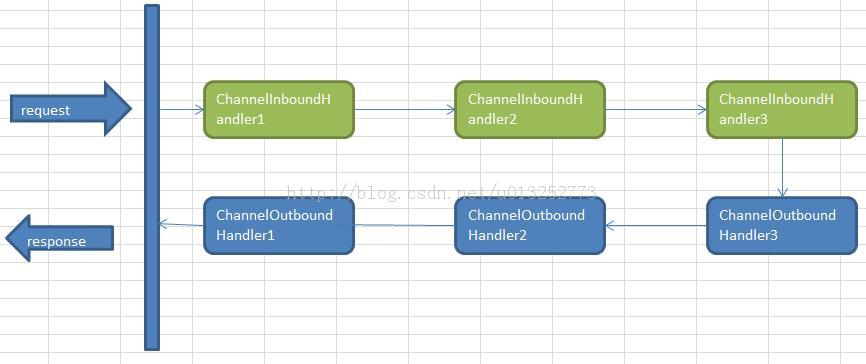
Netty中,可以注册多个handler。ChannelInboundHandler按照注册的先后顺序执行;ChannelOutboundHandler按照注册的先后顺序逆序执行,如下图所示,按照注册的先后顺序对Handler进行排序,request进入Netty后的执行顺序为:
参考文献
【1】http://blog.csdn.net/u013252773/article/details/21195593
【2】http://stackoverflow.com/questions/22354135/in-netty4-why-read-and-write-both-in-outboundhandler
从netty-example分析Netty组件续的更多相关文章
- Netty原理分析
Netty是一个高性能.异步事件驱动的NIO框架,它提供了对TCP.UDP和文件传输的支持,作为一个异步NIO框架,Netty的所有IO操作都是异步非阻塞的,通过Future-Listener机制,用 ...
- 从netty-example分析Netty组件
分析netty从源码开始 准备工作: 1.下载源代码:https://github.com/netty/netty.git 我下载的版本为4.1 2. eclipse导入maven工程. netty提 ...
- buddo源码分析-transport组件之Netty(一)
dubbo 2.5.10 版本,netty仍然使用的是netty的3.10.5版本,我们从下面的代码可以看出,SPI默认使用的是“netty”,而不是“netty4”. package com.ali ...
- netty全局分析1
这个系列都是别人的分析文 https://www.jianshu.com/p/ac7fb5c2640f 一丶 Netty基础入门 Netty是一个高性能.异步事件驱动的NIO框架,它提供了对TCP.U ...
- Netty 系列之 Netty 高性能之道
1. 背景 1.1. 惊人的性能数据 最近一个圈内朋友通过私信告诉我,通过使用 Netty4 + Thrift 压缩二进制编解码技术,他们实现了 10 W TPS(1 K 的复杂 POJO 对象)的跨 ...
- Netty系列之Netty高性能之道
转载自http://www.infoq.com/cn/articles/netty-high-performance 1. 背景 1.1. 惊人的性能数据 最近一个圈内朋友通过私信告诉我,通过使用Ne ...
- 转:Netty系列之Netty高性能之道
1. 背景 1.1. 惊人的性能数据 最近一个圈内朋友通过私信告诉我,通过使用Netty4 + Thrift压缩二进制编解码技术,他们实现了10W TPS(1K的复杂POJO对象)的跨节点远程服务调用 ...
- 【读后感】Netty 系列之 Netty 高性能之道 - 相比 Mina 怎样 ?
[读后感]Netty 系列之 Netty 高性能之道 - 相比 Mina 怎样 ? 太阳火神的漂亮人生 (http://blog.csdn.net/opengl_es) 本文遵循"署名-非商 ...
- Netty 系列之 Netty 高性能之道 高性能的三个主题 Netty使得开发者能够轻松地接受大量打开的套接字 Java 序列化
Netty系列之Netty高性能之道 https://www.infoq.cn/article/netty-high-performance 李林锋 2014 年 5 月 29 日 话题:性能调优语言 ...
- java架构之路-(netty专题)netty的基本使用和netty聊天室
上次回顾: 上次博客,我们主要说了我们的IO模型,BIO同步阻塞,NIO同步非阻塞,AIO基于NIO二次封装的异步非阻塞,最重要的就是我们的NIO,脑海中应该有NIO的模型图. Netty概念: Ne ...
随机推荐
- Solr_全文检索引擎系统
Solr介绍: Solr 是Apache下的一个顶级开源项目,采用Java开发,它是基于Lucene的全文搜索服务.Solr可以独立运行在Jetty.Tomcat等这些Servlet容器中. Solr ...
- Taurus.MVC 2.2 开源发布:WebAPI 功能增强(请求跨域及Json转换)
背景: 1:有用户反馈了关于跨域请求的问题. 2:有用户反馈了参数获取的问题. 3:JsonHelper的增强. 在综合上面的条件下,有了2.2版本的更新,也因此写了此文. 开源地址: https:/ ...
- 架构设计:远程调用服务架构设计及zookeeper技术详解(下篇)
一.下篇开头的废话 终于开写下篇了,这也是我写远程调用框架的第三篇文章,前两篇都被博客园作为[编辑推荐]的文章,很兴奋哦,嘿嘿~~~~,本人是个很臭美的人,一定得要截图为证: 今天是2014年的第一天 ...
- 网站定位之---根据IP获得区域
记得以前做一个培训机构网站时候需要定位,那时候用的搜狐的api,不是很精准. demo:https://github.com/dunitian/LoTCodeBase/tree/master/NetC ...
- ASP.NET MVC5+EF6+EasyUI 后台管理系统(55)-Web打印
系列目录 前言 1.本次主要弥补工作流,用户表单数据的打印 2.使用JQprint做为web打印插件 3.兼容:FireFox,Chrome,IE. 4.没有依赖也没有配置,使用简单 代码下载:htt ...
- [自翻]fasthttp中文文档(持续更新)
fasthttp是由valyala编写的声称快于Go官方标准库net/http包十倍的快速HTTP实现.从各方的性能测试结果来看(评测一.评测二),fasthttp作为当下最快的http Go语言包当 ...
- zookeeper源码分析之五服务端(集群leader)处理请求流程
leader的实现类为LeaderZooKeeperServer,它间接继承自标准ZookeeperServer.它规定了请求到达leader时需要经历的路径: PrepRequestProcesso ...
- 2013 Asia Changsha Regional Contest---Josephina and RPG(DP)
题目链接 http://acm.hdu.edu.cn/showproblem.php?pid=4800 Problem Description A role-playing game (RPG and ...
- BPM配置故事之案例12-触发另外流程
还记得阿海么,对就是之前的那个采购员,他又有了些意见. 阿海:小明,你看现在的流程让大家都这么方便,能不能帮个忙让我也轻松点啊-- 小明:--你有什么麻烦,现在不是已经各个部门自己提交申请了嘛? 阿海 ...
- SAP自定义权限对象
SAP系统自带了很多的权限对象,每一个运行画面都有非常多的权限用到.不过标准的权限对象并不一定适合于用在客户自己开发的程序里面,所以每个ABAPer都应该会自己开发一套权限对象,并引用在程序代码里面. ...