
Tomcat 7 Connector 精读(1)
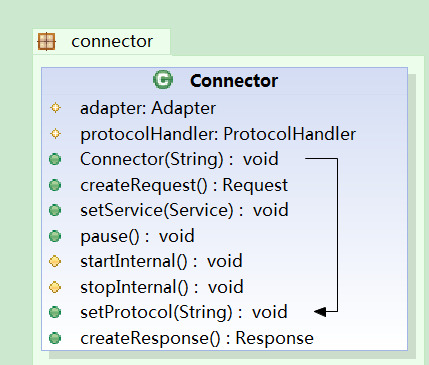
这个类图是本人截取的最重要的类的方法和属性。
其中ProtocalHandler是协议处理器,tomcat支持的协议以下方法可以看到。不同协议实现了不同的ProtocalHandler类。
public void setProtocol(String protocol) {

        if (AprLifecycleListener.isAprAvailable()) {

            if ("HTTP/1.1".equals(protocol)) {

                setProtocolHandlerClassName

                    ("org.apache.coyote.http11.Http11AprProtocol");

            } else if ("AJP/1.3".equals(protocol)) {

                setProtocolHandlerClassName

                    ("org.apache.coyote.ajp.AjpAprProtocol");

            } else if (protocol != null) {

                setProtocolHandlerClassName(protocol);

            } else {

                setProtocolHandlerClassName

                    ("org.apache.coyote.http11.Http11AprProtocol");

            }

        } else {

            if ("HTTP/1.1".equals(protocol)) {

                setProtocolHandlerClassName

                    ("org.apache.coyote.http11.Http11NioProtocol");

            } else if ("AJP/1.3".equals(protocol)) {

                setProtocolHandlerClassName

                    ("org.apache.coyote.ajp.AjpNioProtocol");

            } else if (protocol != null) {

                setProtocolHandlerClassName(protocol);

            }

        }

    }
ProtocalHandler是整个Connector类的核心。
初始化Connector的时候;根据协议名字创建处理器对象。
 public Connector(String protocol) {

        setProtocol(protocol);

        // Instantiate protocol handler

        ProtocolHandler p = null;

        try {

            Class<?> clazz = Class.forName(protocolHandlerClassName);

            p = (ProtocolHandler) clazz.newInstance();

        } catch (Exception e) {

            log.error(sm.getString(

                    "coyoteConnector.protocolHandlerInstantiationFailed"), e);

        } finally {

            this.protocolHandler = p;

        }

        if (!Globals.STRICT_SERVLET_COMPLIANCE) {

            URIEncoding = "UTF-8";

            URIEncodingLower = URIEncoding.toLowerCase(Locale.ENGLISH);

        }

    }
首先是初始化协议处理器(去除了不太重要的代码)
protected void initInternal() throws LifecycleException {

        super.initInternal();

        // 初始化Adapter

        adapter = new CoyoteAdapter(this);

        protocolHandler.setAdapter(adapter);
// 每个协议处理器都有对应的适配器,适配器干啥的呢?

         protocolHandler.init();

    }
Connector的启动,实则是启动对应的协议处理器的启动,
 protected void startInternal() throws LifecycleException {

        // Validate settings before starting

        if (getPort() < 0) {

            throw new LifecycleException(sm.getString(

                    "coyoteConnector.invalidPort", Integer.valueOf(getPort())));

        }

        setState(LifecycleState.STARTING);

        try {

            protocolHandler.start();

        } catch (Exception e) {

            String errPrefix = "";

            if(this.service != null) {

                errPrefix += "service.getName(): \"" + this.service.getName() + "\"; ";

            }

            throw new LifecycleException

                (errPrefix + " " + sm.getString

                 ("coyoteConnector.protocolHandlerStartFailed"), e);

        }

    }
终止实则是终止协议处理器
 protected void startInternal() throws LifecycleException {

        // Validate settings before starting

        if (getPort() < 0) {

            throw new LifecycleException(sm.getString(

                    "coyoteConnector.invalidPort", Integer.valueOf(getPort())));

        }

        setState(LifecycleState.STARTING);

        try {

            protocolHandler.start();

        } catch (Exception e) {

            String errPrefix = "";

            if(this.service != null) {

                errPrefix += "service.getName(): \"" + this.service.getName() + "\"; ";

            }

            throw new LifecycleException

                (errPrefix + " " + sm.getString

                 ("coyoteConnector.protocolHandlerStartFailed"), e);

        }

    }
各位看管看到这里,其实看到连接器类需要做如下工作
(1)创建请求对象
/**

     * Create (or allocate) and return a Request object suitable for

     * specifying the contents of a Request to the responsible Container.

     */

    public Request createRequest() {

        Request request = new Request();

        request.setConnector(this);

        return (request);

    }
(2)创建响应对象
  /**

     * Create (or allocate) and return a Response object suitable for

     * receiving the contents of a Response from the responsible Container.

     */

    public Response createResponse() {

        Response response = new Response();

        response.setConnector(this);

        return (response);

    }
(3)传给这两个对象给容器,简单而言,就是在创建好对象后,传递给那个适配器类就OK了。CoyoteAdapter类
Tomcat 7 Connector 精读(1)的更多相关文章
- Tomcat 7 Connector 精读(2) CoyoteAdapter
这个适配器类只讲2个方法,构造方法中我们看到一个适配器对象有自己关联的连接器类. 其中Service的重要任务就是讲客户端端请求交给容器. public void service(org.apache ...
- Tomcat 7 Connector 精读(2) 协议处理器 Http11Protocol(待续)
. Http11Protocol是阻塞式IO的实现,上图的几个方法是它的生命周期相关的方法.
- Chapter 4: Tomcat Default Connector
一.概述 第三章介绍的connector是一个很好的学习工具,但是我们还可以做的更多.这一章介绍的是Tomcat4默认的connector. 一个Tomcat的connector是一个独立的模块,能够 ...
- Tomcat 核心组件 Connector
Connector是Tomcat的连接器,其主要任务是负责处理浏览器发送过来的请求,并创建一个Request和Response的对象用于和浏览器交换数据,然后产生一个线程用于处理请求,Connecto ...
- 关于 tomcat nio connector, servlet 3.0 async, spring mvc async 的关系
tomcat 的 org.apache.coyote.http11.Http11NioProtocol Connector 是一个使用 Java NIO 实现的异步 accept 请求的 connec ...
- 内嵌Tomcat的Connector对象的静态代码块
在排查问题的过程中发现Connector对象有一个静态代码块: static { replacements.put("acceptCount", "backlog&quo ...
- [转]Loadrunner Error code 10053 & Tomcat 连接器(connector)优化
LoadRunner提示错误:Error : socket0 - Software caused connection abort. Error code : 10053. 在今天的测试过程中发现,s ...
- Tomcat HTTP connector和AJP connector
Tomcat服务器通过Connector连接器组件与客户程序建立连接,“连接器”表示接收请求并返回响应的端点.即Connector组件负责接收客户的请求,以及把Tomcat服务器的响应结果发送给客户. ...
- Tomcat connector元素常用配置(最大连接数等)
在tomcat的server.xml中有类似: <Connector port=" minSpareTHreads=" URIEncoding="gbk" ...
随机推荐
- 链接Eclipse和SQL SEVER
一.本文内容 讲诉使用JDBC建立Eclipse和Sql sever的桥梁的过程与其中可能遇见的问题. 二.详细内容 1.JDBC驱动的下载 建议一定要上与SQL SEVER相关的微软官网下载,以便找 ...
- memcached 在window下的安装与使用
memcached搭建缓存系统 一.概念 Memcached是danga.com(运营LiveJournal的技术团队)开发的一套分布式内存对象缓存系统,用于在动态系统中减少数据库负载,提升性能. 二 ...
- jquery判断对象是否获得焦点
var isFocus=$("#tRow").is(":focus"); if(true==isFocus){ alert("focus") ...
- PAT-乙级-1037. 在霍格沃茨找零钱(20)
1037. 在霍格沃茨找零钱(20) 时间限制 400 ms 内存限制 65536 kB 代码长度限制 8000 B 判题程序 Standard 作者 CHEN, Yue 如果你是哈利·波特迷,你会知 ...
- 极客范:如何使用 Cloud Insight 来监控闭路电视?
最近新上线支持 Windows 系统及其组件 监控功能的 Cloud Insight,在系统监控领域基本囊括了对所有主流和部分非主流平台的支持.但是这还不够,Cloud Insight 可不仅仅是一个 ...
- 关于delete和delete[]
[精彩] 求问delete和delete[] 的区别??http://www.chinaunix.net/jh/23/311058.html C++告诉我们在回收用 new 分配的单个对象的内存空间的 ...
- 2026-Keroro侵略地球
描述 Keroro来侵略地球之前,曾跟Giroro伍长打赌:“我一个人灭掉整个地球给你看!”. 于是Keroro同学真的自己一个人来到地球开始他的侵略行动了.从K隆星出发之前,Keroro从Kurur ...
- iOS开发的小技巧(断点打印)
iOS开发中我们会碰到这样的需求:打印沙盒目录,打印对象信息,对象信息可以通过断点查看,有时候对象属性繁多时看起来又比较麻烦. 今天学到一个比较实用的方法: 在运行时打一个断点,当程序停在这个断点后, ...
- eclipse运行hadoop程序报错:Connection refused: no further information
eclipse运行hadoop程序报错:Connection refused: no further information log4j:WARN No appenders could be foun ...
- [itint5]判断是否为二叉搜索树
http://www.itint5.com/oj/#25 这题在leetcode上是用中序遍历来做的,但是这里由于有相等的情况,即左子树小于等于根,这样中序遍历无法完全判定.可以用递归来做,用递归给出 ...