
宝马-中国官方网站服务站点信息爬去记录(解析json中数据)
具体步骤:
1、进入宝马官网,查找经销商查询界面
http://www.bmw.com.cn/cn/zh/general/dealer_locator/content/dealer_locator.html
2、使用火狐浏览(需要安装Firebug和HttpFox)
找到json数据存储位置:https://secure.bmw.com.cn/cn/_common/_js/dealer_locator/dealer_locator.json
3、查看json数据以后,json中包含省份,城市,店面类型,经销商信息,并且发现里面的经销商数据中包含地域的编号信息,所以决定制作省份字典、城市字典、类型字典,并且和经销商中数据进行比对输出。
4、得到省份信息主要代码:
     def get_province_dict(self):

         province_dict={}

         #创建省份信息字典

         json_data = urllib2.urlopen(self.index_url).read()

         #读取json页面

         jsons = json_data.split(';')

         #将几组json数据分开

         json_province = jsons[0][jsons[0].index('=')+1:-1]

         #jsons[0]是省份信息

         json_province =  json_province+']'

         #将得到的字符串整理成正常的json数据格式

         provinces = json.loads(json_province)

         #读取json数据

         for province in provinces:

             province_dict[province.get('id')] = province.get('nz')

         #得到ID和省份名称存入相应的字典中

         return province_dict
5、得到城市信息的方法遇上面一样
     def get_city_dict(self):

         city_dict={}

         json_data = urllib2.urlopen(self.index_url).read() #读取json数据

         #print json_data

         jsons = json_data.split(';')

         #print jsons[1]# 城市信息

         json_city = jsons[1][jsons[1].index('=')+1:-1]

         json_city =  json_city+']'

         citys = json.loads(json_city)

         #print provinces

         for city in citys:

             #print  province.get('nz')

             city_dict[city.get('id')] = city.get('nz')

         for key in city_dict:#测试字典

             print key

             print city_dict[key]

         return city_dict
6、获得店面类型的信息也类似
    def get_type_dict(self):

        type_dict={}

        json_data = urllib2.urlopen(self.index_url).read() #读取json数据

        #print json_data

        jsons = json_data.split(';')

        #print jsons[2]# 店面类型信息

        json_type = jsons[2][jsons[2].index('=')+1:-1]

        json_type =  json_type+']'

        types = json.loads(json_type)

        #print provinces

        for typea in types:

            #print  province.get('nz')

            type_dict[typea.get('id')] = typea.get('nz')

        return type_dict
7、由于json中店面的类型是通过ID与类型ID进行匹配的,所以需要将类型的名称与店面id进行匹配制成字典
     def get_dealer_type_dict(self):

         dealer_type_dict={}

         types = self.get_type_dict()

         #调用之前的类型方法,用于后面的匹配

         json_data = urllib2.urlopen(self.index_url).read() #读取json数据

         #print json_data

         jsons = json_data.split(';')

         #print jsons[4]# 店面与类型关系信息

         json__delaer_type = jsons[4][jsons[4].index('=')+1:-1]

         json__delaer_type =  json__delaer_type+']'

         delaer_types = json.loads(json__delaer_type)

         #print provinces

         for delaer_type in delaer_types:#有用31-34编号的信息不是所需信息搜易使用if剔除

             if delaer_type.get('tp')==31:

                 continue

             if delaer_type.get('tp')==32:

                 continue

             if delaer_type.get('tp')==33:

                 continue

             if delaer_type.get('tp')==34:

                 continue

             print delaer_type.get('tp')

             dealer_type_dict[delaer_type.get('br')] = types[delaer_type.get('tp')]

         return dealer_type_dict
8、处理经销商数据方法
     def get_dealer_info(self):

         province_dict = self.get_province_dict()

         city_dict = self.get_city_dict()

         dealer_type_dict = self.get_dealer_type_dict()

         json_data = urllib2.urlopen(self.index_url).read()

         jsons = json_data.split(';')

         #print jsons[3]#经销商信息

         json_dealer = jsons[3][jsons[3].index('=')+1:-1]

         #由于此处的json数据过大,致使json.loads()发生异常

         #所以选择拼凑成列表的格式进行生成

         json_dealer = json_dealer.replace('[','')

         json_dealer = json_dealer.replace(']','')

         json_dealer = json_dealer.replace('},','}},')

         json_dealer = json_dealer.split('},')

         #以上为拼凑过程

         dealers =  list(json_dealer)

         #将字符串转变成列表

         dealer_info_list = []

         for dealer in dealers:

             l={}

             dealer = json.loads(dealer)

             #字符减少可以使用json.loads()进行处理,得到字典

             print dealer.get('nz')

             l[Constant.PROVINCE] = province_dict[dealer.get('pv')]

             #用经销商数据中的省份ID匹配省份字典中的ID,得到中文的省份名称

             l[Constant.CITY] = city_dict[dealer.get('ct')]

             l[Constant.TYPE] = dealer_type_dict[dealer.get('id')]

             l[Constant.NAME] = dealer.get('nz')

             l[Constant.ADDRESS] = dealer.get('az')

             l[Constant.TEL] = dealer.get('tel')

             l[Constant.EMAIL] = dealer.get('em')

             l[Constant.WEBSHOP] = dealer.get('ws')

             l[Constant.SINA] = dealer.get('wb')

             l[Constant.LENDER] = dealer.get('fnz')

             l[Constant.LENDERTEL] = dealer.get('ft')

             l[Constant.AFTERSALE] = dealer.get('flt')

             l[Constant.FAX] = dealer.get('fax')

             l[Constant.POSTCODE] = dealer.get('zp')

             dealer_info_list.append(l)

         self.saver.add(dealer_info_list)#提交保存

         self.saver.commit()
还有部分代码是用于将数据存入excel中的,就不贴出来了
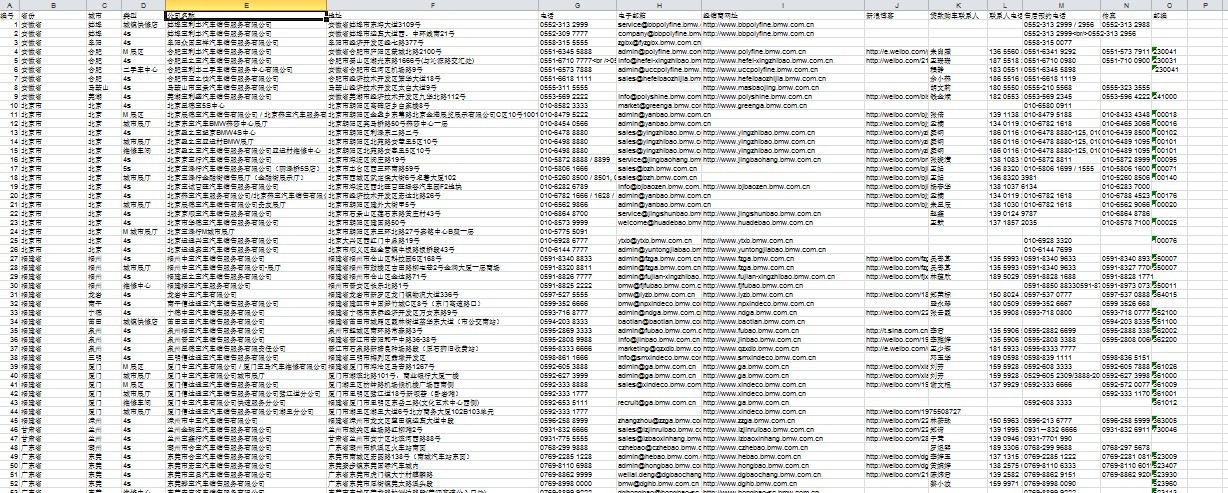
最终结果是
我是爬虫新手,学python也就一个月,还是有高人指点的,代码很冗余,希望对新手有帮助,更希望高手提出意见,我加紧改进学习!!!!!!
宝马-中国官方网站服务站点信息爬去记录(解析json中数据)的更多相关文章
- 爬去酷狗top500的数据
import requests from bs4 import BeautifulSoup import time headers={ #'User-Agent':'Nokia6600/1.0 (3. ...
- 用pyspider爬取并解析json字符串
获取堆糖网站所有用户的id 昵称及主页地址 #!/usr/bin/env python # -*- encoding: utf-8 -*- # Created on 2016-06-21 13:57: ...
- apache官方供下载所有项目所有版本的官方网站地址
Apache官网有一个列举apache所有发布的项目的各个版本的官方网站,现在在此记录下来供大家快速浏览使用. 网站地址如下: http://archive.apache.org/dist/
- Python3爬取王者官方网站英雄数据
爬取王者官方网站英雄数据 众所周知,王者荣耀已经成为众多人们喜爱的一款休闲娱乐手游,今天就利用python3 爬虫技术爬取官方网站上的几十个英雄的资料,包括官方给出的人物定位,英雄名称,技能名称,CD ...
- 中国农产品信息网站scrapy-redis分布式爬取数据
---恢复内容开始--- 基于scrapy_redis和mongodb的分布式爬虫 项目需求: 1:自动抓取每一个农产品的详细数据 2:对抓取的数据进行存储 第一步: 创建scrapy项目 创建爬虫文 ...
- 轻奢请向历史SAY NO_重青网_重庆青年报_重庆青年报电子版_重庆青年报网站_重庆青年报官方网站
轻奢请向历史SAY NO_重青网_重庆青年报_重庆青年报电子版_重庆青年报网站_重庆青年报官方网站 轻奢请向历史SAY NO 经济学家George Taylor在他著名的"裙摆指数" ...
- XCodeGhost表明:为了安全,开发工具应该从官方网站下载
今天的热门话题就是XCode编译器,这个神器在火热的移动互联网浪潮下也被人利用了,据文章分析 (XCode编译器里有鬼 - XCodeGhost样本分析)http://www.huochai.mobi ...
- 微软官方网站线上兼容测试平台-Browser screenshots
前端开发时最不想做的就是在不同浏览器.平台和分辨率测试网页显示效果,通常这会浮现许多问题,尤其浏览器版本就可能让显示成效完全不同,也只好尽力维持让每一种设备都能正常浏览网页.修改到完全没有问题必须投入 ...
- 海蜘蛛网络科技官方网站 :: 做最好的中文软路由 :: 软件路由器 :: 软路由 :: 软件路由 :: RouterOs
海蜘蛛网络科技官方网站 :: 做最好的中文软路由 :: 软件路由器 :: 软路由 :: 软件路由 :: RouterOs 企业简介 武汉海蜘蛛网络科技有限公司成立于2005年,是一家专注于网络新技术研 ...
随机推荐
- nodejs的mysql模块学习(三)数据库连接配置选项详解
连接选项 当在创建数据连接的时候 第一种大多数人用的方法 let mysql = require('mysql'); let connection = mysql.createConnection({ ...
- 第三方框架FMDB
摘要:关键点:创建.插入.查询.数据格式化 第三方框架FMDB -------------------------------------------------------------------- ...
- obj 转为Json 时间格式自定义
var tb = evnWarningBll.GatWarning(); var timeFormat = new IsoDateTimeConverter(); ...
- [改善Java代码]适时选择getDeclaredxxx和getxxx
Java的Class类提供了很多的getDeclaredxxx方法和getxxx方法,例如getDeclaredmethod和getMethod成对出现,getDeclaredConstructors ...
- Android中定义接口的方法
1.接口方法用于回调(这里定义接口是为了使用其接口方法): public interface ICallback { public void func(); } public class Caller ...
- 关于Merge的整理--AndroidScreenSlidePager开源库中用到的
在做AndroidScreenSlidePager开源库练习demo的时候,发现布局文件使用的是<merge>标签而不是<FrameLayout>标签.作者给出的说法是:Cir ...
- iOS下获取用户当前位置的信息
#import <MapKit/MKMapView.h> @interface ViewController (){ CLLocationManager *_currentLoaction ...
- MyBatis(3.2.3) - Configuring MyBatis using XML, Settings
The default MyBatis global settings, which can be overridden to better suit application-specific nee ...
- C#算法基础之希尔排序
using System; using System.Collections.Generic; using System.Linq; using System.Text; using System.T ...
- 详解Win2003 IIS6.0 301重定向带参数的问题(转摘)
网站更换域名,把旧域名用301指到新域名来. 从iis中设置url永久转向就可以,看上去很容易,用了一会儿才发现,参数都没有带上. 从微软网站上找到如下说明,果然好使: 重定向参考 (IIS 6. ...