
java在线聊天项目 swt可视化窗口Design 登录框注册按钮点击改变窗口大小——出现注册面板 实现打开登录框时屏幕居中
登录框注册按钮点击改变窗口大小——出现注册面板
首先用swt可视化设计登录窗口如下图:

此时窗口高度为578
没点击注册时高度为301(可自己定)
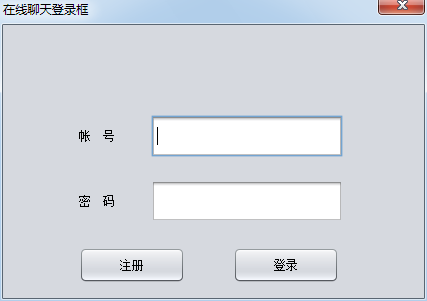
注意:注册用户的Jpanel 的border选择Title Border,title属性是“注册用户”
布局Layout选择Absolute Layout
接着,对话框窗口设计好后,双击注册按钮,进行代码编辑,在注册按钮的监听代码中增加一个if判断,当等于301,就给改为窗口高度578,否则改为301
因为使用的是匿名内部类,不能直接使用this.关键字调用getHeight()方法和setHeight()方法,所以用LoginDialog.this.的方法进行调用
完整代码如下:
package com.swift;

import java.awt.EventQueue;

import java.awt.event.ActionEvent;

import java.awt.event.ActionListener;

import java.awt.event.WindowAdapter;

import java.awt.event.WindowEvent;

import javax.swing.JButton;

import javax.swing.JDialog;

import javax.swing.JFrame;

import javax.swing.JLabel;

import javax.swing.JPanel;

import javax.swing.JPasswordField;

import javax.swing.JTextField;

import javax.swing.UIManager;

import javax.swing.UnsupportedLookAndFeelException;

import javax.swing.border.TitledBorder;

public class LoginDialog extends JDialog {

    private JPasswordField passwordField_2;

    private JPasswordField passwordField_1;

    private JTextField textField_2;

    private JTextField textField;

    public static void main(String args[]) {

        JFrame.setDefaultLookAndFeelDecorated(true);

        JDialog.setDefaultLookAndFeelDecorated(true);

        try {

            UIManager.setLookAndFeel("javax.swing.plaf.nimbus.NimbusLookAndFeel");

        } catch (ClassNotFoundException e1) {

            // TODO Auto-generated catch block

            e1.printStackTrace();

        } catch (InstantiationException e1) {

            // TODO Auto-generated catch block

            e1.printStackTrace();

        } catch (IllegalAccessException e1) {

            // TODO Auto-generated catch block

            e1.printStackTrace();

        } catch (UnsupportedLookAndFeelException e1) {

            // TODO Auto-generated catch block

            e1.printStackTrace();

        }

        EventQueue.invokeLater(new Runnable() {

            public void run() {

                try {

                    LoginDialog dialog = new LoginDialog();

                    dialog.addWindowListener(new WindowAdapter() {

                        public void windowClosing(WindowEvent e) {

                            System.exit(0);

                        }

                    });

                    dialog.setVisible(true);

                } catch (Exception e) {

                    e.printStackTrace();

                }

            }

        });

    }

    public LoginDialog() {

        super();

        setResizable(false);

        setTitle("在线聊天登录框");

        getContentPane().setLayout(null);

        setBounds(100, 100, 427, 301);//注册时高度为578,不注册是301

        final JButton button_1 = new JButton();

        button_1.setText("登录");

        button_1.setBounds(230, 222, 106, 36);

        getContentPane().add(button_1);

        final JTextField textField_1 = new JTextField();

        textField_1.setBounds(148, 90, 192, 42);

        getContentPane().add(textField_1);

        final JLabel label = new JLabel();

        label.setText("帐    号");

        label.setBounds(76, 102, 66, 18);

        getContentPane().add(label);

        final JLabel label_1 = new JLabel();

        label_1.setText("密    码");

        label_1.setBounds(76, 167, 66, 18);

        getContentPane().add(label_1);

        final JPasswordField passwordField = new JPasswordField();

        passwordField.setBounds(148, 155, 192, 42);

        getContentPane().add(passwordField);

        final JButton button = new JButton();

        button.addActionListener(new ActionListener() {

            public void actionPerformed(final ActionEvent e) {

                if(LoginDialog.this.getHeight()==301) {//使用LoginDialog.this.的方法调用,判断高度,前边有setResizable(false);

                    LoginDialog.this.setSize(427, 578);

                }else {

                    LoginDialog.this.setSize(427, 301);

                }

            }

        });

        button.setText("注册");

        button.setBounds(76, 222, 106, 36);

        getContentPane().add(button);

        final JPanel panel = new JPanel();

        panel.setLayout(null);

        panel.setBorder(new TitledBorder(null, "注册用户", TitledBorder.DEFAULT_JUSTIFICATION, TitledBorder.DEFAULT_POSITION, null, null));

        panel.setBounds(10, 278, 401, 226);

        getContentPane().add(panel);

        final JLabel label_2 = new JLabel();

        label_2.setBounds(44, 41, 65, 18);

        label_2.setText("手机号:");

        panel.add(label_2);

        textField = new JTextField();

        textField.setBounds(115, 35, 225, 30);

        panel.add(textField);

        final JButton button_2 = new JButton();

        button_2.setText("发送验证");

        button_2.setBounds(243, 75, 97, 30);

        panel.add(button_2);

        textField_2 = new JTextField();

        textField_2.setBounds(115, 104, 95, 30);

        panel.add(textField_2);

        final JLabel label_3 = new JLabel();

        label_3.setText("验证码:");

        label_3.setBounds(44, 110, 65, 18);

        panel.add(label_3);

        passwordField_1 = new JPasswordField();

        passwordField_1.setBounds(115, 143, 231, 30);

        panel.add(passwordField_1);

        passwordField_2 = new JPasswordField();

        passwordField_2.setBounds(115, 175, 231, 30);

        panel.add(passwordField_2);

        final JLabel label_4 = new JLabel();

        label_4.setText("密        码:");

        label_4.setBounds(44, 149, 65, 18);

        panel.add(label_4);

        final JLabel label_5 = new JLabel();

        label_5.setText("验证密码:");

        label_5.setBounds(44, 181, 65, 18);

        panel.add(label_5);

        final JButton button_3 = new JButton();

        button_3.setBounds(47, 510, 97, 30);

        getContentPane().add(button_3);

        button_3.setText("放弃");

        final JButton button_4 = new JButton();

        button_4.setBounds(262, 510, 97, 30);

        getContentPane().add(button_4);

        button_4.setText("注册用户");

    }

}
实现打开登录框时屏幕居中
因屏幕居中的功能,其他窗口也需要,所以见一个工具类
原理是获得屏幕的宽度和高度
分别减去对话框的宽度和高度
然后除以2
就是窗口居中的那个点——Point
首先,制作一个类com.swift.util.Center
里边有一个方法getPoint(int width,int height)
和一个包装的重载方法,方便调用
getPoint(Dimension d)
全部代码如下:
package com.swift.util;

import java.awt.Dimension;

import java.awt.Point;

import java.awt.Toolkit;

public class Center {

    public static Point getPoint(int width,int height) {

        Toolkit toolkit=Toolkit.getDefaultToolkit();//应该是单例

        int screenW=toolkit.getScreenSize().width;

        int screenH=toolkit.getScreenSize().height;

        int x=(screenW-width)/2;

        int y=(screenH-height)/2;

        Point p=new Point(x,y);

        return p;

    }

    //函数的重载,参数是包装类尺寸——Dimension

    public static Point getPoint(Dimension d) {

        Point p=getPoint(d.width,d.height);

        return p;

    }

}
使用居中的工具类
this.setLocation(Center.getPoint(this.getSize()));
在设置对话框宽度高度后,重新设置窗口位置
LoginDialog.this.setLocation(Center.getPoint(LoginDialog.this.getSize()));
匿名内部类中,当点击注册按钮,窗口被重新改变大小之后,也要不断改变窗口位置,内部类使用LoginDialog.this.
全部代码修改如下:
package com.swift;

import java.awt.Dimension;

import java.awt.EventQueue;

import java.awt.event.ActionEvent;

import java.awt.event.ActionListener;

import java.awt.event.WindowAdapter;

import java.awt.event.WindowEvent;

import javax.swing.JButton;

import javax.swing.JDialog;

import javax.swing.JFrame;

import javax.swing.JLabel;

import javax.swing.JPanel;

import javax.swing.JPasswordField;

import javax.swing.JTextField;

import javax.swing.UIManager;

import javax.swing.UnsupportedLookAndFeelException;

import javax.swing.border.TitledBorder;

import com.swift.util.Center;

public class LoginDialog extends JDialog {

    private JPasswordField passwordField_2;

    private JPasswordField passwordField_1;

    private JTextField textField_2;

    private JTextField textField;

    public static void main(String args[]) {

        JFrame.setDefaultLookAndFeelDecorated(true);

        JDialog.setDefaultLookAndFeelDecorated(true);

        try {

            UIManager.setLookAndFeel("javax.swing.plaf.nimbus.NimbusLookAndFeel");

        } catch (ClassNotFoundException e1) {

            // TODO Auto-generated catch block

            e1.printStackTrace();

        } catch (InstantiationException e1) {

            // TODO Auto-generated catch block

            e1.printStackTrace();

        } catch (IllegalAccessException e1) {

            // TODO Auto-generated catch block

            e1.printStackTrace();

        } catch (UnsupportedLookAndFeelException e1) {

            // TODO Auto-generated catch block

            e1.printStackTrace();

        }

        EventQueue.invokeLater(new Runnable() {

            public void run() {

                try {

                    LoginDialog dialog = new LoginDialog();

                    dialog.addWindowListener(new WindowAdapter() {

                        public void windowClosing(WindowEvent e) {

                            System.exit(0);

                        }

                    });

                    dialog.setVisible(true);

                } catch (Exception e) {

                    e.printStackTrace();

                }

            }

        });

    }

    public LoginDialog() {

        super();

        setResizable(false);

        setTitle("在线聊天登录框");

        getContentPane().setLayout(null);

        setBounds(100, 100, 427, 301);//注册时高度为578,不注册是301

        //设置窗口居中

        this.setLocation(Center.getPoint(this.getSize()));

        final JButton button_1 = new JButton();

        button_1.setText("登录");

        button_1.setBounds(230, 222, 106, 36);

        getContentPane().add(button_1);

        final JTextField textField_1 = new JTextField();

        textField_1.setBounds(148, 90, 192, 42);

        getContentPane().add(textField_1);

        final JLabel label = new JLabel();

        label.setText("帐    号");

        label.setBounds(76, 102, 66, 18);

        getContentPane().add(label);

        final JLabel label_1 = new JLabel();

        label_1.setText("密    码");

        label_1.setBounds(76, 167, 66, 18);

        getContentPane().add(label_1);

        final JPasswordField passwordField = new JPasswordField();

        passwordField.setBounds(148, 155, 192, 42);

        getContentPane().add(passwordField);

        final JButton button = new JButton();

        button.addActionListener(new ActionListener() {

            public void actionPerformed(final ActionEvent e) {

                if(LoginDialog.this.getHeight()==301) {

                    LoginDialog.this.setSize(427, 578);

                }else {

                    LoginDialog.this.setSize(427, 301);

                }
          //设置窗口不断居中

                LoginDialog.this.setLocation(Center.getPoint(LoginDialog.this.getSize()));

            }

        });

        button.setText("注册");

        button.setBounds(76, 222, 106, 36);

        getContentPane().add(button);

        final JPanel panel = new JPanel();

        panel.setLayout(null);

        panel.setBorder(new TitledBorder(null, "注册用户", TitledBorder.DEFAULT_JUSTIFICATION, TitledBorder.DEFAULT_POSITION, null, null));

        panel.setBounds(10, 278, 401, 226);

        getContentPane().add(panel);

        final JLabel label_2 = new JLabel();

        label_2.setBounds(44, 41, 65, 18);

        label_2.setText("手机号:");

        panel.add(label_2);

        textField = new JTextField();

        textField.setBounds(115, 35, 225, 30);

        panel.add(textField);

        final JButton button_2 = new JButton();

        button_2.setText("发送验证");

        button_2.setBounds(243, 75, 97, 30);

        panel.add(button_2);

        textField_2 = new JTextField();

        textField_2.setBounds(115, 104, 95, 30);

        panel.add(textField_2);

        final JLabel label_3 = new JLabel();

        label_3.setText("验证码:");

        label_3.setBounds(44, 110, 65, 18);

        panel.add(label_3);

        passwordField_1 = new JPasswordField();

        passwordField_1.setBounds(115, 143, 231, 30);

        panel.add(passwordField_1);

        passwordField_2 = new JPasswordField();

        passwordField_2.setBounds(115, 175, 231, 30);

        panel.add(passwordField_2);

        final JLabel label_4 = new JLabel();

        label_4.setText("密        码:");

        label_4.setBounds(44, 149, 65, 18);

        panel.add(label_4);

        final JLabel label_5 = new JLabel();

        label_5.setText("验证密码:");

        label_5.setBounds(44, 181, 65, 18);

        panel.add(label_5);

        final JButton button_3 = new JButton();

        button_3.setBounds(47, 510, 97, 30);

        getContentPane().add(button_3);

        button_3.setText("放弃");

        final JButton button_4 = new JButton();

        button_4.setBounds(262, 510, 97, 30);

        getContentPane().add(button_4);

        button_4.setText("注册用户");

    }

}
java在线聊天项目 swt可视化窗口Design 登录框注册按钮点击改变窗口大小——出现注册面板 实现打开登录框时屏幕居中的更多相关文章
- java在线聊天项目 swt可视化窗口Design 重新设计好友列表窗口 增加菜单栏
增加的菜单栏效果图如下: eclipse 中调整到 swt的design视图下 控件区域选择Menu Controls 将Menu Bar拖动到窗口标题栏 将Cascaded Menu拖动到Menu ...
- java在线聊天项目 swt可视化窗口Design 好友列表窗口
熟练使用各种布局方式 FlowLayout 流布局 left center right等 BorderLayout 边框布局 east west sorth north center Absolute ...
- java在线聊天项目 swt可视化窗口Design 重新设计聊天窗口
设计的聊天窗口如下: 制作过程: 首先,在默认的BorderLayout视图下, 上边也就是North处添加一个JPanel,将Layout调整为BorderLayout,West放一个JLabel用 ...
- java在线聊天项目 客户端登陆窗口LoginDialog的注册用户功能 修改注册逻辑 增空用户名密码的反馈 增加showMessageDialog()提示框
LoginDialog类的代码修改如下: package com.swift.frame; import java.awt.EventQueue; import java.awt.event.Acti ...
- java在线聊天项目 使用SWT快速制作登录窗口,可视化窗口Design 更换窗口默认皮肤(切换Swing自带的几种皮肤如矩形带圆角)
SWT成功激活后 new一个JDialog 调整到Design视图 默认的视图模式是BorderLayout,无论你怎么拖拽,只能放到东西南北中的位置上 所以,我们把视图模式调整为AbsoluteLa ...
- java在线聊天项目 实现基本聊天功能后补充的其他功能详细需求分析 及所需要掌握的Java知识基础 SWT的激活方法,swt开发包下载,及破解激活码
补充聊天项目功能,做如下需求分析: 梳理项目开发所需的必要Java知识基础 GUI将使用更快速的swt实现 SWT(Standard Widget Toolkit) Standard Widget T ...
- java在线聊天项目0.1版本 制作客户端窗体,使用swing(用户界面开发工具包)和awt(抽象窗口工具包)
建立Chat项目,并在项目中创建窗口类 package com.swift; import java.awt.BorderLayout; import javax.swing.JFrame; impo ...
- java在线聊天项目0.2版本 制作客户端窗体,使用swing(用户界面开发工具包)和awt(抽象窗口工具包) BorderLayout布局与GridLayout布局不同之处 JPanel设置大小
代码如下: package com.swift; import java.awt.BorderLayout; import java.awt.Color; import javax.swing.JBu ...
- java在线聊天项目1.1版 ——开启多个客户端,分别实现注册和登录功能,使用客户端与服务端信息request机制,重构线程,将单独的登录和注册线程合并
实现效果图: eclipse项目中初步整合之前的各个客户端和服务端的窗口与工具类,效果如下图: 已将注册服务器线程RegServer功能放到LoginServer中,使用客户端与服务端的request ...
随机推荐
- HDU5112【水】
#include <bits/stdc++.h> using namespace std; typedef long long LL; const int N=1e4+10; struct ...
- 各种移动GPU压缩纹理的使用方法
本文系原创整理,欢迎转载,请标明链接 http://www.cnblogs.com/luming1979 有问题欢迎加qq群讨论:366239605 介绍了各种移动设备所使用的GPU,以及各个GPU所 ...
- 一个高效的A-star寻路算法(八方向)(
这种写法比较垃圾,表现在每次搜索一个点要遍历整个地图那么大的数组,如果地图为256*256,每次搜索都要执行65535次,如果遍历多个点就是n*65535,速度上实在是太垃圾了 简单说下思路,以后补充 ...
- java后台杂记
1.在@Select使用动态SQL有 "<=" 时要转义:<![CDATA[ <= ]]> 2.assert函数即断言,也即做出一些假设,程序运行时如果假设 ...
- 企业级应用,如何实现服务化五(dubbo综合案例)
这是企业级应用,如何实现服务化第五篇.在上一篇企业级应用,如何实现服务化四(基础环境准备)中.已经准备好了zookeeper注册中心,和dubbo管理控制台.这一篇通过一个综合案例,看一看在企业级应用 ...
- 上传到git
https://blog.csdn.net/Lucky_LXG/article/details/77849212
- Visual Studio 2015、2013、2012、2010、2008、2005各版本下载+有效密钥激活
Visual Studio是微软发布的一个集成开发工具,业内一般简称为VS,广泛应用于Windows软件开发.网站开发等,是目前十分流行的windows应用程序的集成开发工具,如果大家不了解,可以简单 ...
- 黑马函数式接口学习 Stream流 函数式接口 Lambda表达式 方法引用
- 如何正确在IDEA 里maven构建的项目中引入lib的jar包(图文详解)
不多说,直接上干货! 问题详情 以下是我,maven构建出来的最新spark2.2.0-bin-hadoop2.6的项目. 有些依赖包,maven还是无法一次性满足,所以,得手动加入lib的jar包. ...
- vue.js2.0实战填坑记录
访https://github.com/bailicangdu/vue2-elm的PC商城 在创建的 router 对象中,如果不配置 mode,就会使用默认的 hash 模式,该模式下会将路径格式化 ...