
vue2.0 + vux (五)api接口封装 及 首页 轮播图制作
1.安装 jquery 和 whatwg-fetch (优雅的异步请求API)
npm install jquery --save

npm install whatwg-fetch --save
2.api接口封装
api/index.js
/**

 * 引入 异步请求API

 */

import "whatwg-fetch"

const host_addr='http://192.168.1.110:8081/'

/**

 * 获取资讯列表

 */

export let getList = async (page, tag) => {

  let response = await fetch(host_addr + `news_list?pageIndex=${page}&pageSize=20&catalog=${tag}`, {

    method: 'GET',

    mode: 'cors'

  }).catch((error) => {

    console.log(error)

  })

  return await response.json().catch((error) => {

    console.log(error)

  })

}

/**

 * 获取资讯详情

 */

export let getNewsDetail = async (id) => {

  let response = await fetch(host_addr + `news_detail?id=${id}`, {

    method: 'GET',

    mode: 'cors'

  }).catch((error) => {

    console.log(error)

  })

  return await response.json().catch((error) => {

    console.log(error)

  })

}

/**

 * 获取博客列表

 */

export let getBlogList = async (page, tag) => {

  let response = await fetch(host_addr + `blog_list?pageIndex=${page}&pageSize=20&catalog=${tag}`, {

    method: 'GET',

    mode: 'cors'

  }).catch((error) => {

    console.log(error)

  })

  return await response.json().catch((error) => {

    console.log(error)

  })

}

/**

 * 获取问答列表

 */

export let getQuestionList = async (page, tag) => {

  let response = await fetch(host_addr + `question_list?pageIndex=${page}&pageSize=20&catalog=${tag}`, {

    method: 'GET',

    mode: 'cors'

  }).catch((error) => {

    console.log(error)

  })

  return await response.json().catch((error) => {

    console.log(error)

  })

}

/**

 * 获取活动列表

 */

export let getEventList = async (page, tag) => {

  let response = await fetch(host_addr + `event_list?pageIndex=${page}&pageSize=20&catalog=${tag}`, {

    method: 'GET',

    mode: 'cors'

  }).catch((error) => {

    console.log(error)

  })

  return await response.json().catch((error) => {

    console.log(error)

  })

}
3.轮播图
<!-- 资讯 -->

<template>

  <div>

    <!-- 轮播图 -->

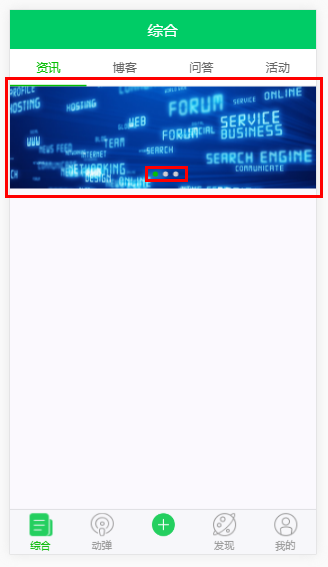
    <swiper :list="imgs" auto style="width:100%;height:120px;margin:0 auto;" dots-class="custom-bottom" dots-position="center"></swiper>

  </div>

</template>

<script>

  // 引入 vux 内部组件

  import { Swiper } from 'vux'

  // 引入 api接口文档

  import { getList } from '../../api'

  // 轮播图列表

  const imgList = [

    'http://file06.16sucai.com/2016/0222/17714c3b51079911760e5ef7fdb553f6.jpg',

    'http://pic.58pic.com/58pic/15/67/98/93C58PICjeM_1024.jpg',

    'http://file06.16sucai.com/2016/0315/1df566087c24a94cd9534bc9bc1871ff.jpg'

  ];

  // 轮播图图片地址列表

  const urlList = imgList.map((one, index) => ({

    url: 'javascript:',  //这里填写图片点击的链接

    img: one

  }));

  export default {

    name: 'NewsList',

    components:{

      Swiper

    },

    data(){

      return {

        imgs:urlList,

      }

    }

  }

</script>
4.效果图
vue2.0 + vux (五)api接口封装 及 首页 轮播图制作的更多相关文章
- iOS回顾笔记(05) -- 手把手教你封装一个广告轮播图框架
html,body,div,span,applet,object,iframe,h1,h2,h3,h4,h5,h6,p,blockquote,pre,a,abbr,acronym,address,bi ...
- js-BOM之offset家族、移动函数的封装升级(轮播图)
Obj.style.width/obj.style.height与obj.offsetWidth/obj.offsetHeight的区别: <style> #div1{ height: 2 ...
- 用require.js封装原生js轮播图
index.html页面: <!DOCTYPE html><html> <head> <meta charset="UTF-8"> ...
- 在Nuxt中使用react-id-swiper封装公共的轮播图组件(移动端
首先就是引入swiper import Swiper from 'react-id-swiper': 一个轮播图首先要考虑到一种情况就是当只有一张图的时候是不是需要按轮播图来处理 一般情况下,一张图是 ...
- JS —— 轮播图中的缓动函数的封装
轮播图的根本其实就是缓动函数的封装,如果说轮播图是一辆跑动的汽车,那么缓动函数就是它的发动机,今天本文章就带大家由简入繁,封装属于自己的缓动函数~~ 我们从需求的角度开始,首先给出一个简单需求: 1. ...
- vue2.0 + vux (六)NewsList 资讯页 及 NewsDetail 资讯详情页
设置代理,避免出现跨域问题 /*设置代理,避免出现跨域问题*/ proxyTable: { '/api':{ target: 'https://www.oschina.net/action/apiv2 ...
- 微信小程序API接口封装
@ 目录 一,让我们看一下项目目录 二,让我们熟悉一下这三个文件目的(文件名你看着办) 三,页面js中如何使用 今天的API的封装,我们拿WX小程序开发中,对它的API (wx.request)对这个 ...
- 05-06 Flutter JSON和序列化反序列化、创建模型类转换Json数据、轮播图数据渲染:Flutter创建商品数据模型 、请求Api接口渲染热门商品 推荐商品
Config.dart class Config{ static String domain='http://jd.itying.com/'; } FocusModel.dart class Focu ...
- 基于ionic框架封装一个图片轮播指令的几点
在这里我想在项目中封装一个图片轮播的指令 (本项目使用的是ionic框架) 1)定义指令 define(['app'],function(myapp){ myapp.directive('myslid ...
随机推荐
- 大数据学习——spark学习
计算圆周率 [root@mini1 bin]# ./run-example SparkPi [root@mini1 bin]# ./run-example SparkPi [root@mini1 bi ...
- IDEA界面创建Scala的Maven项目
1. 创建Maven工程,勾选右侧的Create from archetype选项,然后选中下方的scala-archetype-simple选项,如图所示:2. 填写相应的GroupId.Artif ...
- Leetcode 467.环绕字符串中的唯一子字符串
环绕字符串中的唯一子字符串 把字符串 s 看作是"abcdefghijklmnopqrstuvwxyz"的无限环绕字符串,所以 s 看起来是这样的:"...zabcdef ...
- Codeforces Round #473 (Div. 2)
A. Mahmoud and Ehab and the even-odd game time limit per test 1 second memory limit per test 256 meg ...
- Educational Codeforces Round 20 C. Maximal GCD
C. Maximal GCD time limit per test 1 second memory limit per test 256 megabytes input standard input ...
- Welcome-to-Swift-13继承(Inheritance)
一个类可以继承(inherit)另一个类的方法(methods),属性(property)和其它特性.当一个类继承其它类时,继承类叫子类(subclass),被继承类叫超类(或父类,superclas ...
- Linux硬件资源管理与外设设备使用、系统运行机制及用户管理
Linux硬件资源管理 PCI设备 显卡 $>>dmesg |grep -i vga[ 0.000000] Console: colour VG ...
- 洛谷P2664 树上游戏 【点分治 + 差分】
题目 lrb有一棵树,树的每个节点有个颜色.给一个长度为n的颜色序列,定义s(i,j) 为i 到j 的颜色数量.以及 现在他想让你求出所有的sum[i] 输入格式 第一行为一个整数n,表示树节点的数量 ...
- 线程间通过PostMessage通信
1.查看TMS项目中的相关实例 ::PostMessage(hWnd, WM_USER_MSG_REFRESH_UI, (WPARAM)UMP_REFRESH_MEMBER_INFO, 0); 参考文 ...
- 视频流传输协议RTP/RTCP/RTSP/HTTP的区别 (转)
用一句简单的话总结:RTSP发起/终结流媒体.RTP传输流媒体数据 .RTCP对RTP进行控制,同步.之所以以前对这几个有点分不清,是因为CTC标准里没有对RTCP进行要求,因此在标准RTSP的代码中 ...