
SilverLight:布局(3)StackPanel 对象
| ylbtech-SilverLight-Layout: 布局(3)StackPanel 对象 |
- A, Nesting Layout Containers(内嵌布局容器)
- B, StackPanel(队列面板)对象
- C, StackPanel(队列面板)对象 Orientation="Horizontal"
- D, StackPanel(队列面板)对象之 Alignment
- E, StackPanel(队列面板)对象之 Margins
| 1.A, Nesting Layout Containers(内嵌布局容器)返回顶部 |
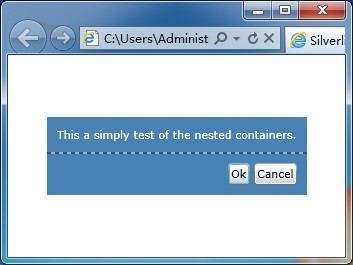
<Grid ShowGridLines="True" Background="SteelBlue" HorizontalAlignment="Center" VerticalAlignment="Center">

    <Grid.RowDefinitions>

        <RowDefinition Height="*"></RowDefinition>

        <RowDefinition Height="Auto"></RowDefinition>

    </Grid.RowDefinitions>

    <TextBlock Margin="10" Grid.Row="0" Foreground="White"

                Text="This a simply test of the nested containers."></TextBlock>

    <StackPanel Grid.Row="1" HorizontalAlignment="Right" Orientation="Horizontal">

        <Button Margin="10,10,2,10" Padding="3" Content="Ok"></Button>

        <Button Margin="2,10,10,10" Padding="3" Content="Cancel"></Button>

    </StackPanel>

</Grid>
3, ShowGridLines, Background, HorizontalAlignment, VerticalAlignment
,Grid.RowDefinitions, RowDefinition
,Grid.Row
,Orientation
,<StackPanel/>[队列面板 对象]
| 1.B, StackPanel(队列面板)对象返回顶部 |
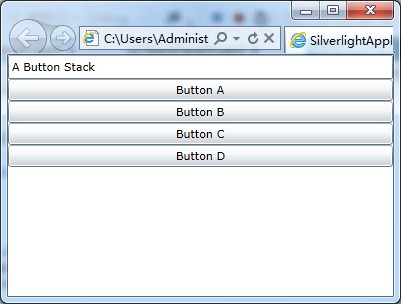
<Grid x:Name="LayoutRoot" Background="White">

    <StackPanel  Background="White">

        <TextBox  Text="A Button Stack"/>

        <Button Content="Button A"/>

        <Button  Content="Button B"/>

        <Button  Content="Button C"/>

        <Button  Content="Button D"/>

    </StackPanel>

</Grid>
3,<StackPanel/>
| 1.C, StackPanel(队列面板)对象 Orientation="Horizontal"返回顶部 |

<Grid x:Name="LayoutRoot" Background="White">

    <StackPanel Orientation="Horizontal"  Background="White">

        <TextBox  Text="A Button Stack"/>

        <Button Content="Button A"/>

        <Button  Content="Button B"/>

        <Button  Content="Button C"/>

        <Button  Content="Button D"/>

    </StackPanel>

</Grid>
3, Orientation
| 1.D, StackPanel(队列面板)对象之 Alignment返回顶部 |
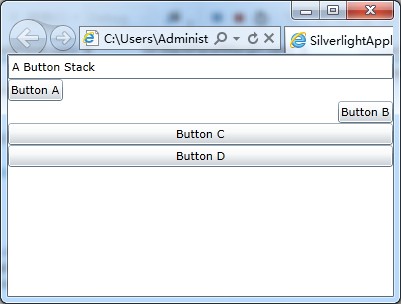
<Grid x:Name="LayoutRoot" Background="White">

    <StackPanel  Background="White">

        <TextBox  Text="A Button Stack"/>

        <Button  HorizontalAlignment="Left" Content="Button A"/>

        <Button HorizontalAlignment="Right"  Content="Button B"/>

        <Button  Content="Button C"/>

        <Button  Content="Button D"/>

    </StackPanel>

</Grid>
3, HorizontalAlignment[水平对齐方式]
| 1.E, StackPanel(队列面板)对象之 Margins返回顶部 |
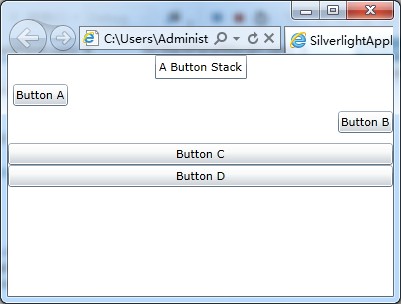
<Grid x:Name="LayoutRoot" Background="White">

    <StackPanel  Background="White">

        <TextBox  Text="A Button Stack" HorizontalAlignment="Center"/>

        <Button  HorizontalAlignment="Left" Content="Button A" Margin="5"/>

        <Button HorizontalAlignment="Right"  Content="Button B" Margin="0,0,0,10"/>

        <Button  Content="Button C"/>

        <Button  Content="Button D"/>

    </StackPanel>

</Grid>
3, Margin[外间距]
| 1.F,返回顶部 |
 |
作者:ylbtech 出处:http://ylbtech.cnblogs.com/ 本文版权归作者和博客园共有,欢迎转载,但未经作者同意必须保留此段声明,且在文章页面明显位置给出原文连接,否则保留追究法律责任的权利。 |
SilverLight:布局(3)StackPanel 对象的更多相关文章
- silverlight Canvas、StackPanel、Grid三者之间的关系
学习 silverlight 首先Canvas.StackPanel.Grid 博客园里看到jailu的这篇文章整理得很好 贴下来: Silverlight提供了非常灵活的布局管理系统,让程序员和 ...
- WPF之旅(三)- 布局之StackPanel
说到WPF的界面布局,相信很多朋友都写过Html代码.在WPF中,大多数程序都使用类似Web的(flow)流布局.在使用流布局模型时,各种控件可以按特定的要求来排列,在窗口内容发生变化时,比如窗口大小 ...
- WPF 界面布局DockPanel stackPanel WrapPanel 元素内容以及位置控制
1 DockPanel 1) 默认充满整个窗口. 2) 最后一个出现的部分,默认充满剩余空间. 3) 非最后一个出现的部分,根据其中内容,进行分配空间s 2 StackPanel 实现居左,居右,居中 ...
- WPF教程二:布局之StackPanel面板
应用程序界面设计中,合理的元素布局至关重要,它可以方便用户使用,并将信息清晰合理地展现给用户.WPF提供了一套功能强大的工具-面板(Panel),来控制用户界面的布局.你可以使用这些面板控件来排布元素 ...
- c# 布局(stackpanel)
<Grid> <StackPanel> <Button Content="asas"> </Button> <Button C ...
- 12.Quick QML-QML 布局(Row、Column、Grid、Flow和嵌套布局) 、Repeater对象
1.Row布局 Row中的item可以不需要使用anchors布局,就能通过行的形式进行布局. 并且item可以使用Positioner附加属性来访问有关其在Row中的位置及其他信息. 示例如下所示, ...
- [Swift通天遁地]六、智能布局-(2)视图对象的尺寸和位置相对约束
★★★★★★★★★★★★★★★★★★★★★★★★★★★★★★★★★★★★★★★★➤微信公众号:山青咏芝(shanqingyongzhi)➤博客园地址:山青咏芝(https://www.cnblogs. ...
- silverlight中鼠标放在对象的提示事件
1.xaml 中实现 <Rectangle x:Name="toolTip" Grid.Column="0" Grid.Row="1" ...
- Silverlight项目笔记1:UI控件与布局、MVVM、数据绑定、await/async、Linq查询、WCF RIA Services、序列化、委托与事件
最近从技术支持转到开发岗,做Silverlight部分的开发,用的Prism+MVVM,框架由同事搭好,目前做的主要是功能实现,用到了一些东西,侧重于如何使用,总结如下 1.UI控件与布局 常用的主要 ...
随机推荐
- install mongodb on macos
Update Homebrew’s package database. In a system shell, issue the following command: brew update 2 In ...
- Flask-用户角色及权限
app/models.py class Role(db.Model): __tablename__ = 'roles' id = db.Column(db.Integer, primary_key=T ...
- jdk生成证书,网站请求变成https
生成证书的步骤 1.进入jdk的bin目录 keytool -genkey -alias tomcat -keyalg RSA 命名证书的名字叫tomcat 2.将证书拷贝至tomcat的bin目 ...
- oracle结构-内存结构与动态内存管理
内存结构与动态内存管理 内存是影响数据库性能的重要因素. oracle8i使用静态内存管理,即,SGA内是预先在参数中配置好的,数据库启动时就按这些配置来进行内在分配,oracle10g引入了动态内存 ...
- 如何在官网下载Spring jar包
该链接里面讲的很仔细! http://blog.csdn.net/frankarmstrong/article/details/69808813
- python - 函数的相互调用 及 变量的作用域
# -*- coding:utf-8 -*- '''@project: jiaxy@author: Jimmy@file: study_函数的相互调用及变量的作用域.py@ide: PyCharm C ...
- python + selenium - selenium常用元素定位
1. Chrome定位工具 打开Chrome浏览器,按F12会弹出开发者工具选项,选择Elements: 1)鼠标点击最左边箭头 2)鼠标滑动到页面中你要操作的元素,单击一下 3)对应的html元素内 ...
- PHP smarty模版引擎基本安装
环境: PHP5.2 以上版本 先去官网下载smarty模版引擎的库文件到你的电脑或服务器上 smarty官方网站库文件下载地址: https://www.smarty.net/download 下 ...
- ssh免密码登录远程服务器(不采用securecrt登录)
http://blog.csdn.net/leexide/article/details/17252369 Linux/UNIX下使用ssh-keygen设置SSH无密码登录 标签: ...
- [Android Studio篇][1] AS开发中遇到问题汇总
1 在android新建文件,提示权限不够,增加权限 修改工程下 main/AndroidMainfest.xml增加 <uses-permission android:name="a ...