
mybatis-spring整合
 1. 配置jar包
Spring,mybatis,mybatis-spring,mysql等。。。
<properties>
<project.build.sourceEncoding>UTF-8</project.build.sourceEncoding>
<project.reporting.outputEncoding>UTF-8</project.reporting.outputEncoding>
<!-- spring版本号 -->
<spring.version>4.2.5.RELEASE</spring.version>
<!-- mybatis版本号 -->
<mybatis.version>3.2.8</mybatis.version>
<!-- mysql驱动版本号 -->
<mysql-driver.version>5.1.29</mysql-driver.version>
<!-- log4j日志包版本号 -->
<slf4j.version>1.7.18</slf4j.version>
<log4j.version>1.2.17</log4j.version>
</properties>
<dependencies>
<!-- 数据库连接池包 -->
<dependency>
<groupId>com.mchange</groupId>
<artifactId>c3p0</artifactId>
<version>0.9.5-pre8</version>
</dependency>
<!-- 添加jstl依赖 -->
<dependency>
<groupId>jstl</groupId>
<artifactId>jstl</artifactId>
<version>1.2</version>
</dependency>
<dependency>
<groupId>javax</groupId>
<artifactId>javaee-api</artifactId>
<version>7.0</version>
</dependency>
<!-- 添加junit4依赖 -->
<dependency>
<groupId>junit</groupId>
<artifactId>junit</artifactId>
<version>4.11</version>
<!-- 指定范围,在测试时才会加载 -->
<scope>test</scope>
</dependency>
<!-- 添加spring核心依赖 -->
<dependency>
<groupId>org.springframework</groupId>
<artifactId>spring-core</artifactId>
<version>${spring.version}</version>
</dependency>
<dependency>
<groupId>org.springframework</groupId>
<artifactId>spring-web</artifactId>
<version>${spring.version}</version>
</dependency>
<dependency>
<groupId>org.springframework</groupId>
<artifactId>spring-oxm</artifactId>
<version>${spring.version}</version>
</dependency>
<dependency>
<groupId>org.springframework</groupId>
<artifactId>spring-tx</artifactId>
<version>${spring.version}</version>
</dependency>
<dependency>
<groupId>org.springframework</groupId>
<artifactId>spring-jdbc</artifactId>
<version>${spring.version}</version>
</dependency>
<dependency>
<groupId>org.springframework</groupId>
<artifactId>spring-webmvc</artifactId>
<version>${spring.version}</version>
</dependency>
<dependency>
<groupId>org.springframework</groupId>
<artifactId>spring-context</artifactId>
<version>${spring.version}</version>
</dependency>
<dependency>
<groupId>org.springframework</groupId>
<artifactId>spring-context-support</artifactId>
<version>${spring.version}</version>
</dependency>
<dependency>
<groupId>org.springframework</groupId>
<artifactId>spring-aop</artifactId>
<version>${spring.version}</version>
</dependency>
<dependency>
<groupId>org.springframework</groupId>
<artifactId>spring-test</artifactId>
<version>${spring.version}</version>
</dependency>
<!-- 添加mybatis依赖 -->
<dependency>
<groupId>org.mybatis</groupId>
<artifactId>mybatis</artifactId>
<version>${mybatis.version}</version>
</dependency>
<!-- 添加mybatis/spring整合包依赖 -->
<dependency>
<groupId>org.mybatis</groupId>
<artifactId>mybatis-spring</artifactId>
<version>1.2.2</version>
</dependency>
<!-- 添加mysql驱动依赖 -->
<dependency>
<groupId>mysql</groupId>
<artifactId>mysql-connector-java</artifactId>
<version>${mysql-driver.version}</version>
</dependency>
<!-- 添加数据库连接池依赖 -->
<dependency>
<groupId>commons-dbcp</groupId>
<artifactId>commons-dbcp</artifactId>
<version>1.2.2</version>
</dependency>
<!-- 添加fastjson -->
<dependency>
<groupId>com.alibaba</groupId>
<artifactId>fastjson</artifactId>
<version>1.1.41</version>
</dependency>
<!-- 添加日志相关jar包 -->
<dependency>
<groupId>log4j</groupId>
<artifactId>log4j</artifactId>
<version>${log4j.version}</version>
</dependency>
<dependency>
<groupId>org.slf4j</groupId>
<artifactId>slf4j-api</artifactId>
<version>${slf4j.version}</version>
</dependency>
<dependency>
<groupId>org.slf4j</groupId>
<artifactId>slf4j-log4j12</artifactId>
<version>${slf4j.version}</version>
</dependency>
<!-- log end -->
<!-- 映入JSON -->
<dependency>
<groupId>org.codehaus.jackson</groupId>
<artifactId>jackson-mapper-asl</artifactId>
<version>1.9.13</version>
</dependency>
<!-- https://mvnrepository.com/artifact/com.fasterxml.jackson.core/jackson-core -->
<dependency>
<groupId>com.fasterxml.jackson.core</groupId>
<artifactId>jackson-core</artifactId>
<version>2.8.0</version>
</dependency>
<!-- https://mvnrepository.com/artifact/com.fasterxml.jackson.core/jackson-databind -->
<dependency>
<groupId>com.fasterxml.jackson.core</groupId>
<artifactId>jackson-databind</artifactId>
<version>2.8.0</version>
</dependency>
<dependency>
<groupId>commons-fileupload</groupId>
<artifactId>commons-fileupload</artifactId>
<version>1.3.1</version>
</dependency>
<dependency>
<groupId>commons-io</groupId>
<artifactId>commons-io</artifactId>
<version>2.4</version>
</dependency>
<dependency>
<groupId>commons-codec</groupId>
<artifactId>commons-codec</artifactId>
<version>1.9</version>
</dependency>
<!-- https://mvnrepository.com/artifact/com.github.abel533/ECharts -->
<dependency>
<groupId>com.github.abel533</groupId>
<artifactId>ECharts</artifactId>
<version>3.0.0</version>
</dependency>
<dependency>
<groupId>com.google.code.gson</groupId>
<artifactId>gson</artifactId>
<version>2.5</version>
<scope>compile</scope>
<optional>true</optional>
</dependency>
<dependency>
<groupId>net.sf.jxls</groupId>
<artifactId>jxls-core</artifactId>
<version>1.0.5</version>
</dependency>
<dependency>
<groupId>org.mybatis.generator</groupId>
<artifactId>mybatis-generator-core</artifactId>
<version>1.3.2</version>
</dependency>
</dependencies>
<build>
<plugins>
<plugin>
<groupId>org.mybatis.generator</groupId>
<artifactId>mybatis-generator-maven-plugin</artifactId>
<version>1.3.2</version>
<configuration>
<verbose>true</verbose>
<overwrite>true</overwrite>
</configuration>
</plugin>
</plugins>
<finalName>ssm4</finalName>
</build>
2.配置文件
2.1applicationContext.xml
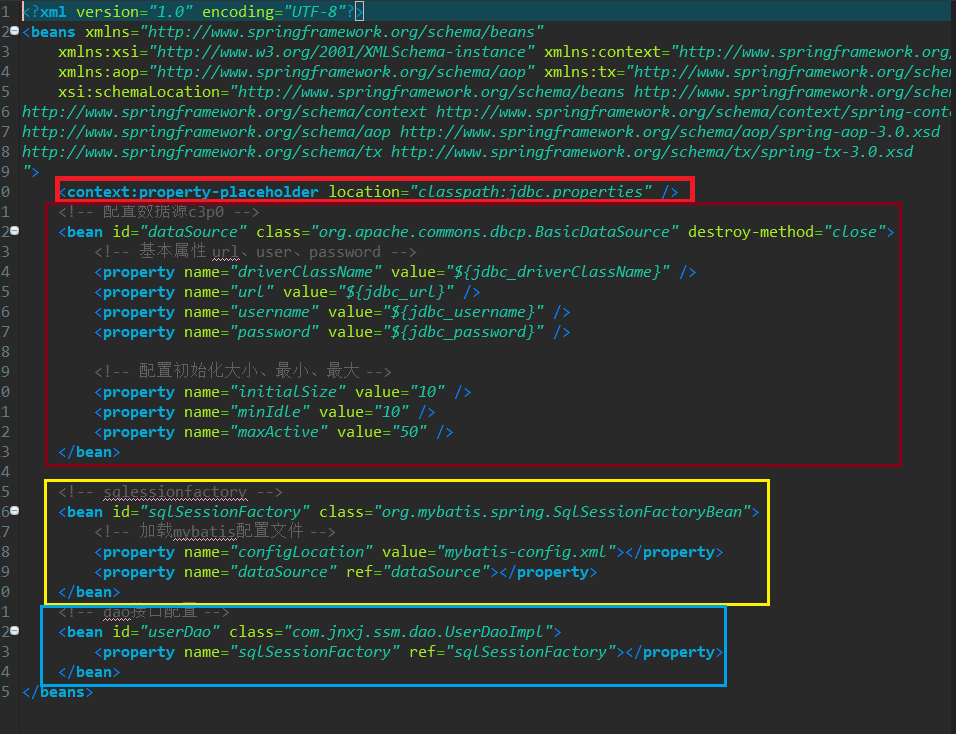
2.1.1第一是要引入数据文件jdbc.properties:保存数据库连接参数的信息
2.1.2第二配置数据源,这里配置了dbcp连接池
2.1.3配置SqlSessionFactory,让spring自动生成管理,这里要引用数据源和mybatis的配置文件
2.1.4配置Dao接口,class指向实现类全称
2.2mybatis.xml配置
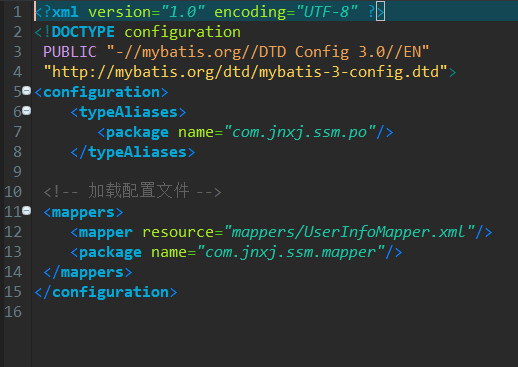
2.2.1加载配置文件
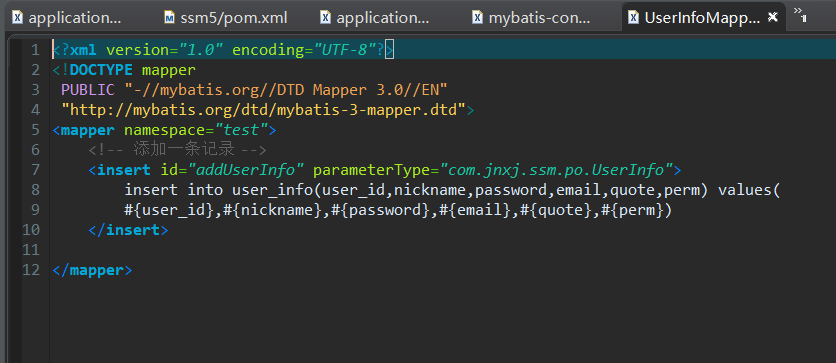
2.3jdbc.porperties

2.4log4j.porperties
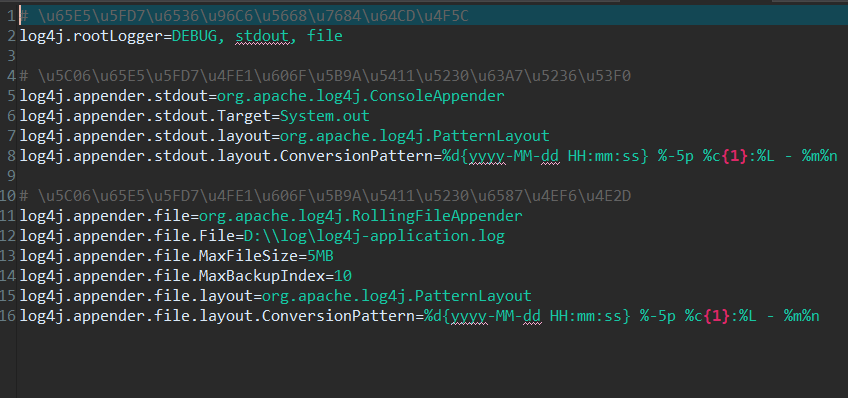
3.测试
3.1项目结构
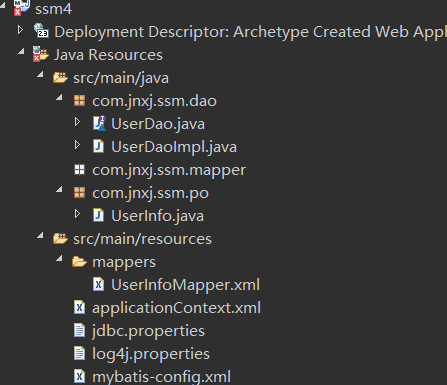
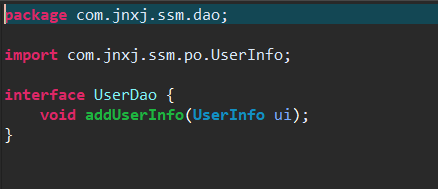
3.1.1UserDao接口
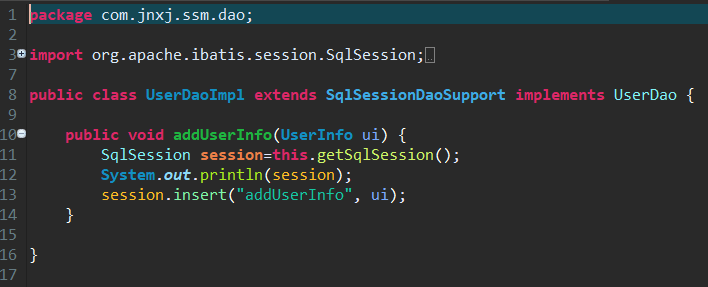
3.1.2UserDaoImpl实现类(实现类要继承SqlSessionDaoSupport类)
3.1.3测试类

4.Mapper代理配置
4.1修改applicationContext.xml
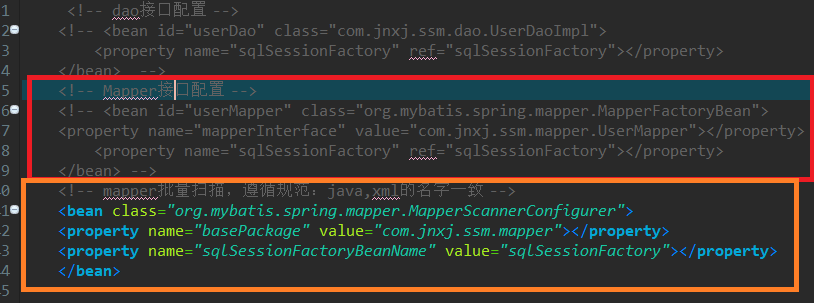
(1) 第一种配置mapper,每个mapper都要配置一次,工程重复繁琐
(2) 第二种批量配置mapper,只要指定basepackage的包,就会到这个下面去扫描,多个包用半角逗号隔开
4.2修改mybatis.xml
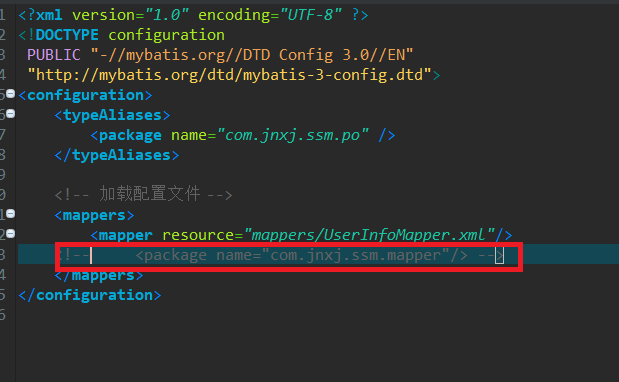
(1)注释掉mapper文件的扫描
5.mapper代理测试
5.1UserMapper.java

5.2UserMapper.xml

5.3测试

5.3.1加载applicationContext.xml文件
5.3.2获取Mapper代理对象
5.3.3使用Mapper的方法操作数据库
6.使用mybatis generator自动化工具创建Mapper.java和xml文件
6.1配置generator.xml配置文件
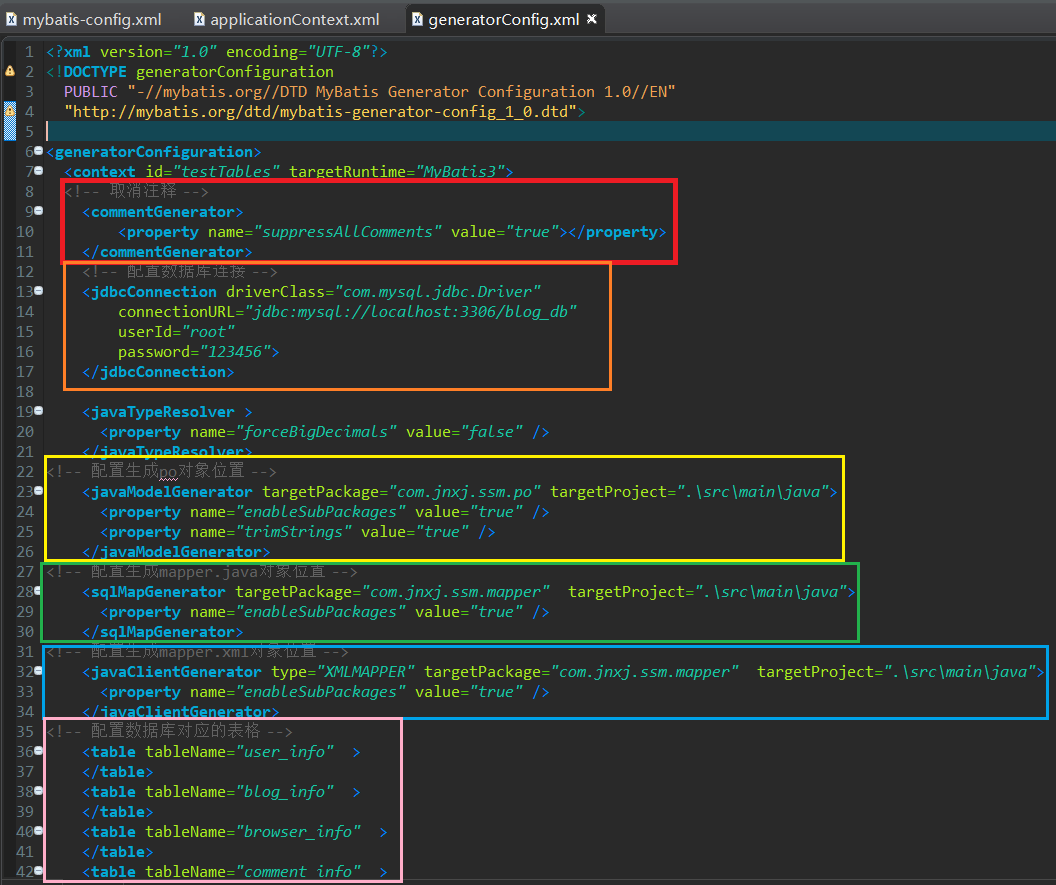
6.2運行java代碼生成代碼

注意:file对应的位置是6.1配置文件的位置
6.3刷新工程
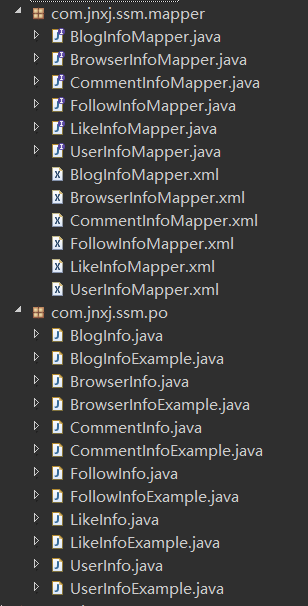
6.3.1po包下的Example类是用于条件查询
6.3.2测试
6.3.2.1查询测试
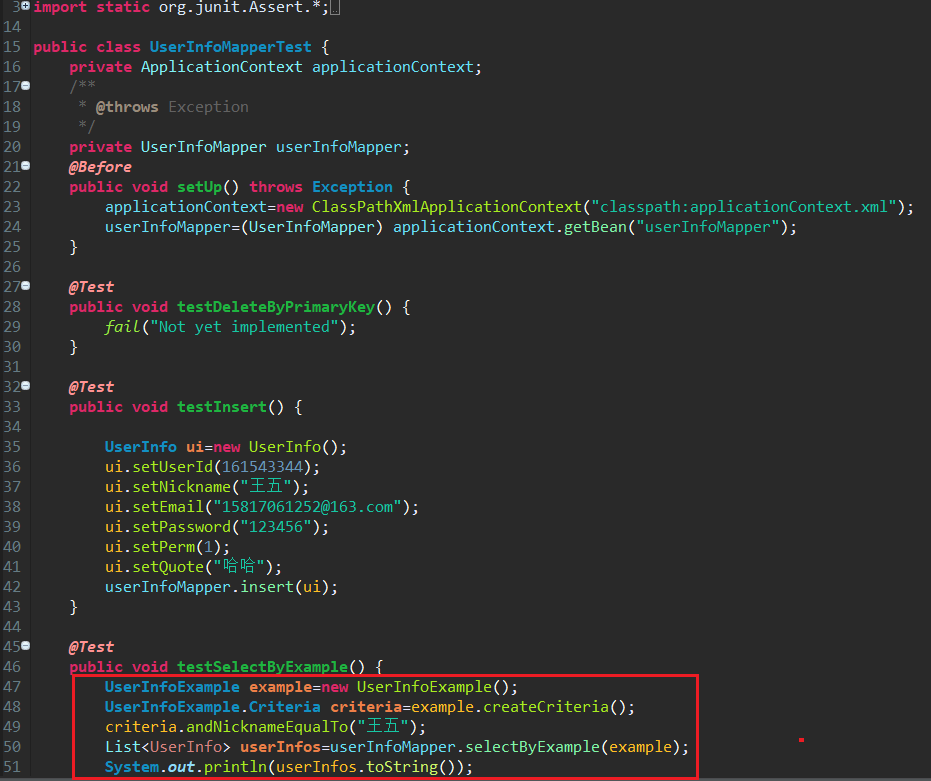
(1) 一般的查询是一样的
(2) 条件查询的步骤是:
- 创建example对象,
- 生成criteria对象
- 通过criteria对象拼凑条件
- 通过mapper去调用相关的查询方法传入example对象
6.3.2.2更新测试
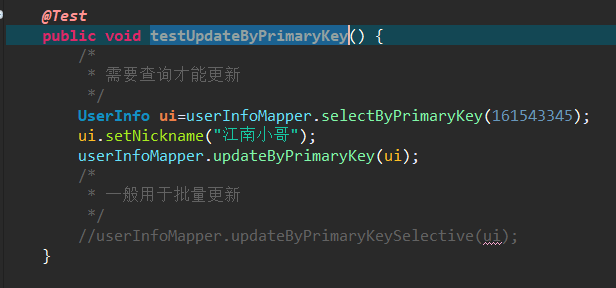
(1) updateByPrimaryKey需要先查询才能更新
(2) updateByPrimaryKeySelective不需要先查询才能更新,一般用于批量更新
mybatis-spring整合的更多相关文章
- springMVC+mybatis+spring整合案例
1.web.xml a:配置spring监听,使web容器在启动时加载spring的applicationContext.xml <listener> <listener-class ...
- SpringMVC+Mybatis+Spring整合
Maven引入需要的JAR包 pom.xml <properties> <!-- spring版本号 --> <spring.version>4.0.2.RELEA ...
- springMVC+MyBatis+Spring 整合(3)
spring mvc 与mybatis 的整合. 加入配置文件: spring-mybaits.xml <?xml version="1.0" encoding=" ...
- MyBatis Spring整合配置映射接口类与映射xml文件
本文转自http://blog.csdn.net/zht666/article/details/38706083 Spring整合MyBatis使用到了mybatis-spring,在配置mybati ...
- Mybatis——Spring整合
一.引入依赖 Spring的相关jar包 mybatis-3.4.1.jar mybatis-spring-1.3.0.jar mysql-connector-java-5.1.37-bin.jar ...
- springMVC+MyBatis+Spring 整合(4) ---解决Spring MVC 对AOP不起作用的问题
解决Spring MVC 对AOP不起作用的问题 分类: SpringMVC3x+Spring3x+MyBatis3x myibaits spring J2EE2013-11-21 11:22 640 ...
- Mybatis+Spring整合后Mapper测试类编写
public class UserMapperTest { private ApplicationContext applicationContext; @Before public void ini ...
- springMVC+MyBatis+Spring 整合(2)
mybatis 与Spring 的整合. 1.导入Spring 和Springmvc的包 pom <project xmlns="http://maven.apache.org/POM ...
- springmvc+mybatis+spring 整合源码项目
A集成代码生成器 [正反双向(单表.主表.明细表.树形表,开发利器)+快速构建表单; freemaker模版技术 ,0个代码不用写,生成完整的一个模块,带页面.建表sql脚本,处理类,service等 ...
- springmvc+mybatis+spring 整合
获取[下载地址] [免费支持更新]三大数据库 mysql oracle sqlsever 更专业.更强悍.适合不同用户群体[新录针对本系统的视频教程,手把手教开发一个模块,快速掌握本系统] ...
随机推荐
- Centos环境下给PHP7.0安装yaf扩展
首先要知道PHP的安装目录在哪里,以我当前的路径为例,在/usr/local/php目录下. 下一步需要下载扩展包,进入http://pecl.php.net/package/yaf寻找符合版本要求的 ...
- Java数字签名——RSA算法
数字签名:带有密钥(公钥,私钥)的消息摘要算法. 验证数据的完整性,认证数据的来源,抗否性 OSI参考模型 私钥签名,公钥验证 签名算法:RSA,DSA,ECDSA 算法1 :RSA MD,SHA两类 ...
- Linux的软链接和硬链接
1.Linux链接概念Linux链接分两种,一种被称为硬链接(Hard Link),另一种被称为符号链接(Symbolic Link).默认情况下,ln命令产生硬链接. [硬连接]硬连接指通过索引节点 ...
- java基础之继承(二)
上篇我们介绍了java中的构造方法,了解了关键字this和super在继承中所起到的作用,this可以显式调用重载的构造方法,super可以显式的调用父类中的任意可见方法.了解方法重载和重写的区别,知 ...
- postman模拟HttpPost请求的方法
开始想装postman的Google浏览器插件的,但是发现应用商店无法搜索,下载的拖进扩展也装不上... 于是找到了这个绿色版的Postman桌面程序!有需要的可以下载,点击下载:http://dow ...
- 通用的Android控件抖动效果实现
这个小程序的功能在实际的开发中会用到,比如:设置Button左右晃动,或者上下的晃动效果,下面就给出示例代码. 首先:要定义一个xml文件,命名为Shake [html] view plain cop ...
- SAS学习︱逻辑库、数据集创建与查看、数据库链接(SAS与R的code对照)
每每以为攀得众山小,可.每每又切实来到起点,大牛们,缓缓脚步来俺笔记葩分享一下吧,please~ --------------------------- 入门学习一周,开始写学习笔记.用习惯R之后,发 ...
- FULL HD
FULL HD(全高清)是Full High Definition的简写,是指物理分辨率高达1920×1080显示(包括1080i和1080P),其中i(interlace)是指隔行扫描:P(Prog ...
- android技术晋升之道
写一篇文章记录一下我看到的几个特别常见的误区,希望对团队晋升的同学能有帮助. 误区1:把特质当成案例 工作非常努力,连续一个月加班到12点,解决了问题 喜欢学习新技术和分享,团队同学都很喜欢 善于钻研 ...
- Win7/8出现An error occurred on the server when processing the URL解决办法
使用的是win8系统搭建的本地服务器,win7使用的方法是相同的.如果你的系统是精简版的Win7/8,那么安装IIS7也有可能出现这问题.下面SJY带领大家来解决这个错误. 解决方法 打开控制面板→管 ...