
[CentOS] SSH 免密钥登录
一、环境说明:
操作系统:CentOS-7-x86_64-Minimal-1611
虚拟机:VMware® Workstation 12 Pro;12.5.5 build-5234757
服务器:node1(User1),node2(User2)
二、实现内容:
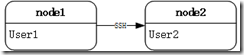
node1 服务器用户 User1 可通过 SSH ,免密钥登录服务器 node2 的 User2 账户;
三、配置流程:
默认情况下,node1 上的用户 User1 想连接 node2,需要输入密码,如下:
 [User1@localhost ~]$ ssh User2@node2

 The authenticity of host 'node2 (192.168.126.141)' can't be established.

 ECDSA key fingerprint is 0c:f2:1d:5b:0a:ea:38:43:e7:d2:07:28:d8:05:8a:d6.

 Are you sure you want to continue connecting (yes/no)? yes

 Warning: Permanently added 'node2,192.168.126.141' (ECDSA) to the list of known hosts.

 User2@node2's password:

 Last login: Fri Feb  2 17:03:45 2018
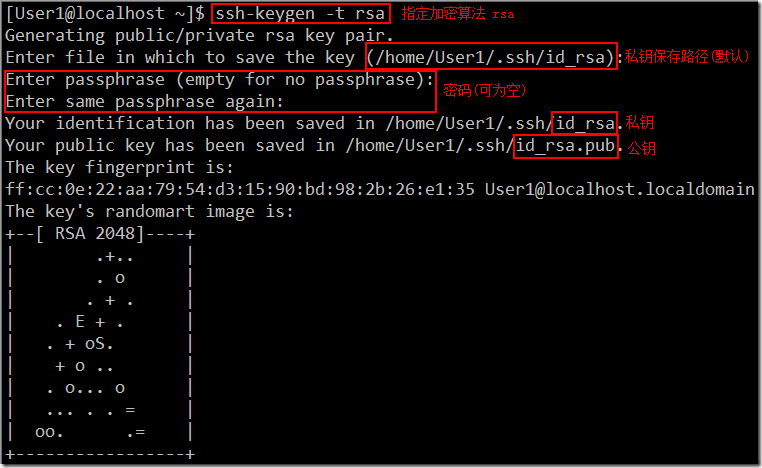
1、现在通过用户 User1 在 node1 的 /home/User1 目录下生成一对公钥和私钥:
 [User1@localhost ~]$ ssh-keygen -t rsa

 Generating public/private rsa key pair.

 Enter file in which to save the key (/home/User1/.ssh/id_rsa):

 Enter passphrase (empty for no passphrase):

 Enter same passphrase again:

 Your identification has been saved in /home/User1/.ssh/id_rsa.

 Your public key has been saved in /home/User1/.ssh/id_rsa.pub.

 The key fingerprint is:

 ff:cc:0e:22:aa:79:54:d3:15:90:bd:98:2b:26:e1:35 User1@localhost.localdomain

 The key's randomart image is:

 +--[ RSA 2048]----+

 |       .+..     |

 |       . o     |

 |       . + .     |

 |   . E + .     |

 |   . + oS.       |

 |    + o ..       |

 |   . o... o     |

 |   ... . . =     |

 |  oo.     .=   |

 +-----------------+
2、然后将公钥上传给 node2 的 User2 用户:
[User1@localhost ~]$ ssh-copy-id User2@node2
/bin/ssh-copy-id: INFO: attempting to log in with the new key(s), to filter out any that are already installed
/bin/ssh-copy-id: INFO: 1 key(s) remain to be installed -- if you are prompted now it is to install the new keys
User2@node2's password:
Number of key(s) added: 1
Now try logging into the machine, with: "ssh 'User2@node2'"
and check to make sure that only the key(s) you wanted were added.
3、登录验证成功:

说明:
1、此时 node1 上用户 User1 的私钥文件内容(id_rsa.pub)会追加到 node2 上用户 User2 的 ~/.ssh/authorized_keys 文件中:


2、还可以通过 scp 命令,将 node1 服务器上的公钥拷贝到 node2 服务器上,然后追加到 ~/.ssh/authorized_keys,
scp ~/.ssh/id_rsa.pub User2@node2:~/
3、还可以通过 cat 命令直接追加:
cat ~/.ssh/id_rsa.pub | ssh -P 22 User2@node2 'cat >> ~/.ssh/authorized_keys'
[CentOS] SSH 免密钥登录的更多相关文章
- linux系统ssh免密钥登录配置
linux主机配置ssh免密钥登录,具体配置如下: 1.执行命令ssh-keygen -t rsa,生成公钥和私钥(具体步骤详见下图) 2.会在当前用户的家目录的.ssh/生成公钥和私钥, 3.执行s ...
- Linux机器之间SSH免密钥登录设置
SSH免密钥登录 私钥:密钥留在本机 公钥:密钥发给其他机 hadoop01 生成密钥: ssh-keygen -t rsa (密钥存放路径:/root/.ssh) id_rsa:私钥 id_rsa. ...
- 014-配置SSH免密钥登录
问题:client端需要免密钥登录服务器server如何配置?1.前提:客户端已安装openssh-client;服务端已安装openssh-server;服务器端22号端口已经打开2.需要密钥登录时 ...
- centos ssh 免密码登录
最近在学习的过程中遇到这个问题: A主机和B主机: A 免密码登录B: 首先在A的 ~/.ssh 目录中 执行 ssh-keygen -t rsa 一路回车 最后生成连个文件: 将id_rsa.pub ...
- ssh免密钥登录一例问题
今天遇到一个奇怪的问题,在同一机器上创建的普通用户使用 ssh-copy-id -i .ssh/id_rsa.pub root@192.168.3.254 建立与root用户的免密钥通信,结果死活还是 ...
- ssh免密钥登录
说明:下文中说的 '客户端'指的是你所使用的本地机器; '服务端'指的是远程你要连接的机器; ----------------------------------------------------- ...
- linux配置ssh免密钥登录
https://blog.csdn.net/xiaoyi23000/article/details/80597516 1.执行命令ssh-keygen -t rsa,生成公钥和私钥 2.会在当前用户的 ...
- Centos6.5之ssh免密码登录配置
Centos6.5之ssh免密码登录配置 centos ssh 免密码登录 0.说明 这里为了方便说明问题,假设有A和B两台安装了centos6.5的主机.目标是实现A.B两台主机分别能够通过ssh免 ...
- 在CentOS/RHEL上设置SSH免密码登录
本文会告诉你怎样在 CentOS/RHEL 上设置 SSH 免密码登录.自动登录配置好以后,你可以通过它使用 SSH (Secure Shell)和安全复制 (SCP)来移动文件. SSH 是开源的, ...
随机推荐
- strstr()函数实现
/* 函数要求:写一个函数模拟strstr()函数,设计中不得使用其他库函数. 函数原型:const char *strstr(const char *str1,const char *str2); ...
- windows驱动之WDF---CharSample
驱动程序部分: NTSTATUS DriverEntry( IN PDRIVER_OBJECT DriverObject, IN PUNICODE_STRING RegistryPath ) /*++ ...
- 三十天学不会TCP,UDP/IP网络编程 - 绅士的开始
经过了过年的忙碌和年初的懈怠一切的日子,我又开始重新更新了~这是最新的一篇~完整版可以去gitbook(https://www.gitbook.com/@rogerzhu/)看到. 如果对和程序员有关 ...
- 通过JDBC连接数据库(MySql为例)并读取数据库信息--JSP基础
1.先建数据库,数据库名为:employee_DB;然后在数据库employee_DB下建表,表名为employee;最后插入数据. create database employee_DB; use ...
- java继承属性相关介绍
这个只需要记住一点,父类的任何属性(变量可以看做属性),子类均可继承并覆盖,allType(father)-->changeAnyType(son)-->AnyType 这是父类的所有代表 ...
- [BZOJ2296] [POJ Challenge] 随机种子
Description 1tthinking除了随机算法,其他什么都不会.但是他还是可以ac很多题目,他用的是什么呢?他会选择一个好的随机种子,然后输出答案.往往他选择的一个好的种子可以有99%的概率 ...
- [CodeVS2370] 小机房的树 (LCA, 树链剖分, LCT)
Description 小机房有棵焕狗种的树,树上有N个节点,节点标号为0到N-1,有两只虫子名叫飘狗和大吉狗,分居在两个不同的节点上.有一天,他们想爬到一个节点上去搞基,但是作为两只虫子,他们不想花 ...
- 来谈谈JAVA面向对象 - 鲁班即将五杀,大乔送他回家??
开发IDE为Eclipse或者MyEclipse. 首先,如果我们使用面向过程的思维来解决这个问题,就是第一步做什么,第二步做什么? 鲁班即将五杀,大乔送他回家 这个现象可以简单地拆分为两步,代码大概 ...
- 论文学习:Fully Convolutional Networks for Semantic Segmentation
发表于2015年这篇<Fully Convolutional Networks for Semantic Segmentation>在图像语义分割领域举足轻重. 1 CNN 与 FCN 通 ...
- hive数据库的哪些函数操作是否走MR
平时我们用的HIVE 我们都知道 select * from table_name 不走MR 直接走HTTP hive 0.10.0为了执行效率考虑,简单的查询,就是只是select,不带count, ...