
python执行报错 configparser.NoSectionError: No section: 'section_1'
场景:请求获取验证码模块regVC.py读取配置文件config.ini时,regVC.py模块单独执行正常,但通过run_all.py模块批量执行时报错,找不到section
解决办法:配置文件路径需写绝对路径
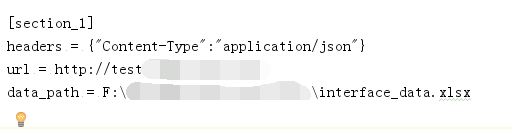
config.ini文件如下:
regVC.py模块代码如下:
 import requests

 import configparser

 import unittest

 from Case.readexcel import ExcelData

 import json

 class registerVerifyCode(unittest.TestCase):

     def setUp(self):

         self.Purl = "/api/register/getVerifyCode"

         #取配置文件内数据

         self.config = configparser.ConfigParser()

         self.text = self.config.read("F:\\Case\\config.ini")      #这里要写配置文件的绝对路径

         self.section = self.config.sections()

         self.option = self.config.options("section_1")

         self.item = self.config.items("section_1")

         self.url = self.config.items("section_1")[1][1]+self.Purl

         self.headers = self.config.items("section_1")[0][1]

         #self.headers由str类型转化为字典类型

         self.header = eval(self.headers)

         self.data_path = self.config.items("section_1")[2][1]

         self.sheetname = "注册验证码获取"

         self.data = ExcelData(self.data_path,self.sheetname).readExcel()

         print(self.url)

         print(self.data)

     def test_reVC(self):

         for a in self.data:

             for b in a:

                 print(a)

                 print(b)

                 par = {"data":{

                     b:a[b]

                 }

                 }

                 print(par)

                 par_json = json.dumps(par)

                 res = requests.post(self.url,par_json,headers=self.header)

                 print(res.text)

                 if "手机号码已注册" in res.text:

                     print("该手机号码已注册")

                 if "请求注册验证码成功" in res.text:

                     print("请求注册验证码成功")

 if __name__ == '__main__':

    unittest.main()
run_all.py代码如下:
 import unittest

 def all_case():

     case_dir = "F:\\KEJINSUO_interface\\Case\\"

     testCase = unittest.TestSuite()

     discover = unittest.defaultTestLoader.discover(case_dir, pattern = "reg*.py", top_level_dir = None)

     testCase.addTest(discover)

     return testCase

 if __name__ == '__main__':

     runner = unittest.TextTestRunner()

     runner.run(all_case())
代码需慢慢优化,先实现简单的功能
python执行报错 configparser.NoSectionError: No section: 'section_1'的更多相关文章
- python 读取配置文件总是报错 configparser.NoSectionError: No section:
本文为作者原创,禁止转载,违者必究法律责任!!! python 读取配置文件总是报错 configparser.NoSectionError: No section: 无论是 python2的版本,还 ...
- 第一次打开pycharm运行python文件报错”No Python interpreter selected“问题的解决办法
前面没有细讲,这里细述一下安装pycharm后,第一次打开pycharm运行python文件报错"No Python interpreter selected"问题的解决办法. 出 ...
- oracle创建包后执行报错:object omgmig.test_package is invalid.
今天学习了一下oracle的包的写法,然后碰到这么个问题.包声明和包主体都正确,但是就是执行报错:object omgmig.test_package is invalid. 这是会报错的sql,看起 ...
- salt执行报错一例
执行报错: 查看服务端日志: 认证有问题 重新认证吧!!! minion端: [root@super66 ~]# cd /etc/salt/[root@super66 salt]# lsminion ...
- Ubuntu下sh *.sh使用==操作符执行报错
----<鸟哥的Linux私房菜--基础篇>学习笔记 ubuntu默认的sh是连接到dash,而我们写shell脚本时使用的时bash.bash和dash在一些方面是不兼容的.因此执行同一 ...
- windows中修改catalina.sh上传到linux执行报错This file is needed to run this program解决
windows中修改catalina.sh上传到linux执行报错This file is needed to run this program解决 一.发现问题 由于tomcat内存溢出,在wind ...
- mac 上python编译报错No module named MySQLdb
mac 上python编译报错No module named MySQLdb You installed python You did brew install mysql You did expor ...
- 调用python脚本报错/usr/bin/env: python : No such file or directory
一.调用python脚本报错 /usr/bin/env: python: No such file or directory 二.解决方法 原因是在windows上编写的脚本,使用dos2unix对脚 ...
- apscheduler 执行报错No handlers could be found for logger "apscheduler.executors.default
执行报错如下: No handlers could be found for logger "apscheduler.executors.default 解决: 加入日志,查看具体报错,载根 ...
随机推荐
- CUDA Samples: green ball
以下CUDA sample是分别用C++和CUDA实现的生成的绿色的球图像,并对其中使用到的CUDA函数进行了解说,code参考了<GPU高性能编程CUDA实战>一书的第五章,各个文件内容 ...
- wordpress 生成自定义 meta box
工具 https://jeremyhixon.com/tool/wordpress-meta-box-generator/ 使用 生成代码 /** * Generated by the WordPre ...
- [Linux] 复制文件夹下指定创建时间的文件
暂时不知道什么命令可以达到这个目标,目前的方法是分步进行: 首先,找出指定创建时间内的文件名 例如在imgs文件夹中,找出创建时间在一天内的文件 > feb_files.txt 然后将这些文件复 ...
- C# 超级狗 二次开发 读写数据 激活验证 存储数据库连接字符串
本文主要讲解如果使用C#语言来对超级狗进行二次开发,如果仅仅是做个激活的功能,可以参照另一篇博客,地址:http://www.cnblogs.com/dathlin/p/8487842.html 如果 ...
- hexo部署Github博客
例子:https://aquarius1993.github.io/blog/ 仓库:https://github.com/Aquarius1993/blog (前提是已经安装Xcode和git) 1 ...
- fedora 修改home下的中文目录为英文目录
<h4>修改home下的中文目录为英文目录</h4>习 惯问题,喜欢使用fedora为您在home目录下自创建的“桌面”.“文档”,“图片 .公共的” .“下载”. “音乐”. ...
- WIN7下配置和使用解压缩版MYSQL
最近mysql出了新的GA版本——mysql5.6.11,此版本windows64位下只有解压缩版,于是在win7上进行了配置.期间碰到了一些问题,在此记录一下. 一.环境 操作系统:WIN764位 ...
- Ubuntu 12.04 LTS 安裝无线网卡驱动
1,当然,首先下载得到驱动的源代码: 2,解压缩到指定位置,我就是用鼠标拖到 home 里面: 3,进入驱动所在目录 CD ~/mt7610u,(我将解压缩出来的驱动目录改名为 mt7610u 这个了 ...
- BZOJ4292 PA2015 Równanie 【暴力水题】
BZOJ4292 PA2015 Równanie Description 对于一个正整数n,定义f(n)为它十进制下每一位数字的平方的和.现在给定三个正整数k,a,b,请求出满足a<=n< ...
- {Reship}{Meanshift}Mean Shift Tracking: 2000-2012回顾
Mean Shift跟踪从 2000年被提出至今已经经历了十余个年头,从被大量灌水到如今不屑被拿来作为比较算法,经历了辉煌高潮的 Mean-Shift based Tracking正在慢慢淡出主流tr ...