Worksheet.ExportAsFixedFormat Method

Mark:

  The ExportAsFixedFormat method is used to publish a workbook to either the PDF or XPS format.

Syntax:

  expression .ExportAsFixedFormat(TypeFilenameQualityIncludeDocPropertiesIgnorePrintAreasFromToOpenAfterPublish)

  expression   A variable that represents a Workbook, Sheet, Chart, or Range object.


Parameters:
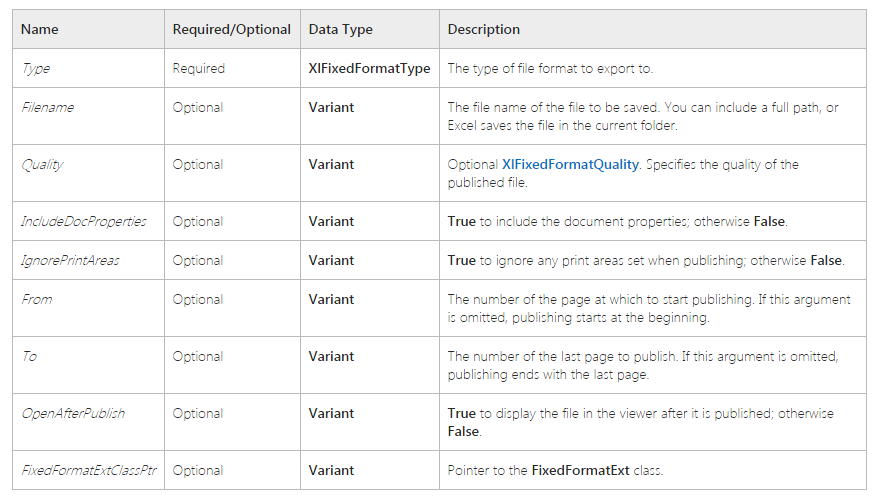
  

代码实现:

 C++ Code 
1
2
3
4
5
6
7
8
9
10
11
12
13
14
15
16
17
18
19
20
21
22
23
24
25
26
27
28
29
30
31
32
33
34
35
36
37
38
39
40
41
42
43
44
45
46
47
48
49
50
51
52
53
54
55
56
57
58
59
60
61
62
63
64
65
66
67
68
69
70
71
72
73
74
75
76
77
78
79
80
81
82
83
84
85
86
87
88
89
90
91
92
93
94
95
96
97
98
99
100
101
102
103
104
105
106
107
108
109
110
111
112
113
114
115
116
117
118
119
120
121
122
123
124
125
126
127
128
129
130
131
132
133
134
135
136
137
138
139
140
141
142
143
144
145
146
147
148
149
150
151
152
153
154
155
156
157
158
159
160
161
162
163
164
165
166
167
168
169
170
171
172
173
174
175
176
177
178
179
180
181
182
183
184
185
186
187
188
189
190
191
192
193
194
195
196
197
198
199
200
201
202
203
204
205
206
207
208
209
210
211
212
213
214
215
216
217
218
219
220
221
222
223
224
225
226
227
228
229
230
231
232
233
234
235
236
237
238
239
240
241
242
243
244
245
246
247
248
249
250
251
252
253
 
// Office2Pdf.cpp : Defines the entry point for the console application.
//

#include "stdafx.h"

/*
    功能:Office文件格式(doc/docx、xls/xlsx、ppt/pptx)转PDF格式文件
    作者: ReOrganized by Michael Joessy 2017-06-01 Happy Children's Day
    使用前提
    [1]Office 2010(Word, Excel, PPT)
    编译环境:
    [1]VS2008
    [2]Win7 x64
    工程类型:Win32 Console Application
*/

//导入Office类型库

#import "C:\Program Files (x86)\Common Files\microsoft shared\OFFICE14\MSO.DLL" \
    rename("RGB","_OfficeRGB")

#import "C:\Program Files (x86)\Common Files\microsoft shared\VBA\VBA6\VBE6EXT.OLB" \
    rename("Reference", "ignorethis")

#import "C:\Program Files (x86)\Microsoft Office\Office14\MSWORD.OLB " \
    rename("FindText","_FindText")\
    rename("Rectangle","_Rectangle")\
    rename("ExitWindows","_ExitWindows")

#import "C:\Program Files (x86)\Microsoft Office\Office14\MSPPT.OLB"
#import "C:\Program Files (x86)\Microsoft Office\Office14\EXCEL.EXE" \
    rename("DialogBox","_DialogBox") \
    rename("RGB","_RGB") \
    exclude("IFont","IPicture")

//使用头文件
#include <string>
#include <iostream>

//声明
int Word2Pdf(std::wstring inputFileName,std::wstring outputFileName);
int Excel2Pdf(std::wstring inputFileName,std::wstring outputFileName);
int Ppt2Pdf(std::wstring inputFileName,std::wstring outputFileName);

//主函数
int _tmain(int argc, _TCHAR* argv[])
{
    ;
    HRESULT hr = CoInitialize(NULL);
    if (FAILED(hr))
    {
        std::cout << "Initialize COM failed..." << std::endl;
        ;
    }

std::wstring wsCmd;
    std::wstring wsS;
    std::wstring wsD;

)
    {
        std::cout << "Command Usage: Office2pdf -[e|p|w] <source file name> <destination file name>" << std::endl;
        std::cout << "         e.g.: Office2pdf -e MyFile.xlsx MyFile.pdf" << std::endl;
        ;
    }

wsCmd = argv[];
    wsS   = argv[];
    wsD   = argv[];

if(wsCmd == L"-e")
    {
        nRet = Excel2Pdf(wsS.c_str(),wsD.c_str());
    }
    else if(wsCmd == L"-p")
    {
        nRet = Ppt2Pdf(wsS.c_str(),wsD.c_str());
    }
    else if(wsCmd == L"-w")
    {
        nRet = Word2Pdf(wsS.c_str(),wsD.c_str());
    }
 
    CoUninitialize();

)
    {
        std::cout << "Error:" << nRet << std::endl;
    }

return nRet;
}

//实现
int Word2Pdf(std::wstring inputFileName,std::wstring outputFileName)  
{
    ;
    Word::_ApplicationPtr  pWordApp = NULL; 
    Word::_DocumentPtr   pDoc = NULL; 
    HRESULT hr = S_OK;

BSTR szBstrOutputFileName;
    szBstrOutputFileName = SysAllocString(outputFileName.c_str());    
    hr = pWordApp.CreateInstance(__uuidof(Word::Application)); 
    if(hr != S_OK)
    {
        ;
    }

Word::DocumentsPtr pDocs = NULL; 
    pWordApp->get_Documents(&pDocs);

if(pDocs==NULL)
    {
        nRet = ;
        goto _RELEASE_APP;
    }

try
    {
        pDoc = pDocs->Open(&(_variant_t(inputFileName.c_str()))); 
        if(pDoc == NULL)
            goto _RELEASE_APP;

pDoc->ExportAsFixedFormat(szBstrOutputFileName,Word::WdExportFormat::wdExportFormatPDF,VARIANT_FALSE,
            Word::WdExportOptimizeFor::wdExportOptimizeForPrint,Word::WdExportRange::wdExportAllDocument,,
            Word::WdExportItem::wdExportDocumentContent,VARIANT_TRUE,VARIANT_TRUE,
            Word::WdExportCreateBookmarks::wdExportCreateNoBookmarks,VARIANT_TRUE,VARIANT_TRUE,VARIANT_FALSE);

pDoc-> Close(); 
        pDoc.Release(); 
        pDoc = NULL; 
    }
    catch(...)
    {
        nRet = ;
    }

_RELEASE_APP:
    pWordApp->Quit(); 
    pWordApp.Release(); 
    pWordApp = NULL;

return nRet;
}

int Excel2Pdf(std::wstring inputFileName,std::wstring outputFileName)
{
    HRESULT hr = S_OK;
    ;
    Excel::_ApplicationPtr pApplication = NULL;
    Excel::_WorkbookPtr pThisWorkbook = NULL ;
    BSTR szBstrInputFileName;
    BSTR szBstrOutputFileName;

szBstrInputFileName = SysAllocString(inputFileName.c_str());    
    szBstrOutputFileName = SysAllocString(outputFileName.c_str());

if (FAILED(pApplication.CreateInstance(__uuidof(Excel::Application))))
    {
        wprintf(L"CreateInstance failed w/err 0x%08lx\n", hr);
        ;
    } 
    try
    {
        pThisWorkbook = pApplication->GetWorkbooks()->Open(szBstrInputFileName);
        pThisWorkbook->ExportAsFixedFormat(Excel::XlFixedFormatType::xlTypePDF, szBstrOutputFileName);
        pThisWorkbook->Close();
        pThisWorkbook.Release();
        pThisWorkbook = NULL;

}catch(...)
    {
        nRet = ;
    }

pApplication-> Quit(); 
    pApplication.Release(); 
    pApplication= NULL;

return nRet;
}

int Ppt2Pdf(std::wstring inputFileName,std::wstring outputFileName)
{
    PowerPoint::_ApplicationPtr spPpApp = NULL; 
    PowerPoint::PresentationsPtr  spPres = NULL;
    PowerPoint::_PresentationPtr  pPre = NULL;

BSTR szBstrInputFileName;
    BSTR szBstrOutputFileName;
    BSTR szBstrEmpty;
    HRESULT hr = S_OK;
    ;

szBstrInputFileName = SysAllocString(inputFileName.c_str());    
    szBstrOutputFileName = SysAllocString(outputFileName.c_str());
    szBstrEmpty = SysAllocString(L"");

if (FAILED(spPpApp.CreateInstance(__uuidof(PowerPoint::Application)))) 
    { 
        wprintf(L"CreateInstance failed w/err 0x%08lx\n", hr); 
        ; 
    }

spPres = spPpApp->Presentations; 
    if(spPres==NULL)
    {
        nRet = ;
        goto _RELEASE_APP;
    }

try
    {
        pPre = spPres->Open(szBstrInputFileName,
            Office::MsoTriState::msoTrue,Office::MsoTriState::msoFalse,Office::MsoTriState::msoFalse);
        if(pPre ==NULL)
        {
            nRet = ;
            goto _RELEASE_APP;
        }

pPre->ExportAsFixedFormat(szBstrOutputFileName,PowerPoint::PpFixedFormatType::ppFixedFormatTypePDF,
            PowerPoint::PpFixedFormatIntent::ppFixedFormatIntentPrint,Office::MsoTriState::msoTriStateMixed,
            PowerPoint::PpPrintHandoutOrder::ppPrintHandoutHorizontalFirst,PowerPoint::PpPrintOutputType::ppPrintOutputSlides,
            Office::MsoTriState::msoFalse,NULL,PowerPoint::PpPrintRangeType::ppPrintAll,szBstrEmpty,
            VARIANT_TRUE,VARIANT_FALSE,VARIANT_TRUE,VARIANT_TRUE,VARIANT_FALSE);
        pPre->Close();
        pPre.Release();
        pPre = NULL;
    }
    catch(...)
    {
        nRet = ;
    }

_RELEASE_APP:
    spPpApp->Quit(); 
    spPpApp.Release(); 
    spPpApp = NULL;

return nRet;
}

Microsoft Word、Excel、PowerPoint转Pdf的更多相关文章

  1. Java解析OFFICE(word,excel,powerpoint)以及PDF的实现方案及开发中的点滴分享

    Java解析OFFICE(word,excel,powerpoint)以及PDF的实现方案及开发中的点滴分享 在此,先分享下写此文前的经历与感受,我所有的感觉浓缩到一个字,那就是:"坑&qu ...

  2. word/excel/ppt 2 PDF

    PHP 实现 word/excel/ppt 转换为 PDF 一般最常见的就是利用OpenOffice来转换,来看看实现的核心代码: class PDFConverter { private $com; ...

  3. C#.net word excel powerpoint (ppt) 转换成 pdf 文件

    using System;using System.Collections.Generic;using System.ComponentModel;using System.Data;using Sy ...

  4. word,excel,ppt转Pdf,Pdf转Swf,通过flexpaper+swftools实现在线预览

    其实这是我好几年前的项目,现在再用这种方式我也不建议了,毕竟未来flash慢慢会淘汰,此方式也是因为目测大部分人都装了flash,才这么做的,但是页面展示效果也不好.其实还是考虑收费的控件,毕竟收费的 ...

  5. word,excel,ppt转pdf

    第一步 需要下载jar包和jacob-1.14.3-x64.dll * <dependency> * <groupId>net.sf.jacob-project</gro ...

  6. C#将Word,Excel与Html,PDF互转

    public class OfficeHelper { /// <summary> /// word转成html /// </summary> /// <param na ...

  7. DataTable导出为word,excel,html,csv,pdf,.txt

    using System; using System.Data; using System.Configuration; using System.Collections; using System. ...

  8. PHP 实现 word/excel/ppt 转换为 PDF

    前段时间负责公司内部文件平台的设计,其中有一个需求是要能够在线浏览用户上传的 office 文件. 我的思路是先将 office 转换成 PDF,再通过 pdf.js 插件解析 PDF 文件,使其能在 ...

  9. 21.PHP实现Word/Excel/PPT转换为PDF

    参考文档: https://www.cnblogs.com/woider/p/7003481.html http://blog.csdn.net/aoshilang2249/article/detai ...

随机推荐

  1. Linux操作系统中多线程的同步

    1 互斥锁 互斥锁用来保证一段时间内只有一个线程在执行一段代码.必要性显而易见:假设各个线程向同一个文件顺序写入数据,最后得到的结果一定是灾难性的. 先看下面一段代码.这是一个读/写程序,它们公用一个 ...

  2. 【linux】Linux查看各类日志

    Log位置: /var/log/message 系统启动后的信息和错误日志,是Red Hat Linux中最常用的日志之一 /var/log/secure 与安全相关的日志信息 /var/log/ma ...

  3. MySQL比较两个表不同的数据

    在本教程中,您将学习如何比较两个表以找到不匹配的记录. 在数据迁移中,我们经常需要比较两个表,以便在一个表中标识另一个表中没有相应记录的记录. 例如,我们有一个新的数据库,其架构与旧数据库不同.我们的 ...

  4. linux 源码安装 Nginx

    1.安装前环境准备安装make:# yum -y install gcc automake autoconf libtool make安装g++:# yum install gcc gcc-c++ 2 ...

  5. Eclipse发布安卓APK包无图标的解决方法

    算是一个Bug,清空项目都不行. 解决方法是卸载掉项目,重新导入.

  6. cygwin 运行java的一些记录

    javac编译没问题,但是java执行就不行,处理方式如下 其实就是把宿主机下的java.exe在cygwin下搞一个快捷方式 关于路径问题,可以使用cygpath命令进行宿主机和cygwin间的转换 ...

  7. 管道相关函数(1)-pipe

    定义: int pipe(int filedes[2]); 表头文件: #include<unistd.h> 说明: pipe()会建立管道, 并将文件描述词由参数filedes数组返回. ...

  8. Spring Cloud重试机制与各组件的重试总结

    SpringCloud重试机制配置 首先声明一点,这里的重试并不是报错以后的重试,而是负载均衡客户端发现远程请求实例不可到达后,去重试其他实例. ? 1 2 3 4 5 6 7 8 @Bean @Lo ...

  9. Qt5中的QtGui

    我在学习Qt查看Qt Creater提供的例子时,遇到了一个小问题.就是明明在代码中包含了QtGui,然而编译的时候还是提示找不到QLabel的定义,以及其他一些类的定义,但是这是官方提供的文档的啊, ...

  10. python3+spark2.1+kafka0.8+sparkStreaming

    python代码: import time from pyspark import SparkContext from pyspark.streaming import StreamingContex ...