
搭建简单的CGI应用程序
原文来源于《核心编程3》第10章web编程
一、静态文件+脚本文件
1.首先开启cgiweb服务器
python2 -m CGIHTTPServer 8000
看到如下反应

2.服务器目录新建cgi-bin目录,html文件放入服务器目录,python cgi脚本放入刚刚建好的cgi-bin目录
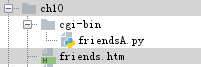
3.看下html代码和python cgi脚本代码都是些什么内容
friends.htm
 <HTML><HEAD><TITLE>

 Friends CGI Demo (static screen)

 </TITLE></HEAD>

 <BODY><H3>Friends list for: <I>NEW USER</I></H3>

 <FORM ACTION="/cgi-bin/friendsA.py">

 <B>Enter your Name:</B>

 <INPUT TYPE=text NAME=person VALUE="NEW USER" SIZE=15>

 <P><B>How many friends do you have?</B>

 <INPUT TYPE=radio NAME=howmany VALUE="0" CHECKED> 0

 <INPUT TYPE=radio NAME=howmany VALUE="10"> 10

 <INPUT TYPE=radio NAME=howmany VALUE="25"> 25

 <INPUT TYPE=radio NAME=howmany VALUE="50"> 50

 <INPUT TYPE=radio NAME=howmany VALUE="100"> 100

 <P><INPUT TYPE=submit></FORM></BODY></HTML>
friends.htm
friendsA.py
 #!/usr/bin/env python

 import cgi

 reshtml = '''Content-Type: text/html\n

 <HTML><HEAD><TITLE>

 Friends CGI Demo (dynamic screen)

 </TITLE></HEAD>

 <BODY><H3>Friends list for: <I>%s</I></H3>

 Your name is: <B>%s</B><P>

 You have <B>%s</B> friends.

 </BODY></HTML>'''

 form = cgi.FieldStorage()

 who = form['person'].value

 howmany = form['howmany'].value

 print reshtml % (who, who, howmany)
friendsA.py
4.运行起来看看,浏览器输入
http://localhost:8000/friends.htm
结果可以看到

我们随意添加一个,点提交
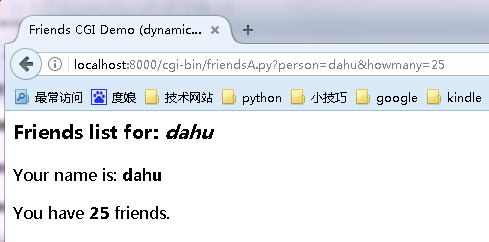
可以看到正文部分变化了,同时地址内容也变化了,

再看下终端,也在有相应的显示。
二、单个脚本文件
1.服务器照常开启,脚本文件friendsB.py放在cgi-bin目录下

2.代码内容
#coding=utf-8

import cgi

header = 'Content-Type: text/html\n\n'  #需要先返回一个适当的http头文件,再返回结果页面

formhtml = '''<HTML><HEAD><TITLE>

Friends CGI Demo</TITLE></HEAD>

<BODY><H3>Friends list for: <I>NEW USER</I></H3>

<FORM ACTION="/cgi-bin/friendsB.py">

<B>Enter your Name:</B>

<INPUT TYPE=hidden NAME=action VALUE=edit>

<INPUT TYPE=text NAME=person VALUE="NEW USER" SIZE=15>

<P><B>How many friends do you have?</B>

%s

<P><INPUT TYPE=submit></FORM></BODY></HTML>'''

fradio = '<INPUT TYPE=radio NAME=howmany VALUE="%s" %s> %s\n'

def showForm():

    friends = []

    for i in (0, 10, 25, 50, 100):

        checked = ''

        if i == 0:

            checked = 'CHECKED'

        friends.append(fradio % (str(i), checked, str(i)))  #灵活输出,避免太多重复

    print '%s%s' % (header, formhtml % ''.join(friends))    #表单页面http头文件和内容都加进去了

reshtml = '''<HTML><HEAD><TITLE>

Friends CGI Demo</TITLE></HEAD>

<BODY><H3>Friends list for: <I>%s</I></H3>

Your name is: <B>%s</B><P>

You have <B>%s</B> friends.

</BODY></HTML>'''

def doResults(who, howmany):

    print header + reshtml % (who, who, howmany)    #结果页面也都加进去了

def process():

    form = cgi.FieldStorage()

    if 'person' in form:

        who = form['person'].value

    else:

        who = 'NEW USER'

    if 'howmany' in form:

        howmany = form['howmany'].value

    else:

        howmany = 0

    if 'action' in form:            #action变量用来判断选择哪个页面,表单页面、结果页面

        doResults(who, howmany)

    else:

        showForm()

if __name__ == '__main__':

    process()
friendsB.py
3.浏览器输入
http://localhost:8000/cgi-bin/friendsB.py
会看到一样的界面,提交后也是一样的
三、单个脚本文件,带有用户交互和错误处理
1.代码
#coding=utf-8

#!/usr/bin/env python

import cgi

from urllib import quote_plus

header = 'Content-Type: text/html\n\n'

url = '/cgi-bin/friendsC.py'

errhtml = '''<HTML><HEAD><TITLE>

Friends CGI Demo</TITLE></HEAD>

<BODY><H3>ERROR</H3>

<B>%s</B><P>

<FORM><INPUT TYPE=button VALUE=Back

ONCLICK="window.history.back()"></FORM>

</BODY></HTML>'''   #后退按钮

def showError(error_str):   #错误处理部分

    print header + errhtml % error_str

formhtml = '''<HTML><HEAD><TITLE>

Friends CGI Demo</TITLE></HEAD>

<BODY><H3>Friends list for: <I>%s</I></H3>

<FORM ACTION="%s">

<B>Enter your Name:</B>

<INPUT TYPE=hidden NAME=action VALUE=edit>

<INPUT TYPE=text NAME=person VALUE="%s" SIZE=15>

<P><B>How many friends do you have?</B>

%s

<P><INPUT TYPE=submit></FORM></BODY></HTML>'''

fradio = '<INPUT TYPE=radio NAME=howmany VALUE="%s" %s> %s\n'

def showForm(who, howmany):

    friends = []

    for i in (0, 10, 25, 50, 100):

        checked = ''

        if str(i) == howmany:   #多传一个参数,用来记录'历史数据'

            checked = 'CHECKED'

        friends.append(fradio % (str(i), checked, str(i)))

    print '%s%s' % (header, formhtml % (

        who, url, who, ''.join(friends)))

reshtml = '''<HTML><HEAD><TITLE>

Friends CGI Demo</TITLE></HEAD>

<BODY><H3>Friends list for: <I>%s</I></H3>

Your name is: <B>%s</B><P>

You have <B>%s</B> friends.

<P>Click <A HREF="%s">here</A> to edit your data again.

</BODY></HTML>'''

def doResults(who, howmany):

    newurl = url + '?action=reedit&person=%s&howmany=%s' % (

        quote_plus(who), howmany)               #表单记录包含

    print header + reshtml % (who, who, howmany, newurl)    #再次编辑回到表单界面

def process():

    error = ''

    form = cgi.FieldStorage()

    if 'person' in form:

        who = form['person'].value.title()

    else:

        who = 'NEW USER'

    if 'howmany' in form:   #根据howmany字段判定有没有选择人数,没有就算有错误,返回错误页面

        howmany = form['howmany'].value

    else:

        if 'action' in form and \

                form['action'].value == 'edit':

            error = 'Please select number of friends.'

        else:

            howmany = 0

    if not error:

        if 'action' in form and \

                form['action'].value != 'reedit':

            doResults(who, howmany)

        else:

            showForm(who, howmany)

    else:

        showError(error)

if __name__ == '__main__':

    process()
friendsC
2.用法和B一样,代码结构也差不多,看下使用效果
浏览器输入地址后

提交用户名,但是不提交数量
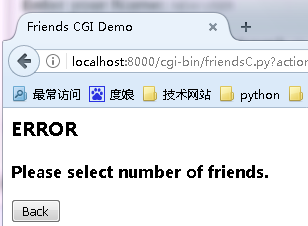
点back返回,选数量

点击here,里面是个引用

会回到提交表单的地方,保存了"历史记录"
至此一个简单的cgi应用程序完成了。
搭建简单的CGI应用程序的更多相关文章
- 简单说明CGI是什么
html { font-family: sans-serif } body { margin: 0 } article,aside,details,figcaption,figure,footer,h ...
- 简单说明CGI和动态请求是什么
1. CGI是什么 CGI是common gateway interface的缩写,大家都译作通用网关接口,但很不幸,我们无法见名知意. 我们知道,web服务器所处理的内容都是静态的,要想处理动态内容 ...
- 拿nodejs快速搭建简单Oauth认证和restful API server攻略
拿nodejs快速搭建简单Oauth认证和restful API server攻略:http://blog.csdn.net/zhaoweitco/article/details/21708955 最 ...
- 转:windows下使用gvim搭建简单的IDE编译环境(支持C/C++/Python等)
原文来自于:http://www.cnblogs.com/zhuyp1015/archive/2012/06/16/2552269.html 使用gvim在windows环境下搭建简单的IDE环境可以 ...
- mongoDB介绍、安装、搭建简单的mongoDB服务器(一)
相关网站 1. http://www.mongodb.org/ 官网,可以下载安装程序,和doc,和驱动等. 2. http://www.mongoing.com/ 国内官方网站,博客,问题谈论等 ...
- JMS学习(四)-一个简单的聊天应用程序分析
一,介绍 本文介绍一个简单的聊天应用程序:生产者将消息发送到Topic上,然后由ActiveMQ将该消息Push给订阅了该Topic的消费者.示例程序来自于<JAVA 消息服务--第二版 Mar ...
- 基于python2【重要】怎么自行搭建简单的web服务器
基本流程:1.需要的支持 1)python本身有SimpleHTTPServer 2)ForkStaticServer.py支持,该文件放在python7目录下 3)将希望共享 ...
- 写了一个简单的CGI Server
之前看过一些开源程序的源码,也略微知道些Apache的CGI处理程序架构,于是用了一周时间,用C写了一个简单的CGI Server,代码算上头文件,一共1200行左右,难度中等偏上,小伙伴可以仔细看看 ...
- 玩转Node.js(四)-搭建简单的聊天室
玩转Node.js(四)-搭建简单的聊天室 Nodejs好久没有跟进了,最近想用它搞一个聊天室,然后便偶遇了socket.io这个东东,说是可以用它来简单的实现实时双向的基于事件的通讯机制.我便看了一 ...
随机推荐
- HDU--2363
原题链接:http://acm.hdu.edu.cn/showproblem.php?pid=2363 分析:最短路+二分. #include<iostream> #include< ...
- SQL Server清理Log文件
---SQL 2008 在SQL2008中清除日志就必须在简单模式下进行,等清除动作完毕再调回到完全模式. USE [master] go ALTER DATABASE PS SET RECOVERY ...
- python---Scrapy模块的使用(一)
Scrapy是一个为了爬取网站数据,提取结构性数据而编写的应用框架. 其可以应用在数据挖掘,信息处理或存储历史数据等一系列的程序中. Scrapy 使用了 Twisted异步网络库来处理网络通讯.整体 ...
- HBase基本操作-Java实现
创建Table public static void createTable(String tableName){ try { HBaseAdmin hbaseAdmin = new HBaseAdm ...
- 2017 Multi-University Training Contest - Team 1
1006(6038) 就是对a,b分别求循环节,先统计一下b中所有长度循环节的出现次数,再对a求循环节时只要满足: a的循环节长度 % b的循环节长度=0,那么这个b的循环节就可以计入答案,尼玛只要是 ...
- Struts2版本更新报错:>>> ActionContextCleanUp <<< is deprecated! Please use the new filters!
因低版本Struts2存在漏洞,更新为较新的版本.启动时,报如下警告信息: ************************************************************** ...
- 关于jQuery UI 使用心得及技巧
1 jQuery UI 有时你仅仅是为了实现一个渐变的动画效果而不得不把javascrip 重新学习一遍然后书写大量代码.直到jQuery的出现,让开发人员从一大堆繁琐的js代码中解脱,取而代之几行j ...
- three.js轨道控制器OrbitControls.js
https://blog.csdn.net/qq_37338983/article/details/78575333 文章地址
- idea docker 连接 linux 上的 docker
安装插件 Docker插件,首先需要在你的IDEA中安装Docker插件,定位到File-Setting-Plugins后搜索Docker Integration安装 配置Docker服务器,在IDE ...
- 关于servlet中重定向、转发的地址问题
先写一个正斜杠"/",再判断是服务器使用该地址还是网站使用该地址. 访问网络资源用/,访问硬盘资源用\. 例如: 转发: request.getRequestDispat ...