
android RecyclerView (二) ItemDecoration 详解
RecyclerView 已经推出了一年多了,日常开发中也已经彻底从 ListView 迁移到了 RecyclerView,但前两天有人在一个安卓群里面问了个关于最顶上的 item view 加蒙层的问题,被人用 ItemDecoration 完美解决。此时我发现自己对 RecyclerView 的使用一直太过基本,更深入更强大的功能完全没有涉及,像 ItemDecoration, ItemAnimator, SmoothScroller, OnItemTouchListener, LayoutManager 之类,以及 RecyclerView 重用 view 的原理。网上也有很多对 RecyclerView 使用的讲解博客,要么讲的内容非常少,要么提到了高级功能,但是并没讲代码为什么这样写,每个方法和参数的含义是什么,像张鸿洋的博客,也讲了 ItemDecoration 的使用,但是看了仍然云里雾里,只能把他的代码拿来用,并不能根据自己的需求编写自己的 ItemDecoration。
在这个系列中,我将对上述各个部分进行深入研究,目标就是看了这一系列的文章之后,开发者可以清楚快捷的根据自己的需求,编写自己需要的各个高级模块。本系列第一篇就聚焦在:RecyclerView.ItemDecoration。本文涉及到的完整代码可以在Github 获取。
TL; DR
- getItemOffsets 中为 outRect 设置的4个方向的值,将被计算进所有 decoration 的尺寸中,而这个尺寸,被计入了 RecyclerView 每个 item view 的 padding 中
- 在 onDraw 为 divider 设置绘制范围,并绘制到 canvas 上,而这个绘制范围可以超出在 getItemOffsets 中设置的范围,但由于 decoration 是绘制在 child view 的底下,所以并不可见,但是会存在 overdraw
- decoration 的 onDraw,child view 的 onDraw,decoration 的 onDrawOver,这三者是依次发生的
- onDrawOver 是绘制在最上层的,所以它的绘制位置并不受限制
RecyclerView.ItemDecoration
这个类包含三个方法 1:
onDraw(Canvas c, RecyclerView parent, State state)onDrawOver(Canvas c, RecyclerView parent, State state)getItemOffsets(Rect outRect, View view, RecyclerView parent, State state)
getItemOffsets
官方样例的 DividerItemDecoration里面是这样实现的:
if (mOrientation == VERTICAL_LIST) {

    outRect.set(0, 0, 0, mDivider.getIntrinsicHeight());

} else {

    outRect.set(0, 0, mDivider.getIntrinsicWidth(), 0);

}
这个outRect设置的四个值是什么意思呢?先来看看它是在哪里调用的,它在RecyclerView中唯一被调用的地方就是 getItemDecorInsetsForChild(View child) 函数。
Rect getItemDecorInsetsForChild(View child) {

    final LayoutParams lp = (LayoutParams) child.getLayoutParams();

    if (!lp.mInsetsDirty) {

        return lp.mDecorInsets;

    }

    final Rect insets = lp.mDecorInsets;

    insets.set(0, 0, 0, 0);

    final int decorCount = mItemDecorations.size();

    for (int i = 0; i < decorCount; i++) {

        mTempRect.set(0, 0, 0, 0);

        mItemDecorations.get(i).getItemOffsets(mTempRect, child, this, mState);

        insets.left += mTempRect.left;

        insets.top += mTempRect.top;

        insets.right += mTempRect.right;

        insets.bottom += mTempRect.bottom;

    }

    lp.mInsetsDirty = false;

    return insets;

}
可以看到,getItemOffsets 函数中设置的值被加到了 insets 变量中,并被该函数返回,那么 insets 又是啥呢?
insets 是啥?
根据Inset Drawable文档,它的使用场景是:当一个view需要的背景小于它的边界时。例如按钮图标较小,但是我们希望按钮有较大的点击热区,一种做法是使用ImageButton,设置background="@null",把图标资源设置给src属性,这样ImageButton可以大于图标,而不会导致图标也跟着拉伸到ImageButton那么大。那么使用Inset drawable也能达到这样的目的。但是相比之下有什么优势呢?src属性也能设置selector drawable,所以点击态也不是问题。也许唯一的优势就是更“优雅”吧 :)
回到正题,getItemDecorInsetsForChild 函数中会重置 insets 的值,并重新计算,计算方式就是把所有 ItemDecoration 的 getItemOffsets 中设置的值累加起来 2,而这个 insets 实际上是 RecyclerView 的 child 的 LayoutParams 中的一个属性,它会在 getTopDecorationHeight, getBottomDecorationHeight 等函数中被返回,那么这个 insets 的意义就很明显了,它记录的是所有 ItemDecoration 所需要的 3尺寸的总和。
而在 RecyclerView 的 measureChild(View child, int widthUsed, int heightUsed) 函数中,调用了 getItemDecorInsetsForChild,并把它算在了 child view 的 padding 中。
public void measureChild(View child, int widthUsed, int heightUsed) {

    final LayoutParams lp = (LayoutParams) child.getLayoutParams();

    final Rect insets = mRecyclerView.getItemDecorInsetsForChild(child);

    widthUsed += insets.left + insets.right;

    heightUsed += insets.top + insets.bottom;

    final int widthSpec = getChildMeasureSpec(getWidth(), getWidthMode(),

            getPaddingLeft() + getPaddingRight() + widthUsed, lp.width,

            canScrollHorizontally());

    final int heightSpec = getChildMeasureSpec(getHeight(), getHeightMode(),

            getPaddingTop() + getPaddingBottom() + heightUsed, lp.height,

            canScrollVertically());

    if (shouldMeasureChild(child, widthSpec, heightSpec, lp)) {

        child.measure(widthSpec, heightSpec);

    }

}
上面这段代码中调用 getChildMeasureSpec 函数的第三个参数就是 child view 的 padding,而这个参数就把 insets 的值算进去了。那么现在就可以确认了,getItemOffsets 中为 outRect 设置的4个方向的值,将被计算进所有 decoration 的尺寸中,而这个尺寸,被计入了 RecyclerView 每个 item view 的 padding 中。
PoC
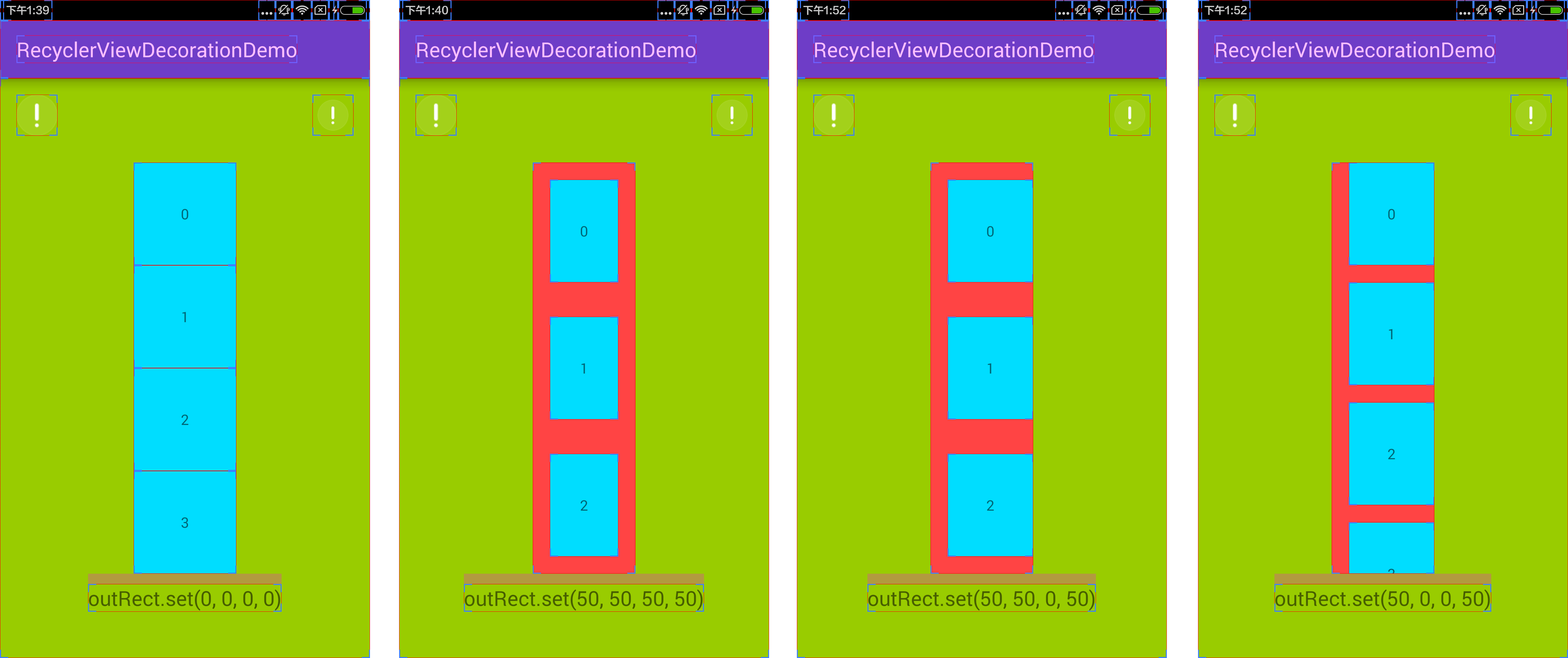
这一步测试主要是对 getItemOffsets 函数传入的 outRect 参数各个值的设置,以证实上述分析的结论。
可以看到,当 left, top, right, bottom 全部设置为50时,RecyclerView 的每个 item view 各个方向的 padding 都增加了,对比各种情况,确实 getItemOffsets 中为 outRect 设置的值都将被计入 RecyclerView 每个 item view 的 padding 中。
onDraw
先来看看官方样例的 DividerItemDecoration实现:
public void drawVertical(Canvas c, RecyclerView parent) {

    final int left = parent.getPaddingLeft();

    final int right = parent.getWidth() - parent.getPaddingRight();

    final int childCount = parent.getChildCount();

    for (int i = 0; i < childCount; i++) {

        final View child = parent.getChildAt(i);

        final RecyclerView.LayoutParams params = (RecyclerView.LayoutParams) child

                .getLayoutParams();

        final int top = child.getBottom() + params.bottomMargin +

                Math.round(ViewCompat.getTranslationY(child));

        final int bottom = top + mDivider.getIntrinsicHeight();

        mDivider.setBounds(left, top, right, bottom);

        mDivider.draw(c);

    }

}
drawVertical 是为纵向的 RecyclerView 绘制 divider,遍历每个 child view 4 ,把 divider 绘制到 canvas 上,而 mDivider.setBounds 则设置了 divider 的绘制范围。其中,left 设置为 parent.getPaddingLeft(),也就是左边是 parent 也就是 RecyclerView 的左边界加上 paddingLeft 之后的位置,而 right 则设置为了 RecyclerView 的右边界减去 paddingRight 之后的位置,那这里左右边界就是 RecyclerView 的内容区域 5了。top 设置为了 child 的 bottom 加上 marginBottom 再加上 translationY,这其实就是 child view 的下边界 6,bottom 就是 divider 绘制的下边界了,它就是简单地 top 加上 divider 的高度。
PoC
这一步测试主要是对 onDraw 函数中对 divider 的绘制边界的设置。
可以看到,当我们把 left, right, top 7 设置得和官方样例一样,bottom 设置为 top + 25,注意,这里 getItemOffsets 对 outSets 的设置只有 bottom = 50,也就是 decoration 高度为50,我们可以看到,decoration 的上半部分就绘制为黑色了,下半部分没有绘制。而如果设置top = child.getBottom() + params.bottomMargin - 25,bottom = top + 50,就会发现 child view 的底部出现了 overdraw。所以这里我们可以得出结论:在 onDraw 为 divider 设置绘制范围,并绘制到 canvas 上,而这个绘制范围可以超出在 getItemOffsets 中设置的范围,但由于 decoration 是绘制在 child view 的底下,所以并不可见,但是会存在 overdraw。
onDrawOver
有一点需要注意:decoration 的 onDraw,child view 的 onDraw,decoration 的 onDrawOver,这三者是依次发生的。而由于 onDrawOver 是绘制在最上层的,所以它的绘制位置并不受限制(当然,decoration 的 onDraw 绘制范围也不受限制,只不过不可见),所以利用 onDrawOver 可以做很多事情,例如为 RecyclerView 整体顶部绘制一个蒙层,或者为特定的 item view 绘制蒙层。这里就不单独进行测试了,请见下一节的整体效果。
All in together
实现的效果:除了最后一个 item view,底部都有一个高度为25的黑色 divider,为整个 RecyclerView 的顶部绘制了一个渐变的蒙层。效果图如下:
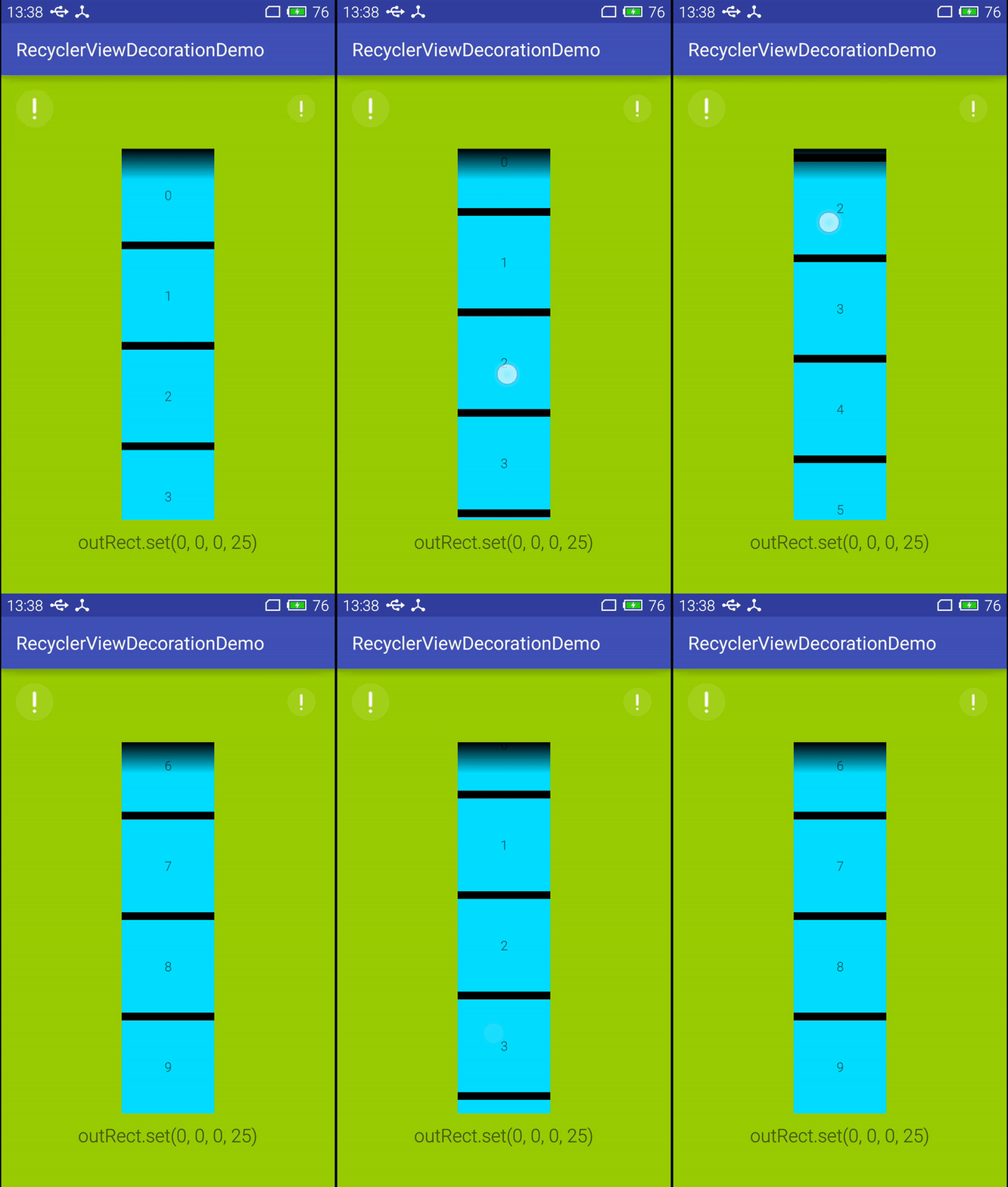
小结
- getItemOffsets 中为 outRect 设置的4个方向的值,将被计算进所有 decoration 的尺寸中,而这个尺寸,被计入了 RecyclerView 每个 item view 的 padding 中
- 在 onDraw 为 divider 设置绘制范围,并绘制到 canvas 上,而这个绘制范围可以超出在 getItemOffsets 中设置的范围,但由于 decoration 是绘制在 child view 的底下,所以并不可见,但是会存在 overdraw
- decoration 的 onDraw,child view 的 onDraw,decoration 的 onDrawOver,这三者是依次发生的
- onDrawOver 是绘制在最上层的,所以它的绘制位置并不受限制
脚注
不算被 Deprecated 的方法 ↩
把 left, top, right, bottom 4个属性分别累加 ↩
也就是在 getItemOffsets 函数中为 outRect 参数设置的4个属性值 ↩
child view,并不是 adapter 的每一个 item,只有可见的 item 才会绘制,才是 RecyclerView 的 child view ↩
可以类比 CSS 的盒子模型,一个 view 包括 content, padding, margin 三个部分,content 和 padding 加起来就是 view 的尺寸,而 margin 不会增加 view 的尺寸,但是会影响和其他 view 的位置间距,但是安卓的 view 没有 margin 的合并 ↩
bottom 就是 content 的下边界加上 paddingBottom,而为了不“吃掉” child view 的底部边距,所以就加上 marginBottom,而 view 还能设置 translation 属性,用于 layout 完成之后的再次偏移,同理,为了不“吃掉”这个偏移,所以也要加上 translationY ↩
这里由于并没有对 child view 设置 translation,为了代码简短,就没有减去 translationY,实际上是需要的 ↩
借鉴:https://blog.piasy.com/2016/03/26/Insight-Android-RecyclerView-ItemDecoration/
android RecyclerView (二) ItemDecoration 详解的更多相关文章
- 《Android NFC 开发实战详解 》简介+源码+样章+勘误ING
<Android NFC 开发实战详解>简介+源码+样章+勘误ING SkySeraph Mar. 14th 2014 Email:skyseraph00@163.com 更多精彩请直接 ...
- ANDROID L——Material Design详解(UI控件)
转载请注明本文出自大苞米的博客(http://blog.csdn.net/a396901990),谢谢支持! Android L: Google已经确认Android L就是Android Lolli ...
- 给 Android 开发者的 RxJava 详解
我从去年开始使用 RxJava ,到现在一年多了.今年加入了 Flipboard 后,看到 Flipboard 的 Android 项目也在使用 RxJava ,并且使用的场景越来越多 .而最近这几个 ...
- [转]ANDROID L——Material Design详解(动画篇)
转载请注明本文出自大苞米的博客(http://blog.csdn.net/a396901990),谢谢支持! 转自:http://blog.csdn.net/a396901990/article/de ...
- ViewPager 详解(二)---详解四大函数
前言:上篇中我们讲解了如何快速实现了一个滑动页面,但问题在于,PageAdapter必须要重写的四个函数,它们都各有什么意义,在上节的函数内部为什么要这么实现,下面我们就结合Android的API说明 ...
- Android屏幕适配问题详解
上篇-Android本地化资源目录详解 :http://www.cnblogs.com/steffen/p/3833048.html 单位: px(像素):屏幕上的点. in(英寸):长度单位. mm ...
- Android的init过程详解(一)
Android的init过程详解(一) Android的init过程(二):初始化语言(init.rc)解析 本文使用的软件版本 Android:4.2.2 Linux内核:3.1.10 本文及后续几 ...
- android ------- 开发者的 RxJava 详解
在正文开始之前的最后,放上 GitHub 链接和引入依赖的 gradle 代码: Github: https://github.com/ReactiveX/RxJava https://github. ...
- Android JNI作用及其详解
Android JNI作用及其详解 Java Native Interface (JNI)标准是Java平台的一部分,它允许Java代码和其他语言写的代码进行交互.JNI 是本地编程接口,它使得在 J ...
随机推荐
- Codeforces Round #286 (Div. 1) D. Mr. Kitayuta's Colorful Graph
D - Mr. Kitayuta's Colorful Graph 思路:我是暴力搞过去没有将答案离线,感觉将答案的离线的方法很巧妙.. 对于一个不大于sqrt(n) 的块,我们n^2暴力枚举, 对于 ...
- LoadRunner:VuGen开发脚本步骤(一)
一.测试过程 1.规划测试:分析应用程序.定义测试目标.方案实施. 2.创建Vuser脚本. 3.创建方案:方案包括运行 Vuser 的计算机的列表.运行 Vuser 脚本的列表以及在方案执行期间运行 ...
- 【C#】Unicode的流言终结者和编码大揭秘
如果你是一个生活在2003年的程序员,却不了解字符.字符集.编码和Unicode这些基础知识.那你可要小心了,要是被我抓到你,我会让你在潜水艇里剥六个月洋葱来惩罚你. 这个邪恶的恐吓是Joel Spo ...
- gVim 启动时窗口自动居中
最近折腾 vim, 除了配置巨麻烦外, 另一个很蛋疼的就是窗口位置问题了, 折腾了半天无法启动时自动居中, 找遍各地也只有保存上次位置, 下次启动时恢复的方法 废话不多说, 直接上代码, 丢到 vim ...
- Educational Codeforces Round 38 部分题解
D. Buy a Ticket 分析 建一个源点,连向所有结点,边的花费为那个结点的花费,图中原有的边花费翻倍,最后跑一遍最短路即可. code #include<bits/stdc++.h&g ...
- Xcode_7_GM_seed.dmg下载
Xcode_7_GM_seed.dmg下载 Xcode_7_GM_seed.dmg 免费下载链接: http://pan.baidu.com/s/1pJ7oGAZ 密码: y5bx
- PHP设置会话(Session)超时过期时间实现登录时间限制[转]
用户登录系统60分钟后如果没有操作就自动退出 第一种方法即设置php.ini配置文件,设置session.gc_maxlifetime和session.cookie_lifetime节点属性值,当然也 ...
- os.path.dirname(__file__)使用
os.path.dirname(__file__)使用 该测试脚本所在的位置:D:\第1层\第2层\第3层\第4层\第5层\test11.py test11.py import os #该文件所在位置 ...
- [BZOJ4423][AMPPZ2013]Bytehattan(对偶图+并查集)
建出对偶图,删除一条边时将两边的格子连边.一条边两端连通当且仅当两边的格子不连通,直接并查集处理即可. #include<cstdio> #include<algorithm> ...
- LOJ2758 年轮蛋糕
JOI 君马上要和妹妹 JOI 子和 JOI 美一起吃小吃.今天的小吃是他们三个人都很喜欢的年轮蛋糕. 年轮蛋糕是像下图一样呈圆筒形的蛋糕.为了把蛋糕分给三个人,JOI 君必须沿着半径方向切 3 刀, ...