
02docker核心概念
1:docker三大核心概念
| 核心概念 | 描述 |
|---|---|
| 镜像 | Docker镜像类似于虚拟机镜像,可以将它理解为一个只读的模板。 |
| 容器 | Docker容器类似于一个轻量级的沙箱,Docker利用容器来运行和隔离应用。 容器是从镜像创建的应用运行实例。它可以启动、开始、停止、删除,而这些容器都是彼此相互隔离、互不可见的。 |
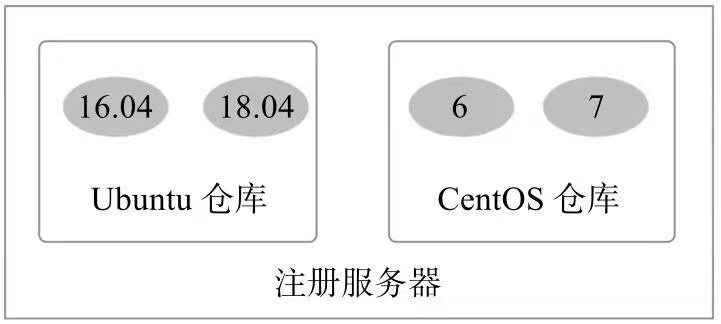
| 仓库 | Docker仓库类似于代码仓库,是Docker集中存放镜像文件的场所 |
区分:注册服务器和仓库
2:ubuntu下安装docker
安装docker前关闭selinux
手动添加软件源安装:
1:ubuntu@ubuntu:~$ uname -a    #内核版本至少3.10才支持docker

Linux ubuntu 5.3.0-19-generic #20-Ubuntu SMP Fri Oct 18 09:04:39 UTC 2019 x86_64 x86_64 x86_64 GNU/Linux

2.安装如下两个软件包---让docker使用aufs存储

ubuntu@ubuntu:~$ sudo apt-get update

ubuntu@ubuntu:~$ sudo apt upgrade

ubuntu@ubuntu:~$ sudo apt install --reinstall linux-image-generic   #重新升级到最新内核

ubuntu@ubuntu:~$ sudo apt install linux-modules-extra-$(uname -r) linux-image-extra-virtual

#linux-image-generic应该已经安装了相关的linux-image-extra包,但名称已更改为linux-modules-extra

以上操作解决报错:

Reading package lists... Done

Building dependency tree

Reading state information... Done

E: Unable to locate package linux-image-extra-5.3.0-19-generic

E: Couldn't find any package by glob 'linux-image-extra-5.3.0-19-generic'

E: Couldn't find any package by regex 'linux-image-extra-5.3.0-19-generic'

3:添加镜像源

-首先需要安装apt-transport-https等软件包

ubuntu@ubuntu:~$ sudo apt-get update

ubuntu@ubuntu:~$ sudo apt-get install \

     apt-transport-https \

     ca-certificates \

     curl \

     software-properties-common

-添加源的gpg密钥

ubuntu@ubuntu:~$ curl -fsSL http://mirrors.ustc.edu.cn/docker-ce/linux/ubuntu/gpg | sudo apt-key add -

OK

-添加成功后

ubuntu@ubuntu:~$ sudo apt-get update

-开始安装docker

ubuntu@ubuntu:~$ sudo apt-get install docker-ce

Reading package lists... Done

Building dependency tree

Reading state information... Done

Package docker-ce is not available, but is referred to by another package.

This may mean that the package is missing, has been obsoleted, or

is only available from another source

E: Package 'docker-ce' has no installation candidate

报错解决:

手动加入源

ubuntu@ubuntu:~$ cd /etc/apt/sources.list.d    #进入到这个目录

ubuntu@ubuntu:/etc/apt/sources.list.d$ sudo vi docker.list  #添加如下源

deb https://download.docker.com/linux/ubuntu zesty edge

ubuntu@ubuntu:/etc/apt/sources.list.d$ sudo apt update     #更新源

ubuntu@ubuntu:~$ sudo apt install docker-ce                 # ----开始安装

安装完成后检查:

ubuntu@ubuntu:~$ docker version               --检查是否安装成功

###配置docker服务

1.ubuntu@ubuntu:~$ sudo usermod -aG docker $USER     #避免每次切换到sudo身份

2.Docker服务的默认配置文件为/etc/default/docker,可以通过修改其中的DOCKER_OPTS来修改服务启动的参数,例如让   Docker服务开启网络2375端口的监听:

  DOCKER_OPTS="$DOCKER_OPTS -H tcp://0.0.0.0:2375 -H unix:///var/run/docker.sock"

###docker开启远程tcp监听端口

3.ubuntu@ubuntu:~$ sudo service docker restart    重启服务
官方提供的脚本安装:
sudo curl -sSL https://get.docker.com/ | sh
3:redhat7安装docker
关闭selinux
[root@registry ~]# getenforce

Enforcing

[root@registry ~]# cat /etc/selinux/config

# This file controls the state of SELinux on the system.

# SELINUX= can take one of these three values:

#     enforcing - SELinux security policy is enforced.

#     permissive - SELinux prints warnings instead of enforcing.

#     disabled - No SELinux policy is loaded.

SELINUX=disabled

# SELINUXTYPE= can take one of these two values:

#     targeted - Targeted processes are protected,

#     minimum - Modification of targeted policy. Only selected processes are protected.

#     mls - Multi Level Security protection.

SELINUXTYPE=targeted

reboot
1:更新

[root@localhost ~]# yum install update

2:支持devicemapper存储类型

[root@localhost ~]# sudo yum install -y  yum-utils   device-mapper-persistent-data

3:添加docker稳定的yum软件源

[root@localhost ~]# sudo yum-config-manager  --add-repo https://download.docker.com/linux/centos/docker-ce.repo

4:更新yum软件源并安装

[root@localhost ~]# sudo yum update

5:安装

[root@localhost ~]#yum install install -y docker-ce

报错,有软件冲突

Error: initscripts conflicts with redhat-release-server-7.0-1.el7.x86_64

解决办法:

[root@localhost ~]#  rpm -e redhat-release-server-7.0-1.el7.x86_64 --nodeps

再重新安装

[root@localhost ~]#yum install install -y docker-ce

安装完成后:

     Docs: https://docs.docker.com

[root@localhost ~]# docker version

Client:

 Version:           18.06.3-ce

 API version:       1.38

 Go version:        go1.10.3

 Git commit:        d7080c1

 Built:             Wed Feb 20 02:26:51 2019

 OS/Arch:           linux/amd64

 Experimental:      false

Cannot connect to the Docker daemon at unix:///var/run/docker.sock. Is the docker daemon running?

[root@localhost ~]# systemctl start docker

Job for docker.service failed because the control process exited with error code. See "systemctl status docker.service" and "journalctl -xe" for details.

有一个异常,只启动了client,server没有起来。

[root@localhost ~]# journalctl -xe |grep mkfs

Nov 13 18:10:14 localhost.localdomain dockerd[2567]: time="2019-11-13T18:10:14.159056463-05:00" level=info msg="Creating filesystem xfs on device docker-253:0-100841185-base, mkfs args: [-m crc=0,finobt=0 /dev/mapper/docker-253:0-100841185-base]" storage-driver=devicemapper

Nov 13 18:10:14 localhost.localdomain dockerd[2616]: time="2019-11-13T18:10:14.646244369-05:00" level=info msg="Creating filesystem xfs on device docker-253:0-100841185-base, mkfs args: [-m crc=0,finobt=0 /dev/mapper/docker-253:0-100841185-base]" storage-driver=devicemapper

Nov 13 18:10:15 localhost.localdomain dockerd[2644]: time="2019-11-13T18:10:15.165383379-05:00" level=info msg="Creating filesystem xfs on device docker-253:0-100841185-base, mkfs args: [-m crc=0,finobt=0 /dev/mapper/docker-253:0-100841185-base]" storage-driver=devicemapper

Nov 13 18:15:30 localhost.localdomain dockerd[2692]: time="2019-11-13T18:15:30.268616422-05:00" level=info msg="Creating filesystem xfs on device docker-253:0-100841185-base, mkfs args: [-m crc=0,finobt=0 /dev/mapper/docker-253:0-100841185-base]" storage-driver=devicemapper

找到根本原因是:

mkfs.xfs版本太低,遂更新:

[root@localhost ~]# yum update xfsprogs   #更新软件版本

[root@localhost ~]# systemctl start docker.service    #重启docker服务

[root@localhost ~]# systemctl enable docker.service    #配置开机启动

Created symlink from /etc/systemd/system/multi-user.target.wants/docker.service to /usr/lib/systemd/system/docker.service.

[root@localhost ~]# docker version

Client:

 Version:           18.06.3-ce

 API version:       1.38

 Go version:        go1.10.3

 Git commit:        d7080c1

 Built:             Wed Feb 20 02:26:51 2019

 OS/Arch:           linux/amd64

 Experimental:      false

Server:

 Engine:

  Version:          18.06.3-ce

  API version:      1.38 (minimum version 1.12)

  Go version:       go1.10.3

  Git commit:       d7080c1

  Built:            Wed Feb 20 02:28:17 2019

  OS/Arch:          linux/amd64

  Experimental:     false
02docker核心概念的更多相关文章
- 领域驱动设计(DDD)部分核心概念的个人理解
领域驱动设计(DDD)是一种基于模型驱动的软件设计方式.它以领域为核心,分析领域中的问题,通过建立一个领域模型来有效的解决领域中的核心的复杂问题.Eric Ivans为领域驱动设计提出了大量的最佳实践 ...
- Javascript本质第一篇:核心概念
很多人在使用Javascript之前都至少使用过C++.C#或Java,面向对象的编程思想已经根深蒂固,恰好Javascript在语法上借鉴了Java,虽然方便了Javascript的入门,但要深入理 ...
- [程序设计语言]-[核心概念]-02:名字、作用域和约束(Bindings)
本系列导航 本系列其他文章目录请戳这里. 1.名字.约束时间(Binding Time) 在本篇博文开始前先介绍两个约定:第一个是“对象”,除非在介绍面向对象语言时,本系列中出现的对象均是指任何可以有 ...
- spring技术核心概念纪要
一.背景 springframework 从最初的2.5版本发展至今,期间已经发生了非常多的修正及优化.许多新特性及模块的出现,使得整个框架体系显得越趋庞大,同时也带来了学习及理解上的困难. 本文阐述 ...
- ElasticSearch学习笔记-01 简介、安装、配置与核心概念
一.简介 ElasticSearch是一个基于Lucene构建的开源,分布式,RESTful搜索引擎.设计用于云计算中,能够达到实时搜索,稳定,可靠,快速,安装使用方便.支持通过HTTP使用JSON进 ...
- Playmaker Input篇教程之引入的核心概念
Playmaker Input篇教程之引入的核心概念 Playmaker Input引入的核心概念 Playmaker引入了4个核心概念:状态机.动作.变量和事件.了解它们是学习操作Playmaker ...
- Maven的几个核心概念
POM (Project Object Model) 一个项目所有的配置都放置在 POM 文件中:定义项目的类型.名字,管理依赖关系,定制插件的行为等等.比如说,你可以配置 compiler 插件让它 ...
- 刀哥多线程GCD核心概念gcd
GCD GCD 核心概念 将任务添加到队列,并且指定执行任务的函数 任务使用 block 封装 任务的 block 没有参数也没有返回值 执行任务的函数 异步 dispatch_async 不用等待当 ...
- cocos2d-x一些核心概念截杀
Cocos2d-x中有很多概念,这些概念很多来源于动画.动漫和电影等行业,例如:导演.场景和层等概念,当然也有些有传统的游戏的概念.Cocos2d-x中核心概念:导演, 场景,层,节点,精灵,菜单动作 ...
随机推荐
- 【Eureka】Eureka 是什么
Eureka是什么? Eureka 是 Netflix 的一个子模块,也是核心模块之一.Eureka 是一个基于 Rest 的服务,用于定位服务,以实现云端中间层服务发现和故障转移.服务注册和发现对于 ...
- SRS之SrsHls::on_audio详解
1. SrsHls::on_audio 将音频数据封装到 ts 文件中. /* * mux the audio packet to ts. * @param shared_audio, directl ...
- Qt网络获取本机网络信息
下面我们就讲解如何获取自己电脑的IP地址以及其他网络信息.这一节中,我们会涉及到网络模块(QtNetwork Module)中的QHostInfo ,QHostAddress ,QNetworkInt ...
- other备忘
wps CONCATENATE 只是因为格式 设置成了文本,把这列 格式 设置成 常规,双击下 结果就出来了 https://zhidao.baidu.com/question/21208668961 ...
- 487-3279 字符串处理+MAP
487-3279 Time Limit: 2000MS Memory Limit: 65536K Total Submissions: 300264 Accepted: 53757 Descr ...
- 2.3 Go语言基础之数组
本文主要介绍Go语言中数组(array)及它的基本使用. 一.Array(数组) 数组是同一种数据类型元素的集合. 在Go语言中,数组从声明时就确定,使用时可以修改数组成员,但是数组大小不可变化. 基 ...
- python之crawlscrapy爬取某集团招聘信息以及招聘详情
针对这种招聘信息,使用crawlscrapy很适合. 1.settings.py # -*- coding: utf-8 -*- # Scrapy settings for gosuncn proje ...
- java 与 c# 3des 加解密
java 与 c# 3des 加解密 主要差异如下: 1. 对于待加密解密的数据,各自的填充模式不一样 C#的模式有:ANSIX923.ISO10126.None.PKCS7.Zero,而Jav ...
- Python multiprocess模块(上)
multiprocess模块 一. Process模块介绍 1. 直接使用Process模块创建进程 (1)主进程和子进程 (2)if __name__ == "__main__" ...
- Jmeter启动报错解决方案
安装好jmeter之后在启动Jmeter的过程中出现了如下的报错信息(大部分的原因是配置不对): /usr/local/Cellar/jmeter/5.1.1/libexec/bin/jmeter: ...