
CoreAnimation-09-模拟时钟
效果图
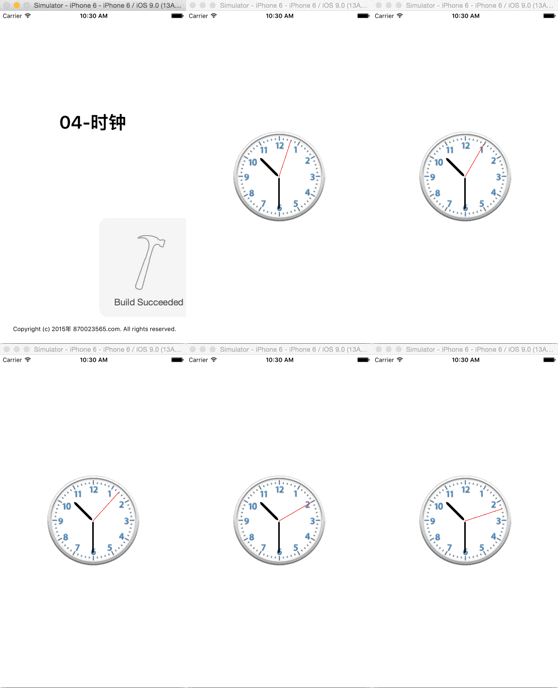
实现思路
- 该示例通过隐式动画实现
- 表盘通过显示在imageView中的一张图片来实现
- 在表盘上绘制(时分秒)三条直线,分别位于不同的图层,且时针位于最下层,秒针位于最上层
- 设置直线为圆角
- 直线的一段位于表盘的圆心
- 通过NSTimer定时器,使不同的图层定时执行对应的动画
实现步骤
通过storyboard创建表盘,并拥有它
@property (weak, nonatomic) IBOutlet UIImageView *clockView;
使用三个成员变量来保存时分秒三根表针位于的不同图层
@property (nonatomic, weak) CALayer *secondLayer;

@property (nonatomic, weak) CALayer *minuteLayer;

@property (nonatomic, weak) CALayer *hourLayer;
初始化所用到的常量
//将旋转角度转换为弧度制

#define angleToRadion(angle) ((angle) / 180.0 * M_PI)

//秒针每秒钟转过的角度

#define perSecondAngle 6

//分针每分钟转过的角度

#define perMinuteAngle 6

//时针每小时转过的角度

#define perHourAngle 30

//时针每分钟转过的角度

#define perMuniteHourAngle 0.5
设置时分秒三根表针
设置时针
- (void)setUpHourLayer

{

	//创建图层

	CALayer *layer = [CALayer layer];

	layer.backgroundColor = [UIColor blackColor].CGColor;

	layer.cornerRadius = 8;

	设置图层的锚点

	layer.anchorPoint = CGPointMake(0.5, 1);

	//设置图层的位置和尺寸

	layer.position = CGPointMake(kClockWith * 0.5, kClockWith * 0.5);

	layer.bounds = CGRectMake(0, 0, 5, kClockWith * 0.5 - 44);

	//将图层添加到父图层中

	[self.clockView.layer addSublayer:layer];

	self.hourLayer = layer;

}
设置分针
- (void)setUpMinuteLayer

{

    CALayer *layer = [CALayer layer];

    layer.backgroundColor = [UIColor blackColor].CGColor;

    layer.cornerRadius = 4;

    //设置锚点

    layer.anchorPoint = CGPointMake(0.5, 1);

    //设置位置和尺寸

    layer.position = CGPointMake(kClockWith * 0.5, kClockWith * 0.5);

    layer.bounds = CGRectMake(0, 0, 3, kClockWith * 0.5 - 34);

    //将图层添加到父图层中

    [self.clockView.layer addSublayer:layer];

    self.minuteLayer = layer;

}
设置秒针
- (void)setUpSecondLayer

{

    CALayer *layer = [CALayer layer];

    layer.backgroundColor = [UIColor redColor].CGColor;

    //设置锚点

    layer.anchorPoint = CGPointMake(0.5, 1);

    //设置位置和尺寸

    layer.position = CGPointMake(kClockWith * 0.5, kClockWith * 0.5);

    layer.bounds = CGRectMake(0, 0, 1, kClockWith * 0.5 - 24);

    //将图层添加到父图层中

    [self.clockView.layer addSublayer:layer];

    self.secondLayer = layer;

}
设置定时器,定时执行动画
[NSTimer scheduledTimerWithTimeInterval:1.0 target:self selector:@selector(timeChange) userInfo:nil repeats:YES];
设置定时器触发时调用的方式,添加动画代码
- (void)timeChange

{

    //获取日历对象

    NSCalendar *calendar = [NSCalendar currentCalendar];

    //获取日期组件

    NSDateComponents *components = [calendar components:NSCalendarUnitSecond | NSCalendarUnitMinute | NSCalendarUnitHour fromDate:[NSDate date]];

    //获取当前的时分秒值

    NSInteger second = components.second;

    NSInteger munite = components.minute;

    NSInteger hour = components.hour;

    //计算当前时分秒表针转过的角度(弧度制)

    CGFloat secondAngle = angleToRadion(second * perSecondAngle);

    CGFloat muniteAngle = angleToRadion(munite * perMinuteAngle);

    CGFloat hourAngle = angleToRadion(hour *perHourAngle + munite * perMuniteHourAngle);

    //修改时分秒表针位于的图层的transform属性,执行隐式动画

    self.secondLayer.transform = CATransform3DMakeRotation(secondAngle, 0, 0, 1);

    self.minuteLayer.transform = CATransform3DMakeRotation(muniteAngle, 0, 0, 1);

    self.hourLayer.transform = CATransform3DMakeRotation(hourAngle, 0, 0, 1);

}
CoreAnimation-09-模拟时钟的更多相关文章
- 一个模拟时钟的时间选择器 ClockPicker
最近开发的一个模拟时钟的时间选择器 ClockPicker,用于 Bootstrap,或者单独作为一个 jQuery 插件. 源代码托管在 GitHub 上: ClockPicker 最近项目中需要用 ...
- 模拟时钟(AnalogClock)和数字时钟(DigitalClock)
Demo2\clock_demo\src\main\res\layout\activity_main.xml <LinearLayout xmlns:android="http://s ...
- android脚步---数字时钟和模拟时钟
时钟UI组件是两个非常简单的组件,分为Digitalclock 和Analogclock, main.xml文件,书中程序有问题,加了两个组件,一个Button和一个<Chronometer ...
- Java多线程之sleep方法阻塞线程-模拟时钟
package org.study2.javabase.ThreadsDemo.status; import java.text.SimpleDateFormat; import java.util. ...
- css模拟时钟
css模拟时钟 思路: 画时钟数字(x,y)坐标 x = x0 + r*cos(deg) y = y0 + r*sin(deg) 知识点: 创建元素: createElement 添加元素: appe ...
- 【CSS3】纯CSS代码实现模拟时钟,+js对时功能。
使用CSS3纯代码来实现模拟时钟,及指针动画功能. 在这里主要使用到css3一些基本元素: border-radius:圆角边框,画圆形:表盘 Transform:变换,旋转,扭曲:刻度盘,指针形状 ...
- 模拟时钟(AnalogClock)
模拟时钟(AnalogClock) 显示一个带时钟和分针的表面 会随着时间的推移变化 常用属性: android:dial 可以为表面提供一个自定义的图片 下面我们直接看代码: 1.Activity ...
- Windows下编程--模拟时钟的实现
windows下编程--模拟时钟的实现: 主要可以分为几个步骤: (1) 编写按键事件处理(启动和停止时钟) (2) 编写时钟事件处理,调用显示时钟函数 (3) 编写显示时钟函数,要调用显 ...
- 变换CALayer锚点实现模拟时钟的动画
变换CALayer锚点实现模拟时钟的动画 变换锚点得需要一点理论知识,看下图就能明白:). https://developer.apple.com/library/ios/documentation/ ...
- VC++SDK编程——模拟时钟
#include <Windows.h> #include <tchar.h> #include <math.h> typedef struct Time { in ...
随机推荐
- 固态硬盘寿命实测让你直观SSD寿命!--转
近年来,高端笔记本及系列上网本越来越多的采用固态硬盘来提升整机性能,尽管众所周知固态硬盘除 了在正常的使用中带来更快速度的体验外,还具有零噪音.不怕震动.低功耗等优点,但大家对固态硬盘的寿命问题的担忧 ...
- codeforces C. Diverse Permutation(构造)
题意:1...n 的全排列中 p1, p2, p3....pn中,找到至少有k个 |p1-p2| , |p2-p3|, ...|pn-1 - pn| 互不相同的元素! 思路: 保证相邻的两个数的差值的 ...
- Java 集合系列14之 Map总结(HashMap, Hashtable, TreeMap, WeakHashMap等使用场景)
概要 学完了Map的全部内容,我们再回头开开Map的框架图. 本章内容包括:第1部分 Map概括第2部分 HashMap和Hashtable异同第3部分 HashMap和WeakHashMap异同 转 ...
- Java hashCode() 和 equals()的若干问题解答
本章的内容主要解决下面几个问题: 1 equals() 的作用是什么? 2 equals() 与 == 的区别是什么? 3 hashCode() 的作用是什么? 4 hashCode() 和 equa ...
- 想从事分布式系统,计算,hadoop等方面,需要哪些基础,推荐哪些书籍?--转自知乎
作者:廖君链接:https://www.zhihu.com/question/19868791/answer/88873783来源:知乎 分布式系统(Distributed System)资料 < ...
- Javascript面向对象之继承
与类的创建篇一样,这里先贴出最终代码,再做详细分析: // 创建一个父类 function SuperType(){ this.company = 'alibaba'; } function SubT ...
- Hibernate中延迟加载和缓存
什么是延迟加载? 延迟加载是指当应用程序想要从数据库获取对象时(在没有设置lazy属性值为false),Hibernate只是从数据库获取符合条件的对象的OId从而生成代理对象,并没有加载出对象 访问 ...
- SQL Server视图复习
视图的好处: 第一点:使用视图,可以定制用户数据,聚焦特定的数据. 第一点:使用视图,可以定制用户数据,聚焦特定的数据. 在实际过程中,公司有不同角色的工作人员,我们以销售公司为例的话,采购人员,可以 ...
- 第一个app.总结
前记: 最近想整点外快,但是又没啥子技术,唉,学了一下android,想写点游戏啥的,,唉,可惜,美工,UI始终不行,代码也勉勉强强... 不过总的来说也是收获参半吧,也是有一些新的知识学到了嘛,至少 ...
- Android小项目合集(经典教程)包含十五个Android开发应用实例
http://www.cnblogs.com/aimeng/archive/2012/03/28/2422435.html