
转:VS2010调试NUnit测试项目 (Running or debugging NUnit tests from Visual Studio without any extensions)
If you write unit tests and use NUnit test framework this may be helpful. I decided to write this simple step by step project configuration because I tend to set it up on every new project but keep forgetting all its details of how to do this. Setting it up is simple and a one-time only process for each test project.
Getting NUnit
You can always get NUnit test framework directly from the web on http://www.nunit.org/ and install it on your machine but it may be better to use a more solution-specific approach by usingNuGet NUnit package that installs it only in a particular solution. Getting it using NuGet can either be done as outlined on the linked package page by using package manager console or using the package manager GUI by doing this:
- Right-click on project in Visual Studio Project Explorer; a popup context menu appears;
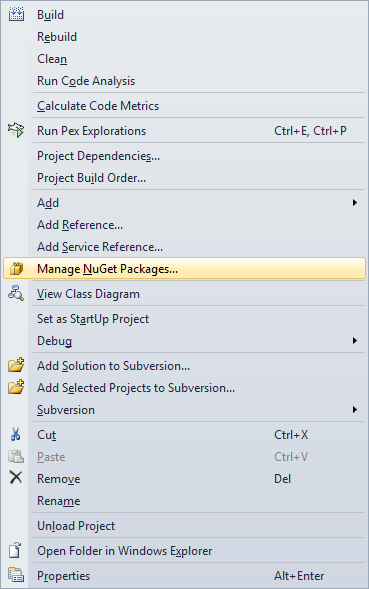
- Click on Manage NuGet Packages... menu option which will open package manager simple to use GUI;
- Wait for the dialog window to load packages from the web repo and then select NUnit;
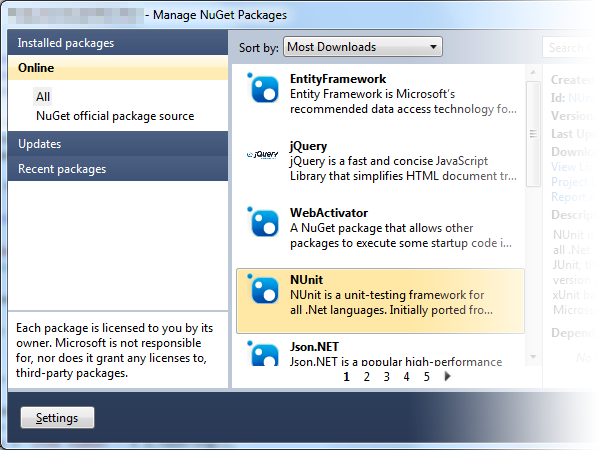
This will automatically add NUnit library and tools to your solution folder and add relevant assembly references in your test project. Having a solution-specific NUnit version makes it future proof if newer NUnit versions are not backwards compatible. So one less thing to think about.
Executing unit tests
NUnit is a fine library, but it offers no Visual Studio integration per-se. It has an external program compiled either as a console app or a GUI. It runs your unit test assembly and executes any unit tests within.
Developers not having additional non-free Visual Studio tools usually run NUnit GUI tool and run those tests manually. But it's much easier if you can easily just hit F5 or Ctrl-F5 in Visual Studio that would compile unit tests and run the NUnit GUI tool automatically for you while also executing all unit tests on application start. The good thing is that you can also debug your unit tests this way in case you wanted to check something that seems to be invalid in your test code.
Project configuration
In order to automatically start NUnit test runner GUI tool you have to follow these steps to configure your test project to be capable of running/debugging unit tests:
- Open your test project properties by right-clicking on project in Visual Studio Project Explorer ans selecting option Properties...;
- Select Debug tab in project properties window;
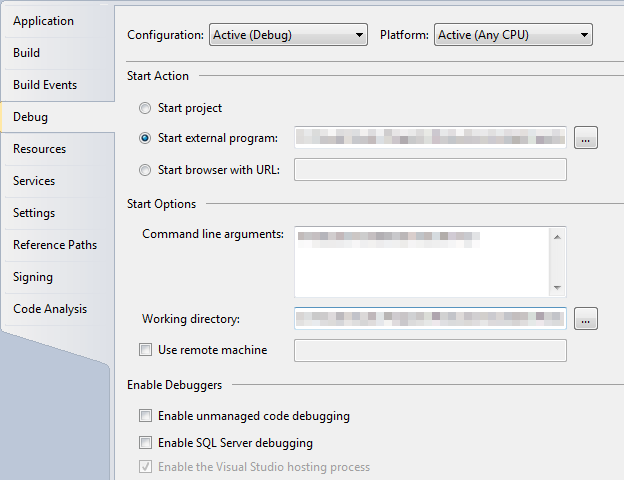
- Set Start action as Start external program and point it to your local solution NUnit package installation; if you used NuGet package this is where you'll find your NUnit folder:
your solution folder\packages\nunit2.5.10.11092\tools\nunit.exeOf course with the right NUnit version in folder name. - Set Command line arguments to point to your test project assembly file like:
YouTestProjectAssemblyName.dll /run - Set Working directory to point to your test project's debug folder like:
YourTestProjectFolder\bin\Debug - Save project configuration properties and you're done;
I usually also configure my solution so that I set Startup project as Current selection. This makes it possible that hitting F5 runs my currently selected project. If I have a unit test file open it will run (start debugging) my unit test project, but if I'm currently working on ie. my web application file, it will automatically start debugging my web application. 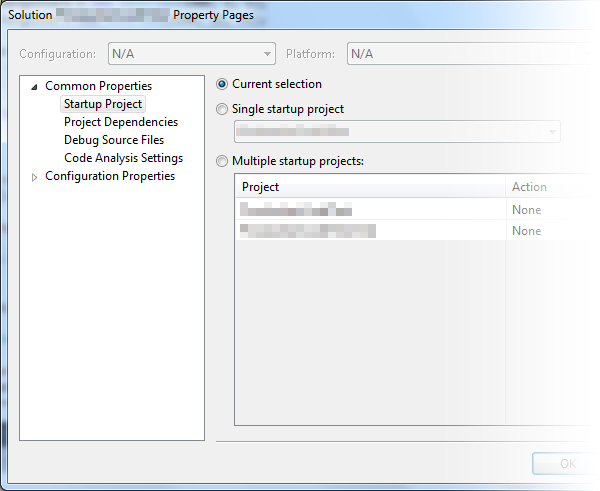
Debugging test assemblies compiled for .Net 4.0
If you're trying to debug your test assembly that is compiled for :net version 4.0 or later you may have problems hitting your breakpoints. Visual Studio simply says that no debug symbols have been loaded for your assembly. The problem is that NUnit is running under .Net 2.0, but your test assembly is compiled for .Net 4.0.
To still keep the capability of automatically running your tests by hitting F5 you will have to edit nunit.exe.config that's in the same folder as nunit.exe test runner GUI. All you have to do is to add these three lines directly under <configuration> configuration element:
1: <startup>
2: <supportedRuntime version="4.0" />
3: </startup>
This is all you need to know to configure your project to run NUnit unit tests directly from Visual Studio by starting NUnit test runner GUI. If you have any additional suggestions regarding this, please leave your comment below.
转:VS2010调试NUnit测试项目 (Running or debugging NUnit tests from Visual Studio without any extensions)的更多相关文章
- Unity3D-RPG项目实战(3):整合Visual Studio 2013开发环境
古人云:工欲善其事必先利其器,IDE尽管属于一个非常上层的工具,可是一个好的IDE对工作效率提高还是非常大的. 事实上我还是满想用一下官方推荐的Mono,毕竟跨平台如今还是非常重要的一个特性.尝试了这 ...
- 右击存放项目的文件夹出现 open with Visual Studio Code 的打开方式
最终效果 步骤1: 找到 Visual Studio Code 的安装位置 (右击桌面Visual Studio Code 图标-->属性-->打开文件夹所在位置) 新建一个可以编辑的 c ...
- Nunit测试工具使用实例
前言: 本文主要是介绍了Nunit的基本使用,其中参详了很多已有的文章,由于最近要使用其进行测试,所以对网上的文章做了下整理,同时加入了一些自己的实践. NUnit的属性 TestFixture 它标 ...
- 远程调试 Asp.Net 项目
项目部署到产品环境后,难免会发生一些故障,有一些可以在本地测试环境中直接重现,而有一些则无法重现.对于可以在本地测试环境中重现的Bug,开发人员往往能够很迅速地进行问题排查.而对于无法重现的Bug,就 ...
- Visual Studio 2017调试开源项目代码
在我们的开发过程中很多时候我们会从GitHub上面下载一些开源的项目代码,然后在此基础上进行调试,正常情况下我们只需要将项目的源代码编译成Dll或者在.Net Core项目中直接引用相应的Nuget包 ...
- 使用 Visual Studio Team Test 进行单元测试和java中的测试
C#中test测试地 方法一. 1.从NUnit官网(http://www.nunit.org/index.php)下载最新版本NUnit,当前版本为NUnit2.5.8. 2.安装后,在VS2008 ...
- 在Visual Studio上开发Node.js程序(2)——远程调试及发布到Azure
[题外话] 上次介绍了VS上开发Node.js的插件Node.js Tools for Visual Studio(NTVS),其提供了非常方便的开发和调试功能,当然很多情况下由于平台限制等原因需要在 ...
- Visual Studio 2012使用NUnit单元测试实践01,安装NUnit并使用
在Visual Studio 2012中,默认使用Microsoft自带的MS-Test测试框架.但,Visual Studio同样允许使用第三方测试框架,比如NUnit,xUnit,MbUnit,等 ...
- 剖析并利用Visual Studio Code在Mac上编译、调试c#程序
0x00 前言 一周多以前的微软的Build大会上,微软发布了一个让很多人眼前一亮的工具,也是本文的主角——Visual Studio Code.很多使用Windows的朋友都很高兴,认为又多了一个很 ...
随机推荐
- UVa11324 The Largest Clique(强连通分量+缩点+记忆化搜索)
题目给一张有向图G,要在其传递闭包T(G)上删除若干点,使得留下来的所有点具有单连通性,问最多能留下几个点. 其实这道题在T(G)上的连通性等同于在G上的连通性,所以考虑G就行了. 那么问题就简单了, ...
- cocos2d 创建精灵图
// 在init这个函数当中做一些初始化的事情 bool HelloWorld::init() { ////////////////////////////// // 先构造父级对象 if ( !CC ...
- BZOJ3448 : [Usaco2014 Feb]Auto-complete
RE了几十发,实在没办法了…只好向管理员要数据,然后发现数据规模与题目描述不符… 建立Trie并求出DFS序,同时根据DFS序确定字典序 然后每次询问相当于询问子树第k小,用主席树维护,注意压缩内存 ...
- 【转】eclipse插件开发,调试运行,导出与安装
[转自]http://www.kankanews.com/ICkengine/archives/61043.shtml 文章来自KENGINE | Kankanews.com 摘要: 本文主要讲ecl ...
- [leetCode][016] Add Two Numbers
[题目]: You are given two linked lists representing two non-negative numbers. The digits are stored in ...
- Codeforces Round #192 (Div. 2) B. Road Construction
#include <iostream> #include <vector> using namespace std; int main(){ int n,m; cin > ...
- 【BZOJ】1043: [HAOI2008]下落的圆盘(计算几何基础+贪心)
http://www.lydsy.com/JudgeOnline/problem.php?id=1043 唯一让我不会的就是怎么求圆的周长并QAAQ... 然后发现好神!我们可以将圆弧变成$[0, 2 ...
- C#设计模式——抽象工厂模式(原文转自:http://blog.jobbole.com/78059/)
一.引言 在上一专题中介绍了工厂方法模式,工厂方法模式是为了克服简单工厂模式的缺点而设计出来的,简单工厂模式的工厂类随着产品类的增加需要增加额外的代码),而工厂方法模式每个具体工厂类只完成单个实例的创 ...
- 【C语言】03-第一个C程序代码分析
前面我们已经创建了一个C程序,接下来分析一下里面的代码. 项目结构如下: 一.代码分析 打开项目中的main.c文件(C程序的源文件拓展名为.c),可以发现它是第一个C程序中的唯一一个源文件,代码如下 ...
- php 过时的sql操作库(学习使用)
学习地址:http://www.imooc.com/video/2459 <?php /** * 连接数据库 * @return resource */ function connect(){ ...