
【C++】map容器的用法
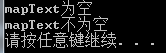
检测map容器是否为空:
 1 #include <iostream>

 2 #include<map>

 3 #include<string>

 4 using namespace std;

 5 int main()

 6 {

 7     //检测容器是否为空

 8     map<string, string>mapText;

 9     if (mapText.empty())

10     {

11         cout << "mapText为空" << endl;

12     }

13     else

14     {

15         cout << "mapText不为空" << endl;

16     }

17

18     //向容器中添加元素

19     mapText["小A"] = "A"; //赋值

20     mapText["小B"] = "B"; //赋值

21     mapText["小C"] = "C"; //赋值

22

23     if (mapText.empty())

24     {

25         cout << "mapText为空" << endl;

26     }

27     else

28     {

29         cout << "mapText不为空" << endl;

30     }

31

32     system("pause");

33     return 0;

34 }
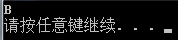
重复赋值,值被替换:
 1 #include <iostream>

 2 #include<map>

 3 #include<string>

 4 using namespace std;

 5 int main()

 6 {

 7     map<string, string>mapText;

 8     mapText["小A"] = "A"; //赋值

 9     mapText["小A"] = "B"; //重复赋值

10     cout << mapText["小A"] << endl;

11

12     system("pause");

13     return 0;

14 }
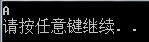
判断键是否存在,如果不存在再赋值:
 1 #include <iostream>

 2 #include<map>

 3 #include<string>

 4 using namespace std;

 5 int main()

 6 {

 7     map<string, string>mapText;

 8     mapText["小A"] = "A";     //赋值

 9      //先检测键是否存在,如果存在则不赋值

10     if (mapText.count("小A") == 0)  //count==0不存在 count==1存在

11     {

12         mapText["小A"] = "B"; //重复赋值

13     }

14     cout << mapText["小A"] << endl;

15

16     system("pause");

17     return 0;

18 }
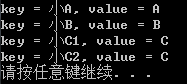
map循环遍历:
map.begin()指向map的第一个元素
map.end()指向map的最后一个元素之后的地址
 1 #include <iostream>

 2 #include<map>

 3 #include<string>

 4 using namespace std;

 5 int main()

 6 {

 7     map<string, string>mapText;

 8     mapText["小A"] = "A";     //赋值

 9     mapText["小B"] = "B";     //赋值

10     mapText["小C1"] = "C";     //赋值

11     mapText["小C2"] = "C";     //赋值

12     for (map<string, string>::iterator itor = mapText.begin(); itor != mapText.end(); ++itor)

13     {

14         cout << "key = " << itor->first << ", value = " << itor->second << endl;

15

16     }

17     system("pause");

18     return 0;

19 }
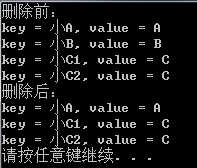
map 通过“键”删除键值对:
 1 #include <iostream>

 2 #include<map>

 3 #include<string>

 4 using namespace std;

 5 int main()

 6 {

 7     map<string, string>mapText;

 8     mapText["小A"] = "A";     //赋值

 9     mapText["小B"] = "B";     //赋值

10     mapText["小C1"] = "C";     //赋值

11     mapText["小C2"] = "C";     //赋值

12     cout << "删除前:" << endl;

13     for (map<string, string>::iterator itor = mapText.begin(); itor != mapText.end(); ++itor)

14     {

15         cout << "key = " << itor->first << ", value = " << itor->second << endl;

16

17     }

18     //删除小B

19     mapText.erase("小B");

20     cout << "删除后:" << endl;

21     for (map<string, string>::iterator itor = mapText.begin(); itor != mapText.end(); ++itor)

22     {

23         cout << "key = " << itor->first << ", value = " << itor->second << endl;

24

25     }

26     mapText.erase("小B"); //小B不存在,erase也不会报错

27     system("pause");

28     return 0;

29 }
map 通过“值”删除键值对,先写一个错误用法,这里要注意:
 1 #include <iostream>

 2 #include<map>

 3 #include<string>

 4 using namespace std;

 5 int main()

 6 {

 7     map<string, string>mapText;

 8     mapText["小A"] = "A";     //赋值

 9     mapText["小B"] = "B";     //赋值

10     mapText["小C1"] = "C";     //赋值

11     mapText["小C2"] = "C";     //赋值

12     cout << "删除前:" << endl;

13     for (map<string, string>::iterator itor = mapText.begin(); itor != mapText.end(); ++itor)

14     {

15         cout << "key = " << itor->first << ", value = " << itor->second << endl;

16

17     }

18     //删除值为C的元素

19     //错误用法:

20     for (map<string, string>::iterator itor = mapText.begin(); itor != mapText.end(); ++itor)

21     {

22         if ((itor->second) == "C")

23         {

24             mapText.erase(itor);

25         }

26     }

27

28     cout << "删除后:" << endl;

29     for (map<string, string>::iterator itor = mapText.begin(); itor != mapText.end(); ++itor)

30     {

31         cout << "key = " << itor->first << ", value = " << itor->second << endl;

32

33     }

34     system("pause");

35     return 0;

36 }
错误原因:itor指针在元素被删除后失效了,回到for语句中与mapText.end()进行比较出现错误。
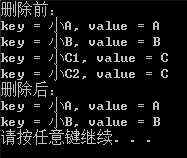
map 通过“值”删除键值对,正确的用法:
 1 #include <iostream>

 2 #include<map>

 3 #include<string>

 4 using namespace std;

 5 int main()

 6 {

 7     map<string, string>mapText;

 8     mapText["小A"] = "A";     //赋值

 9     mapText["小B"] = "B";     //赋值

10     mapText["小C1"] = "C";     //赋值

11     mapText["小C2"] = "C";     //赋值

12     cout << "删除前:" << endl;

13     for (map<string, string>::iterator itor = mapText.begin(); itor != mapText.end(); ++itor)

14     {

15         cout << "key = " << itor->first << ", value = " << itor->second << endl;

16

17     }

18     //删除值为C的元素

19     //正确用法:

20     for (map<string, string>::iterator itor = mapText.begin(); itor != mapText.end(); /*++itor*/)

21     {

22         if ((itor->second) == "C")

23         {

24             itor = mapText.erase(itor);

25         }

26         else

27         {

28             ++itor;

29         }

30     }

31

32

33     cout << "删除后:" << endl;

34     for (map<string, string>::iterator itor = mapText.begin(); itor != mapText.end(); ++itor)

35     {

36         cout << "key = " << itor->first << ", value = " << itor->second << endl;

37

38     }

39     system("pause");

40     return 0;

41 }
删除map的第一个元素
mapText.erase(mapText.begin());
【C++】map容器的用法的更多相关文章
- 蓝桥杯 算法提高 9-3摩尔斯电码 _c++ Map容器用法
//****|*|*-**|*-**|--- #include <iostream> #include <map> #include <vector> #inclu ...
- 详解C++ STL map 容器
详解C++ STL map 容器 本篇随笔简单讲解一下\(C++STL\)中的\(map\)容器的使用方法和使用技巧. map容器的概念 \(map\)的英语释义是"地图",但\( ...
- map的详细用法
map是STL的一个关联容器,它提供一对一(其中第一个可以称为关键字,每个关键字只能在map中出现一次,第二个可能称为该关键字的值)的数据处理能力,由于这个特性,它完成有可能在我们处理一对一数据的时 ...
- stl之map容器的原理及应用
容器的数据结构同样是采用红黑树进行管理,插入的元素健位不允许重复,所使用的节点元素的比较函数,只对元素的健值进行比较,元素的各项数据可通过健值检索出来.map容器是一种关联容器,实现了SortedAs ...
- STL——map/unordered_map基础用法
map /multimap map是STL里重要容器之一. 它的特性总结来讲就是:所有元素都会根据元素的键值key自动排序(也可根据自定义的仿函数进行自定义排序),其中的每个元素都是<key, ...
- map的详细用法 (转
map的详细用法: map是STL的一个关联容器,它提供一对一(其中第一个可以称为关键字,每个关键字只能在map中出现一次,第二个可能称为该关键字的值)的数据处理能 力,由于这个特性,它完成有可能在我 ...
- C++ STL 中 map 容器
C++ STL 中 map 容器 Map是STL的一个关联容器,它提供一对一(其中第一个可以称为关键字,每个关键字只能在map中出现一次,第二个可能称为该关键字的值)的数据 处理能力,由于这个特性,它 ...
- map的常见用法
map的常见用法 map 是什么? map是一组键值对的组合,通俗理解类似一种特殊的数组,a[key]=val,只不过数组元素的下标是任意一种类型,而且数组的元素的值也是任意一种类型.有点类似pyth ...
- map 容器的使用
C++中map容器提供一个键值对容器,map与multimap差别仅仅在于multiple允许一个键对应多个值. 一.map的说明 1 头文件 #include <map> ...
随机推荐
- anaconda安装教程
Anaconda是一个方便的python包管理和环境管理软件,一般用来配置不同的项目环境.我们常常会遇到这样的情况,正在做的项目A和项目B分别基于python2和python3,而第电脑只能安装一个环 ...
- mysql搭建多主一从源复制环境
问题描述:搭建过一主多从的环境,由于数据库数据一致性要求高,有些情景会搭建一主多从的架构,搭建多主一从的模式,相对来说适合数据整合,将多个业务的库整合到一起,方便做查询,也可以当做一个监控其他主库数据 ...
- shell 脚本中常用的内置变量
在 Bash 解释器中,内置了许多变量,这些变量的功能是解释器自带的,我们在编写shell脚本时如果能灵活的使用它们,对脚本的编写效率以及差错大有帮助, 下面一一介绍这些变量 $FUNCNAME.$L ...
- PlantUML --- 使用代码快速绘制时序图、思维导图
本篇思维导图 @startmindmap <style> mindmapDiagram { .green { BackgroundColor lightgreen } .rose { Ba ...
- C++PRIMER第二章前半部分答案
C++PRIMER第二章前半部分答案 哈哈哈,为什么是前半部分呢,后半部分还在学习中,重新系统性的学习c++,共同进步嘛,不多说,跟我一起来看看吧,第三章开始才是新手收割的时候,慢慢来~~ 2.1&a ...
- Spring Boot 2.5.0 发布:支持Java16、Gradle 7、Datasource初始化机制调整
今年520的事情是真的多,娱乐圈的我们不管,就跟DD一起来看看 Spring Boot 2.5.0 的发布吧!看看都带来了哪些振奋人心的新特性和改动! 主要更新 支持 Java 16 支持 Gradl ...
- git合并代码到主分支
git合并login分支到master分支 1.首先查看源码状态 git status 2.添加到暂存区 git add . git status //添加到暂存区后再次查看源码状态 3.提交代码到本 ...
- [bug] Linux下执行.sh命令出现-bash: ./bin/start.sh: /bin/bash^M: bad interpreter: No such file or directory
参考 https://www.cnblogs.com/aeolian/p/10614284.html
- [转发]Linux性能测试工具之Lmbench特性、安装及使用
Linux性能测试工具之Lmbench特性.安装及使用2015年07月16日 10:13:48 Michaelwubo 阅读数:2466Linux性能测试工具Lmbench 是一套简易可移植的,符合A ...
- ar是System Activity Reporter(系统活动情况报告)的缩写。这
ar是System Activity Reporter(系统活动情况报告)的缩写.这个工具所需要的负载很小,也是目前linux中最为全面的性能分析工具之一.此款工具将对系统当前的状态就行取样,然后通过 ...