
011.Ansible条件语句
一 简介
在有的时候play的结果依赖于变量、fact或者是前一个任务的执行结果,或者有的时候,我们会基于上一个task执行返回的结果而决定如何执行后续的task。这个时候就需要用到条件判断。
条件语句在Ansible中的使用场景:
- 在目标主机上定义了一个硬限制,比如目标主机的最小内存必须达到多少,才能执行该task
- 捕获一个命令的输出,根据命令输出结果的不同以触发不同的task
- 根据不同目标主机的facts,以定义不同的task
- 根据目标机的cpu的大小,以调优相关应用性能
- 用于判断某个服务的配置文件是否发生变更,以确定是否需要重启服务
二 when关键字
2.1 when基本使用
在ansible中,使用条件判断的关键字就是when。
如在安装包的时候,需要指定主机的操作系统类型,或者是当操作系统的硬盘满了之后,需要清空文件等,可以使用when语句来做判断 。when关键字后面跟着的是python的表达式,在表达式中你能够使用任何的变量或者fact,当表达式的结果返回的是false,便会跳过本次的任务
基本用法
[root@node1 ansible]# vi when_ex.yml
- name: Install vim

  hosts: all

  tasks:

    - name: Install VIM via yum

      yum:

        name: vim-enhanced

        state: installed

      when: ansible_os_family =="RedHat"

    - name: Install VIM via apt

      apt:

        name: vim

        state: installed

      when: ansible_os_family =="Debian"

    - name: Unexpected OS family

      debug: msg="OS Family {{ ansible_os_family }} is not supported"

      failed_when: not ansible_os_family =="RedHat" or ansible_os_family =="Debian"
结果
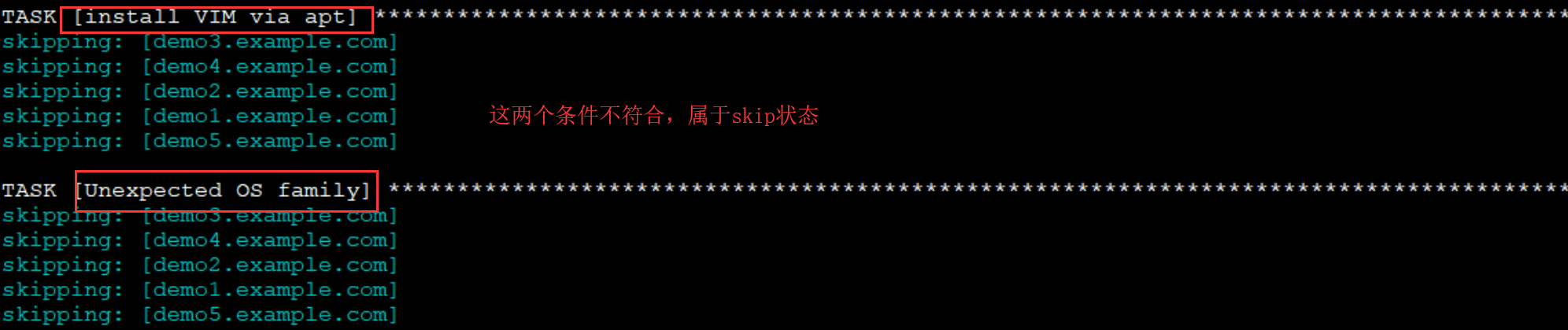
比较运算符
在上面的示例当中,我们使用了"=="的比较运算符,在ansible中,还支持如下比较运算符:
==:比较两个对象是否相等,相等则返回真。可用于比较字符串和数字

!=:比较两个对象是否不等,不等则为真。

>:比较两个对象的大小,左边的值大于右边的值,则为真

<:比较两个对象的大小,左边的值小于右边的值,则为真

>=:比较两个对象的大小,左边的值大于等于右边的值,则为真

<=:比较两个对象的大小,左边的值小于等于右边的值,则为真
逻辑运算符
在Ansible中,除了比较运算符,还支持逻辑运算符:
and:逻辑与,当左边和右边两个表达式同时为真,则返回真

or:逻辑或,当左右和右边两个表达式任意一个为真,则返回真

not:逻辑否,对表达式取反

():当一组表达式组合在一起,形成一个更大的表达式,组合内的所有表达式都是逻辑与的关系
示例:
# 逻辑或

when: ansible_distribution == "RedHat" or ansible_distribution == "Fedora"

# 逻辑与

when: ansible_distribution_version == "7.5" and ansible_kernel == "3.10.0-327.el7.x86_64"

when:

  - ansible_distribution_version == "7.5"

  - ansible_kernel == "3.10.0-327.el7.x86_64"

# 组合

when: =>

  ( ansible_distribution == "RedHat" and ansible_distribution_major_version == "7" )

  or

  ( ansible_distribution == "Fedora" and ansible_distribution_major_version == "28")
完整的例子:
# 判断register注册变量的返回结果

- name: restart httpd if postfix is running

  hosts: test

  tasks:

    - name: get postfix server status

      command: /usr/bin/systemctl is-active postfix

      ignore_errors: yes

      register: result

    - name: restart apache httpd based on postfix status

      service:

        name: httpd

        state: restarted

      when: result.rc == 0
2.2 条件判断与tests
在shell当中,我们可使用test命令来进行一些常用的判断操作,如下:
# 判断/test文件是否存在

test -e /test

# 判断/testdir是否存在且为一个目录

test -d /testdir
事实上,在ansible中也有类似的用法,只不过ansible没有使用linux的test命令,而是jinja2模板的tests。
下面是一个简单示例:
# 通过条件语句判断testpath的路径是否存在

- hosts: test

  vars:

    testpath: /testdir

  tasks:

    - debug:

        msg: "file exist"

      when: testpath is exists
上面的示例中,我们使用了is exists用于路径存在时返回真,也可以使用is not exists用于路径不存在时返回真。也可以在整个条件表达式的前面使用not以取反:
- hosts: test

  vars:

    testpath: /testdir1

  tasks:

    - debug:

        msg: "file not exist"

      when: not testpath is exists
在ansible中,除了能够使用exists这种tests之外,还有一些别的tests
2.3 判断变量
- defined:判断变量是否已定义,已定义则返回真
- undefined:判断变量是否未定义,未定义则返回真
- none:判断变量的值是否为空,如果变量已定义且值为空,则返回真
- hosts: demo2.example.com

  gather_facts: no

  vars:

    testvar: "test"

    testvar1:

  tasks:

    - debug:

        msg: "testvar is defined"

      when: testvar is defined

    - debug:

        msg: "testvar2 is undefined"

      when: testvar2 is undefined

    - debug:

        msg: "testvar1 is none"

      when: testvar1 is none
执行结果
TASK [debug] **************************************************************************************************************************************

ok: [demo2.example.com] => {

    "msg": "testvar is defined"

}

TASK [debug] **************************************************************************************************************************************

ok: [demo2.example.com] => {

    "msg": "testvar2 is undefined"

}

TASK [debug] **************************************************************************************************************************************

ok: [demo2.example.com] => {

    "msg": "testvar1 is none"

}
2.4 判断执行结果
- sucess或succeeded:通过任务执行结果返回的信息判断任务的执行状态,任务执行成功则返回true
- failure或failed:任务执行失败则返回true
- change或changed:任务执行状态为changed则返回true
- skip或skipped:任务被跳过则返回true
查看result结果
[root@node1 ansible]# vim when_ex.yml
- hosts: demo2.example.com

  gather_facts: no

  vars:

    doshell: true

  tasks:

    - shell: 'cat /testdir/aaa'

      when: doshell

      register: result

      ignore_errors: true

    - debug:

        msg: "{{ result }}"
[root@node1 ansible]# ansible-playbook when_ex.yml
PLAY [demo2.example.com] **************************************************************************************************************************

TASK [shell] **************************************************************************************************************************************

fatal: [demo2.example.com]: FAILED! => {"changed": true, "cmd": "cat /testdir/aaa", "delta": "0:00:00.005672", "end": "2020-05-02 05:47:40.484154", "msg": "non-zero return code", "rc": 1, "start": "2020-05-02 05:47:40.478482", "stderr": "cat: /testdir/aaa: No such file or directory", "stderr_lines": ["cat: /testdir/aaa: No such file or directory"], "stdout": "", "stdout_lines": []}

...ignoring

TASK [debug] **************************************************************************************************************************************

ok: [demo2.example.com] => {

    "msg": {

        "changed": true,

        "cmd": "cat /testdir/aaa",

        "delta": "0:00:00.005672",

        "end": "2020-05-02 05:47:40.484154",

        "failed": true,

        "msg": "non-zero return code",

        "rc": 1,

        "start": "2020-05-02 05:47:40.478482",

        "stderr": "cat: /testdir/aaa: No such file or directory",

        "stderr_lines": [

            "cat: /testdir/aaa: No such file or directory"

        ],

        "stdout": "",

        "stdout_lines": []

    }

}
示例
- hosts: demo2.example.com

  gather_facts: no

  vars:

    doshell: true

  tasks:

    - shell: 'cat /testdir/aaa'

      when: doshell

      register: result

      ignore_errors: true

    - debug:

        msg: "{{ result }}"

    - debug:

        msg: "success"

      when: result is success

    - debug:

        msg: "failed"

      when: result is failure

    - debug:

        msg: "changed"

      when: result is change

    - debug:

        msg: "skip"

      when: result is skip
执行
LAY [demo2.example.com] **************************************************************************************************************************

TASK [shell] **************************************************************************************************************************************

fatal: [demo2.example.com]: FAILED! => {"changed": true, "cmd": "cat /testdir/aaa", "delta": "0:00:00.005698", "end": "2020-05-02 05:50:55.314509", "msg": "non-zero return code", "rc": 1, "start": "2020-05-02 05:50:55.308811", "stderr": "cat: /testdir/aaa: No such file or directory", "stderr_lines": ["cat: /testdir/aaa: No such file or directory"], "stdout": "", "stdout_lines": []}

...ignoring

TASK [debug] **************************************************************************************************************************************

ok: [demo2.example.com] => {

    "msg": {

        "changed": true,

        "cmd": "cat /testdir/aaa",

        "delta": "0:00:00.005698",

        "end": "2020-05-02 05:50:55.314509",

        "failed": true,

        "msg": "non-zero return code",

        "rc": 1,

        "start": "2020-05-02 05:50:55.308811",

        "stderr": "cat: /testdir/aaa: No such file or directory",

        "stderr_lines": [

            "cat: /testdir/aaa: No such file or directory"

        ],

        "stdout": "",

        "stdout_lines": []

    }

}

TASK [debug] **************************************************************************************************************************************

skipping: [demo2.example.com]

TASK [debug] **************************************************************************************************************************************

ok: [demo2.example.com] => {

    "msg": "failed"

}

TASK [debug] **************************************************************************************************************************************

ok: [demo2.example.com] => {

    "msg": "changed"

}
2.5 基于注册变量的过滤器
正常情况下,当某个task执行失败的时候,ansible会中止运行。此时我们可以通过ignore_errors来捕获异常以让task继续往下执行。然后调用debug模块打印出出错时的内容,拿来错误结果后,主动失败。
- name: Run myprog

  command: /opt/myprog

  register: result

  ignore_errors: True

- debug:

    var: result

- debug:

    msg: "Stop running the playbook if myprog failed"

    failed_when: result|failed
任务返回值过滤器:
- failed: 如果注册变量的值是任务failed则返回True
- changed: 如果注册变量的值是任务changed则返回True
- success:如果注册变量的值是任务succeeded则返回True
- skipped:如果注册变量的值是任务skipped则返回True
2.6 判断路径
- file:判断指定路径是否为一个文件,是则为真
- directory:判断指定路径是否为一个目录,是则为真
- link:判断指定路径是否为一个软链接,是则为真
- mount:判断指定路径是否为一个挂载点,是则为真
- exists:判断指定路径是否存在,存在则为真
- hosts: demo2.example.com

  gather_facts: no

  vars:

    testpath1: "/testdir/test"

    testpath2: "/testdir"

  tasks:

    - debug:

        msg: "file"

      when: testpath1 is file

    - debug:

        msg: "directory"

      when: testpath2 is directory
2.7 判断字符串
- lower:判断字符串中的所有字母是否都是小写,是则为真
- upper:判断字符串中的所有字母是否都是大写,是则为真
- hosts: demo2.example.com

  gather_facts: no

  vars:

    str1: "abc"

    str2: "ABC"

  tasks:

    - debug:

        msg: "str1 is all lowercase"

      when: str1 is lower

    - debug:

        msg: "str2 is all uppercase"

      when: str2 is upper
执行结果
TASK [debug] **************************************************************************************************************************************

ok: [demo2.example.com] => {

    "msg": "str1 is all lowercase"

}

TASK [debug] **************************************************************************************************************************************

ok: [demo2.example.com] => {

    "msg": "str2 is all uppercase"

}
2.8 判断整除
- even:判断数值是否为偶数,是则为真
- odd:判断数值是否为奇数,是则为真
- divisibleby(num):判断是否可以整除指定的数值,是则为真
- hosts: demo2.example.com

  gather_facts: no

  vars:

    num1: 6

    num2: 8

    num3: 15

  tasks:

    - debug:

        msg: "num1 is an even number"

      when: num1 is even

    - debug:

        msg: "num2 is an odd number"

      when: num2 is odd

    - debug:

        msg: "num3 can be divided exactly by"

      when: num3 is divisibleby(3)
执行结果
PLAY [demo2.example.com] **************************************************************************************************************************

TASK [debug] **************************************************************************************************************************************

ok: [demo2.example.com] => {

    "msg": "num1 is an even number"

}

TASK [debug] **************************************************************************************************************************************

skipping: [demo2.example.com]

TASK [debug] **************************************************************************************************************************************

ok: [demo2.example.com] => {

    "msg": "num3 can be divided exactly by"

}
2.9 其他tests
version
可用于对比两个版本号的大小,或者与指定的版本号进行对比,使用语法为version("版本号","比较操作符")
- hosts: demo2.example.com

  vars:

    ver1: 1.2

    ver2: 1.3

  tasks:

    - debug:

        msg: "ver1 is greater than ver2"

      when: ver1 is version(ver2,">")

    - debug:

        msg: "system version {{ ansible_distribution_version }} greater than 7.3"

      when: ansible_distribution_version is version("7.3","gt")
version中使用的比较运算符说明:
- 大于: >, gt
- 大于等于: >=, ge
- 小于: <, lt
- 小于等于: <=, le
- 等于: =, ==, eq
- 不等于: !=, <>, ne
执行结果
TASK [debug] **************************************************************************************************************************************

skipping: [demo2.example.com]

TASK [debug] **************************************************************************************************************************************

ok: [demo2.example.com] => {

    "msg": "system version 7.7 greater than 7.3"

}
in
判断一个字符串是否存在于另一个字符串中,也可用于判断某个特定的值是否存在于列表中
- hosts: demo2.example.com

  vars:

    supported_distros:

      - RedHat

      - CentOS

  tasks:

    - debug:

        msg: "{{ ansible_distribution }} in supported_distros"

      when: ansible_distribution in supported_distros
执行结果
TASK [debug] **************************************************************************************************************************************

ok: [demo2.example.com] => {

    "msg": "CentOS in supported_distros"

}
2.10 条件判断与block
block
我们在前面使用when做条件判断时,如果条件成立则执行对应的任务。但这就面临一个问题,当我们要使用同一个条件判断执行多个任务的时候,就意味着我们要在某一个任务下面都写一下when语句,而且判断条件完全一样。这种方式不仅麻烦而且显得low。Ansible提供了一种更好的方式来解决这个问题,即block。
在ansible中,使用block将多个任务进行组合,当作一个整体。我们可以对这一个整体做条件判断,当条件成立时,则执行块中的所有任务:
- hosts: test

  tasks:

    - name: set /etc/resolv.conf

      template:

        src: resolv.conf.j2

        dest: /etc/resolv.conf

        owner: root

        group: root

        mode: 0644

    - block:

        - name: ensure /etc/resolvconf/resolv.conf.d/base file for ubuntu 16.04

          template:

            src: resolv.conf.j2

            dest: /etc/resolvconf/resolv.conf.d/base

        - name: config dns for ubuntu 16.04

          template:

            src: resolv.conf.j2

            dest: /etc/resolv.conf

      when: ansible_distribution == "Ubuntu" and ansible_distribution_major_version == "16"
使用block注意事项:
- 可以为block定义name(ansible 2.3增加的特性)
- 可以直接对block使用when,但不能直接对block使用loop
rescue
block除了能和when一起使用之外,还能作错误处理。这个时候就需要用到rescue关键字:
- hosts: test

  tasks:

    - block:

        - shell: 'ls /testdir'

      rescue:

        - debug:

            msg: '/testdir is not exists'
当block中的任务执行失败时,则运行rescue中的任务。如果block中的任务正常执行,则rescue的任务就不会被执行。如果block中有多个任务,则任何一个任务执行失败,都会执行rescue。block中可以定义多个任务,同样rescue当中也可以定义多个任务。
always
当block执行失败时,rescue中的任务才会被执行;而无论block执行成功还是失败,always中的任务都会被执行:
- hosts: test

  tasks:

    - block:

        - shell: 'ls /testdir'

      rescue:

        - debug:

            msg: '/testdir is not exists'

      always:

        - debug:

            msg: 'This task always executes'
2.11 条件判断与错误处理
在上面讲block的使用方法的时候,我们说block除了可以将多个任务组合到一起,还有错误处理的功能。接下来我们继续说一说错误处理。
fail模块
在shell中,可能会有这样的需求:当脚本执行至某个阶段时,需要对某个条件进行判断,如果条件成立,则立即终止脚本的运行。在shell中,可以直接调用"exit"即可执行退出。事实上,在playbook中也有类似的模块可以做这件事。即fail模块。
fail模块用于终止当前playbook的执行,通常与条件语句组合使用,当满足条件时,终止当前play的运行。
选项只有一个:
- msg:终止前打印出信息
- hosts: demo2.example.com

  tasks:

    - shell: echo "Just a test--error"

      register: result

    - debug:

        msg: "{{ result }}"

    - fail:

        msg: "Conditions established,Interrupt running playbook"

      when: "'error' in result.stdout"

    - debug:

        msg: "Inever execute,Because the playbook has stopped"
执行输出
TASK [shell] **************************************************************************************************************************************

changed: [demo2.example.com]

TASK [debug] **************************************************************************************************************************************

ok: [demo2.example.com] => {

    "msg": {

        "changed": true,

        "cmd": "echo \"Just a test--error\"",

        "delta": "0:00:00.004205",

        "end": "2020-05-02 06:51:25.377763",

        "failed": false,

        "rc": 0,

        "start": "2020-05-02 06:51:25.373558",

        "stderr": "",

        "stderr_lines": [],

        "stdout": "Just a test--error",

        "stdout_lines": [

            "Just a test--error"

        ]

    }

}

TASK [fail] ***************************************************************************************************************************************

fatal: [demo2.example.com]: FAILED! => {"changed": false, "msg": "Conditions established,Interrupt running playbook"}
failed_when
事实上,当fail和when组合使用的时候,还有一个更简单的写法,即failed_when,当满足某个条件时,ansible主动触发失败
- hosts: demo2.example.com

  tasks:

    - shell: echo "Just a test--error"

      register: result

    - debug:

        msg: "{{ result }}"

    - debug:

        msg: "Conditions established,Interrupt running playbook"

      failed_when: "'error' in result.stdout"

    - debug:

        msg: "Inever execute,Because the playbook has stopped"
执行输出
TASK [debug] **************************************************************************************************************************************

ok: [demo2.example.com] => {

    "msg": {

        "changed": true,

        "cmd": "echo \"Just a test--error\"",

        "delta": "0:00:00.005333",

        "end": "2020-05-02 06:55:35.930654",

        "failed": false,

        "rc": 0,

        "start": "2020-05-02 06:55:35.925321",

        "stderr": "",

        "stderr_lines": [],

        "stdout": "Just a test--error",

        "stdout_lines": [

            "Just a test--error"

        ]

    }

}

TASK [debug] **************************************************************************************************************************************

fatal: [demo2.example.com]: FAILED! => {

    "msg": "Conditions established,Interrupt running playbook"

}
changed_when
当我们控制一些远程主机执行某些任务时,当任务在远程主机上成功执行,状态发生更改时,会返回changed状态响应,状态未发生更改时,会返回OK状态响应,当任务被跳过时,会返回skipped状态响应。我们可以通过changed_when来手动更改changed响应状态。
博主声明:本文的内容来源主要来自誉天教育晏威老师,由本人实验完成操作验证,需要的博友请联系誉天教育(http://www.yutianedu.com/),获得官方同意或者晏老师(https://www.cnblogs.com/breezey/)本人同意即可转载,谢谢!
011.Ansible条件语句的更多相关文章
- Ansible的条件语句
此篇主要讲述的ansible的condition,主要是用条件进行一些判断,此篇为官方文档的翻译,没有进行相关的测试,后续会写入相关的测试. Ansible的条件语句 1. 前言 在有的时候pl ...
- ansible之条件语句when
注册变量: 变量的另一个用途是将一条命令的运行结果保存到变量中,供后面的playbook使用.例如: - hosts: webservers tasks: - shell: /usr/bin/foo ...
- ansible 之条件语句 when
注册变量: 变量的另一个用途是将一条命令的运行结果保存到变量中,供后面的playbook使用.例如: - hosts: webservers tasks: - shell: /usr/bin/foo ...
- ansible条件使用--实践
ansible条件使用 1.条件使用最简单的方式 ansible中使用条件最简单的方式如下所示: [root@ansibleserver kel]# cat conditions.yml --- - ...
- Ansible9:条件语句【转】
在有的时候play的结果依赖于变量.fact或者是前一个任务的执行结果,从而需要使用到条件语句. 一.when 有的时候在特定的主机需要跳过特定的步骤,例如在安装包的时候,需要指定主机的操作系统 ...
- Ansible条件测试
本节内容: Ansible条件测试 一.Ansible条件测试 在ansible中还可以进行条件测试.如果需要根据变量.facts或此前任务的执行结果来做为某task执行与否的前提时要用到条件测试. ...
- Ansible14:Playbook条件语句
目录 简介 when关键字 1. when基本使用 2. 比较运算符 3. 逻辑运算符 条件判断与tests 判断变量 判断执行结果 判断路径 判断字符串 判断整除 其他tests 条件判断与bloc ...
- Python —条件语句
条件语句 Python条件语句是通过一条或多条语句的执行结果(True或者False)来决定执行的代码块. 可以通过下图来简单了解条件语句的执行过程: Python程序语言指定任何非0和非空(null ...
- php简写表达式,&& or || 缩写条件语句
有时候学的多了, 好多小细节 都忘了 ,比如 简单的表达式, 三元表达式 ?:; $aa or $bb 表达式 等等! 写一些简单的表达式,备忘! php用&&和||缩写条件语句 ...
随机推荐
- 3步安装Python虚拟环境virtualenv
1. pip安装必要库 pip install virtualenv -i https://pypi.douban.com/simple pip install virtualenvwrapper - ...
- 基于gitlab的项目管理流程
框架 背景 个人是不太愿意使用用户体验差的软件来做项目管理,行业内,要找到这么一款软件,又要符合自己的需求,着实不容易.要免费,易用性要好,要安全,要有数据统计.而程序员的世界,SVN 之后,可能没有 ...
- 前端 JS 原生 javascript 和 location.hash 实现一个单页应用的路由 router
开篇日常立个flag-- 前言 最近在做一些应用,类似于单页应用,想实现类似于 Vue 路由的效果. 但是个人 Vue 基础四舍五入约等于无,而且看着 Vue-router 吃力+用不起来(因为我的项 ...
- 【笔记】《Redis设计与实现》chapter22 二进制位数组 chapter23 慢查询日志 chapter24 监视器
chapter22 二进制位数组 22.4 BITCOUNT命令的实现 遍历算法 查表算法 variable-precision SWAP算法 chapter23 慢查询日志 Redis的慢查询日志功 ...
- Day16_90_通过反射机制获取某个特定的构造方法
通过反射机制获取某个特定的构造方法 public class ReflectTest13 { public static void main(String[] args) throws ClassNo ...
- JUC包的线程池详解
为什么要使用线程池 创建/销毁线程需要消耗系统资源,线程池可以复用已创建的线程. 控制并发的数量.并发数量过多,可能会导致资源消耗过多,从而造成服务器崩溃.(主要原因) 可以对线程做统一管理. JUC ...
- 【秒懂音视频开发】21_显示BMP图片
文本的主要内容是:使用SDL显示一张BMP图片,算是为后面的<播放YUV>做准备. 为什么是显示BMP图片?而不是显示JPG或PNG图片? 因为SDL内置了加载BMP的API,使用起来会更 ...
- shackdow-socks 搭建
搭建步骤 wget --no-check-certificate https://raw.githubusercontent.com/teddysun/shadow-1-socks_install/m ...
- vuex 引用方法
引入Vuex(前提是已经用Vue脚手架工具构建好项目) 1.利用npm包管理工具,进行安装 vuex.在控制命令行中输入下边的命令就可以了. npm install vuex --save 要注意的是 ...
- poj3648 2-sat
题意: 一对夫妻结婚,请来了n对夫妻,所有人坐在同一张桌子上吃饭,这张桌子是长方形的可以坐两排人,有如下限制 (1) 新娘和新郎不做同一侧. (2) 每对来的夫妻也不能坐在同一侧. (3 ...