
SpringMVC(6)数据验证
在系列SpringMVC(4)数据绑定-1、SpringMVC(5)数据绑定-2中我们展示了如何绑定数据,绑定完数据之后如何确保我们得到的数据的正确性?这就是我们本篇要说的内容
—> 数据验证。
这里我们采用Hibernate-validator来进行验证,Hibernate-validator实现了JSR-303验证框架支持注解风格的验证。首先我们要到http://hibernate.org/validator/下载需要的jar包,这里以4.3.1.Final作为演示,解压后把hibernate-validator-4.3.1.Final.jar、jboss-logging-3.1.0.jar、validation-api-1.0.0.GA.jar这三个包添加到项目中。
配置之前项目中的springservlet-config.xml文件,如下:
<!-- 默认的注解映射的支持 -->

    <mvc:annotation-driven validator="validator" conversion-service="conversion-service" />

    <bean id="validator" class="org.springframework.validation.beanvalidation.LocalValidatorFactoryBean">

        <property name="providerClass"  value="org.hibernate.validator.HibernateValidator"/>

        <!--不设置则默认为classpath下的 ValidationMessages.properties -->

        <property name="validationMessageSource" ref="validatemessageSource"/>

    </bean>

    <bean id="conversion-service" class="org.springframework.format.support.FormattingConversionServiceFactoryBean" />

    <bean id="validatemessageSource" class="org.springframework.context.support.ReloadableResourceBundleMessageSource">

        <property name="basename" value="classpath:validatemessages"/>

        <property name="fileEncodings" value="utf-8"/>

        <property name="cacheSeconds" value="120"/>

    </bean>
其中<property name="basename" value="classpath:validatemessages"/>中的classpath:validatemessages为注解验证消息所在的文件,需要我们在resources文件夹下添加。
在com.demo.web.controllers包中添加一个ValidateController.java内容如下:
package com.demo.web.controllers;

import java.security.NoSuchAlgorithmException;

import javax.validation.Valid;

import org.springframework.stereotype.Controller;

import org.springframework.ui.Model;

import org.springframework.validation.BindingResult;

import org.springframework.web.bind.annotation.ModelAttribute;

import org.springframework.web.bind.annotation.RequestMapping;

import org.springframework.web.bind.annotation.RequestMethod;

import com.demo.web.models.ValidateModel;

@Controller

@RequestMapping(value = "/validate")

public class ValidateController {

    @RequestMapping(value="/test", method = {RequestMethod.GET})

    public String test(Model model){

        if(!model.containsAttribute("contentModel")){

            model.addAttribute("contentModel", new ValidateModel());

        }

        return "validatetest";

    }

    @RequestMapping(value="/test", method = {RequestMethod.POST})

    public String test(Model model, @Valid @ModelAttribute("contentModel") ValidateModel validateModel, BindingResult result) throws NoSuchAlgorithmException{

        //如果有验证错误 返回到form页面

        if(result.hasErrors())

            return test(model);

        return "validatesuccess";

    }

}
其中@Valid @ModelAttribute("contentModel") ValidateModel validateModel的@Valid 意思是在把数据绑定到@ModelAttribute("contentModel") 后就进行验证。
在com.demo.web.models包中添加一个ValidateModel.java内容如下:
package com.demo.web.models;

import org.hibernate.validator.constraints.Email;

import org.hibernate.validator.constraints.NotEmpty;

import org.hibernate.validator.constraints.Range;

public class ValidateModel{

    @NotEmpty(message="{name.not.empty}")

    private String name;

    @Range(min=0, max=150,message="{age.not.inrange}")

    private String age;

    @NotEmpty(message="{email.not.empty}")

    @Email(message="{email.not.correct}")

    private String email;

    public void setName(String name){

        this.name=name;

    }

    public void setAge(String age){

        this.age=age;

    }

    public void setEmail(String email){

        this.email=email;

    }

    public String getName(){

        return this.name;

    }

    public String getAge(){

        return this.age;

    }

    public String getEmail(){

        return this.email;

    }

}
在注解验证消息所在的文件即validatemessages.properties文件中添加以下内容:
name.not.empty=\u540D\u79F0\u4E0D\u80FD\u4E3A\u7A7A\u3002

age.not.inrange=\u5E74\u9F84\u8D85\u51FA\u8303\u56F4\u3002

email.not.correct=\u90AE\u7BB1\u5730\u5740\u4E0D\u6B63\u786E\u3002

email.not.empty=\u7535\u5B50\u90AE\u4EF6\u4E0D\u80FD\u60DF\u6050\u3002
其中name.not.empty等分别对应了ValidateModel.java文件中message=”xxx”中的xxx名称,后面的内容是在输入中文是自动转换的ASCII编码,当然你也可以直接把xxx写成提示内容,而不用另建一个validatemessages.properties文件再添加,但这是不正确的做法,因为这样硬编码的话就没有办法进行国际化了。
在views文件夹中添加validatetest.jsp和validatesuccess.jsp两个视图,内容分别如下:
<%@ page language="java" contentType="text/html; charset=UTF-8"

    pageEncoding="UTF-8"%>

<!DOCTYPE html PUBLIC "-//W3C//DTD HTML 4.01 Transitional//EN" "http://www.w3.org/TR/html4/loose.dtd">

<%@ taglib prefix="form" uri="http://www.springframework.org/tags/form" %>

<html>

<head>

<meta http-equiv="Content-Type" content="text/html; charset=UTF-8">

<title>Insert title here</title>

</head>

<body>

    <form:form modelAttribute="contentModel" method="post">

        <form:errors path="*"></form:errors><br/><br/>

        name:<form:input path="name" /><br/>

        <form:errors path="name"></form:errors><br/>

        age:<form:input path="age" /><br/>

        <form:errors path="age"></form:errors><br/>

        email:<form:input path="email" /><br/>

        <form:errors path="email"></form:errors><br/>

        <input type="submit" value="Submit" />

    </form:form>

</body>

</html>
<%@ page language="java" contentType="text/html; charset=UTF-8"

    pageEncoding="UTF-8"%>

<!DOCTYPE html PUBLIC "-//W3C//DTD HTML 4.01 Transitional//EN" "http://www.w3.org/TR/html4/loose.dtd">

<html>

<head>

<meta http-equiv="Content-Type" content="text/html; charset=UTF-8">

<title>Insert title here</title>

</head>

<body>

    验证成功!

</body>

</html>
其中特别要指出的是validatetest.jsp视图中<form:form modelAttribute="contentModel" method="post">的modelAttribute="xxx"后面的名称xxx必须与对应的@Valid
@ModelAttribute("xxx") 中的xxx名称一致,否则模型数据和错误信息都绑定不到。
<form:errors path="name"></form:errors>即会显示模型对应属性的错误信息,当path="*"时则显示模型全部属性的错误信息。
运行测试:

直接点击提交:
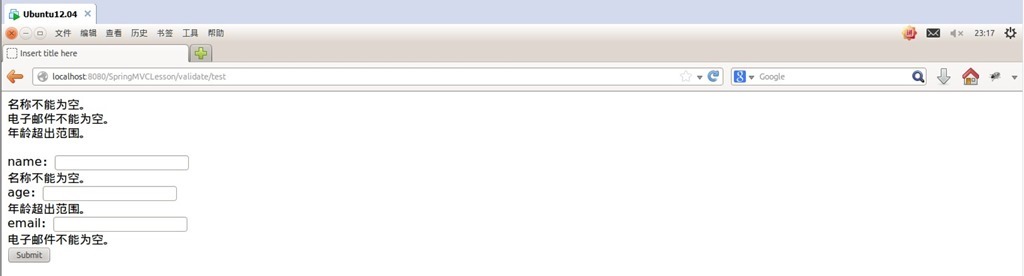
可以看到正确显示了设置的错误信息。
填写错误数据提交:
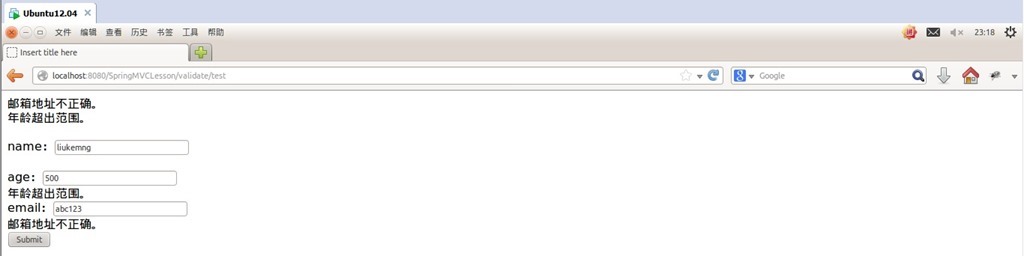
可以看到依然正确显示了设置的错误信息。
填写正确数据提交:


可以看到验证成功。
下面是主要的验证注解及说明:
|
注解 |
适用的数据类型 |
说明 |
|
@AssertFalse |
Boolean, boolean |
验证注解的元素值是false |
|
@AssertTrue |
Boolean, boolean |
验证注解的元素值是true |
|
@DecimalMax(value=x) |
BigDecimal, BigInteger, String, byte,short, int, long and the respective wrappers of the primitive types. Additionally supported by HV: any sub-type of Number andCharSequence. |
验证注解的元素值小于等于@ DecimalMax指定的value值 |
|
@DecimalMin(value=x) |
BigDecimal, BigInteger, String, byte,short, int, long and the respective wrappers of the primitive types. Additionally supported by HV: any sub-type of Number andCharSequence. |
验证注解的元素值小于等于@ DecimalMin指定的value值 |
|
@Digits(integer=整数位数, fraction=小数位数) |
BigDecimal, BigInteger, String, byte,short, int, long and the respective wrappers of the primitive types. Additionally supported by HV: any sub-type of Number andCharSequence. |
验证注解的元素值的整数位数和小数位数上限 |
|
@Future |
java.util.Date, java.util.Calendar; Additionally supported by HV, if theJoda |
验证注解的元素值(日期类型)比当前时间晚 |
|
@Max(value=x) |
BigDecimal, BigInteger, byte, short,int, long and the respective wrappers of the primitive types. Additionally supported by HV: any sub-type ofCharSequence (the numeric value represented |
验证注解的元素值小于等于@Max指定的value值 |
|
@Min(value=x) |
BigDecimal, BigInteger, byte, short,int, long and the respective wrappers of the primitive types. Additionally supported by HV: any sub-type of CharSequence (the numeric value represented |
验证注解的元素值大于等于@Min指定的value值 |
|
@NotNull |
Any type |
验证注解的元素值不是null |
|
@Null |
Any type |
验证注解的元素值是null |
|
@Past |
java.util.Date, java.util.Calendar; Additionally supported by HV, if theJoda |
验证注解的元素值(日期类型)比当前时间早 |
|
@Pattern(regex=正则表达式, flag=) |
String. Additionally supported by HV: any sub-type of CharSequence. |
验证注解的元素值与指定的正则表达式匹配 |
|
@Size(min=最小值, max=最大值) |
String, Collection, Map and arrays. Additionally supported by HV: any sub-type of CharSequence. |
验证注解的元素值的在min和max(包含)指定区间之内,如字符长度、集合大小 |
|
@Valid |
Any non-primitive type(引用类型) |
验证关联的对象,如账户对象里有一个订单对象,指定验证订单对象 |
|
@NotEmpty |
|
验证注解的元素值不为null且不为空(字符串长度不为0、集合大小不为0) |
|
@Range(min=最小值, max=最大值) |
|
验证注解的元素值在最小值和最大值之间 |
|
@NotBlank |
|
验证注解的元素值不为空(不为null、去除首位空格后长度为0),不同于@NotEmpty,@NotBlank只应用于字符串且在比较时会去除字符串的空格 |
|
@Length(min=下限, max=上限) |
|
验证注解的元素值长度在min和max区间内 |
|
|
|
验证注解的元素值是Email,也可以通过正则表达式和flag指定自定义的email格式 |
更多信息请参考官方文档:http://docs.jboss.org/hibernate/validator/4.3/reference/en-US/html/validator-usingvalidator.html
SpringMVC(6)数据验证的更多相关文章
- 15.SpringMVC核心技术-数据验证
在 Web 应用程序中,为了防止客户端传来的数据引发程序的异常,常常需要对数据进行验证. 输入验证分为客户端验证与服务器端验证.客户端验证主要通过 JavaScript 脚本进 行, 而服务器端验证则 ...
- SpringMVC学习笔记七:SpringMVC的数据验证
SpringMVC支持JSR(Java Specification Requests, Java规范提案)303-Bean Validation数据验证规范,该规范的实现者很多,其中较常用的是 Hib ...
- SpringMVC配置数据验证(JSR-303)
这篇文章已经过时了. 请参考比较合适的前后端交互方式. 1.pom.xml中追加hibernate-validator 2.在dto类的域上追加JSR-303的注解 public class Data ...
- springmvc 整合数据验证框架 jsr
1.maven <dependency> <groupId>javax.validation</groupId> <artifactId>validat ...
- springMVC数据验证出现404错误解决办法
今天使用springMVC的数据验证的时候,看似很简单的东西,却有一个很大的陷阱:提交空表单的时候总是出现404错误,但是后台却不给你报任何错.遇到这个错误这个很苦恼,搞了几小时,今天记录并分享一下解 ...
- SpringMVC数据验证
SpringMVC数据验证——第七章 注解式控制器的数据验证.类型转换及格式化——跟着开涛学SpringMVC 资源来自:http://jinnianshilongnian.iteye.com/blo ...
- SpringMVC数据验证(AOP处理Errors和方法验证)
什么是JSR303? JSR 303 – Bean Validation 是一个数据验证的规范,2009 年 11 月确定最终方案. Hibernate Validator 是 Bean Valida ...
- springmvc 数据验证 hibernate-validator --->对象验证
数据验证步骤: 1.测试环境的搭建: 2.验证器的注册 在springmvc.xml配置文件中加以下代码: 3.验证注解添加到对应实体类上 4.修改处理器 5.将验证失败信息写入到表单 index.j ...
- SpringMVC使用@Valid注解进行数据验证
SpringMVC使用@Valid注解进行数据验证 from:https://blog.csdn.net/zknxx/article/details/52426771 我们在做Form表单提交的时 ...
随机推荐
- OpenStack挂载ISO镜像解决
OpenStack挂载ISO镜像解决 Summary 本次在OpenStack平台上进行,基于kvm,挂载iso镜像到OpenStack虚拟机中. 1.针对linux: 上传所需要挂载的iso镜像(必 ...
- DOCKER学习_011:使用Dockerfile制作docker镜像
前面使用commit的方式,制作一个docker镜像,本次介绍使用Dockerfile制作一个dockers镜像 [root@docker-server3 ~]# mkdir /openssh [ro ...
- linux进阶之gitlab仓库搭建及免密使用
一.Gitlab简介 GitLab 是一个用于仓库管理系统的开源项目,使用Git作为代码管理工具,并在此基础上搭建起来的web服务. 可通过Web界面进行访问公开的或者私人项目.它拥有与Github类 ...
- 又卡了~从王者荣耀看Android屏幕刷新机制
前言 正在带妹子上分的我,团战又卡了,我该怎么向妹子解释?在线等. "卡"的意思 不管是端游还是手游,我们都会时不时遇到"卡"的时候,一般这个卡有两种含义: 掉 ...
- Django(43)restful接口规范
restful接口规范 什么是接口规范?接口规范就是为了采用不同的后台语言,也能使用同样的接口获取到同样的数据.如何写接口:接口规范是规范化书写接口的,写接口要写url.响应数据 注:如果将 ...
- 行者APP适配国外环境问题解决
(本文1151字,阅读约5分钟) 玩骑行的同伴都知道,长途骑行,第一需要好的硬件,如大腿发动机.车子.装备等:二是需要好的软件,如意志.有氧能力.骑行app等. 到雅加达后,才发现在国内用了几年的黑鸟 ...
- Linux 文件不能被root修改与编辑原因
近段时间公司的一台服务器被恶意添加了一些定时器任务到crond的配置文件"/var/spool/cron/root"里,本想着只要简单使用crontab -e命令把该恶意的任务去除 ...
- FinFET与2nm晶圆工艺壁垒
FinFET与2nm晶圆工艺壁垒 谈到半导体工艺尺寸的时候,通常对于下面的一串数字耳熟能详:3um.2um.1.5um.1um.0.8um.0.5um.0.35um.0.25um.0.18um.0.1 ...
- CSS 常见问题笔记
CSS 常见问题 布局 一.盒模型宽度计算 问题:div1 的 offsetWidth 是多少? <style> #div1 { width: 100px; padding: 10px; ...
- Bind DNS服务——基础知识
Linux基础--Bind DNS服务 Part0 DNS简介 域名系统(英语:Domain Name System,缩写:DNS)是互联网的一项服务.它作为将域名和IP地址相互映射的一个分布式数据库 ...