
docker上运行mysql服务器
1.搜索MySQL镜像
$ docker search mysql

INDEX       NAME                              DESCRIPTION                                     STARS     OFFICIAL   AUTOMATED

docker.io   docker.io/mysql                   MySQL is a widely used, open-source relati...   6008      [OK]

docker.io   docker.io/mariadb                 MariaDB is a community-developed fork of M...   1891      [OK]

docker.io   docker.io/mysql/mysql-server      Optimized MySQL Server Docker images. Crea...   427                  [OK]

docker.io   docker.io/percona                  Percona Server is a fork of the MySQL rela...   335       [OK]
备注:STARS数最多,OFFICIAL是[OK]的这个就是官方的centos镜像。
2.下载MySQL镜像
$ docker pull docker.io/mysql

$ docker images

REPOSITORY                       TAG                 IMAGE ID            CREATED             SIZE

docker.io/mysql                  latest              5195076672a7        4 weeks ago         371.4 MB
3.运行容器
$ docker run -d --name liying-mysql -e MYSQL_ROOT_PASSWORD=attack docker.io/mysql

$ docker exec -it liying-mysql /bin/bash ##进入容器
4.进入mysql

root@3d21d8918d31:/# mysql -u root -pattack

mysql: [Warning] Using a password on the command line interface can be insecure.

Welcome to the MySQL monitor.  Commands end with ; or \g.

Your MySQL connection id is 2

Server version: 5.7.21 MySQL Community Server (GPL)

Copyright (c) 2000, 2018, Oracle and/or its affiliates. All rights reserved.

Oracle is a registered trademark of Oracle Corporation and/or its

affiliates. Other names may be trademarks of their respective

owners.

Type 'help;' or '\h' for help. Type '\c' to clear the current input statement.

mysql> show databases;

+--------------------+

| Database           |

+--------------------+

| information_schema |

| mysql              |

| performance_schema |

| sys                |

+--------------------+

4 rows in set (0.00 sec)
以上就创建了一个mysql的docker容器,可以看到版本为5.7.21。但是这样创建的容器有两个问题,一是容器删除后,数据就丢失了,二是要访问数据库,必须进入到容器里面才可以。
5.持久化数据,映射开放mysql端口
a、创建宿主机数据存放目录
$ mkdir -p /opt/data/mysql
b、启动容器
$ docker run -d -v /opt/data/mysql/:/var/lib/mysql -p 3306:3306 --name liying-mysql -e MYSQL_ROOT_PASSWORD=attack docker.io/mysql
$ docker logs liying-mysql ##查看日志
$ docker ps #查看容器
c、查看端口
$ lsof -i:3306
d、查看宿主机上的mysql数据
$ cd /opt/data/mysql

$ ll

总用量 188484

-rw-r-----. 1 systemd-bus-proxy input       56 4月  17 11:53 auto.cnf

-rw-------. 1 systemd-bus-proxy input     1679 4月  17 11:53 ca-key.pem

-rw-r--r--. 1 systemd-bus-proxy input     1107 4月  17 11:53 ca.pem

-rw-r--r--. 1 systemd-bus-proxy input     1107 4月  17 11:53 client-cert.pem

-rw-------. 1 systemd-bus-proxy input     1679 4月  17 11:53 client-key.pem

-rw-r-----. 1 systemd-bus-proxy input     1335 4月  17 11:54 ib_buffer_pool

-rw-r-----. 1 systemd-bus-proxy input 79691776 4月  17 11:54 ibdata1

-rw-r-----. 1 systemd-bus-proxy input 50331648 4月  17 11:54 ib_logfile0

-rw-r-----. 1 systemd-bus-proxy input 50331648 4月  17 11:53 ib_logfile1

-rw-r-----. 1 systemd-bus-proxy input 12582912 4月  17 11:54 ibtmp1

drwxr-x---. 2 systemd-bus-proxy input     4096 4月  17 11:53 mysql

drwxr-x---. 2 systemd-bus-proxy input     8192 4月  17 11:53 performance_schema

-rw-------. 1 systemd-bus-proxy input     1679 4月  17 11:53 private_key.pem

-rw-r--r--. 1 systemd-bus-proxy input      451 4月  17 11:53 public_key.pem

-rw-r--r--. 1 systemd-bus-proxy input     1107 4月  17 11:53 server-cert.pem

-rw-------. 1 systemd-bus-proxy input     1679 4月  17 11:53 server-key.pem

drwxr-x---. 2 systemd-bus-proxy input     8192 4月  17 11:53 sys
-p 3306:3306->把容器的mysql端口3306映射到宿主机的3306端口,这样想访问mysql就可以直接访问宿主机的3306端口。
-v /opt/data/mysql:/var/lib/mysql->把宿主机/opt/data/mysql/目录映射到容器的/var/lib/mysql目录
注意事项:
在使用-v选项映射目录时,宿主机需关闭SElinux:
$ setenforce 0
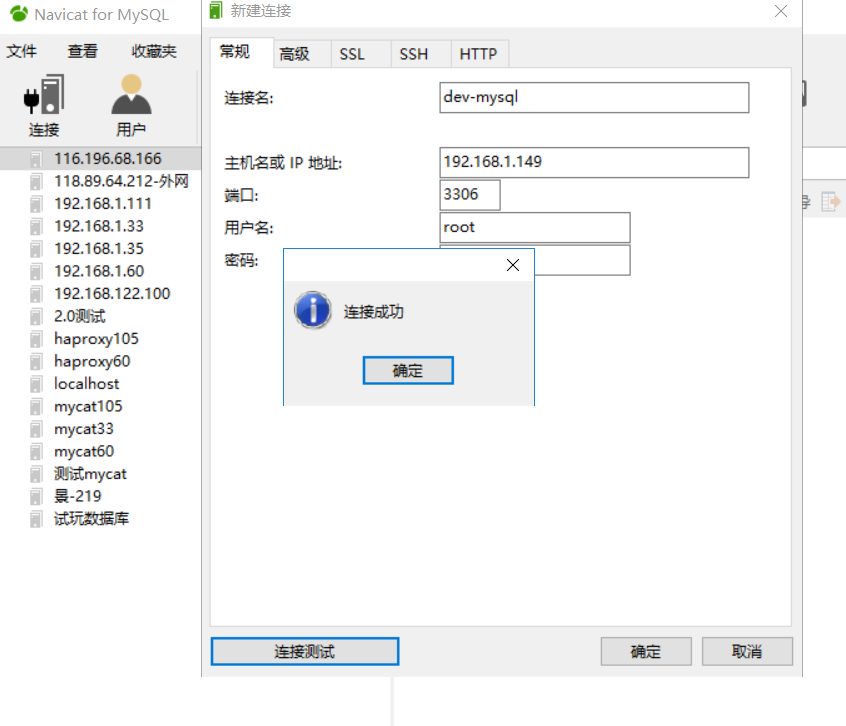
6、Navicat for MySQL客户端访问mysql
docker上运行mysql服务器的更多相关文章
- Docker上运行MySQL服务
1.搜索MySQL镜像 $ docker search mysql INDEX NAME DESCRIPTION STARS OFFICIAL AUTOMATED docker.io docker.i ...
- ELK 性能(3) — 在 Docker 上运行高性能容错的 Elasticsearch 集群
ELK 性能(3) - 在 Docker 上运行高性能容错的 Elasticsearch 集群 介绍 在 Docker 上运行高性能容错的 Elasticsearch 集群 内容 通常熟悉的开发流程是 ...
- 在Docker上构建mysql容器
1.查看docker上的镜像是否有 mysql,如果没有下载则列表中没有 [root@holly holly]# docker images; 如果没有只会看到如下结构 REPOSITORY TA ...
- 在OSX和Windows版本Docker上运行GUI程序
看到很多人在Docker问题区讨论:如何在OS X和Windows的Docker上运行GUI程序, 随手记录几个参考资料: https://github.com/docker/docker/issue ...
- .NET Core 3.0 部署在docker上运行
自从.NET Core3.0发布之后,写了几篇关于.NET Core 3.0的文章,有助于你快速入门.NET Core3.0. 本篇文章主要讲解如何一步步创建一个mvc项目,然后发布并部署在Docke ...
- linux安装docker,并在docker上运行springboot项目
docker架构示例图 仓库---> 镜像 ---> 容器 一.安装docker 1.通过 uname -r 命令查看你当前的内核版本 uname -r 2使用 root 权限登录 Ce ...
- 试试将.NET7编译为WASM并在Docker上运行
之前有听到说Docker支持Wasmtime了,刚好.NET7也支持WASM,就带大家来了解一下这个东西,顺便试试它怎么样. 因为WASM(WebAssembly) 一开始是一个给浏览器的技术,比起J ...
- 在docker中运行mysql实例
Docker是一种新兴的虚拟化技术,能够一定程度上的代替传统虚拟机.下图是容器跟虚拟机的对比 对docker有个大致了解,学习docker断断续续,虽说学习不能急于求成,但断断续续学的话,浪费的碎片化 ...
- docker 中运行 mysql
在宿主机Host的终端执行: 1. 搜索docker镜像仓库中提供的mysql docker search mysql 2.下载mysql镜像 docker pull mysql 3.改变目录权限,非 ...
随机推荐
- centos 7 能ping通但是telnet 22 不通解决方法
试过关闭Linux防火墙,打开sshd服务,修改ens33为enth0.发现不好使. 经过不断的努力我发现,windows系统里面的VMware Network Adapter VMnet8设置的ip ...
- 题解 P3940 分组
有些梦想虽然遥不可及,但不是不可能实现.只要我足够的强. 前言 调了挺长时间的,并查集合并的时候需要 find 一下,不然会炸内存.... 解题思路 参考了题解区一篇思路非常好的题解,在这里讲一下自己 ...
- 深度解读MRS IoTDB时序数据库的整体架构设计与实现
[本期推荐]华为云社区6月刊来了,新鲜出炉的Top10技术干货.重磅技术专题分享:还有毕业季闯关大挑战,华为云专家带你做好职业规划. 摘要:本文将会系统地为大家介绍MRS IoTDB的来龙去脉和功能特 ...
- WIN10安装并汉化PLSQL
WIN10安装并汉化PLSQL 安装文件 链接:https://pan.baidu.com/s/12BBEaFQ8G5LztJmCKgnh1w 提取码:96nx 一.安装 1.双击plsqldev.e ...
- 永恒之蓝MS17-010漏洞复现
永恒之蓝MS17-010漏洞复现 1.漏洞描述: 起因: 永恒之蓝(Eternalblue)是指2017年4月14日晚,黑客团体Shadow Brokers(影子经纪人)公布一大批网络攻击工具,其中包 ...
- kubernetes获取崩溃容器/上一个容器的应用日志
kubectl logs命令将显示当前容器的日志.当你想知道为什么前一个容器终止时,你想看到的是前一个容器的日志,而不是当前容器的.可以通过添加--previous选项来完成: $ kubectl l ...
- 乘风破浪,遇见Visual Studio 2022预览版(Preview),宇宙最强开发者工具首次迎来64位版本
简介 众所周知,我们从官方新闻来看,对Visual Studio 2022最大的期待莫过于:其是首个64位的Visual Studio,这个宇宙最强开发者工具一脚迈入了新的阶段. https://vi ...
- CentOS-Docker安装PostgreSQL(单点)
下载镜像 $ docker pull postgres 创建目录 $ mkdir -p /usr/postgres/data $ chmod -R 755 /usr/postgres/data 运行镜 ...
- 重启outlook的bat脚本
@echo off :openie echo -------------closeing outlook---------- taskkill /f /t /im OUTLOOK.exe echo - ...
- java设计模式(9):模板方法模式(TemplateMethod)
一,定义:模板方法模式定义了一个操作中的算法骨架,而将一些步骤延迟到子类中.模板方法使得子类可以不改变一个算法的结构即可重定义该算法的某些特定步骤. 二,类图: 三,通过小例子讲解: 这个模式一般用在 ...