
路由器基础配置之ospf基础配置
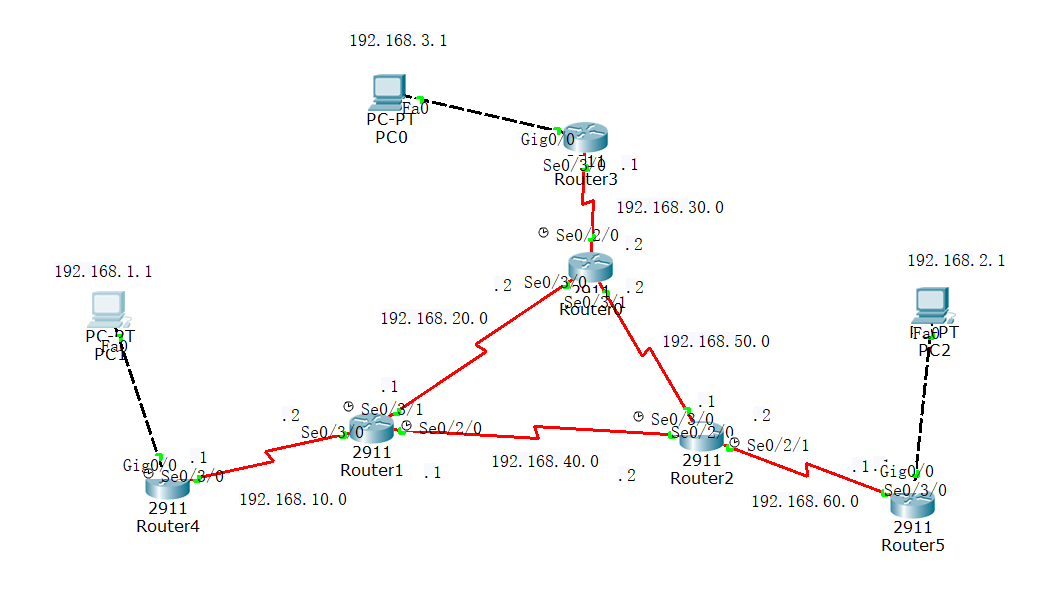
我们将以上面的拓扑图进行本次ospf的实验,目的是能当三台pc机互通
先配置好pc机的IP地址,注意一定要给pc机设置好网关,接下来配置路由器的IP地址
router4
enable 进入特权模式
config t 进入全局配置模式
interface g0/0
ip address 192.168.1.254 255.255.255.0
no shu
exit
interface s0/3/0
ip address 192.168.10.1 255.255.255.0
no shu
router1
enable
config t
interface s0/3/0
ip address 192.168.10.2 255.255.255.0
clock rate 6400 同步时间
no shu
exit
interface s0/3/1
ip address 192.168.20.1 255.255.255.0
clock rate 6400
no shu
exit
interface s0/2/0
ip address 192.168.40.1 255.255.255.0
clock rate 6400
no shu
router2
enable
config t
interface s0/3/0
ip address 192.168.50.1 255.255.255.0
clock rate 6400 同步时间
no shu
exit
interface s0/2/1
ip address 192.168.60.2 255.255.255.0
clock rate 6400
no shu
exit
interface s0/2/0
ip address 192.168.40.2 255.255.255.0
clock rate 6400
no shu
router0
enable
config t
interface s0/3/0
ip address 192.168.20.2 255.255.255.0
clock rate 6400 同步时间
no shu
exit
interface s0/3/1
ip address 192.168.50.2 255.255.255.0
clock rate 6400
no shu
exit
interface s0/2/0
ip address 192.168.30.2 255.255.255.0
clock rate 6400
no shu
router3
enable
config t
interface g0/0
ip address 192.168.3.254 255.255.255.0
no shu
exit
interface s0/3/0
ip address 192.168.30.1 255.255.255.0
no shu
router5
enable
config t
interface g0/0
ip address 192.168.2.254 255.255.255.0
no shu
exit
interface s0/3/0
ip address 192.168.60.1 255.255.255.0
no shu
路由器的IP地址配置完毕
配置ospf
router4
在全局配置模式下
router ospf 1
router-id 1.1.1.1
network 192.168.1.0 0.0.0.255 area 0
network 192.168.10.0 0.0.0.255 area 0
router1
在全局配置模式下
router ospf 1
router-id 2.2.2.2
network 192.168.10.0 0.0.0.255 area 0
network 192.168.20.0 0.0.0.255 area 0
network 192.168.40.0 0.0.0.255 area 0
router0
在全局配置模式下
router ospf 1
router-id 3.3.3.3
network 192.168.30.0 0.0.0.255 area 0
network 192.168.20.0 0.0.0.255 area 0
network 192.168.50.0 0.0.0.255 area 0
router2
在全局配置模式下
router ospf 1
router-id 4.4.4.4
network 192.168.40.0 0.0.0.255 area 0
network 192.168.50.0 0.0.0.255 area 0
network 192.168.60.0 0.0.0.255 area 0
router3
在全局配置模式下
router ospf 1
router-id 5.5.5.5
network 192.168.3.0 0.0.0.255 area 0
network 192.168.30.0 0.0.0.255 area 0
router5
在全局配置模式下
router ospf 1
router-id 6.6.6.6
network 192.168.2.0 0.0.0.255 area 0
network 192.168.60.0 0.0.0.255 area 0
ospf全部配置完毕,等待路由器之间相互学习,可以在特权模式下使用show ip route来查看路由表的学习情况
学习完毕可以使用ping命令,三台pc机就可以互通了,到此实验完成
路由器基础配置之ospf基础配置的更多相关文章
- Network基础(五):配置静态路由、配置浮动路由、配置多路由的静态路由、配置默认路由
一.配置静态路由 目标: 配置路由接口IP地址并通过静态路由的配置实现全网的互通. 方案: 按如下网络拓扑配置接口IP地址并通过静态路由的配置实现全网的互通如下图所示: 步骤: 步骤一:配置静态路由 ...
- Linux基础入门之网络属性配置
Linux基础入门之网络属性配置 摘要 Linux网络属性配置,最根本的就是ip和子网掩码(netmask),子网掩码是用来让本地主机来判断通信目标是否是本地网络内主机的,从而采取不同的通信机制. L ...
- SpringCloud微服务基础 Eureka、Feign、Ribbon、Zuul、Hystrix、配置中心的基础使用
1.单点系统架构 传统项目架构 传统项目分为三层架构,将业务逻辑层.数据库访问层.控制层放入在一个项目中. 优点:适合于个人或者小团队开发,不适合大团队开发. 分布式项目架构 根据业务需求进行拆分成N ...
- Ant学习-001-ant 基础知识及windows环境配置
一.Ant 概要基础知识 Apache Ant 是一个将软件编译.测试.部署等步骤联系在一起加以自动化的一个工具,大多用于Java环境中的软件开发,用以构建应用,或结合其他开源测试工具例如 git.T ...
- android 学习随笔一(配置调试与基础)
一.基础与开发环境安装配置 Memory Options: VM Heap表示每个应用所能占用的最大内存. Android 项目目录结构 SRC java源码 android.jar 导入jar才能使 ...
- WinDbg配置和使用基础
WinDbg配置和使用基础 WinDbg是微软发布的一款相当优秀的源码级(source-level)调试工具,可以用于Kernel模式调试和用户模式调试,还可以调试Dump文件. 1. WinDbg介 ...
- JAVA_SE基础——4.path的临时配置&Classpath的配置
这次,我来写下关于path的临时配置的心的 我来说个有可能的实例:如果你去到别人的电脑 又想写代码 又不想改乱别人的path配置的话 再说别人愿意你在别人的电脑上瞎配吗? 那该怎么办呢? 那没问题 ...
- JAVA_SE基础——2.环境变量的配置&测试JDK
哈喽,利用晚上的空余时间再写篇心的~~~ 谢谢大家 前一篇文章 JAVA_SE基础--JDK&JRE下载及安装http://blog.csdn.net/thescript_j/article ...
- 转 RabbitMQ 基础概念及 Spring 的配置和使用 推荐好文 举例讲解
从不知道到了解—RabbitMQ 基础概念及 Spring 的配置和使用 原理同上 请求地址:http://localhost:8080/home?type=3&routing_key=myO ...
随机推荐
- querySelector()与querySelectorAll()的区别及NodeList和HTMLCollection对象的区别
querySelector().Document.Element类型均可调用该方法. 当用Document类型调用querySelector()方法时,会在文档元素范围内查找匹配的元素:而当用Elem ...
- The only person standing in your way is you.
The only person standing in your way is you.唯一阻碍你的人是你自己.
- vuejs源码摘抄(二)
创建一个用来观察对象的observe类,这个类会附加在被观察的对象上,并且把被观察对象的属性值转换成getter/setter,同时,收集依赖和分发更新,实现代码如下: /* * not type c ...
- Prime Numbers in a Grid素数网格
&/@ Shorthand notation for Map If[PrimeQ[#], Framed@Style[#, Orange, Bold, 15], #] & /@ Rang ...
- asyncio标准库4 asyncio performance
性能包括2部分 每秒并发请求数(Number of concurrent requests per second) 每秒请求负载(Request latency in seconds: min/ave ...
- 基于iframe的CFS(Cross Frame Script)和Clickjacking(点击劫持)攻击
攻击原理: CFS攻击(Cross Frame Script(跨框架脚本)攻击)是利用浏览器允许框架(frame)跨站包含其它页面的漏洞,在主框架的代码 中加入scirpt,监视.盗取用户输入 ...
- 【Leetcode】【Easy】Remove Duplicates from Sorted Array
Given a sorted array, remove the duplicates in place such that each element appear only once and ret ...
- I want to be a Great Web Front-end Developer
有时觉得特别的浮躁,可能是每天春运般的挤地铁,随处可见因为一点小磕小蹭吹胡子瞪眼睛的人,可能是身边的人貌似一下子都好有钱,买房买车或者买第N套房. 很想静下来心寻找到自己inner pace,但是忽然 ...
- (LaTex)CTex的初次使用心得及入门教程
摘要 最近要发论文了,被知乎里人推荐使用论文编译软件(CTex.LaTex和Overleaf之类),瞬间感觉自己用Word简直Out了(书读少). 学校里也听说过LaTex,不过因为当时没怎么写过论文 ...
- PCI PCI-X PCI-E介绍
1.PCI 外设互联标准(或称个人电脑接口,Personal Computer Interface),实际应用中简称PCI(Peripheral Component Interconnect),是一种 ...