
AspNet Core2 浏览器缓存使用
Core2中使用Microsoft.AspNetCore.Mvc下的ResponseCacheAttribute特性来控制Http Get请求的缓存
原理是设置http请求 响应头的Cache-control来告诉浏览器如何进行客户端缓存
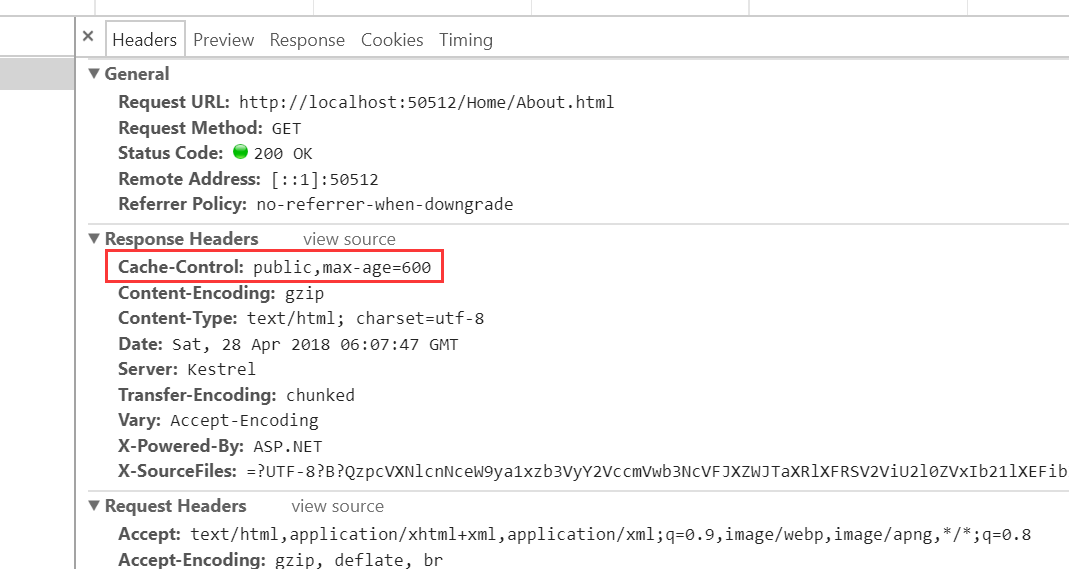
1、在Startup的ConfigureServices方法里面设置一个CacheProfiles,Duration属性定义浏览器缓存的秒数,CacheProfiles一个通用的缓存配置项
 services.AddMvc(option =>

            {

                /*客户端缓存*/

                option.CacheProfiles.Add("default", new Microsoft.AspNetCore.Mvc.CacheProfile

                {

                    Duration =  /*10分钟*/

                });

            });
2、在需要缓存的Action上面添加ResponseCacheAttribute特性,CacheProfileName 的值使用服务配置的名称,该Action将使用配置项进行缓存
[ResponseCache(CacheProfileName = "default")]
也可以在Action 上赋予 Duration 值,指定浏览器缓存的时间
查看ResponseCacheAttribute中的代码
    public unsafe IFilterMetadata CreateInstance(IServiceProvider serviceProvider)

        {

            //IL_0000: Unknown result type (might be due to invalid IL)

            //IL_0008: Unknown result type (might be due to invalid IL)

            //IL_000e: Unknown result type (might be due to invalid IL)

            //IL_0025: Unknown result type (might be due to invalid IL)

            //IL_0032: Expected Ref, but got Unknown

            //IL_0046: Unknown result type (might be due to invalid IL)

            if (serviceProvider == (IServiceProvider))

            {

                throw new ArgumentNullException("serviceProvider");

            }

            IOptions<MvcOptions> requiredService = serviceProvider.GetRequiredService<IOptions<MvcOptions>>();

            CacheProfile cacheProfile = null;

            if (this.CacheProfileName != null)

            {

                ((IDictionary)(?)requiredService.Value.CacheProfiles).TryGetValue((!)this.CacheProfileName, ref *(!*)(&cacheProfile));

                if (cacheProfile == null)

                {

                    throw new InvalidOperationException(Resources.FormatCacheProfileNotFound(this.CacheProfileName));

                }

            }

            this._duration = (this._duration ?? ((cacheProfile != null) ? cacheProfile.Duration : null));

            this._noStore = (this._noStore ?? ((cacheProfile != null) ? cacheProfile.NoStore : null));

            this._location = (this._location ?? ((cacheProfile != null) ? cacheProfile.Location : null));

            this.VaryByHeader = (this.VaryByHeader ?? ((cacheProfile != null) ? cacheProfile.VaryByHeader : null));

            this.VaryByQueryKeys = (this.VaryByQueryKeys ?? ((cacheProfile != null) ? cacheProfile.VaryByQueryKeys : null));

            return new ResponseCacheFilter(new CacheProfile

            {

                Duration = this._duration,

                Location = this._location,

                NoStore = this._noStore,

                VaryByHeader = this.VaryByHeader,

                VaryByQueryKeys = this.VaryByQueryKeys

            });

        }
可以得知Action上设置-----优先级高于--CacheProfiles里面的配置
缓存最终通过ResponseCacheFilter过滤器来实现,ResponseCacheFilter 的代码:
using Microsoft.AspNetCore.Http;

using Microsoft.AspNetCore.Mvc.Core;

using Microsoft.AspNetCore.Mvc.Filters;

using Microsoft.AspNetCore.ResponseCaching;

using System;

using System.Collections;

using System.Collections.Generic;

using System.Globalization;

using System.Linq;

namespace Microsoft.AspNetCore.Mvc.Internal

{

    /// <summary>

    /// An <see cref="T:Microsoft.AspNetCore.Mvc.Filters.IActionFilter" /> which sets the appropriate headers related to response caching.

    /// </summary>

    public class ResponseCacheFilter : IResponseCacheFilter, IActionFilter, IFilterMetadata

    {

        private readonly CacheProfile _cacheProfile;

        private int? _cacheDuration;

        private ResponseCacheLocation? _cacheLocation;

        private bool? _cacheNoStore;

        private string _cacheVaryByHeader;

        private string[] _cacheVaryByQueryKeys;

        /// <summary>

        /// Gets or sets the duration in seconds for which the response is cached.

        /// This is a required parameter.

        /// This sets "max-age" in "Cache-control" header.

        /// </summary>

        public int Duration

        {

            get

            {

                return (this._cacheDuration ?? this._cacheProfile.Duration) ?? ;

            }

            set

            {

                this._cacheDuration = value;

            }

        }

        /// <summary>

        /// Gets or sets the location where the data from a particular URL must be cached.

        /// </summary>

        public ResponseCacheLocation Location

        {

            get

            {

                return (this._cacheLocation ?? this._cacheProfile.Location) ?? ResponseCacheLocation.Any;

            }

            set

            {

                this._cacheLocation = value;

            }

        }

        /// <summary>

        /// Gets or sets the value which determines whether the data should be stored or not.

        /// When set to <see langword="true" />, it sets "Cache-control" header to "no-store".

        /// Ignores the "Location" parameter for values other than "None".

        /// Ignores the "duration" parameter.

        /// </summary>

        public bool NoStore

        {

            get

            {

                return (this._cacheNoStore ?? this._cacheProfile.NoStore) ?? false;

            }

            set

            {

                this._cacheNoStore = value;

            }

        }

        /// <summary>

        /// Gets or sets the value for the Vary response header.

        /// </summary>

        public string VaryByHeader

        {

            get

            {

                return this._cacheVaryByHeader ?? this._cacheProfile.VaryByHeader;

            }

            set

            {

                this._cacheVaryByHeader = value;

            }

        }

        /// <summary>

        /// Gets or sets the query keys to vary by.

        /// </summary>

        /// <remarks>

        /// <see cref="P:Microsoft.AspNetCore.Mvc.Internal.ResponseCacheFilter.VaryByQueryKeys" /> requires the response cache middleware.

        /// </remarks>

        public string[] VaryByQueryKeys

        {

            get

            {

                return this._cacheVaryByQueryKeys ?? this._cacheProfile.VaryByQueryKeys;

            }

            set

            {

                this._cacheVaryByQueryKeys = value;

            }

        }

        /// <summary>

        /// Creates a new instance of <see cref="T:Microsoft.AspNetCore.Mvc.Internal.ResponseCacheFilter" />

        /// </summary>

        /// <param name="cacheProfile">The profile which contains the settings for

        /// <see cref="T:Microsoft.AspNetCore.Mvc.Internal.ResponseCacheFilter" />.</param>

        public ResponseCacheFilter(CacheProfile cacheProfile)

        {

            this._cacheProfile = cacheProfile;

        }

        /// <inheritdoc />

        public void OnActionExecuting(ActionExecutingContext context)

        {

            //IL_0008: Unknown result type (might be due to invalid IL)

            //IL_0051: Unknown result type (might be due to invalid IL)

            //IL_00d4: Unknown result type (might be due to invalid IL)

            //IL_0185: Unknown result type (might be due to invalid IL)

            if (context == null)

            {

                throw new ArgumentNullException("context");

            }

            if (!this.IsOverridden(context))

            {

                if (!this.NoStore && !this._cacheProfile.Duration.get_HasValue() && !this._cacheDuration.get_HasValue())

                {

                    throw new InvalidOperationException(Resources.FormatResponseCache_SpecifyDuration("NoStore", "Duration"));

                }

                IHeaderDictionary headers = context.HttpContext.Response.Headers;

                ((IDictionary)(?)headers).Remove((!)"Vary");

                ((IDictionary)(?)headers).Remove((!)"Cache-Control");

                ((IDictionary)(?)headers).Remove((!)"Pragma");

                if (!string.IsNullOrEmpty(this.VaryByHeader))

                {

                    headers["Vary"] = this.VaryByHeader;

                }

                if (this.VaryByQueryKeys != null)

                {

                    IResponseCachingFeature responseCachingFeature = context.HttpContext.Features.Get<IResponseCachingFeature>();

                    if (responseCachingFeature == null)

                    {

                        throw new InvalidOperationException(Resources.FormatVaryByQueryKeys_Requires_ResponseCachingMiddleware("VaryByQueryKeys"));

                    }

                    responseCachingFeature.VaryByQueryKeys = this.VaryByQueryKeys;

                }

                if (this.NoStore)

                {

                    headers["Cache-Control"] = "no-store";

                    if (this.Location == ResponseCacheLocation.None)

                    {

                        headers.AppendCommaSeparatedValues("Cache-Control", "no-cache");

                        headers["Pragma"] = "no-cache";

                    }

                }

                else

                {

                    string text = null;

                    switch (this.Location)

                    {

                    case ResponseCacheLocation.Any:

                        text = "public";

                        break;

                    case ResponseCacheLocation.Client:

                        text = "private";

                        break;

                    case ResponseCacheLocation.None:

                        text = "no-cache";

                        headers["Pragma"] = "no-cache";

                        break;

                    }

                    text = string.Format((IFormatProvider)CultureInfo.get_InvariantCulture(), "{0}{1}max-age={2}", (object)text, (object)((text != null) ? "," : null), (object)this.Duration);

                    if (text != null)

                    {

                        headers["Cache-Control"] = text;

                    }

                }

            }

        }

        /// <inheritdoc />

        public void OnActionExecuted(ActionExecutedContext context)

        {

        }

        internal bool IsOverridden(ActionExecutingContext context)

        {

            //IL_0008: Unknown result type (might be due to invalid IL)

            if (context == null)

            {

                throw new ArgumentNullException("context");

            }

            return Enumerable.Last<IResponseCacheFilter>(Enumerable.OfType<IResponseCacheFilter>((IEnumerable)context.Filters)) != this;

        }

    }

}
AspNet Core2 浏览器缓存使用的更多相关文章
- ASP.NET Boilerplate 学习 AspNet Core2 浏览器缓存使用 c#基础,单线程,跨线程访问和线程带参数 wpf 禁用启用webbroswer右键菜单 EF Core 2.0使用MsSql/MySql实现DB First和Code First ASP.NET Core部署到Windows IIS QRCode.js:使用 JavaScript 生成
ASP.NET Boilerplate 学习 1.在http://www.aspnetboilerplate.com/Templates 网站下载ABP模版 2.解压后打开解决方案,解决方案目录: ...
- aspnet core2中使用csp内容安全策略
aspnet core2中使用csp内容安全策略 问题:aspnet core2如何使用csp防止xss的攻击 方法: public void ConfigureServices( IServiceC ...
- web性能优化:详说浏览器缓存
TOC 背景 浏览器的总流程图 一步一步说缓存 朴素的静态服务器 设置缓存超时时间 html5 Application Cache Last-Modified/If-Modified-Since Et ...
- 理解web缓存 浏览器缓存
为了: 控制缓存 遇到的现象: 1.开发的时候,浏览器会缓存你的文件,使得你的改动是无效的! 开发过程中:我们是不希望有缓存的. 但正是发布以后,我们是希望页面能够在浏览器缓存,这样用户的体验就会提高 ...
- nginx,控浏览器缓存,前端优化方案
1,困惑 做web项目,对于开发者来说,一个最头痛的问题就是浏览器缓存,有缓存,js更改了,html更改了,发布服务器以后用户往往无法通过浏览器访问到最新的类容,需要用户主动去刷新页面, 因为一直做企 ...
- 关于引用JS和CSS刷新浏览器缓存问题
有时候我们会碰到上线的新版本都要刷新一次缓存的问题.那是因为改了JS的内容,但是JSP引用的地方后面的字符串未发生改变导致浏览器读取浏览器缓存而不会重新加载新的JS内容,以下提供两种解决方式: 1.每 ...
- 浏览器缓存相关的Http头介绍:Expires,Cache-Control,Last-Modified,ETag
转自:http://www.path8.net/tn/archives/2745 缓存对于web开发有重要作用,尤其是大负荷web系统开发中. 缓存分很多种:服务器缓存,第三方缓存,浏览器缓存等.其中 ...
- Nginx使用Expires增加浏览器缓存加速
Max-age是指我们的web中的文件被用户访问(请求)后的存活时间,是个相对的值,相对Request_time(请求时间). Expires它比max-age要麻烦点,Expires指定的时间分&q ...
- 浏览器缓存详解:expires,cache-control,last-modified,etag详细说明
最近在对CDN进行优化,对浏览器缓存深入研究了一下,记录一下,方便后来者 画了一个草图: 每个状态的详细说明如下: 1.Last-Modified 在浏览器第一次请求某一个URL时,服务器端的返回状态 ...
随机推荐
- python 怎样获取toast?
toast是什么? 想要获取toast的小伙伴们,肯定知道这个是一个什么玩意,例行还是加一个图,加以解释,下图的就是传说中的toast,它有一个特点,出现时间特别短,很难通过定位元素去获取这个toas ...
- 欧拉函数(C语言实现)
欧拉函数(Euler's totient function)是指小于n的正整数中与n互质的数的数目,用φ(n)表示.特别的,φ(1)=1: 例如:φ(10)=4:1 3 7 9与10互质. 公式:φ( ...
- [视频]K8飞刀 mysql注入点拿shell & UDF提权教程
[视频]K8飞刀 mysql注入点拿shell & UDF提权教程 链接: https://pan.baidu.com/s/1a7u_uJNF6SReDbfVtAotIw 提取码: ka5m
- 13-03 Java 基本类型包装类概述,Integer类,Character
基本类型包装类概述 将基本数据类型封装成对象的好处在于可以在对象中定义更多的功能方法操作该数据.常用的操作之一:用于基本数据类型与字符串之间的转换.基本类型和包装类的对应Byte,Short,Inte ...
- HW2018校招研发笔试编程题
1. 数字处理 题目描述:给出一个不多于5位的整数,进行反序处理,要求 (1)求出它是几位数 (2)分别输出每一个数字(空格隔开) (3)按逆序输出各位数字(仅数字间以空格间隔,负号与数字之间不需要间 ...
- Animate.css(一款有意思的CSS3动画库)
官网:https://daneden.github.io/animate.css/ animate.css 是一款跨浏览器的动画库. 使用方式: 在页面的 <head>中引入样式文件: & ...
- Python和Java编程题(五)
题目:将一个正整数分解质因数.例如:输入90,打印出90=2*3*3*5. 程序分析:对n进行分解质因数,应先找到一个最小的质数k,然后按下述步骤完成: (1)如果这个质数恰等于n,则说明分解质因数的 ...
- Linux中ls命令用法
ls 命令的含义是list显示当前目录中的文件名字.注意不加参数它显示除隐藏文件外的所有文件及目录的名字. 1)ls –a 显示当前目录中的所有文件,包含隐藏文件 命令: aijian.shi@U-a ...
- MVC架构介绍——自运行任务
实例产品基于asp.net mvc 5.0框架,源码下载地址:http://www.jinhusns.com/Products/Download 通过自运行任务来调度及执行程序中需要定时触发或处理的一 ...
- Anaconda 安装、使用
一.下载: 清华镜像:https://mirrors.tuna.tsinghua.edu.cn/anaconda/archive/ 二.安装: 默认就行,安装路径最好换一下 三.配置环境变量: 控制面 ...