
Solr7.1---Getting Start
目前最新版的Solr是7.1.0
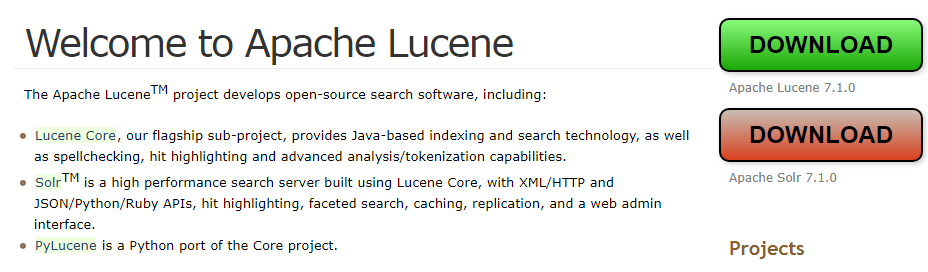
有个我还不清楚的地方是,为何5.5.X或者6.6.X版本还在更新,给我的感觉好像每一个大版本都有自己的维护团队。不管了。
首先-系统要求
JDK1.8+
解压Solr
~$ unzip -q solr-7.1..zip

~$ cd solr-7.1./
以SolrCloud模式启动
Unix或MacOS:bin/solr start -e cloud

Windows:bin\solr.cmd start -e cloud
进入目录-启动【Linux仅仅命令不同】
D:\>cd solr-7.1.

D:\solr-7.1.>bin\solr.cmd start -e cloud

Welcome to the SolrCloud example!

This interactive session will help you launch a SolrCloud cluster on your local

workstation.

To begin, how many Solr nodes would you like to run in your local cluster? (spec

ify - nodes) []:
这个时候直接回车Enter
Ok, let's start up 2 Solr nodes for your example SolrCloud cluster.

Please enter the port for node1 []:
再Enter
Please enter the port for node2 []:
Enter,后面直接出现这么一大段
Creating Solr home directory D:\solr-7.1.\example\cloud\node1\solr

Cloning D:\solr-7.1.\example\cloud\node1 into

   D:\solr-7.1.\example\cloud\node2

Starting up Solr on port  using command:

"D:\solr-7.1.0\bin\solr.cmd" start -cloud -p  -s "D:\solr-7.1.0\example\clou

d\node1\solr"

Waiting up to  to see Solr running on port

Started Solr server on port . Happy searching!

Starting up Solr on port  using command:

"D:\solr-7.1.0\bin\solr.cmd" start -cloud -p  -s "D:\solr-7.1.0\example\clou

d\node2\solr" -z localhost:9983

Waiting up to  to see Solr running on port

INFO  - -- ::54.245; org.apache.solr.client.solrj.impl.ZkClientClust

erStateProvider; Cluster at localhost: ready

Now let's create a new collection for indexing documents in your 2-node cluster.

Please provide a name for your new collection: [gettingstarted]

Started Solr server on port . Happy searching!
最后一段话:系统提示你创建一个用于索引数据的集合。因为Solr提供一些样本数据,我们不妨与教程一致,在控制台输入techproducts 然后回车。
techproducts

How many shards would you like to split techproducts into? []
然后会让你输入想分割到两个节点上的碎片数量。这里默认为2,就是均匀分割到两个节点上。【我们目前有两个节点,所以2就是平均分。如果我们建立三个节点,那么想要平均分就要输入3】。直接回车。
How many replicas per shard would you like to create? []
你想为每个碎片创建多少副本?【副本是用来故障切换的】这里默认2,回车
Please choose a configuration for the techproducts collection, available options

 are:

_default or sample_techproducts_configs [_default]
这里让我们选择一个配置。在本地我也找到了这两个目录
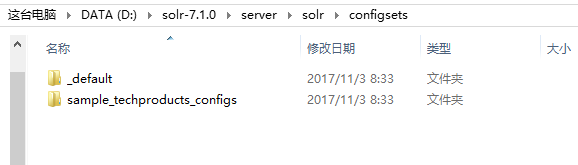
Solr有两个开箱即用的配置文件样本集,称为“configSet”。而索引集合必须有一个“ConfigSet”。它包括两个主要配置文件:

大家注意 sample_techproducts_configs ,它包括了我们定义的索引集合名称:techproducts。这个config包含了我们需要的示例数据。所以在控制台上输入sample_techproducts_configs并回车【可能会慢一点,耐心】:
sample_techproducts_configs

Created collection 'techproducts' with  shard(s),  replica(s) with config-set

'techproducts'

Enabling auto soft-commits with maxTime  secs using the Config API

POSTing request to Config API: http://localhost:8983/solr/techproducts/config

{"set-property":{"updateHandler.autoSoftCommit.maxTime":""}}

Successfully set-property updateHandler.autoSoftCommit.maxTime to

SolrCloud example running, please visit: http://localhost:8983/solr

D:\solr-7.1.>
最后来访问:
http://localhost:8983/solr

Solr现在将运行两个“节点”,一个在端口7574上,一个在端口8983上。一个集合techproducts,两个分片集合,每个都有两个副本。【点击Cloud可见】
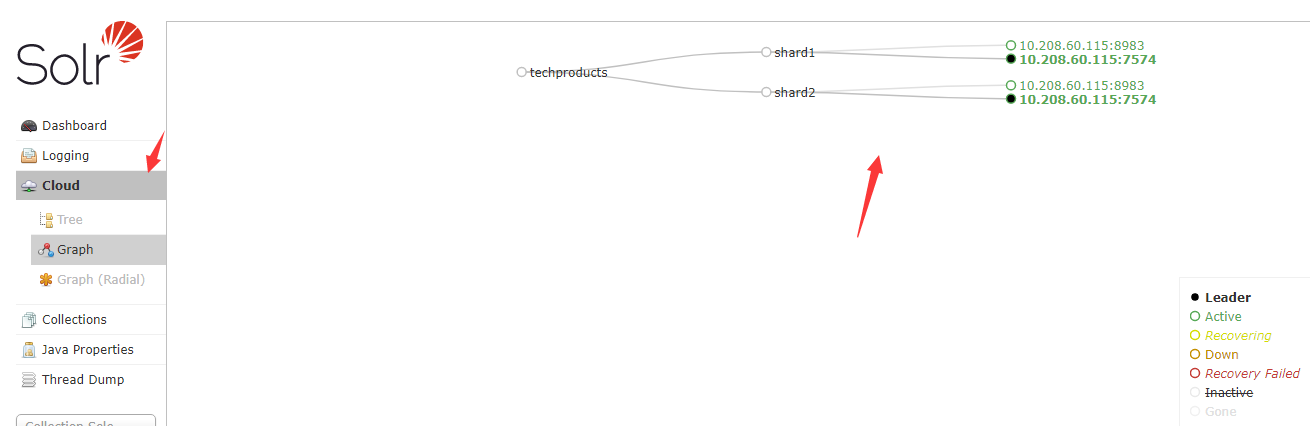
到此Solr已经启动啦,可是还没有数据。下面来完成
加入数据
Linux:solr-7.1.:$ bin/post -c techproducts example/exampledocs/*

Windows:D:\solr-7.1.0> java -jar -Dc=techproducts -Dauto example\exampledocs\post.jar example\exampledocs\*
结果:
D:\solr-7.1.>java -jar -Dc=techproducts -Dauto example\exampledocs\post.jar exa

mple\exampledocs\*

SimplePostTool version 5.0.

Posting files to [base] url http://localhost:8983/solr/techproducts/update...

Entering auto mode. File endings considered are xml,json,jsonl,csv,pdf,doc,docx,

ppt,pptx,xls,xlsx,odt,odp,ods,ott,otp,ots,rtf,htm,html,txt,log

POSTing file books.csv (text/csv) to [base]

POSTing file books.json (application/json) to [base]/json/docs

POSTing file gb18030-example.xml (application/xml) to [base]

POSTing file hd.xml (application/xml) to [base]

POSTing file ipod_other.xml (application/xml) to [base]

POSTing file ipod_video.xml (application/xml) to [base]

POSTing file manufacturers.xml (application/xml) to [base]

POSTing file mem.xml (application/xml) to [base]

POSTing file money.xml (application/xml) to [base]

POSTing file monitor.xml (application/xml) to [base]

POSTing file monitor2.xml (application/xml) to [base]

POSTing file more_books.jsonl (application/json) to [base]/json/docs

POSTing file mp500.xml (application/xml) to [base]

POSTing file post.jar (application/octet-stream) to [base]/extract

POSTing file sample.html (text/html) to [base]/extract

POSTing file sd500.xml (application/xml) to [base]

POSTing file solr-word.pdf (application/pdf) to [base]/extract

POSTing file solr.xml (application/xml) to [base]

POSTing file test_utf8.sh (application/octet-stream) to [base]/extract

POSTing file utf8-example.xml (application/xml) to [base]

POSTing file vidcard.xml (application/xml) to [base]

 files indexed.

COMMITting Solr index changes to http://localhost:8983/solr/techproducts/update.

..

Time spent: ::06.768

D:\solr-7.1.>
基本搜索
访问:http://localhost:8983/solr/#/techproducts/query
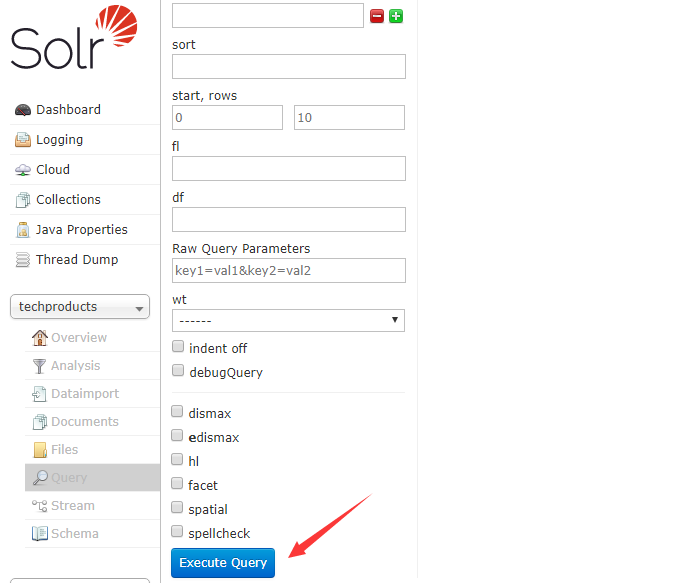
点击Execute Query。开始查询,你会发现右边有好几条JSON数据。准确来说:是十条
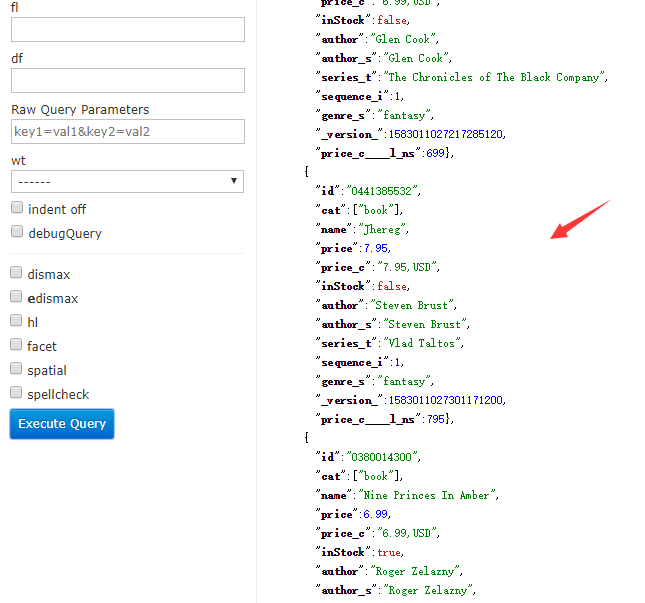
右上角是发送的URL,你可以点击它,点击试试看
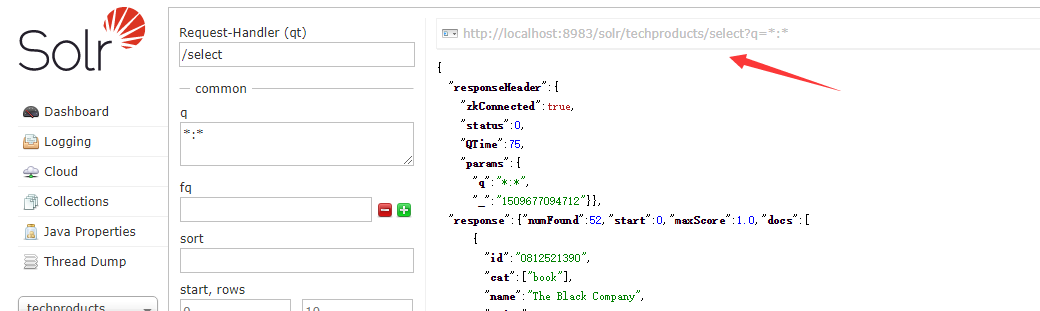
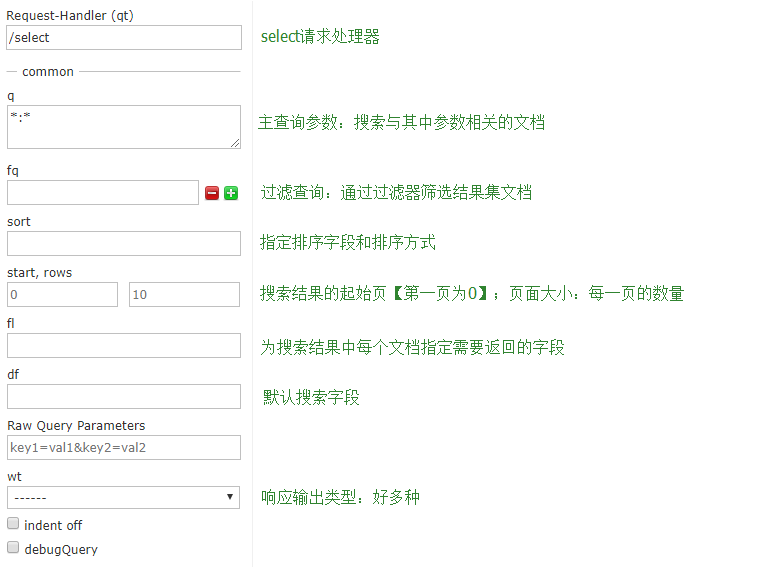
查询参数解释:
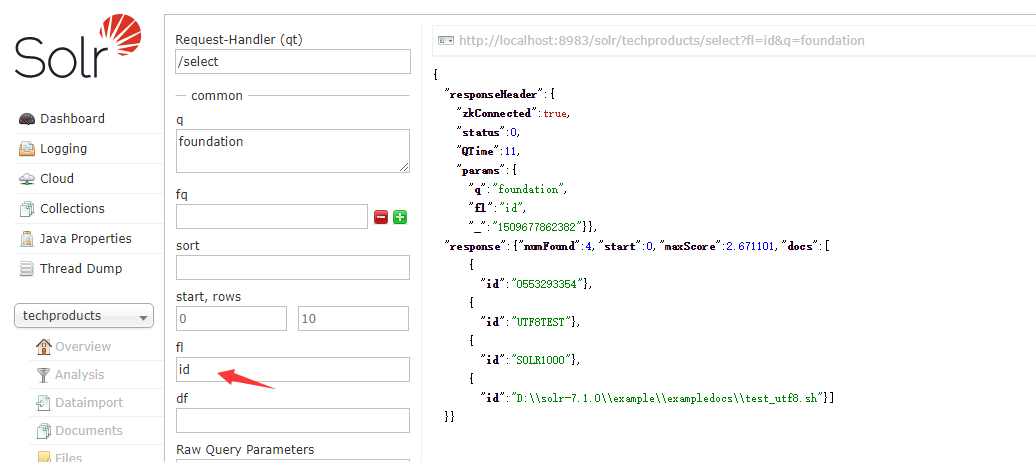
修改q为foundation,结果显示有四个命中。

将id放入fl中,再次查询,你会发现显示的字段只有id
我们再改变p为electronics,有14个结果。
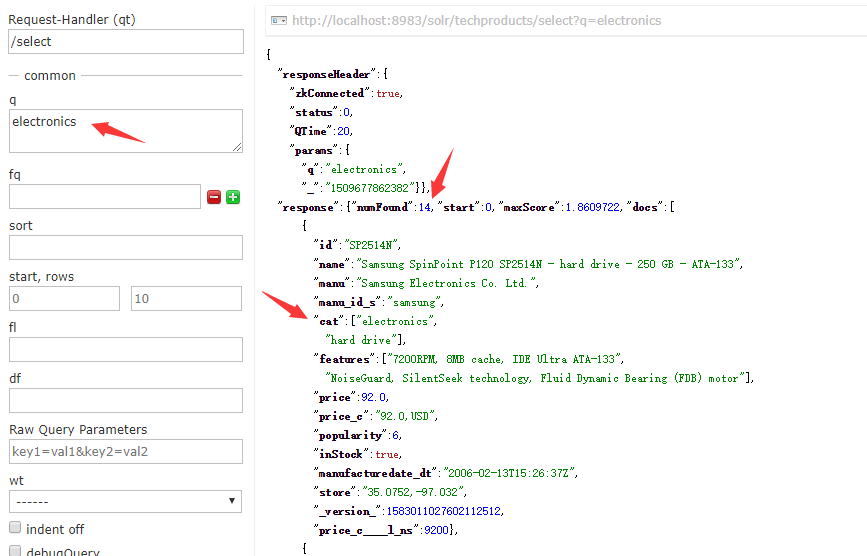
这种查询是在所有索引字段查询包括electronics字段的文档,如果想更精确一点,我们看到有一个cat字段,那么将p改为cat:electronics,意思为仅仅cat字段中包含electronics信息的数据。
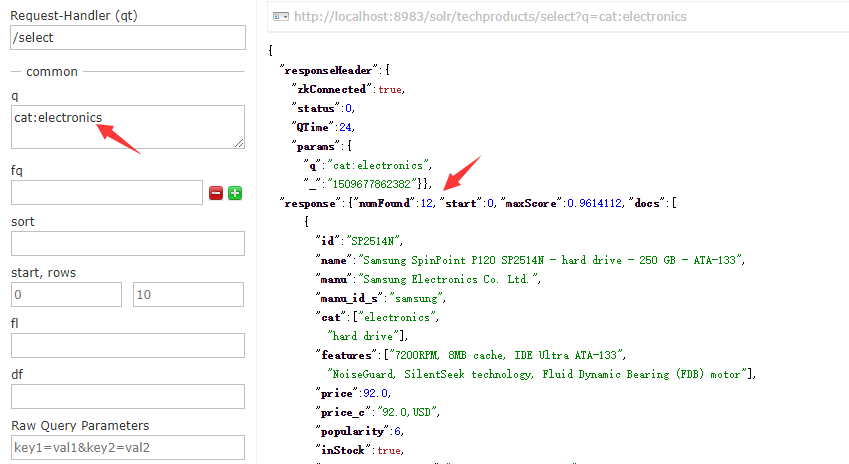
可以看到,只有12条数据,更加精确了。
下面进行短语搜索
p改为"multiple terms here",短语搜索必需加上双引号。

最后
如果你希望删除此集合
D:\solr-7.1.> bin\solr delete -c techproducts
注意:Linux的路径为/
停止启动的Solr
D:\solr-7.1.> bin\solr stop -all
Solr7.1---Getting Start的更多相关文章
- (五)solr7.1.0之solrJ的使用
(五)solr7.1.0之solrJ的使用 下面是solr7的官网API介绍: 网页翻译的不是很准确,只能了解个大概,基本能获取如下信息: 一.构建和运行SolrJ应用程序 对于用Maven构建的项目 ...
- (二)部署solr7.1.0到tomcat
solr7.1.0部署到tomcat8 官方表示solr5之后的版本不再提供对第三方容器的支持(不提供war包了). "旧式"solr.xml格式不再支持,核心必须使用core.p ...
- (一)windows7下solr7.1.0默认jetty服务器环境搭建
windows7下solr7.1.0默认jetty服务器环境搭建 1.下载solr solr7官网地址:http://lucene.apache.org/solr/ jdk8官网地址:http://w ...
- Solr7 安装部署 管理界面介绍
Solr7 安装部署 管理界面介绍 本章重点介绍CentOS 安装部署Solr7 ,Solr的管理界面介绍,添加核心Core配置,Dataimport导入数据,Documents 在线维护索引,Que ...
- 虚拟机下 solr7.1 cloud 集群搭建 (手动解压和官方脚本两种方式)
准备工作: vmware workstation 12,OS使用的是ubuntu16.04,三台虚拟机搭建一个solr集群,zookeeper共用这三台虚拟机组成zookeeper集群. zookee ...
- Solr7使用Oracle数据源导入+中文分词
安装目录假设为#solr_home,本文的#solr_home为apps/svr/solr 1. 在#solr_home/server/solr下新建文件夹,假设为mjd 2. 将#solr_home ...
- Solr7.1---数据库导入并建立中文分词器
这里只是告诉你如何导入,生产环境不要这样部署你的solr服务. 首先修改solrConfig.xml文件 备份_default文件夹 修改solrconfig.xml 加入如下内容 官方示例:< ...
- 最新版solr7.2集群搭建详细步骤
集群:高可用,备份,数据可分片 需要运行4个tomcat 1.tomcat端口号(默认占用8005,8009,8080三个端口) tomcat服务 占用端口 tomcat1 6005.6060.600 ...
- solr7.2安装实例,中文分词器
一.安装实例 1.创建实例目录 [root@node004]# mkdir -p /usr/local/solr/home/jonychen 2.复制实例相关配置文件 [root@node004]# ...
- CentOS7搭建solr7.2
solr介绍 一.Solr它是一种开放源码的.基于 Lucene Java 的搜索服务器,易于加入到 Web 应用程序中. 二.Solr 提供了层面搜索(就是统计).命中醒目显示并且支持多种输出格式( ...
随机推荐
- HAOI2016 找相同字符 后缀自动机
两个串,考虑一建一跑.枚举模式串的位置\(i\),考虑每次统计以\(i\)结尾的所有符合要求的串.在后缀自动机上走时记录当前匹配长度\(curlen\),则当前节点的贡献是\((curlen-len[ ...
- STL next_permutation()
用法 字典序全排列 可以发现函数next_permutation()是按照字典序产生排列的,并且是从数组中当前的字典序开始依次增大直至到最大字典序. 代码 #include<iostream&g ...
- Hitchhiker 是一款开源的 Restful Api 测试工具
Hitchhiker 是一款开源的 Restful Api 测试工具 开源API测试工具 Hitchhiker v0.4更新 - 没有做不到,只有想不到 Hitchhiker 是一款开源的 Restf ...
- PAT L2-011 玩转二叉树
https://pintia.cn/problem-sets/994805046380707840/problems/994805065406070784 给定一棵二叉树的中序遍历和前序遍历,请你先将 ...
- WIN10基于Hyper-V下运行kubernetes入门问题
http://www.cnblogs.com/shanyou/p/8503839.html 安装配置好之后启动,查看ip的方法: minikube status minikube ip 查看仪表盘da ...
- Java用JSoup组件提取asp.net webform开发网页的viewstate相关相关参数
/** * 从页面中提取特定input的的Value * @param formparams * @param document * @param elementId */ private void ...
- [转帖]从1G到5G
一文看懂无线通信:从1G到5G 投递人 itwriter 发布于 2019-02-03 15:25 评论(2) 有280人阅读 [收藏] « » 文/老和山下的小学僧 最近太邪乎,先引用一个马克思政治 ...
- 文件系统的block 数据库中的block 以及内存中的page基础知识汇总(自己理解 可能有误)
1. 操作系统文件系统中的的block 文件系统中的block 是文件系统最小的读写单元,在HDD的磁盘时代, 一般block的大小可能与磁盘的扇区大小一致为 512bytes 也因为这个原因MBR启 ...
- python之tkinter使用-多选框实现开关操作
# tkinter的Checkbutton实现开关操作 import tkinter as tk root = tk.Tk() root.title('开关') root.geometry('170x ...
- selenium之批量执行测试用例生成HTML结果文件
使用HTMLTestRunner运行测试套件,自动生成html测试报告: import unittest, HTMLTestRunner, sendmail_html import time, os ...