
spring El
 package com.wisely.heighlight_spring4.ch2.el;

 import java.io.IOException;

 import org.apache.commons.io.IOUtils;

 import org.springframework.beans.factory.annotation.Autowired;

 import org.springframework.beans.factory.annotation.Value;

 import org.springframework.context.annotation.Bean;

 import org.springframework.context.annotation.ComponentScan;

 import org.springframework.context.annotation.Configuration;

 import org.springframework.context.annotation.PropertySource;

 import org.springframework.context.support.PropertySourcesPlaceholderConfigurer;

 import org.springframework.core.env.Environment;

 import org.springframework.core.io.Resource;

 @Configuration

 @ComponentScan("com.wisely.heighlight_spring4.ch2.el")

 @PropertySource("classpath:com/wisely/heighlight_spring4/ch2/el/test.properties")    //加载属性资源文件

 public class ElConfig {

     @Value("I love you!")    //普通的字符串

     private String normal;

     @Value("#{systemProperties['os.name']}")    //系统属性

     private String osName;

     @Value("#{ T(java.lang.Math).random() * 100.0 }")        //表达式结果

     private double randomNumber;

     @Value("#{demoService.another}")    //其他Bean属性

     private String fromAnother;

     @Value("classpath:com/wisely/heighlight_spring4/ch2/el/test.txt")    //文件资源

     private Resource testFile;

     @Value("http://www.baidu.com")    //网址资源

     private Resource testUrl;

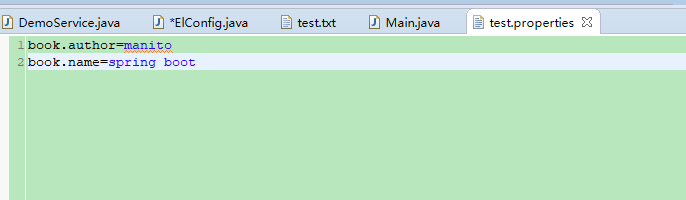
     @Value("${book.name}")        //配置文件

     private String bookName;

     @Autowired

     private Environment environment;

     @Bean

     public static PropertySourcesPlaceholderConfigurer propertyConfigure() {

         return new PropertySourcesPlaceholderConfigurer();

     }

     public void outputResource() {

         try {

             System.out.println("normal:"+normal);

             System.out.println("osName:"+osName);

             System.out.println("randomNumber:"+randomNumber);

             System.out.println("fromAnother:"+fromAnother);

             System.out.println("testFile:"+IOUtils.toString(testFile.getInputStream()));

             System.out.println("testUrl:"+IOUtils.toString(testUrl.getInputStream()));

             System.out.println("bookName:"+bookName);

             System.out.println("environment:"+environment.getProperty("book.author"));

         } catch (IOException e) {

             e.printStackTrace();

         }

     }

 }
 package com.wisely.heighlight_spring4.ch2.el;

 import org.springframework.beans.factory.annotation.Value;

 import org.springframework.stereotype.Service;

 @Service

 public class DemoService {

     @Value("其它类的属性")

     private String another;            //注入普通的字符串

     public String getAnother() {

         return another;

     }

     public void setAnother(String another) {

         this.another = another;

     }

 }
spring El的更多相关文章
- Spring3系列6 - Spring 表达式语言(Spring EL)
Spring3系列6-Spring 表达式语言(Spring EL) 本篇讲述了Spring Expression Language —— 即Spring3中功能丰富强大的表达式语言,简称SpEL.S ...
- Test Spring el with ExpressionParser
Spring expression language (SpEL) supports many functionality, and you can test those expression fea ...
- Spring EL regular expression example
Spring EL supports regular expression using a simple keyword "matches", which is really aw ...
- Spring EL Lists, Maps example
In this article, we show you how to use Spring EL to get value from Map and List. Actually, the way ...
- Spring EL ternary operator (if-then-else) example
Spring EL supports ternary operator , perform "if then else" conditional checking. For exa ...
- Spring EL Operators example
Spring EL supports most of the standard mathematical, logical or relational operators. For example, ...
- Spring EL method invocation example
In Spring EL, you can reference a bean, and nested properties using a 'dot (.)' symbol. For example, ...
- Spring EL hello world example
The Spring EL is similar with OGNL and JSF EL, and evaluated or executed during the bean creation ti ...
- Spring Boot实战笔记(二)-- Spring常用配置(Scope、Spring EL和资源调用)
一.Bean的Scope Scope描述的是Spring容器如何新建Bean实例的.Spring的Scope有以下几种,通过@Scope注解来实现. (1)Singleton:一个Spring容器中只 ...
- Spring 在 xml配置文件 或 annotation 注解中 运用Spring EL表达式
Spring EL 一:在Spring xml 配置文件中运用 Spring EL Spring EL 采用 #{Sp Expression Language} 即 #{spring表达式} ...
随机推荐
- JAVA 第四周学习总结
20175303 2018-2019-2 <Java程序设计>第四周学习总结 教材学习内容总结 •用extends来定义一个类的子类. •Object类是所有类的祖先类. •如果子类和父类 ...
- jQuery 实现点击页面其他地方隐藏菜单
点击页面其它地方隐藏id为messageList的div 代码: $('body').delegate("#message", 'click', function(e) { var ...
- Cocoa 框架 For iOS(一) 框架的介绍,Objectivie-C运行时能力的解析等 (转载)
http://blog.csdn.net/totogo2010/article/details/8081253 Cocoa框架是iOS应用程序的基础,了解Cocoa框架,对开发iOS应用有很大的帮助. ...
- C#基础加强(8)之委托和事件
委托 简介 委托是一种可以声明出指向方法的变量的数据类型. 声明委托的方式 格式: delegate <返回值类型> 委托类型名(参数) ,例如: delegate void MyDel( ...
- JMeter-标的上架调整与完成
问题:利随本青,按日的返回的参数不正确 各种计息方式的上标,新做产品的上架 散标各种计息方式的上架,新做产品的上架 修改后B环境上架 修改后C环境上架 [制作提案(担保机构)-提交18] loan.d ...
- python模拟面试技术题答案
目录 Python4期模拟面试技术面试题答案............................................................................ ...
- C#-MVC-Razor视图引擎及解决路径问题的三个方法
Razor 视图引擎 与Aspx开发区别在于代码: 1.Razor 更智能,摒弃了<%%>格式,直接用@符号开启cs代码,遇到html时自动识别 2.遇到如汉字等即非cs代码,又非html ...
- tiny6410的启动参数
bootargs=root=/dev/mtdblock2 rootfstype=yaffs2 init=/linuxrc console=ttySAC0,115200 bootcmd=nand led ...
- Ajax跨域请求COOKIE无法带上的解决办法
原生ajax请求方式: var xhr = new XMLHttpRequest(); xhr.open("POST", "http://xxxx.com/demo/b/ ...
- myeclipse集成meavn
环境准备: JDK 1.6 Maven 3.0.4 myeclipse 8.6.1 安装 Maven 之前要求先确定你的 JDK 已经安装配置完成.Maven是 Apache 下的一个项目,目前最新版 ...