
Spring Boot实战笔记(二)-- Spring常用配置(Scope、Spring EL和资源调用)
一、Bean的Scope
Scope描述的是Spring容器如何新建Bean实例的。Spring的Scope有以下几种,通过@Scope注解来实现。
(1)Singleton:一个Spring容器中只有一个Bean的实例,此为Spring的默认配置,全容器共享一个实例。
(2)Prototype:每次调用新建一个Bean实例。
(3)Request:Web项目中,给每一个 http request 新建一个Bean实例。
(4)Session:Web项目中,给每一个 http session 新建一个Bean实例。
(5)GlobalSession:这个只在portal应用中有用,给每一个 global http session 新建一个Bean实例。
另外,在Spring Batch中还有一个Scope是使用@StepScope,我们将在批处理介绍这个Scope。
接下来简单演示默认的 Singleton 和 Prototype,分别从Spring容器中获取两次Bean,判断Bean的实例是否相等。
1.编写Singleton的Bean。
package com.ecworking.scope;

import org.springframework.stereotype.Service;

@Service //默认为Singleton,相当于@Scope("singleton")。

public class DemoSingletonService {

}
2.编写Prototype的Bean。
package com.ecworking.scope;

import org.springframework.context.annotation.Scope;

import org.springframework.stereotype.Service;

@Service

@Scope("prototype") //声明Scopew为Prototype。

public class DemoPrototypeService {

}
3.配置类。
package com.ecworking.scope;

import org.springframework.context.annotation.ComponentScan;

import org.springframework.context.annotation.Configuration;

@Configuration

@ComponentScan("com.ecworking.scope")

public class ScopeConfig {

}
4.运行。
package com.ecworking.scope;

import org.springframework.context.annotation.AnnotationConfigApplicationContext;

public class Main {

    public static void main(String[] args) {

        AnnotationConfigApplicationContext context = new AnnotationConfigApplicationContext(ScopeConfig.class);

        DemoSingletonService s1 = context.getBean(DemoSingletonService.class);

        DemoSingletonService s2 = context.getBean(DemoSingletonService.class);

        DemoPrototypeService p1 = context.getBean(DemoPrototypeService.class);

        DemoPrototypeService p2 = context.getBean(DemoPrototypeService.class);

        System.out.println("s1与s2是否相等:" + s1.equals(s2));

        System.out.println("p1与p2是否相等:" + p1.equals(p2));

        context.close();

    }

}
运行结果:

二、Spring EL和资源调用
Spring EL-Spring表达式语言,支持在xml和注解中使用表达式,类似于JSP的EL表达式语言。
Spring 开发中经常涉及调用各种资源的情况,包含普通文件、网址、配置文件、系统环境变量等,我们可以使用Spring表达式语言实现资源的注入。
Spring 主要在注解@Value的参数中使用表达式。
本节演示实现以下几种情况:
(1)注入普通字符;
(2)注入操作系统属性;
(3)注入表达式运算结果;
(4)注入其他Bean的属性;
(5)注入文件内容;
(6)注入网址内容;
(7)注入属性文件;
1. 准备,增加commons-io可简化文件相关操作。
本例中使用commons-io将file转换成字符串:
<dependency>

      <groupId>commons-io</groupId>

      <artifactId>commons-io</artifactId>

      <version>2.3</version>

</dependency>
在com.ecworking.el.source包下新建test.txt,内容随意。
在com.ecworking.el.source包下新建test.propertise,内容如下:
book.author = dongyp

book.name = spring boot
2. 需要被注入的Bean。
package com.ecworking.el;

import org.springframework.beans.factory.annotation.Value;

import org.springframework.stereotype.Service;

@Service

public class DemoService {

    @Value("其他类的属性") //此处为注入普通字符串

    private String another;

    public String getAnother() {

        return another;

    }

    public void setAnother(String another) {

        this.another = another;

    }

}
3. 演示类Bean。
package com.ecworking.el;

import org.apache.commons.io.IOUtils;

import org.springframework.beans.factory.annotation.Autowired;

import org.springframework.beans.factory.annotation.Value;

import org.springframework.context.annotation.Bean;

import org.springframework.context.annotation.PropertySource;

import org.springframework.context.support.PropertySourcesPlaceholderConfigurer;

import org.springframework.core.env.Environment;

import org.springframework.core.io.Resource;

import org.springframework.stereotype.Service;

import java.io.IOException;

@Service

@PropertySource("classpath:test.properties")

//注入配置文件需使用@PropertySource指定文件地址,若使用@Value注入,则要配置一个PropertySourcesPlaceholderConfigurer的Bean。注意@Value("${book.name}"),使用的是$而不是#。

//注入 Properties 还可以从 Environment 中获得。

public class DemoElService {

    @Value("I LOVE YOU!") //注入普通字符串

    private String normal;

    @Value("#{systemProperties['os.name']}") //注入操作系统属性

    private String osName;

    @Value("#{T(java.lang.Math).random() * 100.0}") //注入表达式结果

    private String randomNumber;

    @Value("#{demoService.another}") //注入其他Bean属性

    private String fromAnother;

    @Value("classpath:/test.txt") //注入文件资源

    private Resource testFile;

    @Value("http://www.baidu.com") //注入网址资源

    private Resource testUrl;

    @Value("${book.name}") // 注入配置文件

    private String bookName;

    @Autowired // 注入配置文件

    private Environment environment;

    @Bean // 注入配置文件

    public static PropertySourcesPlaceholderConfigurer propertyConfigurer(){

        return new PropertySourcesPlaceholderConfigurer();

    }

    public void outputResource(){

        try {

            System.out.println(normal);

            System.out.println(osName);

            System.out.println(randomNumber);

            System.out.println(fromAnother);

            System.out.println(IOUtils.toString(testFile.getInputStream()));

            System.out.println(IOUtils.toString(testUrl.getInputStream()));

            System.out.println(bookName);

            System.out.println(environment.getProperty("book.author"));

        } catch (IOException e) {

            e.printStackTrace();

        }

    }

}
4.配置类。
package com.ecworking.el;

import org.springframework.context.annotation.ComponentScan;

import org.springframework.context.annotation.Configuration;

@Configuration

@ComponentScan("com.ecworking.el")

public class ElConfig {

}
5.运行。
package com.ecworking.el;

import org.springframework.context.annotation.AnnotationConfigApplicationContext;

public class Main {

    public static void main(String[] args) {

        AnnotationConfigApplicationContext context = new AnnotationConfigApplicationContext(ElConfig.class);

        DemoElService demoElService = context.getBean(DemoElService.class);

        demoElService.outputResource();

        context.close();

    }

}
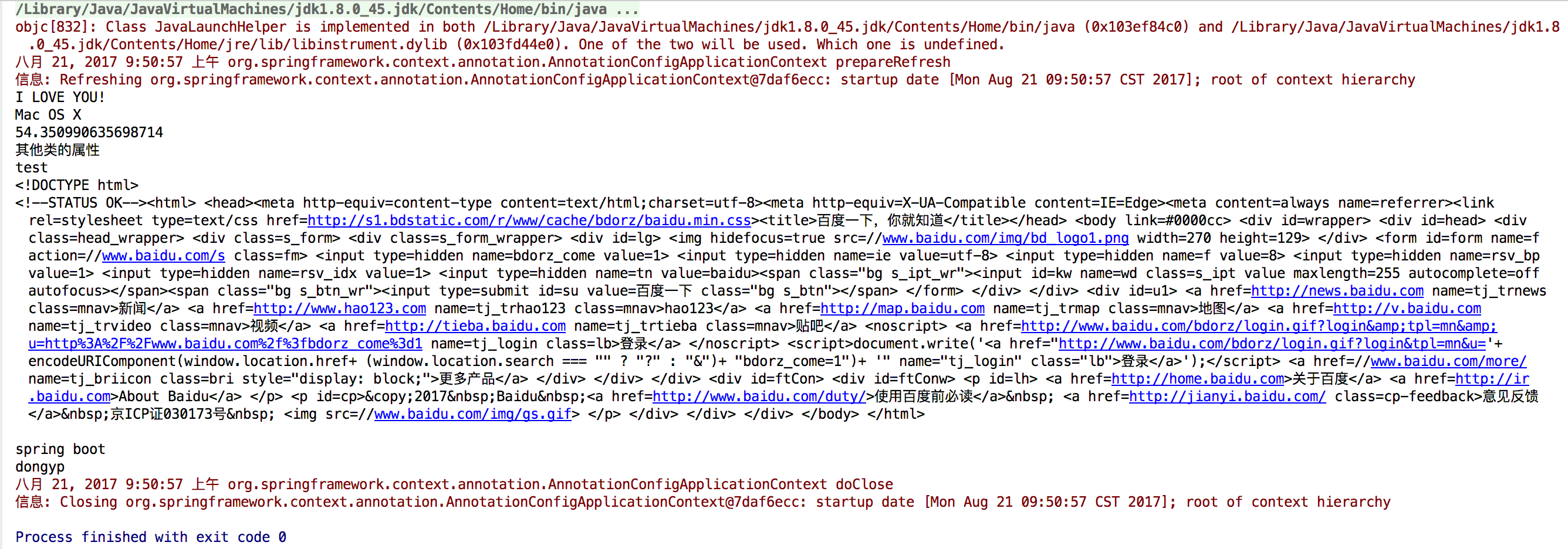
运行结果:
Spring Boot实战笔记(二)-- Spring常用配置(Scope、Spring EL和资源调用)的更多相关文章
- spring boot实战(第十三篇)自动配置原理分析
前言 spring Boot中引入了自动配置,让开发者利用起来更加的简便.快捷,本篇讲利用RabbitMQ的自动配置为例讲分析下Spring Boot中的自动配置原理. 在上一篇末尾讲述了Spring ...
- Spring Boot学习笔记二
Spring Boot入门第二篇 第一天的详见:https://www.cnblogs.com/LBJLAKERS/p/12001253.html 同样是新建一个pring Initializer快速 ...
- Spring Boot实战系列(7)集成Consul配置中心
本篇主要介绍了 Spring Boot 如何与 Consul 进行集成,Consul 只是服务注册的一种实现,还有其它的例如 Zookeeper.Etcd 等,服务注册发现在微服务架构中扮演这一个重要 ...
- Spring Boot实战笔记(一)-- Spring简介
一.Spring 概述 Spring框架是一个轻量级的企业级开发的一站式解决方案.所谓的解决方案就是可以基于Spring解决所有的Java EE开发的所有问题. Spring框架主要提供了Ioc(In ...
- JavaEE开发的颠覆者 Spring Boot实战--笔记
1.Spring boot的三种启动模式 Spring 的问题 Spring boot的特点,没有特别的地方 1.Spring 基础 PS:关于spring配置 PS: 现在都已经使用 java配置, ...
- Spring Boot学习笔记(二二) - 与Mybatis集成
Mybatis集成 Spring Boot中的JPA部分默认是使用的hibernate,而如果想使用Mybatis的话就需要自己做一些配置.使用方式有两种,第一种是Mybatis官方提供的 mybat ...
- spring boot 实战笔记(一)
spring 概述: Bean :每一个被 Spring 管理的 JAVA对象,都称之为 Bean.Spring提供一个IoC容器来初始化对象,负责创建Bean, 解决对象之间的依赖管理和对象的使用. ...
- Spring Boot实战笔记(九)-- Spring高级话题(组合注解与元注解)
一.组合注解与元注解 从Spring 2开始,为了响应JDK 1.5推出的注解功能,Spring开始大量加入注解来替代xml配置.Spring的注解主要用来配置注入Bean,切面相关配置(@Trans ...
- Spring Boot实战笔记(五)-- Spring高级话题(Spring Aware)
一.Spring Aware Spring 依赖注入的最大亮点就是你所有的 Bean 对 Spring容器的存在是没有意识的.即你可以将你的容器替换成其他的容器,如Google Guice,这时 Be ...
随机推荐
- CentOS安装、使用VNC
VNC (Virtual Network Computer)是虚拟网络计算机的缩写.VNC 是一款优秀的远程控制工具软件,由著名的 AT&T 的欧洲研究实验室开发的.VNC 是在基于 UNIX ...
- VisualSVN Server安装过程
运行VisualSVN-Server-2.7.3.msi程序, 如下图 点击Next, 下一步 选中 I accept选项, 点击Next, 下一步 选择默认配置, 服务和控制台组件方式, 点击 ...
- libevent之event_base
event_base是libevent的事务处理框架,负责事件注册.删除等,属于Reactor模式中的Reactor. event_base结构体 event_base结构体定义于<event_ ...
- 安卓Tv开发(二)移动智能电视之焦点控制(按键事件)
原文:http://blog.csdn.net/sk719887916/article/details/44781475 skay 前言:移动智能设备的发展,推动了安卓另一个领域,包括智能电视和智能家 ...
- 数据结构是哈希表(hashTable)
哈希表也称为散列表,是根据关键字值(key value)而直接进行访问的数据结构.也就是说,它通过把关键字值映射到一个位置来访问记录,以加快查找的速度.这个映射函数称为哈希函数(也称为散列函数),映射 ...
- Linux常用命令(第二版) --压缩解压缩命令
压缩解压缩命令: ----------.gz---------- 1.压缩 gzip[GNU zip]: /bin/gzip 格式: gzip 选项 [文件] #压缩文件,压缩后扩展名为.gz,Lin ...
- Hbase replication操作
1.修改hbase-site.xml文件 <property> <name>hbase.replication</name> <value>true ...
- navicat里导入和导出.sql文件
一:Navicat导入MySQL的.sql文件. 打开连接connection,选择你要导入的数据库,双击打开(或者新建一个),然后右键该数据库,选"运行批次任务文件(execute sql ...
- 基于Bresenham和DDA算法画线段
直线:y=kx+b 为了将他在显示屏上显示出来,我们需要为相应的点赋值,那么考虑到计算机的乘法执行效率,我们肯定不会选择用Y=kx+b这个表达式求值,然后进行画线段. 我们应当是将它转化为加法运算. ...
- Linux内核中断和异常分析(中)
在linux内核中,每一个能够发出中断请求的硬件设备控制器都有一条名为IRQ的输出线.所有现在存在的IRQ线都与一个名为可编程中断控制器的硬件电路的输入引脚相连,上次讲到单片机的时候,我就讲到了单片机 ...