
使用 Portainer UI 管理 Docker 主机
Docker 使用命令行的方式来管理有时候并没有那么直观,可以使用 Portainer 的 UI 来管理 Docker 主机和 Docker Swarm 集群。
安装 Portainer
环境:centos 7.x
安装 Dokcer
curl -fsSL https://get.docker.com | bash -s docker --mirror Aliyun
或
sudo yum remove docker docker-client docker-client-latest docker-common docker-latest docker-latest-logrotate docker-logrotate docker-selinux docker-engine-selinux docker-engine

sudo yum install -y yum-utils device-mapper-persistent-data lvm2

#yum-config-manager --add-repo https://download.docker.com/linux/centos/docker-ce.repo

yum-config-manager --add-repo http://mirrors.aliyun.com/docker-ce/linux/centos/docker-ce.repo

sudo yum install docker-ce

sudo systemctl enable docker && systemctl start docker

sudo docker run hello-world

sudo systemctl status docker
Docker CE 镜像源站:https://yq.aliyun.com/articles/110806?spm=a2c4e.11153940.blogcont7695.8.519b1987xdykTn
镜像加速器
sudo mkdir -p /etc/docker

sudo tee /etc/docker/daemon.json <<-'EOF'

{

  "registry-mirrors": ["https://qyu8.mirror.aliyuncs.com"]

}

EOF

sudo systemctl daemon-reload

sudo systemctl restart docker
拉取镜像
docker pull portainer/portainer

docker images

docker run -d -p 9000:9000 -v /var/run/docker.sock:/var/run/docker.sock portainer/portainer
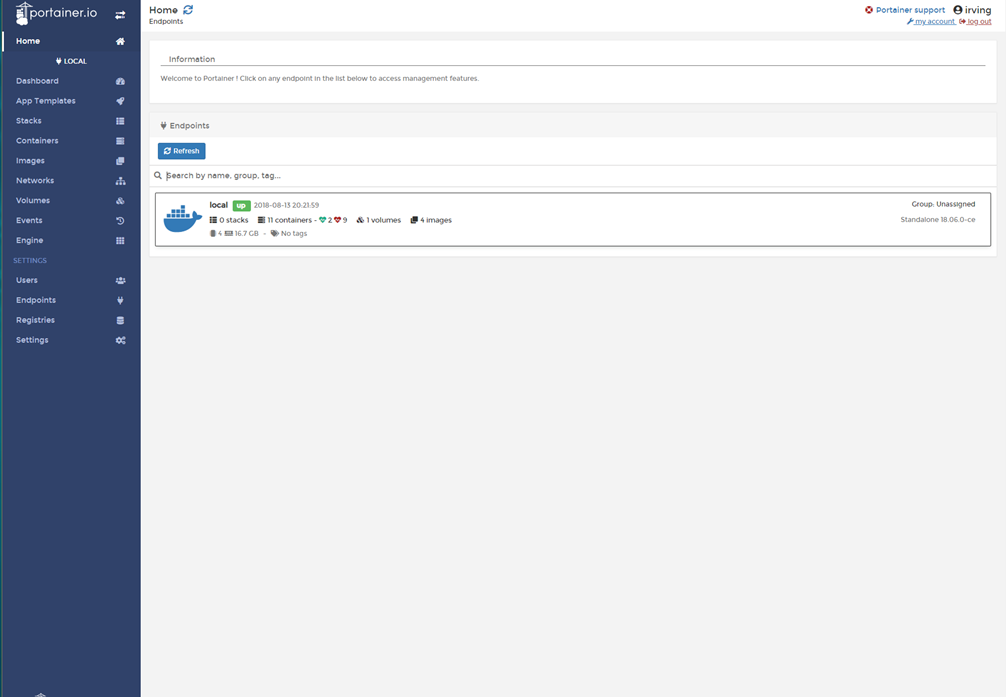
在浏览器中通过 9000 端口即可,常用的可以对 Images、Networks ,Volumes 管理。
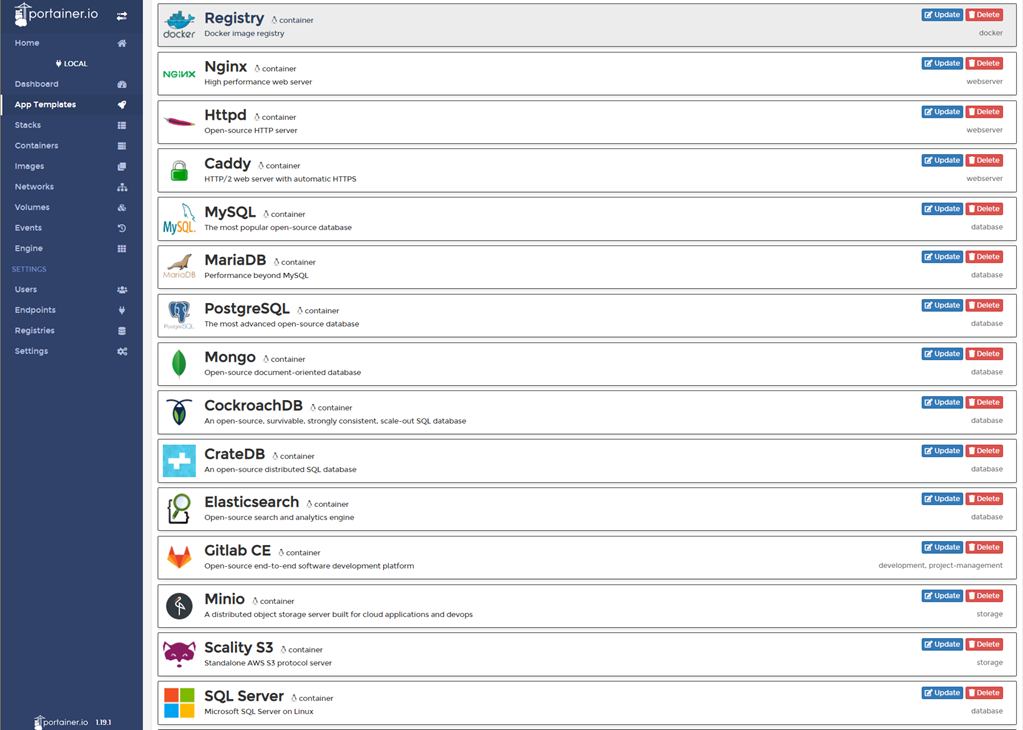
Application templates 中可以 pull 常用的 image,也可以自定义镜像相关的 Network ,Volume , Port 配置 。
REFER:
https://github.com/veggiemonk/awesome-docker
http://portainer.readthedocs.io/en/stable/deployment.html
https://media-glass.es/portainer-the-ui-for-docker-d067f6335f23
http://dockone.io/article/103https://github.com/goharbor/harbor
https://blog.csdn.net/weixin_41465338/article/details/80146218
使用 Portainer UI 管理 Docker 主机的更多相关文章
- 通过 UI 管理 docker
Docker 正在被用在越来越多的场景中,对于不太习惯命令行工具的朋友来说,docker cli 用起来可能会比较吃力.本文笔者将介绍一个功能强大的 docker web 客户端:portainer( ...
- Docker系列四: 使用UI管理docker容器
一.什么是Portainer? Portainer是Docker的图形化管理工具,提供状态显示面板.应用模板快速部署.容器镜像网络数据卷的基本操作(包括上传下载镜像,创建容器等操作).事件日志显示.容 ...
- portainer,用于管理docker swarm,好像也不错哟
shipyard的模式,好像在docker 1.12之后,没有啥用武之地了,也没有更新. 接下来,集群管理和调度,最有知名度的就是rancher了. 在rancher之前,我们试一下portainer ...
- 用 Portainer 远程管理 docker
参考的官网地址为:https://portainer.readthedocs.io/en/stable/deployment.html 先更新Centos docker 镜像加速地址: curl -s ...
- 使用UI管理docker
比较全面的对比 wangzi19870227 比较推荐的有两种(http://dockone.io/article/225): Shipyard 和 dockerui https://docs.doc ...
- Ubuntu下部署Portainer管理docker
在上一篇文章中,我们部署了Shipyard来管理docker集群,总体比较简单,而且Shipyard界面风格很简约,还是比较喜欢的,但是正如提出的node节点无法显示bug,以及该项目早已停止维护,让 ...
- Docker系列七: 使用Humpback管理工具管理容器(一款UI管理工具)
Humpback 可以帮助企业快速搭建轻量级的 Docker 容器云管理平台,若将你的 Docker 主机接入到 Humpback 平台中,就能够为你带来更快捷稳定的容器操作体验. 功能特点 Web操 ...
- 通过Portainer统一管理不同服务器的Docker
通过Portainer统一管理不同服务器的Docker 一.可视化管理工具Portainer的安装 二.跨服务器管理Docker 2.1开启2375监听端口 2.2Portainer配置远程管理 一. ...
- 使用Portainer管理Docker
Portainer Portainer安装非常简单,只需不到一分钟.Portainer完全支持Docker 1.10及更高版本. Mac 快速安装运行: 命令行输入: docker pull port ...
随机推荐
- 442. Find All Duplicates in an Array找出数组中所有重复了两次的元素
[抄题]: Given an array of integers, 1 ≤ a[i] ≤ n (n = size of array), some elements appear twice and o ...
- Linux安装配置Redis,CentOS7下安装Redis教程
1.下载Redis wget https://download.redis.io/releases/redis-3.0.4.tar.gz 2 . 解压Redis .tar.gz 3 . 编译安装Red ...
- 【转载】SQL Server - 使用 Merge 语句实现表数据之间的对比同步
原文地址:SQL Server - 使用 Merge 语句实现表数据之间的对比同步 表数据之间的同步有很多种实现方式,比如删除然后重新 INSERT,或者写一些其它的分支条件判断再加以 INSERT ...
- IP、TCP、DNS协议
·······················································IP协议························· 位于网络层,作用是把数据包传送 ...
- web唤起whatsapp客户端通过号码联系
如果安装了whatsapp客户端,只需跳转 window.location.href = "https://wa.me/号码"; 如果有区号则只需在前面直接加区号,例如加香港区号: ...
- #10072. 「一本通 3.2 例 1」Sightseeing Trip(floyd求最小环+路径)
https://loj.ac/problem/10072 针对无向图 因为Floyd是按照结点的顺序更新最短路的,所以我们在更新最短路之前先找到一个连接点k,当前的点k肯定不存在于已存在的最短路f[i ...
- bzoj3514(主席树+lct)
把边的编号看成边权,维护每个状态对应的最大生成树,得到一个数组a[i],表示第i条边在这个过程中替换的是那条边,询问时看一下a[l,r]内啊有多少个小于l的算一下答案就好:代码参考:http://bl ...
- unigui 调用js
//引用单元uniguiapplicationUniSession.AddJS('alert(unigui调用了JS方法)');
- Springmvc <mvc:cros>和<mvc:intercepters>同时使用时,跨域被拦截了
问题原因:cros也是使用拦截器实现的,并且拦截器配置最后一个处理,导致在跨域处理之前调用了业务拦截器 解决方案:推荐使用http://software.dzhuvinov.com/cors-filt ...
- 4.ASP.NET MVC 5.0 视图之模型绑定
大家好,这篇文章,我将向大家介绍ASP.NET MVC的模型视图绑定,ASP.MVC的模型绑定分为两种:一种是动态绑定[Dynamic Binding];还有一种就是强类型绑定[Strongly ty ...