
java command not found
INSTALLATION PROCEDURE ON RASPBERRY PI
The remaining steps should be performed directly on the console of the Raspberry Pi or using a SSH terminal connection with shell access. In the last step, we transfered the Oracle JDK file to the "pi" user's home directory. We should be logged in as the "pi" user and already in the user's home directory.
Lets create a new directory where we will install the JDK files to.
sudo mkdir -p -v /opt/java
Next, lets unpack the Oracle JDK .gz file using this command
tar xvzf ~/jdk-7u10-linux-arm-sfp.gz
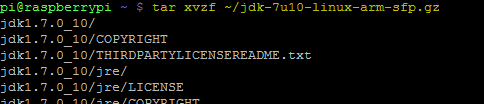 The unpacking process will take a few seconds to complete. It unpacks all the contents of the Oracle JDK tz file to a new directory named "jdk1.7.0_10" located in the user's home directory.
With the unpack complete its now time to move the new unpacked directory to the Java install location that we created earlier under "opt/java".
sudo mv -v ~/jdk1.7.0_10 /opt/java
We can also delete the original .tz file as it is no longer needed
rm ~/jdk-7u10-linux-arm-sfp.gz
To complete the JDK installation we need to let the system know there is a new JVM installed and where it is located. Use the following command to perform this task.
sudo update-alternatives --install "/usr/bin/java" "java" "/opt/java/jdk1.7.0_10/bin/java" 1
And finally we also need to tell the system that we want this JDK to be the default Java runtime for the system. The following command will perform this action.
sudo update-alternatives --set java /opt/java/jdk1.7.0_10/bin/java
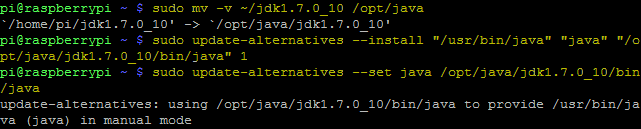
Now java is installed. To test and verify we can execute the java command using the version argument.
java -version
You should get the following response:

That's it the Oracle JDK is installed and ready for use.
ADD JAVA_HOME ENVIRONMENT VARIABLE
Some Java programs require a JAVA_HOME environment variable to be configured on the system. Add the following line to you "/etc/environment" using your favorite text editor.
JAVA_HOME="/opt/java/jdk1.7.0_10"
Also, edit your "~/.bashrc" file using this command
nano ~/.bashrc
and add the following two lines to the bottom of the file and save.
export JAVA_HOME="/opt/java/jdk1.7.0_10"
export PATH=$PATH:$JAVA_HOME/bin
Reboot or re-login to apply the export to your environment.
------------------------------------------------------------------------
att:
sudo update-alternatives --install "/usr/bin/java" "java" "/opt/javak1.7.0_10/bin/java" 1
--install <link> <name> <path> <priority>
java command not found的更多相关文章
- Drip is a launcher for the Java Virtual Machine that provides much faster startup times than the java command. The drip script is intended to be a drop-in replacement for the java command, only faster
小结: 1.初始化jvm: 2.第一次唤醒java命令不快,后续快: https://github.com/elastic/logstash Advanced: Drip Launcher Drip ...
- sudo: java: command not found
背景:搭建了jumpserver,给开发划分了所有权限,但是开发那边账户不能执行java命令 报错:sudo: java: command not found 解决方法: 在用户管理权限配置sudoe ...
- Jenkins远程执行shell出现java: command not found
之前在使用Jenkins执行远程shell脚本时,出现提示java: command not found:多方查找原因后发现是因为远程执行shell脚本时,不会自动加载环境变量,导致出现此错误,解决方 ...
- Wrapper: Error - Unable to execute Java command
在64位的系统下 将短信程序运行于服务中,出现以下错误: Error: [size=14px; line-height: 26px;]FATAL | wrapper | 2012/06/18 17 ...
- Ubuntu 提示sudo: java: command not found解决办法
ubuntu下运行sudo Java 时提示“sudo: java: command not found”.在网上找了,其中很多方法都提示要修改/etc/profile的配置,或是修改/etc/env ...
- kettle crontab java: command not found
contos6.5下,单独执行脚本无问题,添加到crontab 里保存 java: command not found ※(重点)接着,编写执行kettle任务的shell脚本创建test.sh,将以 ...
- bash: java: command not found
[root@izm5eab8t820b79js38tbxz ~]# java -version -bash: java: command not found 出现上面问题,解决方法: [root@iz ...
- java command line error opening registry key 'Software\JavaSoft\Java Runtime Environment' java.dll
C:\Users\huxxxxchan>javaError: opening registry key 'Software\JavaSoft\Java Runtime Environment'E ...
- java 利用ManagementFactory获取jvm,os的一些信息--转
原文地址:http://blog.csdn.net/dream_broken/article/details/49759043 想了解下某个Java项目的运行时jvm的情况,可以使用一些监控工具,比如 ...
随机推荐
- HDU 5274(LCA + 线段树)
Dylans loves tree Time Limit: 2000/1000 MS (Java/Others) Memory Limit: 131072/131072 K (Java/Othe ...
- Windows server 2008 布署FTP服务器实例(适用于阿里云)!
Windows server 2008 布署FTP服务器实例(适用于阿里云). 1.打开管理.配置-用户-新建用户,如:ftp_user,并设置password.选择永只是期和password不能更改 ...
- zzulioj--1841--so easy!麻麻再也不用担心我的数学了!(数学水题)
1841: so easy!麻麻再也不用担心我的数学了! Time Limit: 1 Sec Memory Limit: 128 MB Submit: 27 Solved: 15 SubmitSt ...
- Python 序列化处理
序列化 文件为dump 字符串为dumps dumps()方法返回一个str,内容就是标准的JSON loads()方法将其还原 在程序运行的过程中,所有的变量都是在内存 d = dict(name= ...
- 关于Fragment的setUserVisibleHint() 方法和onCreateView()的执行顺序
1:setUserVisibleHint(boolean isVisibleToUser)的方法就很重要,根据方法名来看当前页面是否可见, 里面的boolean值就是判断当前页面是否可见的变量,所以大 ...
- hdu1864/2844/2159 背包基础题
hdu1864 01背包 题目链接 题目大意:一堆数,找到一个最大的和满足这个和不超过Q要学会分析复杂度! #include <cstdio> #include <cstring&g ...
- Linux下安装使用MySQL
网上找那些安装教程比较多的版本,版本只要不是太旧就行. 下载mysql 5.6.28 通用版64位二进制版,二进制版相当于windows的安装包,可以直接安装,如果是源码版,还需要编译后再进行安装. ...
- NodeJS学习笔记 (19)进阶调试-debugger(ok)
写在前面 谈到node断点调试,目前主要有三种方式,通过node内置调试工具.通过IDE(如vscode).通过node-inspector,三者本质上差不多.本文着重点在于介绍 如何在本地通过nod ...
- opencv——均值/中值滤波器去噪
实验内容及实验原理: 1.用均值滤波器(即邻域平均法)去除图像中的噪声: 2.用中值滤波器去除图像中的噪声 3.比较两种方法的处理结果 实验步骤: 用原始图像lena.bmp或cameraman.bm ...
- 关于vue自定义事件中,传递参数的一点理解
例如有如下场景 先熟悉一下Vue事件处理 <!-- 父组件 --> <template> <div> <!--我们想在这个dealName的方法中传递额外参数 ...