
《DSP using MATLAB》示例 Example 9.8


代码:
%% ------------------------------------------------------------------------

%%            Output Info about this m-file

fprintf('\n***********************************************************\n');

fprintf('        <DSP using MATLAB> Exameple 9.8 \n\n');

time_stamp = datestr(now, 31);

[wkd1, wkd2] = weekday(today, 'long');

fprintf('      Now is %20s, and it is %7s  \n\n', time_stamp, wkd2);

%% ------------------------------------------------------------------------

I = 5; Rp = 0.1; As = 30; wp = pi/I; ws = wp+pi*0.12;

[delta1, delta2] = db2delta(Rp, As); weights = [delta2/delta1, 1];

F = [0, wp, ws, pi]/pi; A = [I, I, 0, 0];

h = firpm(30, F, A, weights); n = [0:length(h)-1];

[Hr, w, a, L] = Hr_Type1(h); Hr_min = min(Hr); w_min = find(Hr == Hr_min);

H = abs(freqz(h, 1, w)); Hdb = 20*log10(H/max(H)); min_attn = Hdb(w_min);

%% -----------------------------------------------------------------

%%                             Plot

%% -----------------------------------------------------------------

Hf1 = figure('units', 'inches', 'position', [1, 1, 8, 6], ...

	'paperunits', 'inches', 'paperposition', [0, 0, 6, 4], ...

	'NumberTitle', 'off', 'Name', 'Exameple 9.8');

set(gcf,'Color','white');

TF = 10;

subplot(2, 2, 1);

Hs1 = stem(n, h, 'filled'); set(Hs1, 'markersize', 2);

axis([-1, length(n), -0.5, 1.5]); grid on;

xlabel('n', 'vertical', 'bottom'); ylabel('Amplitude');

title('Impulse Response', 'fontsize', TF);

subplot(2, 2, 3);

plot(w/pi, Hr, 'm', 'linewidth', 1.0); axis([0, 1, -1, 6]); grid on;

xlabel('frequency in \pi units', 'fontsize', 10); ylabel('Amplitude');

title(' Amplitude Response ', 'fontsize', TF);

set(gca, 'xtick', [0, wp/pi, ws/pi, 1]);

set(gca, 'ytick', [0, I]);

subplot(2, 2, 2);

plot(w/pi, Hdb, 'm', 'linewidth', 1.0); axis([0, 1, -50, 10]); grid on;

xlabel('frequency in \pi units '); ylabel('Decibels');

title('Log-mag Response ', 'fontsize', TF);

set(gca, 'xtick', [0, wp/pi, ws/pi, 1]);

set(gca, 'ytick', [-50, round(min_attn), 0]);

subplot(2, 2, 4);

lw = length(w)-1; PB = [0:floor(wp/pi*lw)]; HrPB = Hr(PB+1)-I;

SB = [ceil(ws/pi*lw):lw]; HrSB = Hr(SB+1);

[AX, H1, H2] = plotyy(PB/lw, HrPB, SB/lw, HrSB);

delta1 = round(delta1*I*100)/100; delta2 = round(delta2*I*100)/100;

set(AX(1), 'xtick', [0, wp/pi, ws/pi, 1]);

set(AX(1), 'ytick', [-delta1, 0, delta1], 'Ycolor', 'g');

set(AX(2), 'xtick', [0, wp/pi, ws/pi, 1]);

set(AX(2), 'ytick', [-delta2, 0, delta2], 'Ycolor', 'r');

set(H1, 'color', 'g', 'linewidth', 1);

set(H2, 'color', 'r', 'linewidth', 1);

title('scaled ripples', 'fontsize', TF);

xlabel('Frequency in \pi units');
运行结果:
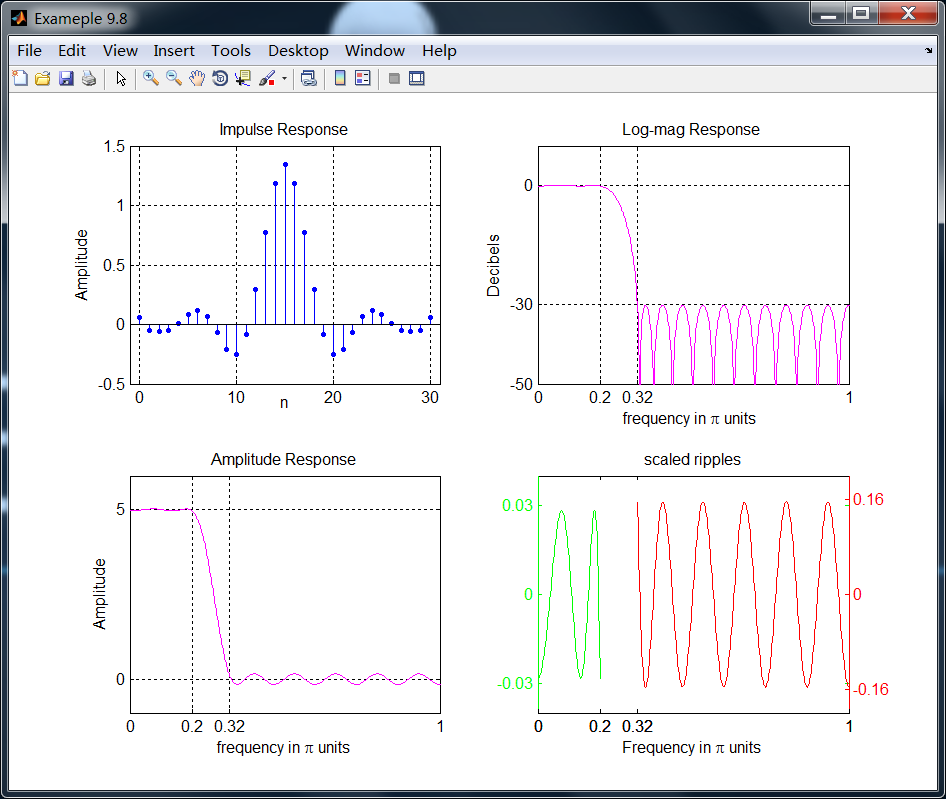
尽管该滤波器通过了原始信号,如果信号是全频带π弧度的,那么邻近的谱能量可能发生泄漏。因此需要更好的设计指标,本节的后面有讨论。
《DSP using MATLAB》示例 Example 9.8的更多相关文章
- DSP using MATLAB 示例Example3.21
代码: % Discrete-time Signal x1(n) % Ts = 0.0002; n = -25:1:25; nTs = n*Ts; Fs = 1/Ts; x = exp(-1000*a ...
- DSP using MATLAB 示例 Example3.19
代码: % Analog Signal Dt = 0.00005; t = -0.005:Dt:0.005; xa = exp(-1000*abs(t)); % Discrete-time Signa ...
- DSP using MATLAB示例Example3.18
代码: % Analog Signal Dt = 0.00005; t = -0.005:Dt:0.005; xa = exp(-1000*abs(t)); % Continuous-time Fou ...
- DSP using MATLAB 示例Example3.23
代码: % Discrete-time Signal x1(n) : Ts = 0.0002 Ts = 0.0002; n = -25:1:25; nTs = n*Ts; x1 = exp(-1000 ...
- DSP using MATLAB 示例Example3.22
代码: % Discrete-time Signal x2(n) Ts = 0.001; n = -5:1:5; nTs = n*Ts; Fs = 1/Ts; x = exp(-1000*abs(nT ...
- DSP using MATLAB 示例Example3.17
- DSP using MATLAB示例Example3.16
代码: b = [0.0181, 0.0543, 0.0543, 0.0181]; % filter coefficient array b a = [1.0000, -1.7600, 1.1829, ...
- DSP using MATLAB 示例 Example3.15
上代码: subplot(1,1,1); b = 1; a = [1, -0.8]; n = [0:100]; x = cos(0.05*pi*n); y = filter(b,a,x); figur ...
- DSP using MATLAB 示例 Example3.13
上代码: w = [0:1:500]*pi/500; % freqency between 0 and +pi, [0,pi] axis divided into 501 points. H = ex ...
- DSP using MATLAB 示例 Example3.12
用到的性质 代码: n = -5:10; x = sin(pi*n/2); k = -100:100; w = (pi/100)*k; % freqency between -pi and +pi , ...
随机推荐
- SpringBoot 通过自定义注解实现AOP切面编程实例
一直心心念的想写一篇关于AOP切面实例的博文,拖更了许久之后,今天终于着手下笔将其完成. 基础概念 1.切面(Aspect) 首先要理解‘切’字,需要把对象想象成一个立方体,传统的面向对象变成思维,类 ...
- 逆向及BOF基础实践
逆向及BOF基础实践 20145316 许心远 一.缓冲区溢出基础知识 缓冲区溢出是一种非常普遍.非常危险的漏洞,在各种操作系统.应用软件中广泛存在.利用缓冲区溢出攻击,可以导致程序运行失败.系统宕机 ...
- PhpStorm 10.0.3破解版下载
汉化破解版软件下载: http://pan.baidu.com/s/1geNO24r 密码: d5ci 这个汉化破解软件解决了大纲视图里空白的问题. 先安装腾讯电脑管家,然后安装这个软件,安装到最后提 ...
- Linux内核分析 03
一,构造一个简单的Linux系统MenuOS 1.Linux内核源代码简介 回顾一下前面的三大法宝和两把宝剑. arch/x86目录下的代码需要重点关注 阅读代码的时候把除了x86以外的都删掉会有利于 ...
- 学习Zookeeper之第3章Zookeeper内部原理
第 3 章 Zookeeper 内部原理 3.1 选举机制 3.2 节点类型 3.3 stat 结构体 3.4 监听器原理 1)监听原理详解 2)常见的监听 3.5 写数据流程 第 3 章 Z ...
- POJ 1625 Censored!(AC自动机->指针版+DP+大数)题解
题目:给你n个字母,p个模式串,要你写一个长度为m的串,要求这个串不能包含模式串,问你这样的串最多能写几个 思路:dp+AC自动机应该能看出来,万万没想到这题还要加大数...orz 状态转移方程dp[ ...
- CentOS日常维护及常用脚本
[root@-.x.x xiewenming]# curl myip.ipip.net 当前 IP:42.62.x.x 来自于:中国 北京 北京 联通/电信 www.17ce.com cdn解析网站 ...
- 用训练好的caffemodel来进行分类
caffe程序自带有一张小猫图片,存放路径为caffe根目录下的 examples/images/cat.jpg, 如果我们想用一个训练好的caffemodel来对这张图片进行分类,那该怎么办呢? 如 ...
- javascript之反柯里化(uncurrying)
在JavaScript中,当我们调用对象的某个方法时,其实不用去关心该对象原本是否被设计为拥有这个方法,这是动态类型语言的特点.可以通过反柯里化(uncurrying)函数实现,让一个对象去借用一个原 ...
- UVA-12118 Inspector's Dilemma (欧拉回路)
题目大意:一个有v个顶点的完全图,找一条经过m条指定边的最短路径. 题目分析:当每条边仅经过一次时,路径最短.给出的边可能构成若干棵树.在一棵树中,奇点个数总为偶数,若一棵树的奇点个数为0,则这棵树可 ...