
在express中HMR(合并express和webpack-dev-server)
在学习react的时候,经常用create-react-app来创建web应用,然而写到后面总有连自己服务器和数据库的需求,create-react-app创建的是一个webpack-dev-server,主要用来进行webpack的编译和热加载(HMR),所以想要把这两个东西融合,就是既能监听修改实现热加载,然后用的又是自己的express服务器。网上有两种解决方案:1.设置代理,同时启动express和webpack-dev-server,然后将webpack-dev-server代理到过来。2.利用webpack-hot-middleware和webpack-dev-middleware这两个插件处理编译和热加载。
在这里我选择第二种,因为觉得既然webpack-dev-server本身就是个express服务器,为什么不能把编译和HMR的功能直接用到express上呢。
但是参照https://github.com/webpack-contrib/webpack-hot-middleware/blob/master/example/server.js出现了问题。
var http = require('http');

var express = require('express');

require('console-stamp')(console, "HH:MM:ss.l");

var app = express();

app.use(require('morgan')('short'));

// ************************************

// This is the real meat of the example

// ************************************

(function() {

  // Step 1: Create & configure a webpack compiler

  var webpack = require('webpack');

  var webpackConfig = require(process.env.WEBPACK_CONFIG ? process.env.WEBPACK_CONFIG : './webpack.config');//我这里改成了create-react-app中的webpack.config.dev(需要npm run eject看到)

  var compiler = webpack(webpackConfig);

  // Step 2: Attach the dev middleware to the compiler & the server

  app.use(require("webpack-dev-middleware")(compiler, {

    logLevel: 'warn', publicPath: webpackConfig.output.publicPath

  }));

  // Step 3: Attach the hot middleware to the compiler & the server

  app.use(require("webpack-hot-middleware")(compiler, {

    log: console.log, path: '/__webpack_hmr', heartbeat: 10 * 1000

  }));

})();

// Do anything you like with the rest of your express application.

app.get("/", function(req, res) {

  res.sendFile(__dirname + '/index.html');

});

app.get("/multientry", function(req, res) {

  res.sendFile(__dirname + '/index-multientry.html');

});

if (require.main === module) {

  var server = http.createServer(app);

  server.listen(process.env.PORT || 1616, function() {

    console.log("Listening on %j", server.address());

  });
简单的把config文件替换成webpack.config.dev并不奏效,发现修改js文件时,确实会重新编译但是网页不会刷新,也就是HMR失败
看了webpack-hot-middleware的issue之后找到了问题
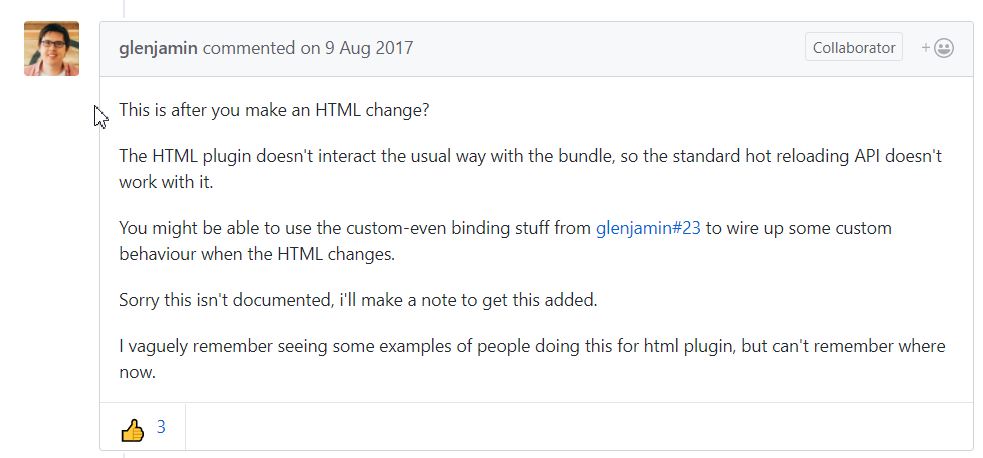
通过作者的回答可以看出,html的插件和热加载的api是不兼容的,而create-react-app中的config中用了html-webpack-plugin这个插件,所以要用别的方法来解决这个问题。
在issue里也找到了答案,原理就是用node的chokidar模块来监听index.html的改变,然后主动发送一个reload请求给浏览器,让它刷新
demo地址:https://github.com/thesimpledesigners/webpack-hot-reload-client
首先给webpackHotMiddlewareClient添加监听事件,其中subscribe方法是注册监听事件,之后会用public方法来发布信息,就是js中的观察者模式。payload.action === 'reload'时刷新浏览器
// client.js

(function() {

    'use strict';

    const webpackHotMiddlewareClient = require('webpack-hot-middleware/client?reload=true');

    webpackHotMiddlewareClient.subscribe(function(payload) {

        if (payload.action === 'reload' || payload.reload === true) {

            window.location.reload();

        }

    });

    module.exports = webpackHotMiddlewareClient;

}());
然后利用chokidar来监听index.html文件,使得其一修改就能让服务器发送一个reload请求
//./devScripts/hotReloader.js

(function() {

  'use strict';

  const path = require('path');

  const chokidar = require('chokidar');

  function activate(server) {

    /**

     * Here, we use Chokidar to force page reloading for some other file types

     * like html changes or php if you want

     */

    const watcher = chokidar.watch([

        path.resolve(__dirname, '../index.html'),// index.html is on the root folder

    ]);

    watcher.on('ready', function() {

        console.log('Initial scan complete. Ready for changes');

    });

    watcher.on('change', function(path) {

        console.log('File [' + path + '] changed !');

        // reload the client on file changes

        server.reloadClient();//这个方法要在服务器实现,就是public一个消息给hotMiddleware
}); } // here we export an activate function to activate the watcher module.exports = { activate: activate, }; }());
服务器代码:
const path = require('path');

// import express

const express = require('express');

// import webpack and the dev & hot middlewares

const webpack = require('webpack');

const webpackDevMiddleware = require('webpack-dev-middleware');

const webpackHotMiddleware = require('webpack-hot-middleware');

function createServer() {

  // Step 1: create the express instance

  const app = express();

  // Step 2: Create & configure a webpack compiler

  const webpackConf = require('../webpack.config.dev.js');

  const webpackCompiller = webpack(webpackConf);

  const hotMiddleware = webpackHotMiddleware(webpackCompiller);

  const devMiddleWare = webpackDevMiddleware(

    webpackCompiller,

    {

      publicPath: webpackConf.output.publicPath,

   });

  // Step 3: Attach the dev middleware and hot middleware to the server

  app.use(devMiddleWare);

  app.use(hotMiddleware);

  function startServer() {

    app.listen(3000, function(err) {

      if (err) {

        console.error(err);

        return;

      }

      // log server running

      console.log('Listening at http://localhost:3000/');

    });

  }// end function start server

  /**

   *

   */

  function reloadClient() {

    hotMiddleware.publish({action: 'reload'});

  }// end function RelaodClient

  return {

    start: startServer,

    reloadClient: reloadClient,

  };

}

module.exports = createServer();
华丽的分割线--------------------------------------------------------------------------------------------------------------------------------------------------------------------------------------------------------------------------------------------------------------------------------------------------------------------------
总之,你如果想在express中用HMR,并且用create-react-app中webpack.config.dev的配置,只要两步:1.将服务器代码改成下方的app.js这样,2.修改webpack.config.dev中entry的配置
1:我将上面代码精炼了一下,贴一下我的服务端代码app.js
var http = require('http');

var path = require('path');

var session = require('express-session') ;

var express = require('express');

const chokidar = require('chokidar');

const webpack = require('webpack');

const webpackDevMiddleware = require('webpack-dev-middleware');

const webpackHotMiddleware = require('webpack-hot-middleware');

const app = express();

app.use(require('morgan')('short'));

'use strict';

// Do this as the first thing so that any code reading it knows the right env.

process.env.BABEL_ENV = 'development';

process.env.NODE_ENV = 'development';

const webpackConf = require('./config/webpack.config.dev.js');

const webpackCompiller = webpack(webpackConf);

const hotMiddleware = webpackHotMiddleware(webpackCompiller);

const devMiddleWare = webpackDevMiddleware(

    webpackCompiller,

    {

        publicPath: webpackConf.output.publicPath,

    });

// Step 3: Attach the dev middleware and hot middleware to the server

app.use(devMiddleWare);

app.use(hotMiddleware);

app.active = ()=>{

    const watcher = chokidar.watch([

        path.resolve(__dirname, '/public/index.html'),// index.html is on the root folder

    ]);

    watcher.on('ready', function() {

        console.log('Initial scan complete. Ready for changes');

    });

    watcher.on('change', function(path) {

        console.log('File [' + path + '] changed !');

        // reload the client on file changes

        hotMiddleware.publish({action: 'reload'});

    });

}

app.active()

// Do anything you like with the rest of your express application.

app.set('views', path.join(__dirname, 'views'));

app.set('view engine', 'ejs');

app.use(express.static(path.join(__dirname, 'public')));

app.get("/", function(req, res) {

    res.sendFile(__dirname + '/public/index.html');

});

app.listen(3000, function(err) {

    if (err) {

        console.error(err);

        return;

    }

    // log server running

    console.log('Listening at http://localhost:3000/');

});
2:然后在webpack.config.dev的entry中这样修改
    //require.resolve('react-dev-utils/webpackHotDevClient'),

    'webpack-hot-middleware/client?path=/__webpack_hmr&timeout=20000&reload=true',
就是把原来它自己写的webpackHotDevClient注释掉,加上后面那句话。
我的demo:https://github.com/jokermask/HMRwithExpress
至此大工告成!
在express中HMR(合并express和webpack-dev-server)的更多相关文章
- 配置Webpack Dev Server 实战操作方法步骤
本文摘要:配置 Webpack Dev Server 可以解决本地开发前端应用时,手动执行 webpack 命令或 yarn build 命令,再去浏览器中访问 dist/index.html 的麻烦 ...
- 笔记:配置 webpack dev server
笔记:配置 webpack dev server 安装 webpack-dev-server 组件 配置 webpack.config.js 配置 增加 html-webpack-plugin 组件 ...
- [Webpack] Access Webpack Dev Server from Mobile Safari on an iPhone
Testing your sites on mobile devices is a critical part of the development process. Webpack dev serv ...
- webpack dev server 和 sublime text 配合时需要注意的地方
参考:https://webpack.js.org/guides/development/ Adjusting Your Text Editor Some text editors have a &q ...
- webpack dev server 配置 启动项目报错Error: listen EADDRINUSE
Error: listen EADDRINUSE 0.0.0.0:5601 它的意思是,端口5601被其他进程占用. 切换端口即可解决问题
- express 中文文档
express() 创建一个express应用程序 var express = require('express'); var app = express(); app.get('/', functi ...
- express中的路由
一.读取静态文件 基本代码: "use strict"; const express = require("express"); let app = expre ...
- 精华 对express中next函数的一些理解
关于next主要从三点来进行说明: next的作用是什么? 我们应该在何时使用next? next的内部实现机制是什么? Next的作用 我们在定义express中间件函数的时候都会将第三个参 ...
- Nodejs express中创建ejs项目,解决express下默认创建jade,无法创建ejs问题
最近在看<Node.js开发指南>,看到使用nodejs进行web开发的时候,准备创建ejs项目遇到问题了, 书上命令为: express -t ejs microblog 可是执行后,仍 ...
随机推荐
- Java 中你必须了解的常用类(8)
Java 中的包装类 相信各位小伙伴们对基本数据类型都非常熟悉,例如 int.float.double.boolean.char 等.基本数据类型是不具备对象的特性的, 比如基本类型不能调用方法.功能 ...
- 【问题:发现与解决】angularJs指令在dijit控件中的使用
由于公司主要用的JS框架是DOJO,最近又运用了angularJs.因此,不可能避免的遇到dojo控件和angular指令(directive)共用时遇到的一些问题,问题如下: <input ...
- java编写银行管理 。ATM管理
package Demo; import java.util.Date; import java.util.Scanner; //date是数据库中的一个用法,初始化后输出的是操作时的时间 publi ...
- libcrypto.so.10内容丢失导致sshd无法运行
今天启动虚拟机,ssh服务起不来,提示如下: Starting sshd: /usr/sbin/sshd: error while loading shared libraries: libcrypt ...
- minimal sparse ruler problem 最少尺子刻度问题
一个长度13的尺子,如果在1位置刻点可以量出1和12,13三种刻度.那么至少刻几个点,可以直接量出1-13所有的长度,分别刻在哪几个位置? 注:必须是直接量.即在尺子上能找出一个1-13任意的整数长度 ...
- C# 按位或,按位与, 按位异或
a != b -----> a = a | b , a 或者 b 只要有一个为 1, 那么,a 的最终结果就为 1 a &= b -----> a = a & b ...
- Angular实现多标签页效果(路由重用)
1.需求 做了几年的MES系统,从ASP.NET WebForm至MVC,系统决定了用户界面必须为标签页方式实现,因为用户在进行一项操作的时候很有可能会进行其它的操作,比如查询之类的.如果按MVC的方 ...
- php中的static
静态成员是一种类变量,可以把它看成时属于整个类而不是属于类的某个实例.与一般的实例变量不同的是,静态成员只保留一个变量值,而这个变量值对所有的实例都是有效的,也就是说,所有的实例共享这个成员. $th ...
- 一个简单的使用matplotlib作图的例子
#使用matplotlib作图 import numpy as np import matplotlib.pyplot as plt #x = np.linspace(start, stop, num ...
- Eclipse PHPEclipse 配置
最近偶来兴致趁着有些时间,看了看php的书. 说到php就不得不提php的开发环境了,一般的都是采用apache做服务器.mysql做数据库,再加上php组合成一个完备的运行环境,但是好像没有写代码的 ...