
nginx安装与部署
1:安装工具包 wget、vim和gcc
yum install -y wget

yum install -y vim-enhanced

yum install -y make cmake gcc gcc-c++
2:下载nginx安装包
wget http://nginx.org/download/nginx-1.6.2.tar.gz3:安装依赖包

yum install -y pcre pcre-devel

yum install -y zlib zlib-devel

yum install -y openssl openssl-devel
4:解压nginx-1.6.2.tar.gz到/usr/local/目录下
tar -zxvf nginx-1.6.2.tar.gz -C /usr/local/
5:进行configure配置
进入nginx-1.6.2目录然后在执行./configure命令
[root@MiWiFi-R3-srv nginx-1.6.2]# ./configure --prefix=/usr/local/nginx
6:编译安装
[root@MiWiFi-R3-srv nginx-1.6.2]# make && make install
7:启动Nginx,启动完之后检查nginx是否已经正常启动,看到如下信息说明正常启动
[root@MiWiFi-R3-srv nginx-1.6.2]# /usr/local/nginx/sbin/nginx

[root@MiWiFi-R3-srv nginx-1.6.2]# ps -ef | grep nginx

root 24956 1 0 19:41 ? 00:00:00 nginx: master process /usr/local/nginx/sbin/nginx

nobody 24957 24956 0 19:41 ? 00:00:00 nginx: worker process

root 24959 10533 0 19:41 pts/0 00:00:00 grep --color=auto nginx

[root@MiWiFi-R3-srv nginx-1.6.2]#
如果要关闭nginx,我们可以使用如下命令:
[root@MiWiFi-R3-srv nginx-1.6.2]# /usr/local/nginx/sbin/nginx -s stop
如果想要重新热启动nginx,则使用如下命令:
[root@MiWiFi-R3-srv nginx-1.6.2]# /usr/local/nginx/sbin/nginx -s reload
8:配置防火墙,nginx默认的端口是80
[root@MiWiFi-R3-srv nginx-1.6.2]# firewall-cmd --zone=public --add-port=/tcp --permanent

success

[root@MiWiFi-R3-srv nginx-1.6.2]# firewall-cmd --reload

success

[root@MiWiFi-R3-srv nginx-1.6.2]#
9:测试nginx
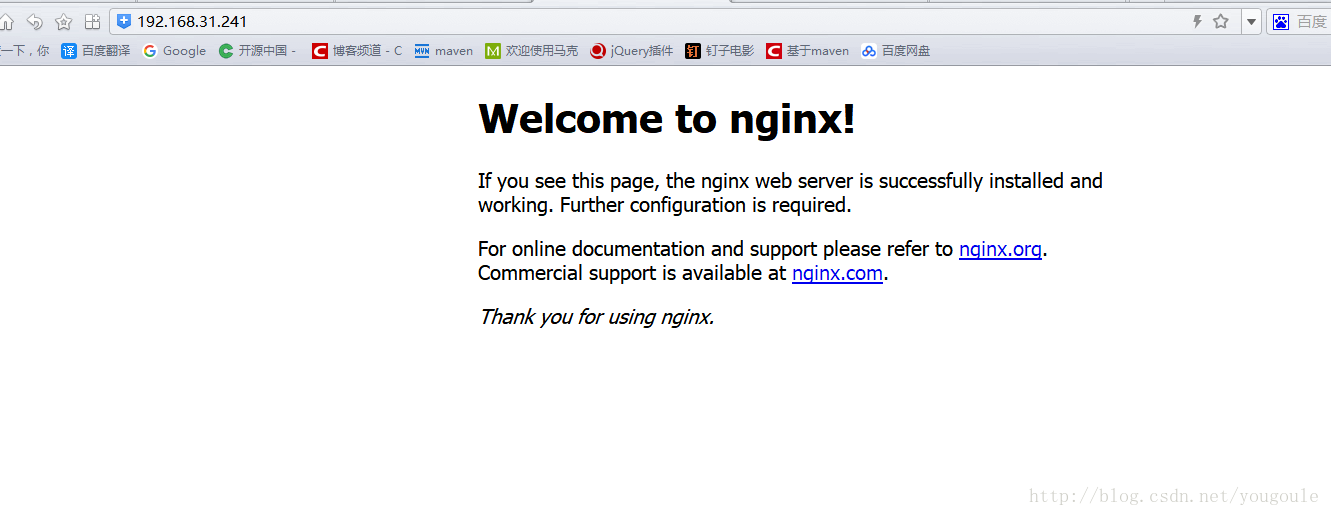
通过浏览器访问nginx欢迎页,在地址栏输入:http://192.168.31.241/(80端口可以不用输)或http://192.168.156.11:80/,如下图所示。
10:学习nginx配置
在nginx目录下进入conf目录,该目录下有个nginx.conf文件,这是nginx最重要的配置文件
[root@MiWiFi-R3-srv conf]# vim /usr/local/nginx/conf/nginx.conf
nginx.conf文件的全部内容如下(有注释版):
#user  nobody;

#开启进程数 <=CPU数

worker_processes  ;

#错误日志保存位置

#error_log  logs/error.log;

#error_log  logs/error.log  notice;

#error_log  logs/error.log  info;

#进程号保存文件

#pid        logs/nginx.pid;

#每个进程最大连接数(最大连接=连接数x进程数)每个worker允许同时产生多少个链接,默认1024

events {

    worker_connections  ;

}

http {

    #文件扩展名与文件类型映射表

    include       mime.types;

    #默认文件类型

    default_type  application/octet-stream;

    #日志文件输出格式 这个位置相于全局设置

    #log_format  main  '$remote_addr - $remote_user [$time_local] "$request" '

    #                  '$status $body_bytes_sent "$http_referer" '

    #                  '"$http_user_agent" "$http_x_forwarded_for"';

    #请求日志保存位置

    #access_log  logs/access.log  main;

    #打开发送文件

    sendfile        on;

    #tcp_nopush     on;

    #keepalive_timeout  ;

    #连接超时时间

    keepalive_timeout  ;

    #打开gzip压缩

    #gzip  on;

    server {

        #监听端口,默认是80端口

        listen       ;

        #监听域名

        server_name  localhost;

        #charset koi8-r;

        #nginx访问日志放在logs/host.access.log下,并且使用main格式(还可以自定义格式)

        #access_log  logs/host.access.log  main;

        #如果没有location更明确的匹配访问路径的话,访问请求都会被该location处理。

        location / {

            #root指定nginx的根目录为/usr/local/nginx/html

            root   html;

            #默认访问文件,欢迎页先去html目录下找index.html,如果找不到再去找index.htm

            index  index.html index.htm;

        }

        #error_page                /.html;

        # redirect server error pages to the static page /50x.html

        #

        #错误页面及其返回地址,错误码为500、、、504都会返回50.html错误页面。

        error_page        /50x.html;

        #location后面是"="的话,说明是精确匹配

        location = /50x.html {

            root   html;

        }

        # proxy the PHP scripts to Apache listening on 127.0.0.1:

        #

        #location ~ \.php$ {

        #    proxy_pass   http://127.0.0.1;

        #}

        # pass the PHP scripts to FastCGI server listening on 127.0.0.1:

        #

        #location ~ \.php$ {

        #    root           html;

        #    fastcgi_pass   127.0.0.1:;

        #    fastcgi_index  index.php;

        #    fastcgi_param  SCRIPT_FILENAME  /scripts$fastcgi_script_name;

        #    include        fastcgi_params;

        #}

        # deny access to .htaccess files, if Apache's document root

        # concurs with nginx's one

        #

        #location ~ /\.ht {

        #    deny  all;

        #}

    }

    # another virtual host using mix of IP-, name-, and port-based configuration

    #

    #server {

    #    listen       ;

    #    listen       somename:;

    #    server_name  somename  alias  another.alias;

    #    location / {

    #        root   html;

    #        index  index.html index.htm;

    #    }

    #}

    # HTTPS server

    #

    #server {

    #    listen        ssl;

    #    server_name  localhost;

    #    ssl_certificate      cert.pem;

    #    ssl_certificate_key  cert.key;

    #    ssl_session_cache    shared:SSL:1m;

    #    ssl_session_timeout  5m;

    #    ssl_ciphers  HIGH:!aNULL:!MD5;

    #    ssl_prefer_server_ciphers  on;

    #    location / {

    #        root   html;

    #        index  index.html index.htm;

    #    }

    #}

}
配置文件里可以添加多个server,server监听的端口不同,可以根据需要让nginx代理多个端口,当访问某个端口的时候,指定去做某些事情。我这里添加了一个server,这个server监听的端口为1234,server_name我指定为了test.com,也就是域名为test.com,当访问1234端口时会自动导航到/usr/local/nginx/tester/tester111.html页面,如下所示
#user  nobody;

#开启进程数 <=CPU数

worker_processes  ;

#错误日志保存位置

#error_log  logs/error.log;

#error_log  logs/error.log  notice;

#error_log  logs/error.log  info;

#进程号保存文件

#pid        logs/nginx.pid;

#每个进程最大连接数(最大连接=连接数x进程数)每个worker允许同时产生多少个链接,默认1024

events {

    worker_connections  ;

}

http {

    #文件扩展名与文件类型映射表

    include       mime.types;

    #默认文件类型

    default_type  application/octet-stream;

    #日志文件输出格式 这个位置相于全局设置

    #log_format  main  '$remote_addr - $remote_user [$time_local] "$request" '

    #                  '$status $body_bytes_sent "$http_referer" '

    #                  '"$http_user_agent" "$http_x_forwarded_for"';

    #请求日志保存位置

    #access_log  logs/access.log  main;

    #打开发送文件

    sendfile        on;

    #tcp_nopush     on;

    #keepalive_timeout  ;

    #连接超时时间

    keepalive_timeout  ;

    #打开gzip压缩

    #gzip  on;

    server {

        #监听端口

        listen       ;

        #监听域名

        server_name  localhost;

        #charset koi8-r;

        #nginx访问日志放在logs/host.access.log下,并且使用main格式(还可以自定义格式)

        #access_log  logs/host.access.log  main;

        #如果没有location更明确的匹配访问路径的话,访问请求都会被该location处理。

        location / {

            #root指定nginx的根目录为/usr/local/nginx/html

            root   html;

            #默认访问文件,欢迎页先去html目录下找index.html,如果找不到再去找index.htm

            index  index.html index.htm;

        }

        #error_page                /.html;

        # redirect server error pages to the static page /50x.html

        #

        #错误页面及其返回地址,错误码为500、、、504都会返回50.html错误页面。

        error_page        /50x.html;

        #location后面是"="的话,说明是精确匹配

        location = /50x.html {

            root   html;

        }

        server {

            listen ;

            server_name test.com;

            location / {

                #正则表达式匹配uri方式:在/usr/local/nginx/tester下 建立一个tester111.html 然后使用正则匹配

                root tester;

                index tester111.html;

            }

        }

    }

}
nginx安装与部署的更多相关文章
- Nginx 安装与部署配置以及Nginx和uWSGI开机自启
下载 官方网站:https://nginx.org/en/download.html Windows下安装 安装 下载后解压(切记不能含有中文路径!!),文件结构如图(我解压的路径就有中文,记得拷贝放 ...
- Nginx 安装与部署配置
下载 官方网站:https://nginx.org/en/download.html Windows下安装 安装 下载后解压(切记不能含有中文路径!!),文件结构如图(我解压的路径就有中文,记得拷贝放 ...
- nginx 安装部署
1. 安装passenger:sudo gem install passenger 2. 找到passenger的安装目录,一般是 cd /var/lib/gems/2.0.0/gems/passe ...
- Nginx安装部署与测试
场景:项目需要部署在生产环境中,这些新的工具都需要在生产环境中去实践练习.有时间再部署一套ELK的日志分析系统,这样的系统才算具有一定的应用价值. 1 Nginx安装 用root用户安装,采用源代码编 ...
- Angular20 nginx安装,angular项目部署
1 nginx安装(Windows版本) 1.1 下载安装包 到官网下载Windows版本的nginx安装包 技巧01:下载好的压缩包解压即可,无需安装 1.2 启动nginx 进入到解压目录,点击 ...
- nginx安装部署(支持https)
1 安装环境准备 1.1 准备环境清单 以下是基本环境清单列表: 软件名称 版本号 说明信息 Linux CentOS 6.7 部署机器只需为Linux系统即可,无严格要求 1.2 ...
- 云服务器内,nginx安装部署,Xshell,Xftp安装
nginx部署 三丰云云服务器,安装nginx nginx部署 在宝塔面板,添加Nginx安装,一般进来会默认推荐安装几款软件,mysql等,暂时可以后面再装,先把nginx装上去,去感受将前端页面放 ...
- tomcat 安装配置部署到nginx+tomcat+https
目录 1 Tomcat简介 2.下载并安装Tomcat服务 2.2 部署java环境 2.3 安装Tomcat 2.4 Tomcat目录介绍 (关注点 bin conf logs webapps) 2 ...
- linux CentOs 7.4 64位 系统下 nuxt部署 、nginx 安装、node环境及软连接,pm2软连接
一.nginx安装 1.安装依赖包 //一键安装上面四个依赖 yum -y install gcc zlib zlib-devel pcre-devel openssl openssl-devel 2 ...
随机推荐
- 使用jdk的xjc命令由schema文件生成相应的实体类
xjc D:\operate-process.xsd -d D:\workspace\wmsc\src\main\java -p com.yd.wmsc.util operate-process.xs ...
- mybatis批量处理sql
转载大神 https://www.cnblogs.com/xujingyang/p/8301130.html
- 页面上AJAX调用数据
<div class="section page9" data-page='9'> <div class="global-section-wrp med ...
- html 页面跳转方式
网页的跳转在很多时候都非常的有用,下面的是两个简单的例子.仅供参考. 一.用<meta>里直接写刷新语句:5秒后跳转到百度 <html> <head> <me ...
- linux之sed的用法
sed是一个很好的文件处理工具,本身是一个管道命令,主要是以行为单位进行处理,可以将数据行进行替换.删除.新增.选取等特定工作,下面先了解一下sed的用法sed命令行格式为: sed ...
- pat1079. Total Sales of Supply Chain (25)
1079. Total Sales of Supply Chain (25) 时间限制 250 ms 内存限制 65536 kB 代码长度限制 16000 B 判题程序 Standard 作者 CHE ...
- 详细介绍VO(值对象)和PO(持久对象)的区别
VO,值对象(Value Object),PO,持久对象(Persisent Object),它们是由一组属性和属性的get和set方法组成.从结构上看,它们并没有什么不同的地方.但从其意义和本质上来 ...
- Java规则引擎drools:drt动态生成规则并附上具体项目逻辑
一 整合 由于本人的码云太多太乱了,于是决定一个一个的整合到一个springboot项目里面. 附上自己的项目地址https://github.com/247292980/spring-boot 以整 ...
- 根据FileUpload的值,控制textBox的可用与否
JS代码: <script type="text/javascript"> $(document).ready(function () { $("#<% ...
- P1868 饥饿的奶牛
题目描述 有一条奶牛冲出了围栏,来到了一处圣地(对于奶牛来说),上面用牛语写着一段文字. 现用汉语翻译为: 有N个区间,每个区间x,y表示提供的x~y共y-x+1堆优质牧草.你可以选择任意区间但不能有 ...