
Maven环境下搭建SSH框架
© 版权声明:本文为博主原创文章,转载请注明出处
1.搭建环境
Maven:3.3.9
Struts2:2.5.10
Spring:4.3.8.RELEASE
Hibernate:5.1.7.Final
MySQL:5.7.17
2.说明
本文只有完整代码。具体搭建步骤请参考《Maven环境下搭建SSH框架之Spring整合Struts2》和《Maven环境下搭建SSH框架之Spring整合Hibernate》
此代码只新增了简单的日志功能。
3.项目结构
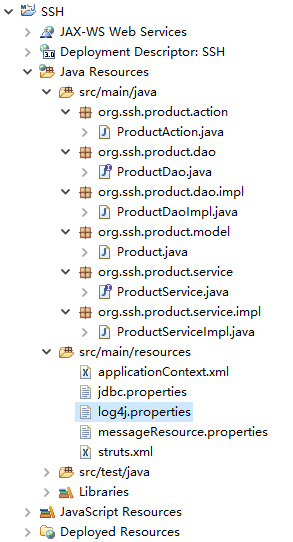
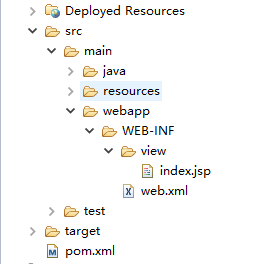
4.pom.xml
<project xmlns="http://maven.apache.org/POM/4.0.0" xmlns:xsi="http://www.w3.org/2001/XMLSchema-instance"

  xsi:schemaLocation="http://maven.apache.org/POM/4.0.0 http://maven.apache.org/maven-v4_0_0.xsd">

  	<modelVersion>4.0.0</modelVersion>

	<groupId>org.ssh</groupId>

	<artifactId>SSH</artifactId>

	<packaging>war</packaging>

	<version>0.0.1-SNAPSHOT</version>

	<properties>

		<!-- 统一源码的编码方式 -->

		<project.build.sourceEncoding>UTF-8</project.build.sourceEncoding>

		<!-- 统一各个框架版本 -->

		<struts.version>2.5.10</struts.version>

		<spring.version>4.3.8.RELEASE</spring.version>

		<hibernate.version>5.1.7.Final</hibernate.version>

	</properties>

	<dependencies>

		<!-- Junit依赖 -->

		<dependency>

			<groupId>junit</groupId>

			<artifactId>junit</artifactId>

			<version>4.12</version>

			<scope>test</scope>

		</dependency>

		<!-- Spring 核心依赖 -->

		<dependency>

		    <groupId>org.springframework</groupId>

		    <artifactId>spring-core</artifactId>

		    <version>${spring.version}</version>

		</dependency>

		<!-- Spring web依赖 -->

		<dependency>

		    <groupId>org.springframework</groupId>

		    <artifactId>spring-web</artifactId>

		    <version>${spring.version}</version>

		</dependency>

		<!-- Spring整合ORM框架依赖 -->

		<dependency>

		    <groupId>org.springframework</groupId>

		    <artifactId>spring-orm</artifactId>

		    <version>${spring.version}</version>

		</dependency>

		<!-- Struts2 核心依赖 -->

		<dependency>

		    <groupId>org.apache.struts</groupId>

		    <artifactId>struts2-core</artifactId>

		    <version>${struts.version}</version>

		</dependency>

		<!-- Struts2和Spring整合依赖 -->

		<dependency>

		    <groupId>org.apache.struts</groupId>

		    <artifactId>struts2-spring-plugin</artifactId>

		    <version>${struts.version}</version>

		</dependency>

		<!-- Hibernate 核心依赖 -->

		<dependency>

		    <groupId>org.hibernate</groupId>

		    <artifactId>hibernate-core</artifactId>

		    <version>${hibernate.version}</version>

		</dependency>

		<!-- MySQL 依赖 -->

		<dependency>

		    <groupId>mysql</groupId>

		    <artifactId>mysql-connector-java</artifactId>

		    <version>5.1.42</version>

		</dependency>

		<!-- C3P0 依赖 -->

		<dependency>

		    <groupId>com.mchange</groupId>

		    <artifactId>c3p0</artifactId>

		    <version>0.9.5</version>

		</dependency>

		<!-- AspectJ依赖 -->

		<dependency>

		    <groupId>org.aspectj</groupId>

		    <artifactId>aspectjweaver</artifactId>

		    <version>1.8.10</version>

		</dependency>

		<!-- SLF4J依赖 -->

		<dependency>

		    <groupId>org.slf4j</groupId>

		    <artifactId>slf4j-log4j12</artifactId>

		    <version>1.7.25</version>

		</dependency>

	</dependencies>

	<build>

	  	<plugins>

            <!-- 统一源代码编译输出的JDK版本 -->

            <plugin>

                <groupId>org.apache.maven.plugins</groupId>

                <artifactId>maven-compiler-plugin</artifactId>

                <version>3.5.1</version>

                <configuration>

                    <source>1.7</source>

                    <target>1.7</target>

                </configuration>

            </plugin>

            <!-- 打包时跳过单元测试 -->

            <plugin>

                <groupId>org.apache.maven.plugins</groupId>

                <artifactId>maven-surefire-plugin</artifactId>

                <version>2.19.1</version>

                <configuration>

                    <skipTests>true</skipTests>

                </configuration>

            </plugin>

            <!-- 集成Tomcat插件 -->

            <plugin>

                <groupId>org.apache.tomcat.maven</groupId>

                <artifactId>tomcat7-maven-plugin</artifactId>

                <version>2.2</version>

                <configuration>

                    <path>/${project.artifactId}</path>

                </configuration>

            </plugin>

        </plugins>

	</build>

</project>
5.web.xml
<?xml version="1.0" encoding="UTF-8"?>

<web-app xmlns="http://java.sun.com/xml/ns/javaee"

         xmlns:xsi="http://www.w3.org/2001/XMLSchema-instance"

         xsi:schemaLocation="http://java.sun.com/xml/ns/javaee

                      http://java.sun.com/xml/ns/javaee/web-app_3_0.xsd"

         version="3.0">

	<!-- 配置Struts2过滤器 -->

	<filter>

		<filter-name>struts2</filter-name>

		<filter-class>org.apache.struts2.dispatcher.filter.StrutsPrepareAndExecuteFilter</filter-class>

	</filter>

	<filter-mapping>

		<filter-name>struts2</filter-name>

		<url-pattern>/*</url-pattern>

	</filter-mapping>

	<!-- 配置Spring的监听器 -->

	<listener>

		<listener-class>org.springframework.web.context.ContextLoaderListener</listener-class>

	</listener>

	<!-- 指定Spring配置文件所在路径 -->

	<context-param>

		<param-name>contextConfigLocation</param-name>

		<param-value>classpath:applicationContext.xml</param-value>

	</context-param>

</web-app>
6.index.jsp
<%@ page language="java" contentType="text/html; charset=UTF-8"

    pageEncoding="UTF-8"%>

<%@ taglib prefix="s" uri="/struts-tags" %>

<!DOCTYPE html PUBLIC "-//W3C//DTD HTML 4.01 Transitional//EN" "http://www.w3.org/TR/html4/loose.dtd">

<html>

<head>

<meta http-equiv="Content-Type" content="text/html; charset=UTF-8">

<title>新增商品界面</title>

</head>

<body>

	<h1>新增商品</h1>

	<s:actionmessage/>

	<s:form action="product_save" method="post" namespace="/" theme="simple">

		<table width="600px">

			<tr>

				<th>商品名称</th>

				<td><s:textfield name="pname"/></td>

				<td><font color="red"><s:fielderror fieldName="pname"/></font></td>

			</tr>

			<tr>

				<th>商品价格</th>

				<td><s:textfield name="price"/></td>

				<td><font color="red"><s:fielderror fieldName="price"/></font></td>

			</tr>

			<tr>

				<th colspan="2">

					<input type="submit" value="保存"/>

				</th>

				<th> </th>

			</tr>

		</table>

	</s:form>

</body>

</html>
7.Product.java
package org.ssh.product.model;

import javax.persistence.Column;

import javax.persistence.Entity;

import javax.persistence.GeneratedValue;

import javax.persistence.Id;

import org.hibernate.annotations.GenericGenerator;

@Entity

public class Product {

	@Id

	@GeneratedValue(generator = "pid")

	@GenericGenerator(name = "pid", strategy = "native")

	private int pid;// 商品ID

	@Column(length = 100)

	private String pname;// 商品名称

	private double price;// 商品价格

	public Product() {

	}

	public Product(String pname, double price) {

		this.pname = pname;

		this.price = price;

	}

	public int getPid() {

		return pid;

	}

	public void setPid(int pid) {

		this.pid = pid;

	}

	public String getPname() {

		return pname;

	}

	public void setPname(String pname) {

		this.pname = pname;

	}

	public double getPrice() {

		return price;

	}

	public void setPrice(double price) {

		this.price = price;

	}

}
8.ProductDao.java
package org.ssh.product.dao;

import org.ssh.product.model.Product;

/**

 * 商品操作-持久层接口

 *

 */

public interface ProductDao {

	void saveProduct(Product product);

}
9.ProductDaoImpl.java
package org.ssh.product.dao.impl;

import org.hibernate.SessionFactory;

import org.springframework.beans.factory.annotation.Autowired;

import org.springframework.orm.hibernate5.HibernateTemplate;

import org.springframework.stereotype.Repository;

import org.ssh.product.dao.ProductDao;

import org.ssh.product.model.Product;

/**

 * 商品信息-服务层实现

 *

 */

@Repository

public class ProductDaoImpl implements ProductDao {

	private HibernateTemplate template;

	@Autowired

	public ProductDaoImpl(SessionFactory sessionFactory) {

		this.template = new HibernateTemplate(sessionFactory);

	}

	@Override

	public void saveProduct(Product product) {

		template.save(product);

	}

}
10.ProductService.java
package org.ssh.product.service;

import org.ssh.product.model.Product;

/**

 * 商品操作-服务层接口

 *

 */

public interface ProductService {

	void saveProduct(Product product);

}
11.ProductServiceImpl.java
package org.ssh.product.service.impl;

import org.springframework.beans.factory.annotation.Autowired;

import org.springframework.stereotype.Service;

import org.ssh.product.dao.ProductDao;

import org.ssh.product.model.Product;

import org.ssh.product.service.ProductService;

@Service

public class ProductServiceImpl implements ProductService {

	@Autowired

	private ProductDao productDao;

	@Override

	public void saveProduct(Product product) {

		productDao.saveProduct(product);

	}

}
12.ProductAction.java
package org.ssh.product.action;

import org.springframework.beans.factory.annotation.Autowired;

import org.springframework.context.annotation.Scope;

import org.springframework.stereotype.Controller;

import org.ssh.product.model.Product;

import org.ssh.product.service.ProductService;

import com.opensymphony.xwork2.ActionSupport;

/**

 * 商品操作-控制层

 *

 */

@Controller

@Scope("prototype")

public class ProductAction extends ActionSupport {

	private static final long serialVersionUID = 1L;

	@Autowired

	private ProductService productService;

	private String pname;

	private double price;

	/**

	 * 保存商品操作

	 *

	 * @return

	 */

	public String saveProduct() {

		Product product = new Product(pname, price);

		productService.saveProduct(product);

		this.addActionMessage("保存成功...");

		return SUCCESS;

	}

	public String getPname() {

		return pname;

	}

	public void setPname(String pname) {

		this.pname = pname;

	}

	public double getPrice() {

		return price;

	}

	public void setPrice(double price) {

		this.price = price;

	}

	@Override

	public void validate() {

		if(pname == null || "".equals(pname.trim())) {

			this.addFieldError("pname", "商品名称不能为空");

		}

	}

}
13.struts.xml
<?xml version="1.0" encoding="UTF-8"?>

<!DOCTYPE struts PUBLIC

    "-//Apache Software Foundation//DTD Struts Configuration 2.5//EN"

    "http://struts.apache.org/dtds/struts-2.5.dtd">

<struts>

	<!-- 默认访问页面 -->

	<package name="default" extends="struts-default" namespace="/">

		<default-action-ref name="default"/>

		<action name="default">

			<result>/WEB-INF/view/index.jsp</result>

		</action>

	</package>

	<!-- 商品相关请求转发 -->

	<!-- Struts2在2.5版本后添加strict-method-invocation(严格方法访问),默认为true,不能使用动态方法调用功能,故需设为false -->

	<package name="product" extends="struts-default" namespace="/" strict-method-invocation="false">

		<!-- 保存商品 -->

		<action name="product_*" class="productAction" method="{1}Product">

			<result>WEB-INF/view/index.jsp</result>

			<result name="input">WEB-INF/view/index.jsp</result>

		</action>

	</package>

	<!-- 引入资源文件 -->

	<constant name="struts.custom.i18n.resources" value="messageResource"></constant>

</struts>
14.messageResource.properties
invalid.fieldvalue.price = \u5546\u54c1\u4ef7\u683c\u8f93\u5165\u683c\u5f0f\u6709\u8bef
15.jdbc.properties
jdbc.url=jdbc:mysql:///ssh?useSSL=true&characterEncoding=UTF-8

jdbc.driverClass=com.mysql.jdbc.Driver

jdbc.username=root

jdbc.password=***
16.applicationContext.xml
<?xml version="1.0" encoding="UTF-8"?>

<beans xmlns="http://www.springframework.org/schema/beans"

    xmlns:xsi="http://www.w3.org/2001/XMLSchema-instance"

    xmlns:context="http://www.springframework.org/schema/context"

    xmlns:tx="http://www.springframework.org/schema/tx"

    xmlns:aop="http://www.springframework.org/schema/aop"

    xsi:schemaLocation="http://www.springframework.org/schema/beans

        http://www.springframework.org/schema/beans/spring-beans.xsd

        http://www.springframework.org/schema/context

        http://www.springframework.org/schema/context/spring-context.xsd

        http://www.springframework.org/schema/tx

        http://www.springframework.org/schema/tx/spring-tx.xsd

        http://www.springframework.org/schema/aop

        http://www.springframework.org/schema/aop/spring-aop.xsd">

	<!-- 开启包扫描,并注册注解 -->

	<context:component-scan base-package="org.ssh.*"/>

	<!-- 引入属性文件 -->

	<context:property-placeholder location="classpath:jdbc.properties"/>

	<!-- 配置C3P0连接池 -->

	<bean id="dataSource" class="com.mchange.v2.c3p0.ComboPooledDataSource">

		<!-- 数据库连接相关信息 -->

		<property name="jdbcUrl" value="${jdbc.url}"/>

		<property name="driverClass" value="${jdbc.driverClass}"/>

		<property name="user" value="${jdbc.username}"/>

		<property name="password" value="${jdbc.password}"/>

	</bean>

	<!-- 配置Hibernate的SessionFactory -->

	<bean id="sessionFactory" class="org.springframework.orm.hibernate5.LocalSessionFactoryBean">

		<!-- 注入连接池 -->

		<property name="dataSource" ref="dataSource"/>

		<!-- 配置Hibernate属性 -->

		<property name="hibernateProperties">

			<props>

				<prop key="hibernate.show_sql">true</prop><!-- 是否展示SQL -->

				<prop key="hibernate.hbm2ddl.auto">update</prop><!-- 是否自动创建表结构 -->

				<prop key="hibernate.dialect">org.hibernate.dialect.MySQL5InnoDBDialect</prop>

			</props>

		</property>

		<!-- 扫描并加载注解过的实体类 -->

		<property name="packagesToScan" value="org.ssh.*.model"/>

	</bean>

	<!-- 配置事务管理器 -->

	<bean id="transactionManager" class="org.springframework.orm.hibernate5.HibernateTransactionManager">

		<!-- 注入SessionFactory -->

		<property name="sessionFactory" ref="sessionFactory"/>

	</bean>

	<!-- 配置事务增强 -->

	<tx:advice id="txAdvice" transaction-manager="transactionManager">

		<tx:attributes>

			<!-- 配置需要进行事务管理的方法,和事务传播行为 -->

			<tx:method name="save*" propagation="REQUIRED"/>

			<tx:method name="update*" propagation="REQUIRED"/>

			<tx:method name="delete*" propagation="REQUIRED"/>

		</tx:attributes>

	</tx:advice>

	<!-- 配置切面 -->

	<aop:config>

		<!-- 配置切入点

			* org.ssh.service.*+.*(..)

	            *:表示方法的作用域,*表示所有

	            org.ssh.service.*:表示org.ssh.service下的任何包

	            org.ssh.service.*+:表示org.ssh.service下的任何包及其子包

	            *(..):*表示任何方法,(..)表示方法的任何参数

		 -->

		<aop:pointcut id="pointcut" expression="execution(* org.ssh.*.service.*+.*(..))"/>

		<!-- 适配切入点和事务增强 -->

		<aop:advisor advice-ref="txAdvice" pointcut-ref="pointcut"/>

	</aop:config>

</beans>
17.log4j.properties
log4j.rootCategory=INFO, console

log4j.appender.console=org.apache.log4j.ConsoleAppender

log4j.appender.console.layout=org.apache.log4j.PatternLayout

log4j.appender.console.layout.ConversionPattern=%d{yyyy-MM-dd HH:mm:ss} %5p %t %c{2}:%L - %m%n
Maven环境下搭建SSH框架的更多相关文章
- Maven环境下搭建SSH框架之Spring整合Hibernate
© 版权声明:本文为博主原创文章,转载请注明出处 1.搭建环境 Spring:4.3.8.RELEASE Hibernate:5.1.7.Final MySQL:5.7.17 注意:其他版本在某些特性 ...
- Maven环境下搭建SSH框架之Spring整合Struts2
© 版权声明:本文为博主原创文章,转载请注明出处 1.搭建环境 Struts2:2.5.10 Spring:4.3.8.RELEASE 注意:其他版本在某些特性的使用上可能稍微存在差别 2.准备工作 ...
- Java之基于Eclipse搭建SSH框架(下)
在上篇博客里,我简介了Tomcat滴配置与Struts2滴搭建,假设对这个还不会滴童鞋去看一下我滴上篇博客<Java之基于Eclipse搭建SSH框架(上)>.今天我们接着上篇博客滴内容. ...
- win 7 下Maven环境的搭建
Apache Maven,是一个软件(特别是Java软件)项目管理及自动构建工具. Maven是什么? 比较正式的定义:Maven是一个项目管理工具,它包含了: 一个项目对象模型 (Project O ...
- MyEclipse8.5快速搭建SSH框架
来源于:http://jingyan.baidu.com/article/a378c960a78125b3282830cc.html MyEclipse8.5快速搭建SSH框架 使用版本: Strut ...
- [JavaEE] SSH框架笔记_eclipse搭建SSH框架详解
SSH框架是最常用的框架之一,在搭建SSH框架的时候总有人遇到这样,那样的问题.下面我介绍一下SSH框架搭建的全过程. 第一步:准备工作. 下载好eclipse,Struts2,Spring,Hibe ...
- freeSSHD在windows环境下搭建SFTP服务器
freeSSHD在windows环境下搭建SFTP服务器 0 建议现在windows环境下安装cygwin,否则在windows环境下cmd模式使用不了sftp去连接,可以利用win scp去测试连接 ...
- windows环境下安装yaf框架
windows环境下安装yaf框架 在windows下安装yaf框架 准备工作: php环境(过程略,wamp,xampp,phpstudy都行,php版本大于5.3) git工具(需要从github ...
- maven环境的搭建,lemon-OA办公系统的搭建
当时要搭建activiti工作流,但是这个工作流是基于maven启动的,于是,学习了一下,maven环境的搭建 准备的环境: Jdk 1.6 Eclipse IDE 一个或者 MyEclipse M ...
随机推荐
- (2)C语言 基础2
一.函数 二.指针 1.指针是一个用来存储内存地址的变量. int * p ; 定义了一个指针变量p,p中存储的是一个地址,改地址里必定会存储一个int类型的数据. *号表示变量p是一个指针.*和指针 ...
- XML签名
英文:https://www.javacodegeeks.com/2013/10/xml-security-with-digital-signature-in-java.html 中文:http:// ...
- 818E - Card Game Again(尺取法)
818E - Card Game Again 题意 给出一个数列,选择连续的一段使得这些数字的乘积是 k 的倍数,问合法的方案数. 分析 尺取法.设 num 为连续的数的乘积,只要对于 k 的每个素因 ...
- luogu P1147 连续自然数和
题目描述 对一个给定的自然数M,求出所有的连续的自然数段,这些连续的自然数段中的全部数之和为M. 例子:1998+1999+2000+2001+2002 = 10000,所以从1998到2002的一个 ...
- 1.12(java学习笔记)多态及向上、向下转型
一.多态 多态是指同一个方法被调用,由于对象不同导致行为不同. 例如调用自由活动方法,张三喜欢玩耍,那么他就会去玩耍. 李四喜欢学习,那么他可能去学习.调用方法因对象的不同 而产生了不同的行为. 形成 ...
- C++指针、引用知多少?
上午搞了一个小程序,test半天都没有得到想要的结构,原来是递归的时候没有注意的循环的问题,结果直接死循环了.催了...看来当程序出现问题的时候,首先要整理的是算法思路是否有问题,其次是算法的实现,是 ...
- elasticsearch 插件使用
5.3.0新版本好像插件和开源的项目没有以前的多,官网就那么几个 常用的先安装Kibana: 提供炫丽的可视化图形展示并且作为elasticsearch的搜索的小清新客户端 1.下载安装包 wget ...
- Delphi ParamStr 使用方法
ParamStr(0) 代表程序的路径, ParamStr(1) 代表程序的设置的参数
- Creating and Flashing UBIFS with MTD Utils
转:http://wiki.atlas-embedded.com/index.php?title=Creating_and_Flashing_UBIFS_with_MTD_Utils Contents ...
- iOS开发15:自定义UITableViewCell
上篇文章介绍了如何用UITableView显示表格,并讲了几种UITableViewCell的风格.不过有时候我们需要自己定义 UITableViewCell的风格,其实就是向行中添加子视图.添加子视 ...