
Android开发之文件下载,状态时显示下载进度,点击自动安装
在进行软件升级时,需要进行文件下载,在这里实现自定义的文件下载,并在状态栏显示下载进度,下载完成后,点击触发安装。
效果如图:
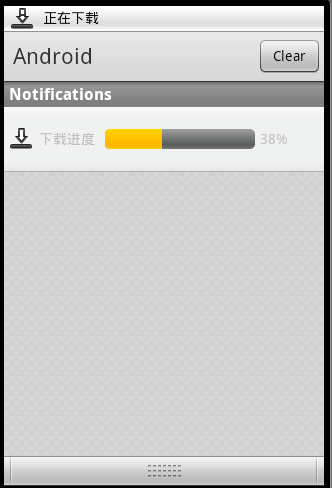
用于下载文件和显示现在进度的线程类如下:
- package com.channelsoft.ahzyfis.util;
- import java.io.File;
- import java.io.FileOutputStream;
- import java.io.InputStream;
- import java.net.HttpURLConnection;
- import java.net.URL;
- import android.app.Notification;
- import android.app.NotificationManager;
- import android.app.PendingIntent;
- import android.content.Context;
- import android.content.Intent;
- import android.net.Uri;
- import android.os.Environment;
- import android.os.Handler;
- import android.os.Message;
- import android.util.Log;
- import android.widget.RemoteViews;
- import android.widget.Toast;
- import com.channelsoft.ahzyfis.AhzyFisActivity;
- import com.channelsoft.ahzyfis.R;
- /**
- *
- * <dl>
- * <dt>AppFileDownUtils.java</dt>
- * <dd>Description: 文件下载</dd>
- * <dd>Copyright: Copyright (C) 2011</dd>
- * <dd>Company: </dd>
- * <dd>CreateDate: 2011-10-19</dd>
- * </dl>
- *
- * @author ZhanHua
- */
- public class AppFileDownUtils extends Thread {
- private Context mContext;
- private Handler mHandler;
- private String mDownloadUrl; // 文件下载url,已做非空检查
- private String mFileName;
- private Message msg;
- private final String APP_FOLDER = "DownDemo"; // sd卡应用目录
- private final String APK_FOLDER = "apkFile"; // 下载apk文件目录
- public static final int MSG_UNDOWN = 0; //未开始下载
- public static final int MSG_DOWNING = 1; // 下载中
- public static final int MSG_FINISH = 1; // 下载完成
- public static final int MSG_FAILURE = 2;// 下载失败
- private NotificationManager mNotifManager;
- private Notification mDownNotification;
- private RemoteViews mContentView; // 下载进度View
- private PendingIntent mDownPendingIntent;
- public AppFileDownUtils(Context context, Handler handler,
- String downloadUrl, String fileName) {
- mContext = context;
- mHandler = handler;
- mDownloadUrl = downloadUrl;
- mFileName = fileName;
- mNotifManager = (NotificationManager) mContext
- .getSystemService(Context.NOTIFICATION_SERVICE);
- msg = new Message();
- }
- @Override
- public void run() {
- try {
- if (Environment.getExternalStorageState().equals(
- Environment.MEDIA_MOUNTED)) {
- Message downingMsg = new Message();
- downingMsg.what = MSG_DOWNING;
- mHandler.sendMessage(downingMsg);
- // SD卡准备好
- File sdcardDir = Environment.getExternalStorageDirectory();
- // 文件存放路径: sdcard/DownDemo/apkFile
- File folder = new File(sdcardDir + File.separator + APP_FOLDER
- + File.separator + APK_FOLDER);
- if (!folder.exists()) {
- //创建存放目录
- folder.mkdir();
- }
- File saveFilePath = new File(folder, mFileName);
- System.out.println(saveFilePath);
- mDownNotification = new Notification(
- android.R.drawable.stat_sys_download, mContext
- .getString(R.string.notif_down_file), System
- .currentTimeMillis());
- mDownNotification.flags = Notification.FLAG_ONGOING_EVENT;
- mDownNotification.flags = Notification.FLAG_AUTO_CANCEL;
- mContentView = new RemoteViews(mContext.getPackageName(),
- R.layout.custom_notification);
- mContentView.setImageViewResource(R.id.downLoadIcon,
- android.R.drawable.stat_sys_download);
- mDownPendingIntent = PendingIntent.getActivity(mContext, 0, new Intent(), 0);
- boolean downSuc = downloadFile(mDownloadUrl, saveFilePath);
- if (downSuc) {
- msg.what = MSG_FINISH;
- Notification notification = new Notification(
- android.R.drawable.stat_sys_download_done, mContext
- .getString(R.string.downloadSuccess),
- System.currentTimeMillis());
- notification.flags = Notification.FLAG_ONGOING_EVENT;
- notification.flags = Notification.FLAG_AUTO_CANCEL;
- Intent intent = new Intent(Intent.ACTION_VIEW);
- intent.setFlags(Intent.FLAG_ACTIVITY_NEW_TASK);
- intent.setDataAndType(Uri.fromFile(saveFilePath),
- "application/vnd.android.package-archive");
- PendingIntent contentIntent = PendingIntent.getActivity(
- mContext, 0, intent, 0);
- notification.setLatestEventInfo(mContext, mContext
- .getString(R.string.downloadSuccess), null,
- contentIntent);
- mNotifManager.notify(R.drawable.icon, notification);
- } else {
- msg.what = MSG_FAILURE;
- Notification notification = new Notification(
- android.R.drawable.stat_sys_download_done, mContext
- .getString(R.string.downloadFailure),
- System.currentTimeMillis());
- notification.flags = Notification.FLAG_AUTO_CANCEL;
- PendingIntent contentIntent = PendingIntent.getActivity(
- mContext, 0, new Intent(), 0);
- notification.setLatestEventInfo(mContext, mContext
- .getString(R.string.downloadFailure), null,
- contentIntent);
- mNotifManager.notify(R.drawable.icon, notification);
- }
- } else {
- Toast.makeText(mContext, Environment.getExternalStorageState(),
- Toast.LENGTH_SHORT).show();
- msg.what = MSG_FAILURE;
- }
- } catch (Exception e) {
- Log.e(AhzyFisActivity.TAG, "AppFileDownUtils catch Exception:", e);
- msg.what = MSG_FAILURE;
- } finally {
- mHandler.sendMessage(msg);
- }
- }
- /**
- *
- * Desc:文件下载
- *
- * @param downloadUrl
- * 下载URL
- * @param saveFilePath
- * 保存文件路径
- * @return ture:下载成功 false:下载失败
- */
- public boolean downloadFile(String downloadUrl, File saveFilePath) {
- int fileSize = -1;
- int downFileSize = 0;
- boolean result = false;
- int progress = 0;
- try {
- URL url = new URL(downloadUrl);
- HttpURLConnection conn = (HttpURLConnection) url.openConnection();
- if (null == conn) {
- return false;
- }
- // 读取超时时间 毫秒级
- conn.setReadTimeout(10000);
- conn.setRequestMethod("GET");
- conn.setDoInput(true);
- conn.connect();
- if (conn.getResponseCode() == HttpURLConnection.HTTP_OK) {
- fileSize = conn.getContentLength();
- InputStream is = conn.getInputStream();
- FileOutputStream fos = new FileOutputStream(saveFilePath);
- byte[] buffer = new byte[1024];
- int i = 0;
- int tempProgress = -1;
- while ((i = is.read(buffer)) != -1) {
- downFileSize = downFileSize + i;
- // 下载进度
- progress = (int) (downFileSize * 100.0 / fileSize);
- fos.write(buffer, 0, i);
- synchronized (this) {
- if (downFileSize == fileSize) {
- // 下载完成
- mNotifManager.cancel(R.id.downLoadIcon);
- } else if (tempProgress != progress) {
- // 下载进度发生改变,则发送Message
- mContentView.setTextViewText(R.id.progressPercent,
- progress + "%");
- mContentView.setProgressBar(R.id.downLoadProgress,
- 100, progress, false);
- mDownNotification.contentView = mContentView;
- mDownNotification.contentIntent = mDownPendingIntent;
- mNotifManager.notify(R.id.downLoadIcon,
- mDownNotification);
- tempProgress = progress;
- }
- }
- }
- fos.flush();
- fos.close();
- is.close();
- result = true;
- } else {
- result = false;
- }
- } catch (Exception e) {
- result = false;
- Log.e(AhzyFisActivity.TAG, "downloadFile catch Exception:", e);
- }
- return result;
- }
- }
在下载过程中,如果需要和主线程(UI Main Thread)通信,及时让主线程了解下载进度和状态,可用通过Handle向主线程发送Message
进度条显示的布局文件如下:
- <?xml version="1.0" encoding="utf-8"?>
- <LinearLayout
- android:id="@+id/custom_notification"
- xmlns:android="http://schemas.android.com/apk/res/android"
- android:orientation="horizontal"
- android:layout_width="fill_parent"
- android:layout_height="fill_parent">
- <ImageView
- android:id="@+id/downLoadIcon"
- android:layout_width="wrap_content"
- android:layout_height="wrap_content"
- android:layout_marginLeft="5dip"
- android:layout_gravity="center_vertical"
- />
- <TextView
- android:layout_height="fill_parent"
- android:layout_width="wrap_content"
- android:layout_marginLeft="5dip"
- android:text="@string/downloadProgress"
- android:gravity="center_vertical"
- />
- <ProgressBar
- android:id="@+id/downLoadProgress"
- style="?android:attr/progressBarStyleHorizontal"
- mce_style="?android:attr/progressBarStyleHorizontal"
- android:layout_marginLeft="10dip"
- android:layout_width="150dip"
- android:layout_height="wrap_content"
- android:layout_gravity="center_vertical"
- />
- <TextView
- android:id="@+id/progressPercent"
- android:layout_height="fill_parent"
- android:layout_width="wrap_content"
- android:layout_marginLeft="5dip"
- android:gravity="center_vertical"
- />
- </LinearLayout>
Android开发之文件下载,状态时显示下载进度,点击自动安装的更多相关文章
- 使用AsyncTask实现文件下载并且在状态中显示下载进度
2013年10月24日 上班的第二天 昨天我是用afinal完成的则个功能,但是公司里并不希望使用第三方的代码,所以要求我在不使用第三方开源项目的情况下实现. 最先我是使用Thread开启一个子线程, ...
- 基于Android开发的天气预报app(源码下载)
原文:基于Android开发的天气预报app(源码下载) 基于AndroidStudio环境开发的天气app -系统总体介绍:本天气app使用AndroidStudio这个IDE工具在Windows1 ...
- android开发获取网络状态,wifi,wap,2g,3g.工具类(一)
android开发获取网络状态整理: package com.gzcivil.utils; import android.content.Context; import android.net.Con ...
- Android中如何下载文件并显示下载进度
原文地址:http://jcodecraeer.com/a/anzhuokaifa/androidkaifa/2014/1125/2057.html 这里主要讨论三种方式:AsyncTask.Serv ...
- [Xcode 实际操作]八、网络与多线程-(16)使用网址会话对象URLSession下载图片并显示下载进度
目录:[Swift]Xcode实际操作 本文将演示如何通过网址会话对象URLSession显示下载图片的进度. 网址会话对象URLSession具有在后台上传和下载.暂停和恢复网络操作.丰富的代理模式 ...
- requests实现文件下载, 期间显示文件信息&下载进度_python3
requests实现文件下载, 期间显示文件信息&下载进度 """使用模块线程方式实现网络资源的下载 # 实现文件下载, 期间显示文件信息&下载进度 # ...
- 使用libcurl显示下载进度
使用libcurl显示下载进度 http://blog.csdn.net/zhouzhenhe2008/article/details/53876622
- [Swift通天遁地]四、网络和线程-(8)下载图片并实时显示下载进度
★★★★★★★★★★★★★★★★★★★★★★★★★★★★★★★★★★★★★★★★➤微信公众号:山青咏芝(shanqingyongzhi)➤博客园地址:山青咏芝(https://www.cnblogs. ...
- Android开发之从网络URL上下载JSON数据
网络下载拉取数据中,json数据是一种格式化的xml数据,非常轻量方便,效率高,体验好等优点,下面就android中如何从给定的url下载json数据给予解析: 主要使用http请求方法,并用到Htt ...
随机推荐
- ALV编辑行内容有改变时候操作
ALV编辑行内容时,调用方法 check_changed_data返回变量 gf_valid = 'X'的话说明alv行有变化. 以下拿alv维护表程序部分代码做例: DATA: gr_alvgrid ...
- HTML5动态分页效果代码
<!DOCTYPE html> <html> <head> <meta charset="UTF-8"> <title> ...
- <一年成为Emacs高手>更新到20130706版
这次更新比较多,加了第三方精品插件推荐,添加了我认为不错的Emacs社区. 见 原文
- linux下用tar命令将当前目录下文件按子目录压缩归档
作者:iamlaosong 日常工作中,我们常常需要用tar命令将历史文件压缩归档,再删除源文件,以便节省空间.如果压缩归档成一个文件,就比较简单,用一条命令即可,如命令:tar -czf bak20 ...
- 成功为Android系统配上了GNU开发环境
单击此处获得本文的最新更新 经过一周的艰苦努力,成功为我的小米2手机适配上了全功能的GNU开发环境,完全兼容GNU/LINUX(Android自带的bionic.linker真心不好 ...
- 使用Boost库中的组件进行C++内存管理
C++标准库中的auto_ptr,智能指针,部分的解决了获取资源自动释放的问题 在Boost中,提供了6中智能指针:scoped_ptr, scoped_array, shared_ptr, shar ...
- Java NIO 完全学习笔记(转)
本篇博客依照 Java NIO Tutorial翻译,算是学习 Java NIO 的一个读书笔记.建议大家可以去阅读原文,相信你肯定会受益良多. 1. Java NIO Tutorial Java N ...
- Eclipse插件引入jar包的方法
搞了两天,终于找到解决办法了.原来 Eclipse 插件项目引入外面的jar包不能用 build path---->add external jars的方法. 先说明两个概念:类加载器,O ...
- oracle数据库单个数据文件的大小限制
之前没有仔细想过这个问题,因为总是不会用到,也没有犯过类似错误. 顺便提一下学习方法吧. 卤肉的学习方法是:常用知识点,熟悉理论并反复做实验,深入理解:不常用的知识点,相关内容都了解大概,遇到问题时想 ...
- E. Mike and Foam(容斥原理)
E. Mike and Foam Mike is a bartender at Rico's bar. At Rico's, they put beer glasses in a special sh ...