
怎么把顶部的Django administration去掉!!
/Library/Frameworks/Python.framework/Versions/3.4/lib/python3.4/site-packages/django/contrib/admin/templates/admin
目录下,有个叫
base_site.html的文件,打开并把Django administration去掉即可
{% extends "admin/base.html" %}

{% block title %}{{ title }} | {{ site_title|default:_('Django site admin') }}{% endblock %}

{% block branding %}

<h1 id="site-name"><a href="{% url 'admin:index' %}">{{ site_header|default:_('Django Administration') }}</a></h1>

{% endblock %}

{% block nav-global %}{% endblock %}
把{{ site_header|default:_('Django Administration') }} 替换掉
{% extends "admin/base.html" %}

{% block title %}{{ title }} | {{ site_title|default:_('Django site admin') }}{% endblock %}

{% block branding %}

<h1 id="site-name"><a href="{% url 'admin:index' %}">广州XX贸易有限公司</a></h1>

{% endblock %}

{% block nav-global %}{% endblock %}
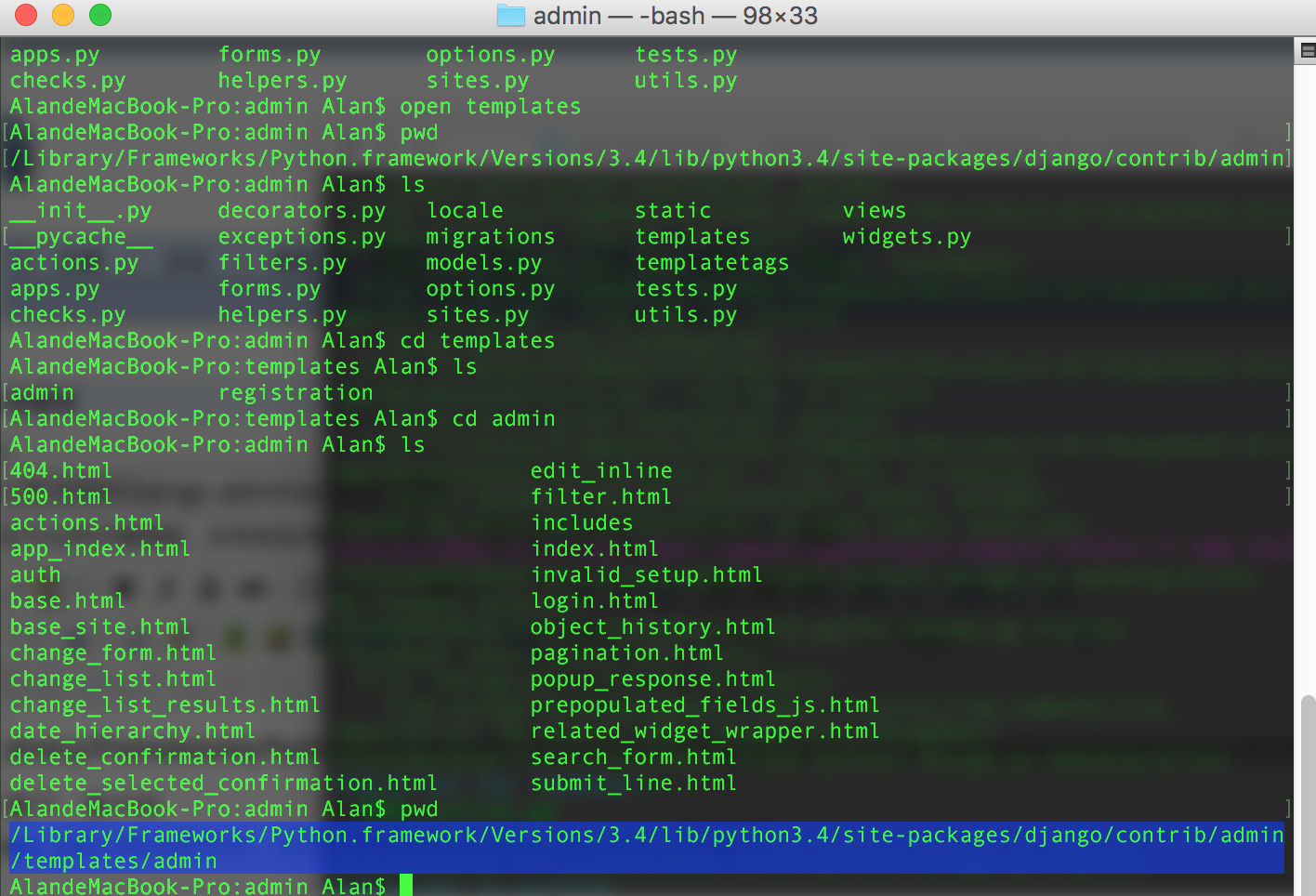
其中sites.py,是django的源码文件之一,
class AdminSite(object):

    """

    An AdminSite object encapsulates an instance of the Django admin application, ready

    to be hooked in to your URLconf. Models are registered with the AdminSite using the

    register() method, and the get_urls() method can then be used to access Django view

    functions that present a full admin interface for the collection of registered

    models.

    """

    # Text to put at the end of each page's <title>.

    site_title = ugettext_lazy('Django site admin')

    # Text to put in each page's <h1>.

    site_header = ugettext_lazy('Django administration')

    # Text to put at the top of the admin index page.

    index_title = ugettext_lazy('Site administration')

    # URL for the "View site" link at the top of each admin page.

    site_url = '/'

    _empty_value_display = '-'

    login_form = None

    index_template = None

    app_index_template = None

    login_template = None

    logout_template = None

    password_change_template = None

    password_change_done_template = None
# Text to put at the end of each page's <title>.
site_title = ugettext_lazy('Django site admin')
# Text to put in each page's <h1>.
site_header = ugettext_lazy('Django administration')
# Text to put at the top of the admin index page.
index_title = ugettext_lazy('Site administration')
即可修改admin的界面内容
怎么把顶部的Django administration去掉!!的更多相关文章
- 修改 Django Administration
只需要在django项目下的APP下的admin.py重写以下几个变量即可,不需要改django源码 from django.contrib import adminadmin.site.site_t ...
- 【Django】搭建Django administration并登录
Python自带一个后台管理系统,这个后台管理系统搭建与登陆呢? 新建项目Django_Admin 文件结构目录如下: 创建APP 在pycharm下方的terminal终端中输入命令: python ...
- 编写你的第一个 Django 程序 第2部分
原地址:http://django-chinese-docs.readthedocs.org/en/latest/intro/tutorial02.html 本教程上接 教程 第1部分 . 我们将继续 ...
- Django 2.0.1 官方文档翻译: 编写你的第一个 Django app,第七部分(Page 12)
编写你的第一个 Django app,第七部分(Page 12)转载请注明链接地址 本节教程承接第六部分(page 11)的教程.我们继续开发 web-poll应用,并专注于自定义django的自动生 ...
- 利用django创建一个投票网站(二)
创建你的第一个 Django 项目, 第二部分 这一篇从第一部分(zh)结尾的地方继续讲起.本节我们将继续写 Web 投票应用,并主要关注 Django 提供的自动生成的管理页面(admin site ...
- “全能”选手—Django 1.10文档中文版Part3
Django 1.10官方文档的入门教程已经翻译完毕,后续的部分将不会按照顺序进行翻译,而是挑重点的先翻译. 有兴趣的可以关注我的博客. 第一部分传送门 第二部分传送门 第四部分传送门 3.2 模型和 ...
- 实战Django:官方实例Part2
我们接着Part1部分往下讲.我们在part1中启动服务器后,并没有在管理页面中发现新添加的Polls应用,怎么办捏? 7.在管理界面中显示Question 只要注册一下这个应用就可以了.编辑poll ...
- Part 7:自定义admin站点--Django从入门到精通系列教程
该系列教程系个人原创,并完整发布在个人官网刘江的博客和教程 所有转载本文者,需在顶部显著位置注明原作者及www.liujiangblog.com官网地址. Python及Django学习QQ群:453 ...
- Django admin 组件 原理分析与扩展使用 之 sites.py (一)
一 . 前言 Django 提供了admin 组件 为项目提供基本的管理后台功能(对数据表的增删改查). 本篇文章通过 admin源码 简单分析admin 内部原理 ,扩展使用方式,为以后进行定制和自 ...
随机推荐
- unity GPU bound or CPU bound
unity判断GPU CPUbound android 用unity profiler 里面的cpu时间 xcode有直接的显示
- win7上搭建ruby开发环境
1. 安装ruby 可使用windows下的ruby安装工具rubyinstaller来方便地安装ruby解释器,可以http://rubyinstaller.org/网站上下载得到.安装时,看清安装 ...
- C#写的一个视频转换解码器
C#写的一个视频转换解码器 using System; using System.Collections.Generic; using System.Linq; using System.Text; ...
- Node.js meitulu图片批量下载爬虫1.03版
//====================================================== // https://www.meitulu.com图片批量下载Node.js爬虫1. ...
- SQL Server 2008R2发布与订阅的配置
使用SQL Server的发布与订阅可以将一个数据库的数据实时传送到另一个数据库中,使用这种方式与Link Server相比可以减少对数据库的连接次数.下面介绍SQL Server 2008R2发布与 ...
- JDK自带监控工具 jps、jinfo、jstat、jmap、jconsole
分类: JVM 2010-10-04 11:05 587人阅读 评论(0) 收藏 举报 工具jdkjava远程连接unixstring 常用有五个命令行工具: jinfo: 可以输出并修改运行时的ja ...
- jumpserver-v0.5.0 应用图解
一. Jumpserver启动 Python: 版本 3.6 1.1 启动Jumpserver 先进入Python虚拟环境 [root@localhost ~]# source /opt/py3/bi ...
- Oracle undo 表空间管理 (摘DAVID)
Oracle 的Undo有两种方式: 一是使用undo 表空间,二是使用回滚段. 我们通过 undo_management 参数来控制使用哪种方式,如果设为auto,就使用UNDO 表空间,这时必须要 ...
- Python解微分方程
1.求解常微分方程的步骤: from sympy import * init_printing() #定义符号常量x 与 f(x) g(x).这里的f g还可以用其他字母替换,用于表示函数 x = S ...
- EditPlus设置html和js文件的注释快捷键
EditPlus默认是可以通过快捷键注释html的,格式是 <!-- </label> <label>类型</label> <label> --& ...