
【转】appium常用方法整理
1、相对坐标解锁九宫格
应用场景
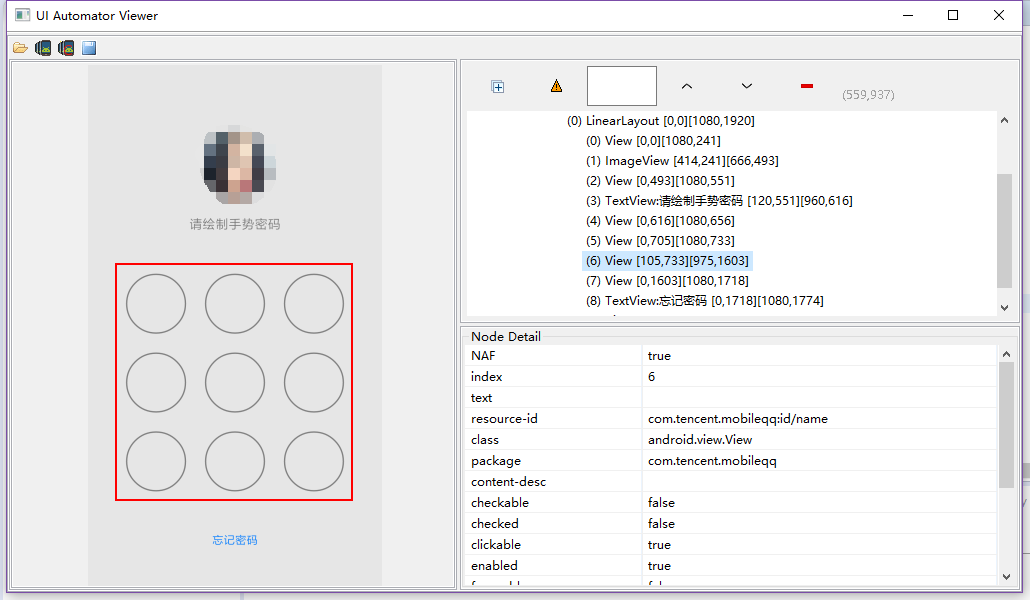
QQ解锁屏幕如上,可见九个按键在同一个View下面,要实现解锁,用press moveTo release perform方法
实现代码如下:

     WebElement jiugongge = pi.findByXpath("jiugongge");//获取九宫格所在的位置元素

        final TouchAction touchAction = new TouchAction(driver);

        // 元素的起始x和y坐标

        Point start = jiugongge.getLocation();

        int startX = start.x;

        int startY = start.y;

        System.out.println("startX : "+startX);

        System.out.println("startY : "+startY);

        // 元素的宽和高

        Dimension q = jiugongge.getSize();

        int width = q.getWidth();

        int hight = q.getHeight();

        System.out.println("width : "+width);

        System.out.println("hight : "+hight);

        //计算每个数字间隔的距离

        int jianjuX = width/3;

        int jianjuY = hight/3;

        System.out.println("jianjuX : "+jianjuX);

        System.out.println("jianjuY : "+jianjuY);

        // 计算出控件结束坐标

        int endX = width + startX;

        int endY = hight + startY;

        System.out.println("endX :"+endX);

        System.out.println("endY :"+endY);

        //1 的坐标

        int oneX = startX + jianjuX/2;

        int oneY = startY + jianjuY/2;

        System.out.println("oneX : "+oneX);

        System.out.println("oneY : "+oneY);
int twoX = oneX + jianjuX;
int twoY = oneY;
int threeX = twoX + jianjuX;
int threeY = oneY;
    //Z型  上下滑动时,x相对坐标为0,y的相对坐标为高度的jianju,相对坐标值为正数时向下you滑动,为负数时向上zuo滑动

        touchAction.press(oneX, oneY).waitAction(500).moveTo(jianjuX, 0).moveTo(jianjuX, 0).moveTo(-jianjuX, jianjuY).moveTo(-jianjuX, jianjuY).moveTo(jianjuX, 0).moveTo(jianjuX, 0).waitAction(500).release();

        touchAction.perform(); //运行会抛异常
//3-2-1-4-7-8-9 运行可以通过
touchAction.press(threeX, threeY).waitAction(500).moveTo(-jianjuX, 0).moveTo(-jianjuX, 0)
.moveTo(0, jianjuY).moveTo(0, jianjuY).moveTo(jianjuX, 0).moveTo(jianjuX, 0).waitAction(500).release();
touchAction.perform();
基本思路:
1、找到元素所在位置;
2、求出第一个点的坐标;
3、找出平均移动的间距;
4、利用TouchAction 的press() moveTo()等方法实现相对移动
解释:press(oneX, oneY)是按下时的坐标,moveTo()的坐标就是相对于按下的那个坐标而言
上下滑动时,x相对坐标为0,y的相对坐标为高度的jianju,相对坐标值为正数时向下右滑动,为负数时向上左滑动
moveTo方法的官方解释,移动是相对上一个点的坐标进行相对移动
/**

     * Move current touch to a new position relative to the current position on

     * the screen. If the current position of this TouchAction is (xOld, yOld),

     * then this method will move the TouchAction to (xOld + x, yOld + y).

     *

     * @param x change in x coordinate to move through.

     * @param y change in y coordinate to move through.

     * @return this TouchAction, for chaining.

     */

    public TouchAction moveTo(int x, int y) {

        ActionParameter action = new ActionParameter("moveTo");

        action.addParameter("x", x);

        action.addParameter("y", y);

        parameterBuilder.add(action);

        return this;

    }
备注:
这块解锁Z型的会有一个异常抛出,当然我还不知道怎么解决,但是大概知道了为什么会有这个异常,
我试了其他形状,只要不包括斜着移动就可以成功运行,有斜着移就会抛出异常
2、在控件上进行上下左右滑动
应用场景:
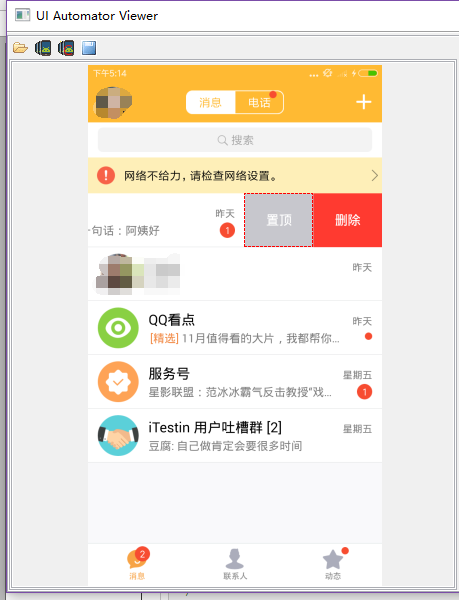
在第一个聊天的控件上进行左滑删除操作
实现代码如下:
/**

     * 根据控件定位

     * 在控件内上下左右滑动

     * @param element      控件定位方式

     * @param heading 滑动方向 UP  DOWN

     */

    public void swipeControl(WebElement element, Heading heading) {

        // 获取控件位置的坐标轴

        Point start = element.getLocation();

        int startX = start.x;

        int startY = start.y;

        // 获取控件坐标轴差

        Dimension q = element.getSize();

        int x = q.getWidth();

        int y = q.getHeight();

        // 计算出控件结束坐标

        int endX = x + startX;

        int endY = y + startY;

        // 计算中间点坐标

        int centreX = (endX + startX) / 2;

        int centreY = (endY + startY) / 2;

        switch (heading) {

            // 向you滑动

            case RIGHT:

                driver.swipe(endX - 10, endY, centreX, endY, 500);

                break;

            // 向zuo滑动

            case LEFT:

                driver.swipe(endX- 10,endY , centreX , endY -5, 1000);

                break;

            //向上滑动

            case UP:

                driver.swipe(endX,endY + 5,centreX,centreY,1000);

                break;

            //向下滑动

            case DOWN:

                driver.swipe(endX,endY - 5,centreX,centreY,1000);

                break;

        }

    }
/**

     * 控制滑动方向

     */

    public enum Heading {

        RIGHT, LEFT,

        UP, DOWN

    }
基本思路:
1、找到要滑动的元素;
2、得到元素的起始位置;
3、利用swipe(startx,starty,endx,endy,time)函数进行滑动,time为滑动的时间,毫秒为单位
解释:在滑动的坐标可以根据自己需要的进行控制
3、清楚控件的值
应用场景:密码框获取不到值,直接用appium自带的clear函数不能清除干净
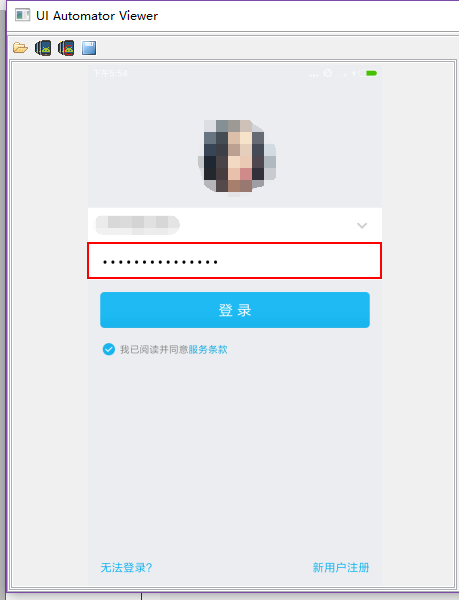
亲测,QQ的密码框的值用clear函数有时候不能清除干净
实现代码如下:
/**

     * 一个一个删除edittext控件里的值

     * @author lu

     * @param driver

     * @param text

     */

    public void clearText(String text ,int second) {

        driver.pressKeyCode(123);//123:光标移动到输入框最右边

        if(text.length()!=0)

            driver.pressKeyCode(67);//67删除

        CommonUtils.sleep(second);

    }
4、截图操作
public static void snapshot(AndroidDriver driver, String filename) {

//        CommonUtils.sleep(2);

        boolean ret = ViewUtils.waitForWebViewInit(driver,"WEBVIEW_com.eshare.Purse");

        if (ret) {

            driver.context("NATIVE_APP");

        }

        String currentPath = System.getProperty("user.dir"); // get current work

            // folder

        File scrFile = ((TakesScreenshot) driver).getScreenshotAs(OutputType.FILE);

        try {

            System.out.println("save snapshot path is:" + currentPath + "/screen/" + filename);

            FileUtils.copyFile(scrFile, new File(currentPath + "\\screen\\" + filename));

        } catch (IOException e) {

            System.out.println("Can't save screenshot");

            e.printStackTrace();

        } finally {

            ret = false;

            if (!ret) {

                driver.context("WEBVIEW");

            }

            System.out.println("screen shot finished, it's in " + currentPath + " folder");

            CommonUtils.sleep(2);

        }
代码如上
对于混合型APP(NATIVE_APP,WEBVIEW混合)
由代码可见,我在截图之前,先判断了当前是原生页面还是webview页面,操作之后又将其还原为WEBVIEW模式
这是因为,截图这个操作在webview模式下会提示一个异常错误
所以在截图前,先将其转换为NATIVE_APP模式。
5、判断页面是否存在某个元素
public boolean isElementExist(String xpath ){

        try{

            driver.findElement(By.xpath(xpath));

            return  true;

        }catch(org.openqa.selenium.NoSuchElementException ex){

            return false;

        }

    }
我之前有用过isDisplay()函数,但是这个函数只是判断元素是否显示,它使用的前提是元素存在
对于不存在元素,要判断其是否存在,见如上代码。
【转】appium常用方法整理的更多相关文章
- appium常用方法整理
1.相对坐标解锁九宫格 应用场景 QQ解锁屏幕如上,可见九个按键在同一个View下面,要实现解锁,用press moveTo release perform方法 实现代码如下: WebElem ...
- Python 部分系统类的常用方法整理
下面是常用的几个系统类的常用方法整理: list: 列表[1, 2,...] set: 集合,无重复元素{1, 2,...} str: 字符串 dict: 字典{a:'a', b:'b',...} T ...
- appium问题整理
在刚进入appium的世界时,遇到无数的坑,趟过无数的浑水,现在整理一些常用的报错讯息,供大家参考 1.org.openqa.selenium.remote.UnreachableBrowserExc ...
- APPIUM API整理(python)---元素查找
最近在学习自动化框架appium,网上找一些API相关资料整理了一下 1.find_element_by_id find_element_by_id(self, id_): Finds element ...
- 八 Appium常用方法介绍
由于appium是扩展了Webdriver协议,所以可以使用webdriver提供的方法,比如在处理webview页面,完全可以使用webdriver中的方法.当然在原生应用中,也可以使用. 1.元素 ...
- PHP常用方法整理
最近开始写PHP项目,各种常用的方法简单整理一下,以备后用. 1. Xml转Json json_decode(json_encode(simplexml_load_string($xml, 'Sim ...
- underscore.js常用方法整理(慢慢完善)
整理自Underscore.js (1.8.3) 中文文档,http://www.css88.com/doc/underscore/ 1. extend _.extend() 复制对象中的所有属性到目 ...
- appium===常用方法介绍,元素定位
https://testerhome.com/topics/3711 元素定位方法: find_element_by_android_uiautomator ,使用uiautomator定位,后面参数 ...
- Appium 常用方法
锁定 锁定屏幕 # python driver.lock(5) 将 app 置于后台 把当前应用放到后台去 # python driver.background_app(5) 收起键盘 收起键盘 # ...
随机推荐
- arcgis的炸开多边形功能
有时候我们使用dissolve工具,或其他操作会将空间不相连的多边形对应的属性合并到一起,如图: 在高级编辑工具中: 有这样一个工具,但是它能满足我的要求,但是他不是批量的,不过它使用起来比较方便. ...
- javaScript this 之谜
作为接触js没多久的人对变量作用域和this所指表示非常迷惑,专门花了一个下午google了一下,感觉以前百度到的结果都是什么鬼... 下面是我对this的认识,学疏才浅请拍砖 每一个方法都有自己的上 ...
- 【题解】Bzoj2560串珠子
挺强的……容斥+状压DP.首先想到如果可以求出f[k],f[k]代表联通状态为k的情况下的合法方案数,则f[k] = g[k] - 非法方案数.g[k]为总的方案数,这是容易求得的.那么非法方案数我们 ...
- ionic安装遇到的一些问题
ionic = Cordova + Angular + ionic CSS // 安装(失败的话 Mac 尝试使用 sudo,Windows 尝试管理员身份运行 cmd)$ npm install - ...
- node搭建文件服务器
python可以在目录下python -m http.server 8080来启动一个静态文件服务器,使用node实现一个 运行node fileServer.js D:\lanFeature 即可将 ...
- 面向对象的tab选项卡实现
利用最基础的面向对象的思想,实现tab选项卡效果: 效果截图:
- 动态规划:高维DP
例子当然是王八棋这道题,这道题以前是写烂了 先来一个大暴力,zlw教的暴力~~ #include<iostream> using namespace std; ,maxm=; ]; int ...
- All in One到”分布式“迁移过程中的坑
为什么“分布式”要加引号? 与其他公司提高并发性能的场景可能不太一样,我们的系统之前是多个模块共用一个tomcat来运行的(All in One),模块有很多,光安装包就几十个.当某个模块或某几个模块 ...
- 01-modal
Demo示例程序源代码
源代码下载链接:01-modal.zip37.8 KB // MJAppDelegate.h // // MJAppDelegate.h // 01-modal // // Created by ...
- NYOJ 115 城市平乱 (最短路)
* 题目链接* 描述 南将军统领着N个部队,这N个部队分别驻扎在N个不同的城市. 他在用这N个部队维护着M个城市的治安,这M个城市分别编号从1到M. 现在,小工军师告诉南将军,第K号城市发生了暴乱,南 ...