
Android 单选按钮(RadioButton)和复选框(CheckBox)的使用
1.RadioButton
(1)介绍
(2)单选按钮点击事件的用法

(3)RadioButton与RadioGroup配合使用实现单选题功能
(4)xml布局及使用
<?xml version="1.0" encoding="utf-8"?>

<LinearLayout xmlns:android="http://schemas.android.com/apk/res/android"

    xmlns:app="http://schemas.android.com/apk/res-auto"

    xmlns:tools="http://schemas.android.com/tools"

    android:layout_width="match_parent"

    android:layout_height="match_parent"

    android:orientation="vertical"

    tools:context=".MainActivity">

    <TextView

        android:id="@+id/textView"

        android:layout_width="match_parent"

        android:layout_height="wrap_content"

        android:text="您最喜欢的城市是" />

    <RadioGroup

        android:id="@+id/radiogroup"

        android:layout_width="match_parent"

        android:layout_height="wrap_content"

        android:orientation="vertical">

        <RadioButton

            android:id="@+id/radioButton"

            android:layout_width="match_parent"

            android:layout_height="wrap_content"

            android:text="北京" />

        <RadioButton

            android:id="@+id/radioButton2"

            android:layout_width="match_parent"

            android:layout_height="wrap_content"

            android:text="上海" />

        <RadioButton

            android:id="@+id/radioButton3"

            android:layout_width="match_parent"

            android:layout_height="wrap_content"

            android:text="广州" />

        <RadioButton

            android:id="@+id/radioButton4"

            android:layout_width="match_parent"

            android:layout_height="wrap_content"

            android:text="杭州" />

    </RadioGroup>

    <Button

        android:id="@+id/button"

        android:layout_width="wrap_content"

        android:layout_height="wrap_content"

        android:text="确定" />

</LinearLayout>
2.复选框(CheckBox)
(1)介绍

(2)xml文件
<TextView

        android:id="@+id/textview2"

        android:layout_width="match_parent"

        android:layout_height="wrap_content"

        android:text="你最喜欢的运动是"/>

    <CheckBox

        android:id="@+id/checkBox"

        android:layout_width="match_parent"

        android:layout_height="wrap_content"

        android:text="乒乓球" />

    <CheckBox

        android:id="@+id/checkBox2"

        android:layout_width="match_parent"

        android:layout_height="wrap_content"

        android:text="羽毛球" />

    <CheckBox

        android:id="@+id/checkBox3"

        android:layout_width="match_parent"

        android:layout_height="wrap_content"

        android:text="排球" />

    <CheckBox

        android:id="@+id/checkBox4"

        android:layout_width="match_parent"

        android:layout_height="wrap_content"

        android:text="足球" />

    <Button

        android:id="@+id/button2"

        android:layout_width="wrap_content"

        android:layout_height="wrap_content"

        android:text="确定" />
(3)java后台
对应工程名:test23
package com.lucky.test23;

import android.support.v7.app.AppCompatActivity;

import android.os.Bundle;

import android.view.View;

import android.widget.Button;

import android.widget.CheckBox;

import android.widget.RadioButton;

import android.widget.RadioGroup;

import android.widget.Toast;

public class MainActivity extends AppCompatActivity {

    Button button1;

    Button button2;

    RadioGroup radioGroup;

    CheckBox checkBox1;

    CheckBox checkBox2;

    CheckBox checkBox3;

    CheckBox checkBox4;

    @Override

    protected void onCreate(Bundle savedInstanceState) {

        super.onCreate(savedInstanceState);

        setContentView(R.layout.activity_main);

        button1=findViewById(R.id.button);

        button2=findViewById(R.id.button2);

        radioGroup=findViewById(R.id.radiogroup);

        checkBox1=findViewById(R.id.checkBox);

        checkBox2=findViewById(R.id.checkBox2);

        checkBox3=findViewById(R.id.checkBox3);

        checkBox4=findViewById(R.id.checkBox4);

        //绑定按钮点击事件

        button1.setOnClickListener(new View.OnClickListener() {

            @Override

            public void onClick(View v) {

                for (int i = 0; i <radioGroup.getChildCount(); i++) {   //radioGroup.getChildCount()获取子容器数量

                    RadioButton radioButton= (RadioButton) radioGroup.getChildAt(i);

                    //判断按钮是否被选中

                    if(radioButton.isChecked()){

                        String str=radioButton.getText().toString();

                        Toast.makeText(MainActivity.this,str,Toast.LENGTH_SHORT).show();

                        break;

                    }

                }

            }

        });

        button2.setOnClickListener(new View.OnClickListener() {

            @Override

            public void onClick(View v) {

                //将变量放入数组中便于取用

                CheckBox[] cbox={checkBox1,checkBox2,checkBox3,checkBox4};

                String str="";

                //遍历数组,判断各个复选框的选中情况

                for (int i = 0; i <cbox.length ; i++) {

                    if(cbox[i].isChecked()){

                        str=str+cbox[i].getText().toString();

                    }

                }

                Toast.makeText(MainActivity.this,str,Toast.LENGTH_SHORT).show();

            }

        });

    }

}
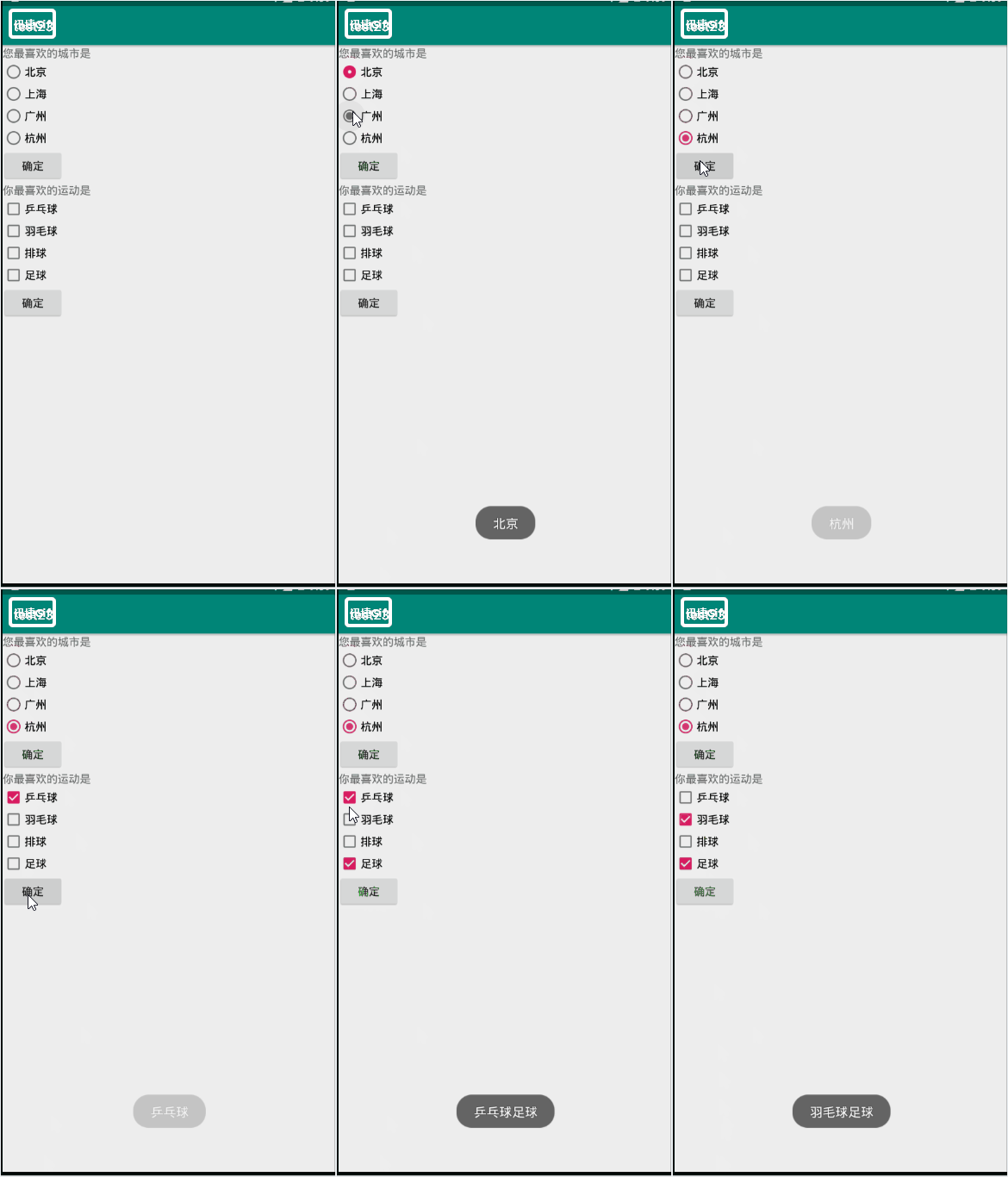
3.效果图
Android 单选按钮(RadioButton)和复选框(CheckBox)的使用的更多相关文章
- 3.Android之单选按钮RadioGroup和复选框Checkbox学习
单选按钮和复选框在实际中经常看到,今天就简单梳理下. 首先,我们在工具中拖进单选按钮RadioGroup和复选框Checkbox,如图: xml对应的源码: <?xml version=&quo ...
- 安卓开发:UI组件-RadioButton和复选框CheckBox
2.5RadioButton 为用户提供由两个及以上互斥的选项组成的选项集. 2.5.1精简代码 在按钮变多之后,多次重复书写点击事件有些繁琐,我们在这里创建一个事件OnClick,每次点击时调用该事 ...
- 可分组的选择框控件(MVVM下)(Toggle样式 仿造单选框RadioButton,复选框CheckBox功能)
原地址: http://www.cnblogs.com/yk250/p/5660340.html 效果图如下:支持分组的单选框,复选框样式和MVVM下功能的实现.这是项目中一个快捷键功能的扩展. 1, ...
- android 中单选和复选框监听操作
单选按钮RadioGroup.复选框CheckBox都有OnCheckedChangeListener事件,我们一起了解一下. package com.genwoxue.oncheckedchange ...
- 关于bootstrap--表单(下拉<select>、输入框<input>、文本域<textare>复选框<checkbox>和单选按钮<radio>)
html 里面的 role 本质上是增强语义性,当现有的HTML标签不能充分表达语义性的时候,就可以借助role来说明.通常这种情况出现在一些自定义的组件上,这样可增强组件的可访问性.可用性和可交互性 ...
- [原创]纯JS实现网页中多选复选框checkbox和单选radio的美化效果
图片素材: 最终效果图: <html><title> 纯JS实现网页中多选复选框checkbox和单选radio的美化效果</title><head>& ...
- css3美化复选框checkbox
两种美化效果如下图: 代码(html) <div id="main"> <h2 class="top_title">使用CSS3美化复 ...
- 复选框(checkbox)、单选框(radiobox)的使用
复选框(checkbox).单选框(radiobox)的使用 复选框: HTML: // 复选框 <input type="checkbox" name="chec ...
- php 判断复选框checkbox是否被选中
php 判断复选框checkbox是否被选中 复选框checkbox在php表单提交中经常被使用到,本文章通过实例向大家介绍php如何判断复选框checkbox中的值是否被选中,需要的朋友可以参考 ...
随机推荐
- PHP自动加载配置ArrayAccess类
ArrayAccess是PHP的类,可以把对象当成数组来使用访问. Config.php 配置类 <?php namespace IMooc; class Config implements ...
- Ros学习——移动机器人Ros导航详解及源码解析
1 执行过程 1.运行仿真机器人fake_turtlebot.launch:加载机器人模型——启动机器人仿真器——发布机器人状态 2.运行amcl节点fake_amcl.launch:加载地图节点ma ...
- sfidsk创建可启动分区问题
前言 由于工作上需要经常要为嵌入式设备制作启动SD卡,因此本人使用sfdisk编写了自动分区.格式化和安装文件的脚本.(不选择fdisk是因为它是为用户交互设计的,在脚本上使用不够方便) 实际使用过程 ...
- 详解servlet的url-pattern匹配规则.RP
首先需要明确几容易混淆的规则: servlet容器中的匹配规则既不是简单的通配,也不是正则表达式,而是特定的规则.所以不要用通配符或者正则表达式的匹配规则来看待servlet的url-pattern. ...
- eclipse——Maven插件创建java工程
目录结构如下 注意默认JDK为1.5 更改默认JDK 方式一 右键工程 选中JRE1.5 Remove 双击JRE System Library 点击Finish 更改完成 方式二 配置maven ...
- linux命令下载安装软件
在ubuntu下获取对应内核源码命令 Ubuntu的包管理系统,为您提供了一种高效快捷的软件管理方式,您只要知道您需要什么软件就可以了,甚至不需要关心它存放在网络上的哪一台服务器中,而且绝大多数的软件 ...
- Python基础入门-数据类型
一.变量 1)变量定义 在python中,我们可以把变量理解为一个值,变量是一个标签名,变量是有对应的一个值. name = 100(name是变量名 = 号是赋值号100是变量的值) 2)变量赋值 ...
- php无限级分类
使用递归方法,遍历子类,对数据进行重新排序,使用level进行无限级分类 /** * 功能:无限级分类 * 参数:$data 类别查询结果集 * 返回值:$arr 排序后的数组 */ public f ...
- Controlling Session Behavior in Asp.Net MVC4
Posted By : Shailendra Chauhan, 06 Jan 2013 Updated On : 11 Jun 2014 By default, Asp.Net MVC support ...
- C# JSON使用的常用技巧(二)
JSON在php里一句json_encode就可以得到 在C#里我们同样也很容易的可以得到 用到的类库:Newtonsoft.Json.dll 实体类: class Cat { public stri ...