
Writing a Windows Shell Extension(marco cantu的博客)
Writing a Windows Shell Extension
This is a technical article covering the content of my last week skill sprint about Writing Windows Shell Extensions in Delphi. Not really a new concept, but worth sharing.
This is a technical article covering the content of my last week skill sprint about Writing Windows Shell Extensions in Delphi. Not really a new concept, but worth sharing. In any case, resources for the skill sprint (including video reply) are athttp://community.embarcadero.com/blogs/entry/skill-sprint-windows-shell-integration and the code download is at http://www.marcocantu.com/files/ShellSkillSprint.zip.
Building a Shell Extension
Windows Resource Explorer Extensions, or Shell Extensions, are in-process COM objects that implement given interfaces. In other words, you can write a COM object (part of an ActiveX or COM library) and register it in the system as a shell extensions. You've likely seen applications that adds themselves in Explorer, we can use Delphi to do the same.
The program in question is a “to-do” application tied to files. It has a simple database table storing filenames and notes about these files. The form has a DBGrid component showing only a single column containing the filenames and a memo control hosting the notes related to the current file. The DBGrid is set up as a read-only component. In fact, users should not be able to create new records except by dragging a file onto the form (a portion of the program I'm not going to discuss here, as it doesn't related with COM support) or by using an extra Explorer menu. Here is the dmeo in action, with the active shell extension additional menu item and the target application:
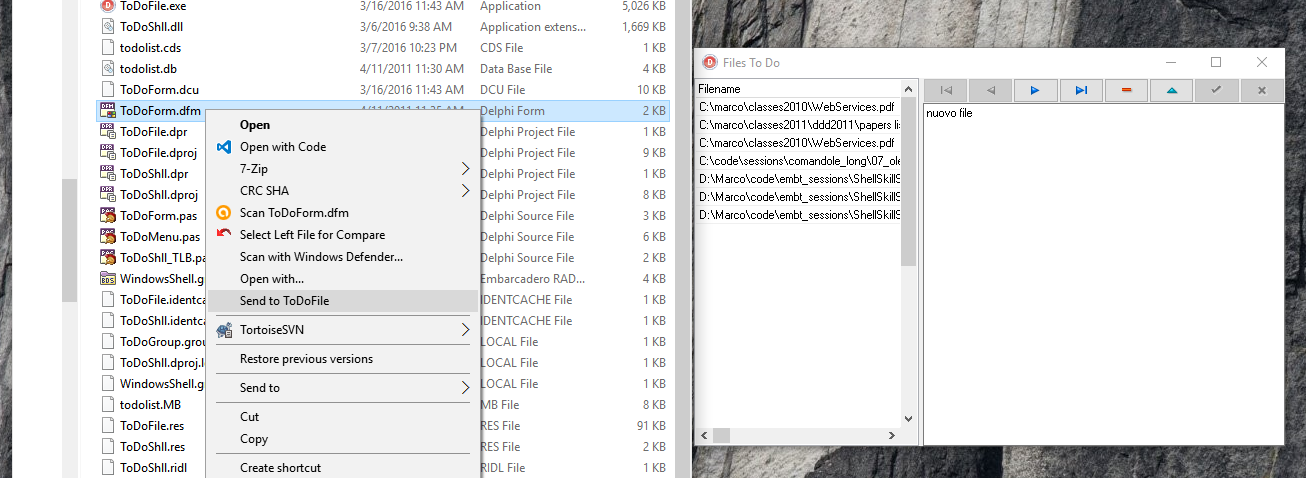
Creating a Context-Menu Handler
Once you have the base program running, you can add a shell extension to the system to let the user simply select a file and “send” it to the application without having to do the dragging operation, which is not always handy when there are many programs running. A context-menu extension is one of the available Windows shell extensions and is activated every time a user right-clicks a file in the Windows Explorer (given the file extensions is associated with the shell extension).
Technically, a context menu is a COM server exposing an internal object that is going to be created and used by the system. A context-menu COM object must implement two different interfaces, IContextMenu and IShellExtInit. The first interface defines specific actions for the context menu, such as defining the number of menu items to add and their text, while the second interface defines a way to access the file or files the user is operating on. This is the resulting definition of the COM server object class:
type

  TToDoMenu = class(TComObject, IUnknown,

    IContextMenu, IShellExtInit)

  private

    fFileName: string;

  protected

    {Declare IContextMenu methods here}

    function QueryContextMenu(Menu: HMENU; indexMenu, idCmdFirst, idCmdLast,

      uFlags: UINT): HResult; stdcall;

    function InvokeCommand(var lpici: TCMInvokeCommandInfo): HResult; stdcall;

    function GetCommandString(idCmd: UINT_PTR; uFlags: UINT; pwReserved: PUINT;

      pszName: LPSTR; cchMax: UINT): HResult; stdcall;

    {Declare IShellExtInit methods here}

    function IShellExtInit.Initialize = InitShellExt;

    function InitShellExt (pidlFolder: PItemIDList; lpdobj: IDataObject;

      hKeyProgID: HKEY): HResult; stdcall;

  end;
Notice that the class implements the Initialize method of the IShellExtInit interface with a differently named method,InitShellExt. The reason is that I wanted to avoid confusion with the Initialize method of the TComObject base class, which is the hook we have to initialize the object, as described earlier in this chapter. Let’s examine the InitShellExt method first; it is definitely the most complex one:
function TToDoMenu.InitShellExt(pidlFolder: PItemIDList;

  lpdobj: IDataObject; hKeyProgID: HKEY): HResult; stdcall;

var

  medium: TStgMedium;

  fe: TFormatEtc;

begin

  Result := E_FAIL;

  // check if the lpdobj pointer is nil

  if Assigned (lpdobj) then

  begin

    with fe do

    begin

      cfFormat := CF_HDROP;

      ptd := nil;

      dwAspect := DVASPECT_CONTENT;

      lindex := -1;

      tymed := TYMED_HGLOBAL;

    end;

    // transform the lpdobj data to a storage medium structure

    Result := lpdobj.GetData(fe, medium);

    if not Failed (Result) then

    begin

      // check if only one file is selected

      if DragQueryFile (medium.hGlobal, $FFFFFFFF, nil, 0) = 1 then

      begin

        SetLength (fFileName, 1000);

        DragQueryFile (medium.hGlobal, 0, PChar (fFileName), 1000);

        // realign string

        fFileName := PChar (fFileName);

        Result := NOERROR;

      end

      else

        Result := E_FAIL;

    end;

    ReleaseStgMedium(medium);

  end;

end;
The initial portion of the method transforms the pointer to the IDataObject interface, which we receive as a parameter, into the same data structure used in a file drop operation, so that we can read the file information by using the DragQueryFile function again. This complex way of coding is actually the simplest one you can use! At the end of this operation, we have the value of the file name. Any selection of multiple files is not accepted.
We can now look at the methods of the IContextMenu interface. The first method, QueryContextMenu, is used to add new items to the local menu of the file. In this case, we add a new menu item (calling the InsertMenu API function) only if the ToDoFile application is running. We can determine this by searching for a window corresponding to the TToDoFileForm class, which should be unique in the system. The result of the function is the number of items added to the menu:
function TToDoMenu.QueryContextMenu(Menu: HMENU;

  indexMenu, idCmdFirst, idCmdLast, uFlags: UINT): HResult;

begin

  // add entry only if the program is running

  if FindWindow ('TToDoFileForm', nil) <> 0 then

  begin

    // add a new item to context menu

    InsertMenu (Menu, indexMenu,

      MF_STRING or MF_BYPOSITION, idCmdFirst,

      'Send to ToDoFile');

    // Return number of menu items added

    Result := 1;

  end

  else

    Result := 0;

end;
Now that items have been added to the menu, a user can select them. While the user moves over the items, a descriptive message is displayed in the status bar of the Windows Explorer. The menu ID (idCmd) we receive in the GetCommandString method is simply the relative number, starting with zero, of the items we have added to the menu. When the cursor is over an item, we simply copy a string with its description to the buffer provided by the system:
function TToDoMenu.GetCommandString(idCmd: UINT_PTR; uFlags: UINT; pwReserved: PUINT;

      pszName: LPSTR; cchMax: UINT): HResult; stdcall;

begin

  if (idCmd = 0) and (uFlags = GCS_HELPTEXT) then

  begin

    // return help string for menu item

    strLCopy (pszName, 'Add file to the ToDoFile database', cchMax);

    Result := NOERROR;

  end

  else

    Result := E_INVALIDARG;

end;
The final step is the operation to do once a menu item is selected. The InvokeCommand method receives a pointer to a structure holding the request. This method follows a standard pattern of first checking that the request is valid by looking at the two 16-bit words of the lpici.lpVerb value. After these preliminary (but required) steps, we check the value to see which menu item was activated; or, if the context menu has only one item, as in this case, we simply test for a value of zero. The following is the skeleton of the code, before we add the specific action:
function TToDoMenu.InvokeCommand(var lpici: TCMInvokeCommandInfo): HResult;

var

  hwnd: THandle;

  cds: CopyDataStruct;

begin

  Result := NOERROR;

  // Make sure we are not being called by an application

  if HiWord(Integer(lpici.lpVerb)) <> 0 then

  begin

    Result := E_FAIL;

    Exit;

  end;

  // Make sure we aren't being passed an invalid argument number

  if LoWord(lpici.lpVerb) > 0 then

  begin

    Result := E_INVALIDARG;

    Exit;

  end;

  // execute the command specified by lpici.lpVerb.

  if LoWord(lpici.lpVerb) = 0 then

  begin

    ... // send data to application

  end;

end;
Sending Data to the Application
Because we have the file name the user is operating on, all we have to do in the context-menu handler is send this name to the main form of the ToDoFile application. The problem is that the context-menu handler DLL runs in the Windows Explorer process, so it cannot send the value of a memory pointer to another process. This would simply be useless; as in Win32, different applications have separate memory address spaces. We could have used OLE Automation to communicate with the main program, however in this case I've resorted to a standard Windows technique, the wm_CopyData message. This is a special Windows message, which can be used to send a memory buffer to another application: Windows will resolve all the memory conversion problems for us.
Here is the core of the code of the InvokeCommand method, that was missing above:
    // get the handle of the window

    hwnd := FindWindow ('TToDoFileForm', nil);

    if hwnd <> 0 then

    begin

      // prepare the data to copy

      cds.dwData := 0;

      cds.cbData := ByteLength (fFileName);

      cds.lpData := PChar (fFileName);

      // activate the destination window

      SetForegroundWindow (hwnd);

      // send the data

      SendMessage (hwnd, wm_CopyData,

        lpici.hWnd, Integer (@cds));

    end

    else

    begin

      // the program should never get here

      MessageBox(lpici.hWnd,

        'FilesToDo Program not found',

        'Error',

        MB_ICONERROR or MB_OK);

    end;
As the context-menu handler sends data to it, the application has to be extended to handle the wm_CopyData message. In this event handler, we receive the same structure we sent on the other side. As a result, extracting the filename is actually very simple, but keep in mind that this is so only because Windows does a lot of work behind the scenes.
The code added to the form of the ToDoFile application restores the application if it was minimized and retrieves the name of the file:
procedure TToDoFileForm.CopyData(var Msg: TWmCopyData);

var

  Filename: string;

begin

  // restore the window if minimized

  if IsIconic (Application.Handle) then

    Application.Restore;

  // extract the filename from the data

  Filename := Copy (

    PChar (Msg.CopyDataStruct.lpData),

    1, Msg.CopyDataStruct.cbData div 2);

  // now insert a new record (omitted)
Registering the Shell Extension
After writing this shell extension, we must register it. With the Run | ActiveX Server | Register command of the RAd Studio IDE, we can register the server in the system, but only if the operating system and the shell extensions are 32bit applications. For a 64bit version of Windows you need to build the COM server with a 64bit target, and perform a manual registration by invoking regsvr32.exe and passing the COM server DLL as parameter. (Yes, this has "32" in the name even for 64 bit systems).
In any case, we still have to provide some extra information to register it as a shell extension. There are several approaches: you can edit the Registry manually, you can write a REG file, or you can add registration information right into the COM server library, which is my preferred approach.
In a Delphi COM server, the default registration takes place in the TComObjectFactory class, when the UpdateRegistry method is executed. We can modify the default registration by inheriting a class from the standard class factory class and overriding this method:
type

  TToDoMenuFactory = class (TComObjectFactory)

  public

    procedure UpdateRegistry (Register: Boolean); override;

  end;

procedure TToDoMenuFactory.UpdateRegistry(Register: Boolean);

var

  Reg: TRegistry;

begin

  inherited UpdateRegistry (Register);

  Reg := TRegistry.Create;

  Reg.RootKey := HKEY_CLASSES_ROOT;

  try

    if Register then

      if Reg.OpenKey('\*\ShellEx\ContextMenuHandlers\ToDo', True) then

        Reg.WriteString('', GUIDToString(Class_ToDoMenuMenu))

    else

      if Reg.OpenKey('\*\ShellEx\ContextMenuHandlers\ToDo', False) then

        Reg.DeleteKey ('\*\ShellEx\ContextMenuHandlers\ToDo');

  finally

    Reg.CloseKey;

    Reg.Free;

  end;

end;
In the initialization section of the COM object unit, we also need to create a new global object of this class instead of the base class factory class:
initialization

  TToDoMenuFactory.Create (ComServer, TToDoMenu, Class_ToDoMenuMenu,

    'ToDoMenu', 'ToDoMenu Shell Extension', ciMultiInstance, tmApartment);
This is all in terms of the code. To see this demo in action, refer to the video in the skill sprint resource page linked above.
http://blog.marcocantu.com/blog/2016-03-writing-windows-shell-extension.html
Writing a Windows Shell Extension(marco cantu的博客)的更多相关文章
- Windows Shell Extension 系列文章
Windows Shell Extension 系列文章 http://www.codeproject.com/Articles/512956/NET-Shell-Extensions-Shell-C ...
- [windows篇] 使用Hexo建立个人博客,自定义域名https加密,搜索引擎google,baidu,360收录
为了更好的阅读体验,欢迎阅读原文.原文链接在此. [windows篇] 使用Hexo建立个人博客,自定义域名https加密,搜索引擎google,baidu,360收录 Part 2: Using G ...
- 在Windows下使用Hexo+GithubPage搭建博客的过程
1.安装Node.js 下载地址:传送门 去 node.js 官网下载相应版本,进行安装即可. 可以通过node -v的命令来测试NodeJS是否安装成功 2.安装Git 下载地址:传送门 去 Git ...
- 巨高兴,偶的文章 “如何在服务器上配置ODBC来访问本机DB2for Windows服务器”被推荐至CSDN博客首页
非常高兴,偶的文章 "如何在服务器上配置ODBC来访问本机DB2for Windows服务器"被推荐至CSDN博客首页,截图留念. 文章被推荐在C ...
- windows上使用mkdocs搭建静态博客
windows上使用mkdocs搭建静态博客 之前尝试过用HEXO搭建静态博客,最近发现有个叫mkdocs的开源项目也是搭建静态博客的好选择,而且它支持markdown格式,下面简要介绍一下mkdoc ...
- 峰回路转:去掉 DbContextPool 后 Windows 上的 .NET Core 版博客表现出色
今天早上,我们修改了博客程序中的1行代码,将 services.AddDbContextPool 改为 services.AddDbContext ,去掉 DbContextPool . 然后奇迹出现 ...
- Hexo博客系列(一)-Windows系统配置Hexo v3.x个人博客环境
[原文链接]:https://www.tecchen.xyz/blog-hexo-env-01.html 我的个人博客:https://www.tecchen.xyz,博文同步发布到博客园. 由于精力 ...
- Windows Live Writer发布CSDN离线博客教程及测试
目前大部分的博客作者在用Word写博客这件事情上都会遇到以下3个痛点: 1.所有博客平台关闭了文档发布接口,用户无法使用Word,Windows Live Writer等工具来发布博客.使用Word写 ...
- windows下hexo+github搭建个人博客
网上利用hexo搭建博客的教程非常多,大部分内容都大同小异,选择一篇合适的参考,跟着一步一步来即可. 但是,很多博客由于发布时间较为久远等问题,其中某些操作在现在已不再适用,从而导致类似于我这样的小白 ...
随机推荐
- Poj 2255 Tree Recovery(二叉搜索树)
题目链接:http://poj.org/problem?id=2255 思路分析:根据先序遍历(如DBACEGF)可以找出根结点(D),其后为左右子树:根据中序遍历(如ABCDEFG),已知根结点(D ...
- 【充电器】小米手机2S电池座充——小米手机官网
ligh@local-host$ ssh-copy-id -i ~/.ssh/id_rsa.pub root@192.168.0.3 [充电器]小米手机2S电池座充--小米手机官网 小米手机2S电池座 ...
- CSS块元素与内联元素(转)
为什么<a><span>这种标签定义width,height等CSS属性时会发现完全不生效? 因为它们不是容器,它们是内联元素,不是块元素 CSS 块元素与内联元素 关键字: ...
- 关于在cocos2dx中继承Sprite的分析与技巧
(转载请注明原文:http://blog.csdn.net/while0/article/details/25615685) 本文章特指使用C++作为编程语言.基于cocos2dx游戏引擎开发游戏. ...
- AWS要进入中国了
去年底就开始有这个传言见诸于某些媒体,说网站支持中文了要进中国了,也有说这不代表什么是谣言 这几天又听到有消息说比较靠谱就半年内的事儿 其实如果没有政策阻碍的话进中国是迟早的事情,原因如下 Amazo ...
- G - 小希的迷宫(并查集)
1今天准备复习三道以前做过的题呢,结果只看了一道,也因为交题的时候没把测试时候为了方便而改的数字改过来而wrong answer,浪费了好长时间,啊啊啊~~ 不过这道题应该是掌握了,嘿嘿…… Desc ...
- [置顶] Linux下文件和目录权限说明
在Linux下使用ls -l或者ll命令可以查看文件和文件夹的权限.结果显示类似于: drwxrwxrwx,这里分为四组,分别为文件类型,文件所有者的权限(读写执行),文件所有者所在组用户的权限(读写 ...
- javascript 学习随笔1
html部分 <body onload="message()"><!--主题部分加载就调用-->document.getElementById(" ...
- 【转】Shell编程
原文链接: Shell编程 打算有时间简单了解shell编程 1.shell结构 一个简单的例子: [root@localhost shell]# vi example #!/bin/sh #Thi ...
- vs2010断点使用技巧
msdn:http://msdn.microsoft.com/zh-cn/library/vstudio/5557y8b4.aspx 有很多断点的文章. 为提供更大的灵活性,Visual Studio ...