
Android学习总结——Service组件
从Service的启动方式上,可以将Service分为Started Service和Bound Service。在使用Service时,要想系统能够找到此自定义Service,无论哪种类型,都需要在AndroidManifest.xml中声明:
<service android:name=".MyService">
一:StartService方式启动服务
Started Service相对比较简单,通过context.startService(Intent serviceIntent)启动Service,context.stopService(Intent serviceIntent)停止此Service。
AndroidManifest.xml
<?xml version="1.0" encoding="utf-8"?>

<manifest xmlns:android="http://schemas.android.com/apk/res/android"

    package="com.example.servicetest">

    <application

        android:allowBackup="true"

        android:icon="@mipmap/ic_launcher"

        android:label="@string/app_name"

        android:supportsRtl="true"

        android:theme="@style/AppTheme">

        <activity android:name=".MainActivity">

            <intent-filter>

                <action android:name="android.intent.action.MAIN" />

                <category android:name="android.intent.category.LAUNCHER" />

            </intent-filter>

        </activity>

        <service android:name=".MyService">

        </service>

    </application>

</manifest>
activity_main.xml
<?xml version="1.0" encoding="utf-8"?>

<LinearLayout xmlns:android="http://schemas.android.com/apk/res/android"

    xmlns:tools="http://schemas.android.com/tools"

    android:layout_width="match_parent"

    android:layout_height="match_parent"

    android:orientation="vertical"

    tools:context="com.example.servicetest.MainActivity">

    <Button

        android:layout_width="wrap_content"

        android:layout_height="wrap_content"

        android:text="启动服务"

        android:id="@+id/btn_StartService" />

    <Button

        android:layout_width="wrap_content"

        android:layout_height="wrap_content"

        android:text="停止服务"

        android:id="@+id/btn_StopService" />

</LinearLayout>
MainActivity:
package com.example.servicetest;

import android.content.Intent;

import android.support.v7.app.AppCompatActivity;

import android.os.Bundle;

import android.view.View;

import android.widget.Button;

public class MainActivity extends AppCompatActivity implements View.OnClickListener{

    private Button startService;

    private Button stopService;

    @Override

    protected void onCreate(Bundle savedInstanceState) {

        super.onCreate(savedInstanceState);

        setContentView(R.layout.activity_main);

        startService=(Button)findViewById(R.id.btn_StartService);

        stopService=(Button) findViewById(R.id.btn_StopService);

        startService.setOnClickListener(this);

        stopService.setOnClickListener(this);

    }

    @Override

    public void onClick(View view) {

        switch (view.getId()){

            case R.id.btn_StartService:

                //启动服务

                Intent intentStart=new Intent(MainActivity.this,MyService.class);

                startService(intentStart);

                break;

            case R.id.btn_StopService:

                //停止服务

                Intent intentStop=new Intent(MainActivity.this,MyService.class);

                stopService(intentStop);

                break;

        }

    }

}
MyService:
package com.example.servicetest;

import android.app.Service;

import android.content.Intent;

import android.os.IBinder;

import android.support.annotation.Nullable;

import android.util.Log;

import java.text.SimpleDateFormat;

import java.util.Date;

/**

 * Created by xch on 2016/9/5.

 */

public class MyService extends Service{

    private boolean flag=true;

    @Nullable

    @Override

    public IBinder onBind(Intent intent) {

        return null;

    }

    @Override

    public void onCreate() {

        super.onCreate();

        Log.i("tag","服务被创建!");

    }

    @Override

    public void onDestroy() {

        super.onDestroy();

        Log.i("tag","服务被销毁!");

        new MyThread().setFlagFalse();

    }

    @Override

    public int onStartCommand(Intent intent, int flags, int startId) {

        new MyThread().start();

        return super.onStartCommand(intent, flags, startId);

    }

    class MyThread extends Thread{

        public void setFlagFalse(){

            flag=false;

        }

        @Override

        public void run() {

            super.run();

            while (flag){

                //每隔一秒钟打印当前时间一次

                //设置时间打印格式

                SimpleDateFormat sdf=new SimpleDateFormat("yyyy-MM-dd HH:mm:ss");//24小时制

                Date date=new Date();

                String time=sdf.format(date);

                Log.i("date",time);

                try {

                    //沉睡1秒

                    Thread.sleep(1000);

                } catch (InterruptedException e) {

                    e.printStackTrace();

                }

            }

        }

    }

}
二. BoundService方式启动服务
bindService启动流程: context.bindService() ——> onCreate() ——> onBind() ——> Service running ——> onUnbind() ——> onDestroy() ——> Service stop
MainActivity:
package com.example.servicetest2;

import android.content.ComponentName;

import android.content.Context;

import android.content.Intent;

import android.content.ServiceConnection;

import android.os.IBinder;

import android.support.v7.app.AppCompatActivity;

import android.os.Bundle;

import android.view.View;

import android.widget.Button;

public class MainActivity extends AppCompatActivity implements View.OnClickListener{

    private Button bindService,unBindService;

    private Intent intent;

    private MyServiceConn conn=new MyServiceConn();

    @Override

    protected void onCreate(Bundle savedInstanceState) {

        super.onCreate(savedInstanceState);

        setContentView(R.layout.activity_main);

        bindService=(Button)findViewById(R.id.btn_BindService);

        unBindService=(Button)findViewById(R.id.btn_UnBindService);

        bindService.setOnClickListener(this);

        unBindService.setOnClickListener(this);

    }

    @Override

    public void onClick(View v) {

        switch (v.getId()){

            case R.id.btn_BindService:

                intent=new Intent(MainActivity.this,MyService.class);

                bindService(intent,conn, Context.BIND_AUTO_CREATE);

                break;

            case R.id.btn_UnBindService:

                intent=new Intent(MainActivity.this,MyService.class);

                unbindService(conn);

                break;

        }

    }

    private class MyServiceConn implements ServiceConnection {

        @Override

        public void onServiceConnected(ComponentName name, IBinder service) {

           //在服务绑定成功的时候执行

        }

        @Override

        public void onServiceDisconnected(ComponentName name) {

           //当服务所在的进程被杀死,或崩溃的时候执行

        }

    }

}
MyService:
package com.example.servicetest2;

import android.app.Service;

import android.content.Intent;

import android.os.IBinder;

import android.support.annotation.Nullable;

import android.util.Log;

import java.text.SimpleDateFormat;

import java.util.Date;

/**

 * Created by xch on 2016/9/7.

 */

public class MyService extends Service {

    private boolean flag=true;

    private MyThread thread=new MyThread();

    @Nullable

    @Override

    public IBinder onBind(Intent intent) {

        thread.start();

        return null;

    }

    @Override

    public void onCreate() {

        Log.i("service","服务被创建!");

        super.onCreate();

    }

    @Override

    public void onDestroy() {

        super.onDestroy();

        Log.i("service","服务被销毁!");

        thread.setFlagFalse();

    }

    @Override

    public int onStartCommand(Intent intent, int flags, int startId) {

        return super.onStartCommand(intent, flags, startId);

    }

    class MyThread extends Thread{

        public void setFlagFalse(){

            flag=false;

        }

        @Override

        public void run() {

            super.run();

            while (flag){

                Date date=new Date();

                SimpleDateFormat sdf=new SimpleDateFormat("yyyy-mm-dd HH:mm:ss");

                Log.i("date",sdf.format(date));

                try {

                    sleep(1000);

                } catch (InterruptedException e) {

                    e.printStackTrace();

                }

            }

        }

    }

}
三.Service与Activity之间通讯
BoundService可以实现,但是startService没有这个特点。这里需要注意的是,利用bindService启动的Service无法获取这个Service对象,所以这里需要在Service中将对象返回,既然有返回就需要接收。so,看代码:
MyService:
package com.example.servicetest2;

import android.app.Service;

import android.content.Intent;

import android.os.Binder;

import android.os.IBinder;

import android.support.annotation.Nullable;

import android.util.Log;

import java.text.SimpleDateFormat;

import java.util.Date;

/**

 * Created by xch on 2016/9/7.

 */

public class MyService extends Service {

    private boolean flag=true;

    private MyThread thread;

    private String format="yyyy-mm-dd HH:mm:ss";

    //更改系统时间的输出格式

    public void setFormat(String format){

        this.format=format;

    }

    public void changeFormat(String format){

        if(thread!=null){

            //调用方法,更改时间输出格式

            setFormat(format);

        }

    }

    @Nullable

    @Override

    public IBinder onBind(Intent intent) {

        thread.start();

        //将代理类返回回去

        return new ServiceBinder();

    }

    @Override

    public void onCreate() {

        Log.i("service","服务被创建!");

        thread=new MyThread();

        super.onCreate();

    }

    @Override

    public void onDestroy() {

        super.onDestroy();

        Log.i("service","服务被销毁!");

        thread.setFlagFalse();

    }

    @Override

    public int onStartCommand(Intent intent, int flags, int startId) {

        return super.onStartCommand(intent, flags, startId);

    }

    class MyThread extends Thread{

        public void setFlagFalse(){

            flag=false;

        }

        @Override

        public void run() {

            super.run();

            while (flag){

                Date date=new Date();

                SimpleDateFormat sdf=new SimpleDateFormat(format);

                Log.i("date",sdf.format(date));

                try {

                    sleep(1000);

                } catch (InterruptedException e) {

                    e.printStackTrace();

                }

            }

        }

    }

    /**

     * 当前服务的代理类,即可使用changeFormat()方法

     * 需要通过IBinder将这个代理类返回回去,即onBinder()方法

     */

    public class ServiceBinder extends Binder{

        public void changeServiceBinder(String format){

            if(thread!=null){

                changeFormat(format);

            }

        }

    }

}
这里需要在service中定义一个代理类,并利用onBinder()方法返回去。
MainActivity:
package com.example.servicetest2;

import android.content.ComponentName;

import android.content.Context;

import android.content.Intent;

import android.content.ServiceConnection;

import android.os.IBinder;

import android.support.v7.app.AppCompatActivity;

import android.os.Bundle;

import android.view.View;

import android.widget.Button;

public class MainActivity extends AppCompatActivity implements View.OnClickListener{

    private Button bindService,unBindService,changeFormat;

    private Intent intent;

    private MyServiceConn conn=new MyServiceConn();

    //接收到的service对象

    private MyService.ServiceBinder serviceBinder;

    @Override

    protected void onCreate(Bundle savedInstanceState) {

        super.onCreate(savedInstanceState);

        setContentView(R.layout.activity_main);

        bindService=(Button)findViewById(R.id.btn_BindService);

        unBindService=(Button)findViewById(R.id.btn_UnBindService);

        changeFormat=(Button)findViewById(R.id.btn_changeFormat);

        bindService.setOnClickListener(this);

        unBindService.setOnClickListener(this);

        changeFormat.setOnClickListener(this);

    }

    @Override

    public void onClick(View v) {

        switch (v.getId()){

            case R.id.btn_BindService:

                intent=new Intent(MainActivity.this,MyService.class);

                bindService(intent,conn, Context.BIND_AUTO_CREATE);

                break;

            case R.id.btn_UnBindService:

                intent=new Intent(MainActivity.this,MyService.class);

                unbindService(conn);

                break;

            case R.id.btn_changeFormat:

                serviceBinder.changeServiceBinder("HH:mm:ss");

                break;

        }

    }

    private class MyServiceConn implements ServiceConnection {

        @Override

        public void onServiceConnected(ComponentName name, IBinder service) {

           //在服务绑定成功的时候执行,同时接收到了IBinder对象(类型为代理类对象,因为onBinder方法返回了代理类对象)

            serviceBinder= (MyService.ServiceBinder) service;

        }

        @Override

        public void onServiceDisconnected(ComponentName name) {

           //当服务所在的进程被杀死,或崩溃的时候执行

        }

    }

}
这里实现了ServiceConnection接口的自定义类需要实现如上两个方法,其中onServiceConnected(ComponentName name, IBinder service)方法能获取onBinder()返回的service对象。
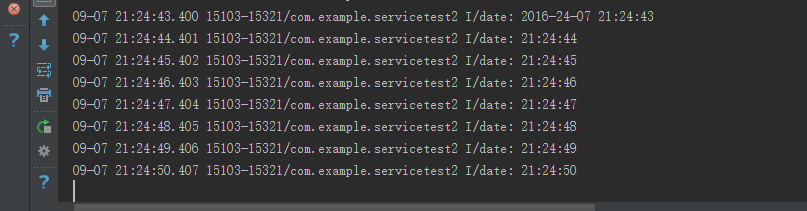
结果:


Android学习总结——Service组件的更多相关文章
- Android中的Service组件具体解释
Service与Activity的差别在于:Service一直在后台执行,他没实用户界面,绝不会到前台来. 一,创建和配置Service 开发Service须要两个步骤:1.继承Service子类,2 ...
- 我有一壶酒 Android学习之Service(1)--->BinderService方式
本文只讨论扩展Binder类 创建一个Binder.xml <?xml version="1.0" encoding="utf-8"?> <L ...
- Android学习之Service(1)--->Started方式
界面退出后进程程序还在运行,不会被杀死,如音乐播发器.后台下载等 注:本文只讨论Started方式 main.xml代码分析 <?xml version="1.0" enco ...
- 【Android学习】Service&Boradcast初步
Service初步 掌握Service概念 掌握Service分类 Service开发能力具备 了解Service和intentService类的区别 重点难点 StartService和BoundS ...
- Android 学习笔记 Service服务与远程通信...(AIDL)
PS:这一章节看的我有几分迷茫,不是很容易理解...不过还好总算是明白了一大半了...基本的迷惑是解决了... 学习内容: 1.跨应用启动服务... 2.跨应用绑定服务... 3.跨应用实现通信... ...
- Android 学习笔记 Service
PS:前几篇的内容光是上代码了,也没有细细的讲解..感觉这样写很不好..因此还是多一些讲解吧... 学习内容: 1.了解Service... 2.Service的启动与停止.. 3.绑定与取消绑定Se ...
- android学习笔记 Service
Service(服务): 长期后台运行的没有界面的组件 android应用什么地方需要用到服务? 天气预报:后台的连接服务器的逻辑,每隔一段时间获取最新的天气信息.股票显示:后台的连接服务器的逻辑,每 ...
- Android学习笔记⑧——UI组件的学习AdapterView相关2
前面都是用ListView控件来配合Adapter做的一些实例,这次我们来见识一下GridView与Adapter之间的爱恨情仇.... GridView是用于在界面上按行.列分布的方式来显示多个的组 ...
- Android学习笔记⑦——UI组件的学习AdapterView相关1
AdapterView是一个非常重要的组件之一,他非常灵活,所以得好好学...AdapterView本身是一个抽象类,派生出来的子类用法也十分相似,只是界面有一定的区别,因此本节把他们归为一类 Ada ...
随机推荐
- Qt creator自定义编译运行步骤
一直用Qt creator开发.无它,只是因为linux下C++ IDE选择不多.同时因为我抛弃了MFC,平时写个小工具还得靠Qt,正好一举两用. 用Qt creator开发一般的工程,是不用修改编译 ...
- TCP和UDP的区别(转)
TCP协议与UDP协议的区别 首先咱们弄清楚,TCP协议和UCP协议与TCP/IP协议的联系,很多人犯糊涂了,一直都是说TCP/IP协议与UDP协议的区别,我觉得这是没有从本质上弄清楚网络通信! ...
- Android声明和使用权限
Android定义了一种权限方案来保护设备上的资源和功能.例如,在默认情况下,应用程序无法访问联系人列表.拨打电话等.下面就以拨打电话为例介绍一下系统对权限的要求.一般在我们的应用中,如果要用到拨打电 ...
- 图的最小生成树(Prim、Kruskal)
理论: Prim: 基本思想:假设G=(V,E)是连通的,TE是G上最小生成树中边的集合.算法从U={u0}(u0∈V).TE={}开始.重复执行下列操作: 在所有u∈U,v∈V-U的边(u,v)∈E ...
- ArcGIS Runtime SDK for Android开发之调用GP服务(异步调用)
一.背景说明 通过调用GP服务,Android客户端也能实现专业的.复杂的GIS分析处理功能,从而增加应用的实用价值. ArcGIS Server发布的GP服务,分为同步和异步两种类型,一般执行步骤较 ...
- 关于select元素的一些基本知识
为select元素绑定值的几个方法: 一.通过字符串拼接,让后追加到select元素下, 二.通过DOM创建option元素,为其绑上value值和文本: function loadProvinve( ...
- HTML5+CSS3项目总结
经过一个月的学习,我基本掌握了HTML5的一些标签的用法和特性,以及一些CSS3的属性的特点和用法. 在本周安排的为期四天的第一阶段的课程的项目实训中,我基本能够熟练运用学到的知识,完成页面的速度 ...
- javascript 阻止事件冒泡和阻止默认事件对比
公司项目有像上图中效果的功能需求这也是很常见功能很简单功能,通过一个小例子和大家聊聊js的事件冒泡和默认事件. 先说说一般的实现方式即使用阻止事件冒泡的方式去做,给input绑定一个click事件(并 ...
- socket原理详解
1.什么是socket 我们知道进程通信的方法有管道.命名管道.信号.消息队列.共享内存.信号量,这些方法都要求通信的两个进程位于同一个主机.但是如果通信双方不在同一个主机又该如何进行通信呢?在计算机 ...
- Linux中Firefox——Firebug插件安装及使用
Firebug的安装方法即打开方式同httpfox Firebug使用指南: Firebug可以随时编辑页面:在HTML标签中,点击窗口上方的"inspect"命令,然后再选择页面 ...