
tensorflow张量限幅
本篇内容有clip_by_value、clip_by_norm、gradient clipping
1.tf.clip_by_value
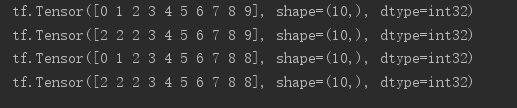
a = tf.range(10)

print(a)

# if x<a res=a,else x=x

print(tf.maximum(a,2))

# if x>a,res=a,else x=x

print(tf.minimum(a,8))

# 综合maximum和minimum两个函数的功能,指定上下限

print(tf.clip_by_value(a,2,8))
2.tf.clip_by_norm
# 随机生成一个2行2列的tensor

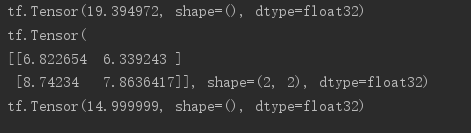
a = tf.random.normal([2,2],mean=10)

# 打印二范数

print(tf.norm(a))

# 根据新的norm进行放缩

print(tf.clip_by_norm(a,15))

print(tf.norm(tf.clip_by_norm(a,15)))
3.tf.clip_by_global_norm
# gradient clipping为解决梯度下降和梯度消失问题

# 可保证整体向量同时缩放(等倍数)

for g in grads:

    grads,_ = tf.clip_by_global_norm(grads,15)
实测:
import  tensorflow as tf

from    tensorflow import keras

from    tensorflow.keras import datasets, layers, optimizers

import  os

os.environ['TF_CPP_MIN_LOG_LEVEL']=''

print(tf.__version__)

(x, y), _ = datasets.mnist.load_data()

x = tf.convert_to_tensor(x, dtype=tf.float32) / 50.

y = tf.convert_to_tensor(y)

y = tf.one_hot(y, depth=10)

print('x:', x.shape, 'y:', y.shape)

train_db = tf.data.Dataset.from_tensor_slices((x,y)).batch(128).repeat(30)

x,y = next(iter(train_db))

print('sample:', x.shape, y.shape)

# print(x[0], y[0])

def main():

    # 784 => 512

    w1, b1 = tf.Variable(tf.random.truncated_normal([784, 512], stddev=0.1)), tf.Variable(tf.zeros([512]))

    # 512 => 256

    w2, b2 = tf.Variable(tf.random.truncated_normal([512, 256], stddev=0.1)), tf.Variable(tf.zeros([256]))

    # 256 => 10

    w3, b3 = tf.Variable(tf.random.truncated_normal([256, 10], stddev=0.1)), tf.Variable(tf.zeros([10]))

    optimizer = optimizers.SGD(lr=0.01)

    for step, (x,y) in enumerate(train_db):

        # [b, 28, 28] => [b, 784]

        x = tf.reshape(x, (-1, 784))

        with tf.GradientTape() as tape:

            # layer1.

            h1 = x @ w1 + b1

            h1 = tf.nn.relu(h1)

            # layer2

            h2 = h1 @ w2 + b2

            h2 = tf.nn.relu(h2)

            # output

            out = h2 @ w3 + b3

            # out = tf.nn.relu(out)

            # compute loss

            # [b, 10] - [b, 10]

            loss = tf.square(y-out)

            # [b, 10] => [b]

            loss = tf.reduce_mean(loss, axis=1)

            # [b] => scalar

            loss = tf.reduce_mean(loss)

        # compute gradient

        grads = tape.gradient(loss, [w1, b1, w2, b2, w3, b3])

        # print('==before==')

        # for g in grads:

        #     print(tf.norm(g))

        grads,  _ = tf.clip_by_global_norm(grads, 15)

        # print('==after==')

        # for g in grads:

        #     print(tf.norm(g))

        # update w' = w - lr*grad

        optimizer.apply_gradients(zip(grads, [w1, b1, w2, b2, w3, b3]))

        if step % 100 == 0:

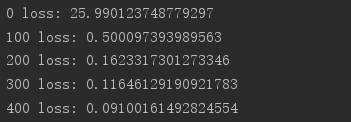
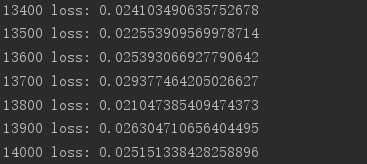
            print(step, 'loss:', float(loss))

if __name__ == '__main__':

    main()
tensorflow张量限幅的更多相关文章
- AI - TensorFlow - 张量(Tensor)
张量(Tensor) 在Tensorflow中,变量统一称作张量(Tensor). 张量(Tensor)是任意维度的数组. 0阶张量:纯量或标量 (scalar), 也就是一个数值,例如,\'Howd ...
- Tensorflow张量
张量常规解释 张量(tensor)理论是数学的一个分支学科,在力学中有重要应用.张量这一术语起源于力学,它最初是用来表示弹性介质中各点应力状态的,后来张量理论发展成为力学和物理学的一个有力的数学工具. ...
- tensorflow 张量的阶、形状、数据类型及None在tensor中表示的意思。
x = tf.placeholder(tf.float32, [None, 784]) x isn't a specific value. It's a placeholder, a value th ...
- TensorFlow2.0(五):张量限幅
.caret, .dropup > .btn > .caret { border-top-color: #000 !important; } .label { border: 1px so ...
- tensorflow张量排序
本篇记录一下TensorFlow中张量的排序方法 tf.sort和tf.argsort # 声明tensor a是由1到5打乱顺序组成的 a = tf.random.shuffle(tf.range( ...
- TensorFlow—张量运算仿真神经网络的运行
import tensorflow as tf import numpy as np ts_norm=tf.random_normal([]) with tf.Session() as sess: n ...
- Tensorflow张量的形状表示方法
对输入或输出而言: 一个张量的形状为a x b x c x d,实际写出这个张量时: 最外层括号[…]表示这个是一个张量,无别的意义! 次外层括号有a个,表示这个张量里有a个样本 再往内的括号有b个, ...
- 121、TensorFlow张量命名
# tf.Graph对象定义了一个命名空间对于它自身包含的tf.Operation对象 # TensorFlow自动选择一个独一无二的名字,对于数据流图中的每一个操作 # 但是给操作添加一个描述性的名 ...
- 吴裕雄--天生自然TensorFlow2教程:张量限幅
import tensorflow as tf a = tf.range(10) a # a中小于2的元素值为2 tf.maximum(a, 2) # a中大于8的元素值为8 tf.minimum(a ...
随机推荐
- 题解 bzoj1954【Pku3764 The xor – longest Path】
做该题之前,至少要先会做这道题. 记 \(d[u]\) 表示 \(1\) 到 \(u\) 简单路径的异或和,该数组可以通过一次遍历求得. \(~\) 考虑 \(u\) 到 \(v\) 简单路径的异或和 ...
- 第3章 JDK并发包(三)
3.2 线程复用:线程池 一种最为简单的线程创建和回收的方法类似如下代码: new Thread(new Runnable() { @Override public void run() { // d ...
- 全网最详细的Linux命令系列-Screen远程会话命令
screen 管理你的远程会话 你是不是经常需要 SSH 或者 telent 远程登录到 Linux 服务器?你是不是经常为一些长时间运行的任务而头疼,比如系统备份.ftp 传输等等.通常情况下我们都 ...
- mIoU混淆矩阵生成函数代码详解
代码参考博客原文: https://blog.csdn.net/jiongnima/article/details/84750819 在原文和原文的引用里,找到了关于mIoU详尽的解释.这里重点解析 ...
- Keras学习系列——神经网络层组件
对Keras提供的对各种层的抽象进行相对全面的概括 1 基础常用层 名称 作用 原型参数 Dense 实现全连接层 Dense(units,activation,use_bias=True, kern ...
- JMeter接口测试-提取动态列表最后一个值的两种方法
前言 在用JMeter做接口测试时,我们经常会遇到,一个接口返回一个json串,在这个json串中,某个节点的值是一个列表,而且这个列表的长度是动态变化的.今天我们来学习两种提取动态列表最后一个值的两 ...
- 解决关闭SSH进程CobaltStrike自动关闭
解决关闭SSH进程CobaltStrike自动关闭 0x0 那么为什么ssh一关闭,程序就不再运行了? 答:元凶:SIGHUP 信号 让我们来看看为什么关掉窗口/断开连接会使得正在运行的程序死掉. 在 ...
- To use the new Server Discover and Monitoring engine, pass option { useUnifiedTopology: true } to the MongoClient constructor.
mongoose报错:DeprecationWarning: current Server Discovery and Monitoring engine is deprecated, and wil ...
- C#24种设计模式汇总
创建型:6 01. 简单工厂模式 08. 工厂方法模式 09. 原型模式 13. 建造者模式 15. 抽象工厂模式 21. 单例模式 结构型:7 06. 装饰模式 07. 代理模式 12. 外观模式 ...
- 使用uftrace来debug应用程序
谈uftrace之前,先谈谈ftrace. ftrace是一个用于调试linux内核的工具,它可以用于调试内核的调用栈,performance等. ftrace的核心是在编译内核代码时,通过制定-pg ...