
springcloud系列14 bus的使用
首先springcloud_bus原理:
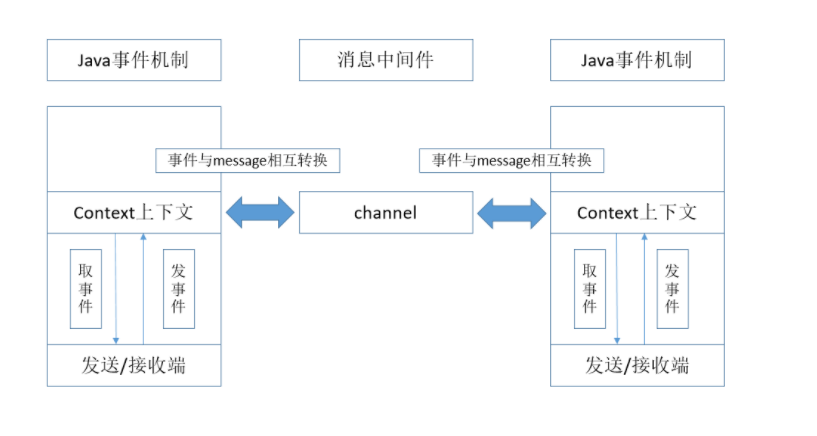
(1)完整流程:发送端(endpoint)构造事件event,将其publish到context上下文中(spring cloud bus有一个父上下文,bootstrap),然后将事件发送到channel中(json串message),接收端从channel中获取到message,将message转为事件event(转换过程这一块没有深究),然后将event事件publish到context上下文中,最后接收端(Listener)收到event,调用服务进行处理。整个流程中,只有发送/接收端从context上下文中取事件和发送事件是需要我们在代码中明确写出来的,其它部分都由框架封装完成。
(2)先大致描述了一下流程,关于封装的部分流程,我们基本上可以在BusAutoConfiguration.class中找到,下面的代码都是这个类中的代码
  @EventListener(classes = RemoteApplicationEvent.class)

    public void acceptLocal(RemoteApplicationEvent event) {

        if (this.serviceMatcher.isFromSelf(event)

                && !(event instanceof AckRemoteApplicationEvent)) {

            this.cloudBusOutboundChannel.send(MessageBuilder.withPayload(event).build());

        }

    }
这是封装了java事件处理机制,当收到RemoteApplicationEvent时,如果这个event是从这个服务发出的,而且不是ack事件,那么就会把这个事件发送到channel中。
  @StreamListener(SpringCloudBusClient.INPUT)

    public void acceptRemote(RemoteApplicationEvent event) {

        if (event instanceof AckRemoteApplicationEvent) {

            if (this.bus.getTrace().isEnabled() && !this.serviceMatcher.isFromSelf(event)

                    && this.applicationEventPublisher != null) {

                this.applicationEventPublisher.publishEvent(event);

            }

            // If it's an ACK we are finished processing at this point

            return;

        }

        if (this.serviceMatcher.isForSelf(event)

                && this.applicationEventPublisher != null) {

            if (!this.serviceMatcher.isFromSelf(event)) {

                this.applicationEventPublisher.publishEvent(event);

            }

            if (this.bus.getAck().isEnabled()) {

                AckRemoteApplicationEvent ack = new AckRemoteApplicationEvent(this,

                        this.serviceMatcher.getServiceId(),

                        this.bus.getAck().getDestinationService(),

                        event.getDestinationService(), event.getId(), event.getClass());

                this.cloudBusOutboundChannel

                        .send(MessageBuilder.withPayload(ack).build());

                this.applicationEventPublisher.publishEvent(ack);

            }

        }

        if (this.bus.getTrace().isEnabled() && this.applicationEventPublisher != null) {

            // We are set to register sent events so publish it for local consumption,

            // irrespective of the origin

            this.applicationEventPublisher.publishEvent(new SentApplicationEvent(this,

                    event.getOriginService(), event.getDestinationService(),

                    event.getId(), event.getClass()));

        }

    }
@StreamListener这个标签有兴趣的可以去了解一下。这个方法就是从channel中取出事件进行处理的过程(message转事件部分需要自行了解,我没有深入研究),根据事件的类型、发送方和接收方来处理这个事件:如果是ack事件,发送到context上下文中;如果自己是接收端且不是发送端,就会将事件发送到context上下文。
(3)消息中间件可以采用rabbitmq、kafka之类的
(4)说两个比较有意思的问题
1)自定义事件时,我们需要添加无参构造方法:目的在于,在message转事件时,会调用这个无参构造方法,具体情况可以去参考源码看看
2)自定义事件时,事件的参数需要用final修饰,这个一直没有找到合理的解释,有兴趣可以去研究研究
使用:
引入rabbitmq依赖:
<?xml version="1.0" encoding="UTF-8"?>
<project xmlns="http://maven.apache.org/POM/4.0.0" xmlns:xsi="http://www.w3.org/2001/XMLSchema-instance"
         xsi:schemaLocation="http://maven.apache.org/POM/4.0.0 http://maven.apache.org/xsd/maven-4.0.0.xsd">
    <modelVersion>4.0.0</modelVersion>
    <parent>
        <groupId>org.springframework.boot</groupId>
        <artifactId>spring-boot-starter-parent</artifactId>
        <version>2.1.2.RELEASE</version>
        <relativePath/> <!-- lookup parent from repository -->
    </parent>
    <groupId>com.cxy</groupId>
    <artifactId>person</artifactId>
    <version>0.0.1-SNAPSHOT</version>
    <name>person</name>
    <description>Demo project for Spring Boot</description>

    <properties>
        <java.version>1.8</java.version>
        <spring-cloud.version>Greenwich.RELEASE</spring-cloud.version>
    </properties>

    <dependencies>
        <dependency>
            <groupId>org.springframework.boot</groupId>
            <artifactId>spring-boot-starter-amqp</artifactId>
        </dependency>
        <dependency>
            <groupId>org.springframework.boot</groupId>
            <artifactId>spring-boot-starter-web</artifactId>
        </dependency>
        <dependency>
            <groupId>org.mybatis.spring.boot</groupId>
            <artifactId>mybatis-spring-boot-starter</artifactId>
            <version>2.1.0</version>
        </dependency>
        <dependency>
            <groupId>org.springframework.cloud</groupId>
            <artifactId>spring-cloud-config-client</artifactId>
        </dependency>
        <dependency>
            <groupId>org.springframework.cloud</groupId>
            <artifactId>spring-cloud-starter-netflix-eureka-client</artifactId>
        </dependency>
        <dependency>
            <groupId>org.springframework.cloud</groupId>
            <artifactId>spring-cloud-starter-netflix-ribbon</artifactId>
        </dependency>
        <dependency>
            <groupId>org.springframework.cloud</groupId>
            <artifactId>spring-cloud-starter-openfeign</artifactId>
        </dependency>
        <dependency>
            <groupId>org.mybatis.spring.boot</groupId>
            <artifactId>mybatis-spring-boot-starter</artifactId>
            <version>2.0.0</version>
        </dependency>
        <dependency>
            <groupId>mysql</groupId>
            <artifactId>mysql-connector-java</artifactId>
            <version>5.1.41</version>
        </dependency>
        <dependency>
            <groupId>org.springframework.boot</groupId>
            <artifactId>spring-boot-starter-actuator</artifactId>
        </dependency>
        <dependency>
            <groupId>org.springframework.boot</groupId>
            <artifactId>spring-boot-starter-test</artifactId>
            <scope>test</scope>
        </dependency>
    </dependencies>

    <dependencyManagement>
        <dependencies>
            <dependency>
                <groupId>org.springframework.cloud</groupId>
                <artifactId>spring-cloud-dependencies</artifactId>
                <version>${spring-cloud.version}</version>
                <type>pom</type>
                <scope>import</scope>
            </dependency>
        </dependencies>
    </dependencyManagement>

    <build>
        <plugins>
            <plugin>
                <groupId>org.springframework.boot</groupId>
                <artifactId>spring-boot-maven-plugin</artifactId>
            </plugin>
        </plugins>
    </build>

</project>
然后配置:
bootstrap.yml
spring:

  cloud:

    config:

      profile: dev

      discovery:

        service-id: config

        enabled: true

  rabbitmq:

    host: 192.168.230.134

  application:

    name: person
线上配置文件:
https://gitee.com/chenxiufen/springcloudconfig/blob/master/person-dev.yml
然后启动就可以了.
springcloud系列14 bus的使用的更多相关文章
- 多项目如何高效协同合作 | springcloud系列之bus消息总线
前言 在springcloud config章节中我们完成了配种中心的搭建,以及通过配置中心完成配置的抽离通过springcloud config模块我们将配置抽离到git仓库中我们不必要每次为了改配 ...
- springcloud系列15 bus的使用
可以结合wekbbok进行通知: 将更新的代码进行点击就好:
- SpringCloud系列——Bus 消息总线
前言 SpringCloud Bus使用轻量级消息代理将分布式系统的节点连接起来.然后可以使用此代理广播状态更改(例如配置更改)或其他管理指令.本文结合RabbitMQ+GitHub的Webhook实 ...
- springCloud系列教程01:Eureka 注册中心集群搭建
springCloud系列教程包含如下内容: springCloud系列教程01:Eureka 注册中心集群搭建 springCloud系列教程02:ConfigServer 配置中心server搭建 ...
- SpringCloud系列:前言
准备写springcloud系列了,先吐槽下自己,之前准备把学到的东西写下来,都因为工作或自己太懒(主要还是懒),写了个开篇就GG了,这次springcloud一定会坚持写完.加油! 这里先说下我搭建 ...
- SpringCloud系列之分布式配置中心极速入门与实践
SpringCloud系列之分布式配置中心极速入门与实践 @ 目录 1.分布式配置中心简介 2.什么是SpringCloud Config? 3.例子实验环境准备 4.Config Server代码实 ...
- Java 集合系列14之 Map总结(HashMap, Hashtable, TreeMap, WeakHashMap等使用场景)
概要 学完了Map的全部内容,我们再回头开开Map的框架图. 本章内容包括:第1部分 Map概括第2部分 HashMap和Hashtable异同第3部分 HashMap和WeakHashMap异同 转 ...
- Java 集合系列 14 hashCode
java 集合系列目录: Java 集合系列 01 总体框架 Java 集合系列 02 Collection架构 Java 集合系列 03 ArrayList详细介绍(源码解析)和使用示例 Java ...
- ASP.NET MVC+EF框架+EasyUI实现权限管理系列(14)-主框架搭建
原文:ASP.NET MVC+EF框架+EasyUI实现权限管理系列(14)-主框架搭建 ASP.NET MVC+EF框架+EasyUI实现权限管系列 (开篇) (1):框架搭建 (2 ...
随机推荐
- gnome/KDE安装,gnome出现问题,重新安装nvdia驱动, Linux(CentOS7) NVIDIA GeForece GTX 745 显卡驱动
新安装显示gtx745驱动NVIDIA-Linux-x86_64-346.59.run, yum groupremove kde-desktop yum groupinstall "Desk ...
- MFC-按行读取TXT数据
TXT中数据格式如下: 1 23 4 0 4 10 …… 要实现的功能是:定义一个函数,每次调用时从TXT文档中读一个整数 ,赋值给变量.同时,文件位置向下移动一行,以便下次调用时读取下一行的数据. ...
- 牛客网多校训练第二场D Kth Minimum Clique
链接:https://ac.nowcoder.com/acm/contest/882/D来源:牛客网 Given a vertex-weighted graph with N vertices, fi ...
- USACO 2007 November Silver Best Cow Line /// oj21653
题目大意: 输入n 接下来n行字母 在队头和队尾中选出较小的放入新的队列 Sample Input 6ACDBCB Sample Output ABCBCD 注意相同的情况 先判断内层的大小 输出 ...
- ES6 学习 -- 字符串新增方法
1.检测字符串中是否包含某个字符 ES5方法:string.indexOf("需要检测的字符"),如果返回值为-1,则说明当前字符串中不存在这个字符,返回值不为-1,则 是当前字符 ...
- TCP/IP协议,,OSI的七层参考模型,HTTP请求响应机制
一.TCP/IP协议 TCP/IP是Transmission Control Protocol/Internet Protocol的简写,中译名为传输控制协议/因特网互联协议,又名网络通讯协议,是In ...
- nginx 知识
nginx如何实现高并发? 启动nginx服务器后,输入 ps -ef |grep nginx,会发现nginx有一个master进程 和若干个worker进程, 这些worker进程是平等的,都是被 ...
- python -m引发的对模块的认识
python -m <pythonfile>: 以模块的方式运行 在文件内部,我们一般通过下面的代码来区分当前脚本,是作为模块导入,还是作为脚本直接运行. if __name__ == ' ...
- Windows 设置内网和外网同时使用
想要电脑同时使用内网和外网必须具备两个网卡,一个是无线网卡一个是本地连接,无线网卡用来连接wifi也就是外网,而本地连接需要网线连接内网,外网是不需要做设置的,我们只需要设置内网即可,鼠标右击电脑右下 ...
- python截图+百度ocr(图片识别)+ 百度翻译
一直想用python做一个截图并自动翻译的工具,恰好最近有时间就在网上找了资料,根据资料以及自己的理解做了一个简单的截图翻译工具.整理一下并把代码放在github给大家参考.界面用python自带的G ...