
.Net Core添加分布式Session
一、Session
HTTP是一个无状态协议,Web服务器将每一个请求都视为独立请求。并且不保存之前请求中用户的值。
Session 状态是ASP.NET Core提供的一个功能,它可以在用户通应用访问网络服务器的时候保存和存储用户数据。ASP.NET Core通过包含Session ID的Cookie来维护会话状态,每个请求都会携带此Session ID。
实现分布式Session方法官方提供有Redis、Sql Server等。但是Sql Server效率对于这种以key/value获取值的方式远远不及Redis效率高,所以这里选用Redis来作示例实现分布式Session。
二、安装Redis(Docker方式)
2.1、新建一个Dockerfile和一个redis.conf

Dockerfile内容:
FROM redis

COPY redis.conf /usr/local/etc/redis/redis.conf

CMD [ "redis-server", "/usr/local/etc/redis/redis.conf" ]
redis.conf内容:主要是启用密码登陆redis
protected-mode yes

port 6379

tcp-backlog 511

timeout 0

tcp-keepalive 300

daemonize no

supervised no

pidfile /var/run/redis_6379.pid

loglevel notice

logfile ""

databases 16

always-show-logo yes

save 900 1

save 300 10

save 60 10000

stop-writes-on-bgsave-error yes

rdbcompression yes

rdbchecksum yes

dbfilename dump.rdb

dir ./

slave-serve-stale-data yes

slave-read-only yes

repl-diskless-sync no

repl-diskless-sync-delay 5

repl-disable-tcp-nodelay no

slave-priority 100

requirepass wangjun1234

lazyfree-lazy-eviction no

lazyfree-lazy-expire no

lazyfree-lazy-server-del no

slave-lazy-flush no

appendonly no

appendfilename "appendonly.aof"

appendfsync everysec

no-appendfsync-on-rewrite no

auto-aof-rewrite-percentage 100

auto-aof-rewrite-min-size 64mb

aof-load-truncated yes

aof-use-rdb-preamble no

lua-time-limit 5000

slowlog-log-slower-than 10000

slowlog-max-len 128

latency-monitor-threshold 0

notify-keyspace-events ""

hash-max-ziplist-entries 512

hash-max-ziplist-value 64

list-max-ziplist-size -2

list-compress-depth 0

set-max-intset-entries 512

zset-max-ziplist-entries 128

zset-max-ziplist-value 64

hll-sparse-max-bytes 3000

activerehashing yes

client-output-buffer-limit normal 0 0 0

client-output-buffer-limit slave 256mb 64mb 60

client-output-buffer-limit pubsub 32mb 8mb 60

hz 10

aof-rewrite-incremental-fsync yes
2.1、构建docker镜像(docker build -t redis_test .)
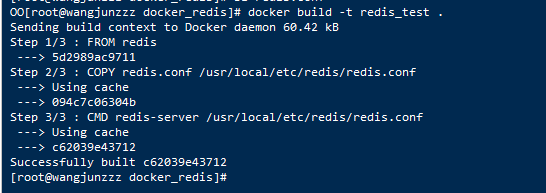
2.1、运行容器(docker run -d --restart=always -p 6379:6379 --name redis_container redis_test)

三、开始建立Core Demo
3.1、新建2个MVC项目
dotnet new mvc --name Session-demo-1
dotnet new mvc --name Session-demo-2

3.2、2个项目都添加(Microsoft.AspNetCore.DataProtection.Redis和Microsoft.Extensions.Caching.Redis)nuget包
dotnet add package Microsoft.Extensions.Caching.Redis
dotnet add package Microsoft.AspNetCore.DataProtection.Redis
3.3、修改Startup.cs
在ConfigureServices中添加:
        public void ConfigureServices(IServiceCollection services)

        {

            //分布式session

            var redis = ConnectionMultiplexer.Connect("47.107.30.29:6379,password=f***,defaultdatabase=7");

            services.AddDataProtection()

            .SetApplicationName("Test")

            .PersistKeysToRedis(redis, "Test-Keys");

            services.AddDistributedRedisCache(options => {

                options.Configuration = "47.107.30.29:6379,password=***,defaultdatabase=7";

                options.InstanceName = "session";

            });

            services.AddMvc().SetCompatibilityVersion(CompatibilityVersion.Version_2_1);

          services.AddSession(options =>

            {

                options.IdleTimeout = TimeSpan.FromHours();

            });

        }
在Configure中添加
app.UseSession();
只配置Session-demo-1,同时启动2个项目

配置Session-demo-2(startup.cs的配置一摸一样),同时启动项目


源码:https://github.com/WangJunZzz/Core-Session.git
.Net Core添加分布式Session的更多相关文章
- ASP.NET Core中间件实现分布式 Session
1. ASP.NET Core中间件详解 1.1. 中间件原理 1.1.1. 什么是中间件 1.1.2. 中间件执行过程 1.1.3. 中间件的配置 1.2. 依赖注入中间件 1.3. Cookies ...
- ASP.NET Core中间件实现分布式 Session(转载)
ASP.NET Core中间件实现分布式 Session 1. ASP.NET Core中间件详解 1.1. 中间件原理 1.1.1. 什么是中间件 1.1.2. 中间件执行过程 1.1.3. 中间件 ...
- springboot集成redis(mybatis、分布式session)
安装Redis请参考:<CentOS快速安装Redis> 一.springboot集成redis并实现DB与缓存同步 1.添加redis及数据库相关依赖(pom.xml) <depe ...
- asp.net core 缓存和Session
缓存 缓存在内存中 ASP.NET Core 使用 IMemoryCache内存中缓存是使用依赖关系注入从应用中引用的服务. 请在ConfigureServices中调用AddMemoryCache( ...
- 在 ASP.NET CORE 中使用 SESSION (转载)
Session 是保存用户和 Web 应用的会话状态的一种方法,ASP.NET Core 提供了一个用于管理会话状态的中间件.在本文中我将会简单介绍一下 ASP.NET Core 中的 Session ...
- 【Distributed】分布式Session一致性问题
一.概述 1.1 什么是Session 1.2 Session实现原理 1.3 Session常见问题 Session 保证在那里? 关闭浏览器Session会失效吗 服务器集群之后,Session产 ...
- SpringBoot搭建基于Apache Shiro+Redis的分布式Session共享功能
我们在上一遍文档中已经完成了Shiro验证功能.(http://www.cnblogs.com/nbfujx/p/7773789.html),在此基础上我们将完成分布式Session共享功能. Red ...
- Asp.net Core中使用Session
前言 2017年就这么悄无声息的开始了,2017年对我来说又是特别重要的一年. 元旦放假在家写了个Asp.net Core验证码登录, 做demo的过程中遇到两个小问题,第一是在Asp.net Cor ...
- 在 ASP.NET CORE 中使用 SESSION
Session 是保存用户和 Web 应用的会话状态的一种方法,ASP.NET Core 提供了一个用于管理会话状态的中间件.在本文中我将会简单介绍一下 ASP.NET Core 中的 Session ...
随机推荐
- openstack——cinder服务篇
一.cinder 介绍: 理解 Block Storage 操作系统获得存储空间的方式一般有两种: 通过某种协议(SAS,SCSI,SAN,iSCSI 等)挂接裸硬盘,然后分区.格式化.创建文 ...
- sysbench使用指南
sysbench 安装.使用和测试 摘要: sysbench是一个开源的.模块化的.跨平台的多线程性能测试工具,可以用来进行CPU.内存.磁盘I/O.线程.数据库的性能测试.目前支持的数据库有MySQ ...
- SGU100
Read integers A and B from input file and write their sum in output file. Input Input file contains ...
- JavaScript day3(数据类型)
数据类型(data type) JavaScript提供七种不同的数据类型(data types),它们是string(字符串), symbol(符号), number(数字), undefined( ...
- 读取json文件并把uft-8转换为ascii
#!/usr/bin/python import sys import json as js import codecs import collections #reload(sys) #sys.se ...
- python爬虫17 | 听说你又被封 ip 了,你要学会伪装好自己,这次说说伪装你的头部
这两天 有小伙伴问小帅b 为什么我爬取 xx 网站的时候 不返回给我数据 而且还甩一句话给我 “系统检测到您频繁访问,请稍后再来” 小帅b看了一下他的代码 ): requests.get(url) 瞬 ...
- 第十五节:pandas之concat()级联
Pandas 提供了concat()函数可以轻松的将Series.DataFrame对象进行合并在一起. pandas.concat(obj , axis=0 , join="inner&q ...
- 【模板】可持久化Treap
洛谷3835 #include<cstdio> #include<algorithm> #include<cstdlib> #define ls (a[u].l) ...
- GeoTrust 企业(OV)型 多域名(SAN/UC)版 SSL证书
GeoTrust 企业(OV)型 多域名(SAN/UC)版 SSL证书(GeoTrust True BusinessID With Multi-Domain(SAN/UC) ),支持多域名,属于企业 ...
- 敏捷开发系列学习总结(5)——这几招搞定团队协同Coding
一个团队在一起Coding时,就怕发生这样的事情:同1个文件你改了,我也改了,他也改了,最后怎么同步呢?以前用clearcase时,A把文件checkout了,其他人就不能提交,保证了代码的唯一性.但 ...