
Webdriver配合Tesseract-OCR 自动识别简单的验证码
验证码: 如下,在进行自动化测试,遇到验证码的问题,一般有两种方式
1.找开发去掉验证码或者使用万能验证码
2.使用OCR自动识别
使用OCR自动化识别,一般识别率不是太高,处理一般简单验证码还是没问题
这里使用的是Tesseract-OCR,下载地址:https://github.com/A9T9/Free-Ocr-Windows-Desktop/releases
怎么使用呢?
进入安装后的目录:
tesseract.exe test.png test -1
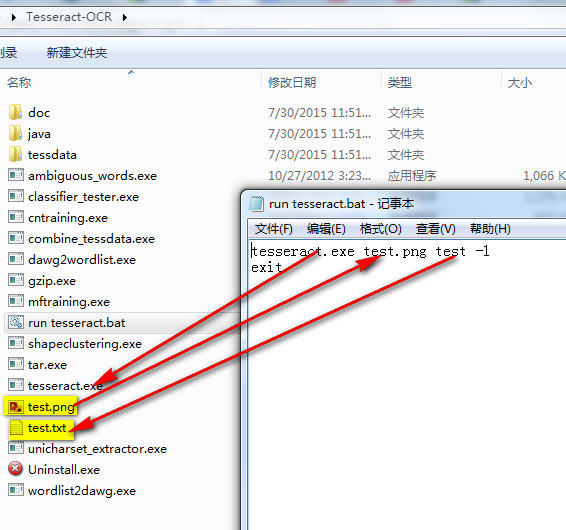
准备一份网页,上面使用该验证码
<html>

<head>

<title>Table test by Young</title>

</head>

<body>

 </br>

<h1> Test </h1>

 <img src="http://csujwc.its.csu.edu.cn/sys/ValidateCode.aspx?t=1">

 </br>

</body>

</html>
要识别验证码,首先得取得验证码,这两款采取对 页面元素部分截图的方式,首先获取整个页面的截图
然后找到页面元素坐标进行截取
/**

     * This method for screen shot element

     *

     * @param driver

     * @param element

     * @param path

     * @throws InterruptedException

     */

    public static void screenShotForElement(WebDriver driver,

            WebElement element, String path) throws InterruptedException {

        File scrFile = ((TakesScreenshot) driver)

                .getScreenshotAs(OutputType.FILE);

        try {

            Point p = element.getLocation();

            int width = element.getSize().getWidth();

            int height = element.getSize().getHeight();

            Rectangle rect = new Rectangle(width, height);

            BufferedImage img = ImageIO.read(scrFile);

            BufferedImage dest = img.getSubimage(p.getX(), p.getY(),

                    rect.width, rect.height);

            ImageIO.write(dest, "png", scrFile);

            Thread.sleep(1000);

            FileUtils.copyFile(scrFile, new File(path));

        } catch (IOException e) {

            e.printStackTrace();

        }

    }
截取完元素,就可以调用Tesseract-OCR生成text
// use Tesseract to get strings

        Runtime rt = Runtime.getRuntime();

        rt.exec("cmd.exe /C  tesseract.exe D:\\Tesseract-OCR\\test.png  D:\\Tesseract-OCR\\test -1 ");
接下来通过java读取txt
/**

     * This method for read TXT file

     *

     * @param filePath

     */

    public static void readTextFile(String filePath) {

        try {

            String encoding = "GBK";

            File file = new File(filePath);

            if (file.isFile() && file.exists()) { // 判断文件是否存在

                InputStreamReader read = new InputStreamReader(

                        new FileInputStream(file), encoding);// 考虑到编码格式

                BufferedReader bufferedReader = new BufferedReader(read);

                String lineTxt = null;

                while ((lineTxt = bufferedReader.readLine()) != null) {

                    System.out.println(lineTxt);

                }

                read.close();

            } else {

                System.out.println("找不到指定的文件");

            }

        } catch (Exception e) {

            System.out.println("读取文件内容出错");

            e.printStackTrace();

        }

    }
整体代码如下:
 package com.dbyl.tests;

 import java.awt.Rectangle;

 import java.awt.image.BufferedImage;

 import java.io.BufferedReader;

 import java.io.File;

 import java.io.FileInputStream;

 import java.io.IOException;

 import java.io.InputStreamReader;

 import java.io.Reader;

 import java.util.concurrent.TimeUnit;

 import javax.imageio.ImageIO;

 import org.apache.commons.io.FileUtils;

 import org.openqa.selenium.By;

 import org.openqa.selenium.OutputType;

 import org.openqa.selenium.Point;

 import org.openqa.selenium.TakesScreenshot;

 import org.openqa.selenium.WebDriver;

 import org.openqa.selenium.WebElement;

 import com.dbyl.libarary.utils.DriverFactory;

 public class TesseractTest {

     public static void main(String[] args) throws IOException,

             InterruptedException {

         WebDriver driver = DriverFactory.getChromeDriver();

         driver.get("file:///C:/Users/validation.html");

         driver.manage().timeouts().pageLoadTimeout(30, TimeUnit.SECONDS);

         WebElement element = driver.findElement(By.xpath("//img"));

         // take screen shot for element

         screenShotForElement(driver, element, "D:\\Tesseract-OCR\\test.png");

         driver.quit();

         // use Tesseract to get strings

         Runtime rt = Runtime.getRuntime();

         rt.exec("cmd.exe /C  tesseract.exe D:\\Tesseract-OCR\\test.png  D:\\Tesseract-OCR\\test -1 ");

         Thread.sleep(1000);

         // Read text

         readTextFile("D:\\Tesseract-OCR\\test.txt");

     }

     /**

      * This method for read TXT file

      *

      * @param filePath

      */

     public static void readTextFile(String filePath) {

         try {

             String encoding = "GBK";

             File file = new File(filePath);

             if (file.isFile() && file.exists()) { // 判断文件是否存在

                 InputStreamReader read = new InputStreamReader(

                         new FileInputStream(file), encoding);// 考虑到编码格式

                 BufferedReader bufferedReader = new BufferedReader(read);

                 String lineTxt = null;

                 while ((lineTxt = bufferedReader.readLine()) != null) {

                     System.out.println(lineTxt);

                 }

                 read.close();

             } else {

                 System.out.println("找不到指定的文件");

             }

         } catch (Exception e) {

             System.out.println("读取文件内容出错");

             e.printStackTrace();

         }

     }

     /**

      * This method for screen shot element

      *

      * @param driver

      * @param element

      * @param path

      * @throws InterruptedException

      */

     public static void screenShotForElement(WebDriver driver,

             WebElement element, String path) throws InterruptedException {

         File scrFile = ((TakesScreenshot) driver)

                 .getScreenshotAs(OutputType.FILE);

         try {

             Point p = element.getLocation();

             int width = element.getSize().getWidth();

             int height = element.getSize().getHeight();

             Rectangle rect = new Rectangle(width, height);

             BufferedImage img = ImageIO.read(scrFile);

             BufferedImage dest = img.getSubimage(p.getX(), p.getY(),

                     rect.width, rect.height);

             ImageIO.write(dest, "png", scrFile);

             Thread.sleep(1000);

             FileUtils.copyFile(scrFile, new File(path));

         } catch (IOException e) {

             e.printStackTrace();

         }

     }

 }
Webdriver配合Tesseract-OCR 自动识别简单的验证码的更多相关文章
- Python+Selenium+PIL+Tesseract真正自动识别验证码进行一键登录
Python 2.7 IDE Pycharm 5.0.3 Selenium:Selenium的介绍及使用,强烈推荐@ Eastmount的博客 PIL : Pillow-3.3.0-cp27-cp27 ...
- Tesseract OCR简单实用介绍
做字符识别,不能不了解google的Tesseract-OCR,但是如何在自己的工程中使用其API倒是语焉不详,官网上倒是很详尽地也很啰嗦地介绍如何重新编译生成适合自己平台的lib和dll,经过近些天 ...
- selenium使用笔记(二)——Tesseract OCR
在自动化测试过程中我们经常会遇到需要输入验证码的情况,而现在一般以图片验证码居多.通常我们处理这种情况应该用最简单的方式,让开发给个万能验证码或者直接将验证码这个环节跳过.之前在技术交流群里也跟朋友讨 ...
- python 简单图像识别--验证码
python 简单图像识别--验证码 记录下,准备工作安装过程很是麻烦. 首先库:pytesseract,image,tesseract,PIL windows安装PIL,直接exe进行安装更方便( ...
- tesseract ocr文字识别Android实例程序和训练工具全部源代码
tesseract ocr是一个开源的文字识别引擎,Android系统中也可以使用.可以识别50多种语言,通过自己训练识别库的方式,可以大大提高识别的准确率. 为了节省大家的学习时间,现将自己近期的学 ...
- Tesseract——OCR图像识别 入门篇
Tesseract——OCR图像识别 入门篇 最近给了我一个任务,让我研究图像识别,从我们项目的screenshot中识别文字信息,so我开始了学习,与大家分享下. 我看到目前OCR技术有很多,最主要 ...
- Tesseract Ocr引擎
Tesseract Ocr引擎 1.Tesseract介绍 tesseract 是一个google支持的开源ocr项目,其项目地址:https://github.com/tesseract-ocr/t ...
- Python下Tesseract Ocr引擎及安装介绍
1.Tesseract介绍 tesseract 是一个google支持的开源ocr项目,其项目地址:https://github.com/tesseract-ocr/tesseract,目前最新的源码 ...
- python简单处理验证码,三分钟,不能再多了
序言 大家好鸭, 又是我小熊猫啦 我们在做采集数据的时候,过快或者访问频繁,或者一访问就给弹出验证码,然后就蚌珠了~今天就给大家来一个简单处理验证码的方法 环境模块 Python和pycharm如果还 ...
随机推荐
- PHP引用(&)使用详解
初学php关于&引用 官方文档: 1.引用是什么:http://www.php.net/manual/zh/language.references.whatare.php 2.引用做什么:ht ...
- HIbernate的property-ref属性
为公司之前的一个公交卡系统修改bug: 通过排查发现, 卡类型表和卡等级表是一对多的关系, 但是卡等级表中没有字段引用卡类型表的主键,而是引用了卡类型表中非主键的另外两个字段 通过查看hibernat ...
- url参数中带有+号,服务器端解码之后没了
解决办法: 客户端:encodeURIComponent 服务器端:Uri.UnescapeDataString 参考网址:http://www.cnblogs.com/artwl/archive/2 ...
- Android 手机怎么录屏制成gif图片
参考:http://www.cnblogs.com/dasusu/p/4903511.html 上面的博主说的很详细了,但作为学习记录我就重新写一遍帮助自己加深记忆 一.准备条件 1.你搭建了Andr ...
- 配置linux----------------ip
在终端中输入 vi /etc/sysconfig/network-scripts/ifcfg-eth0 =================================== DEVICE=" ...
- HTML案例—很讨巧的一种js+css制作hover模式展示二级菜单方法
<!DOCTYPE html><html> <head> <meta charset="UTF-8"> <title>利 ...
- grunt自动化构建工具
一.什么是grunt? 是基于nodejs的项目构建工具,grunt和grunt插件是通过npm安装并管理的,npm是node.js的包管理器 二.为什么要用grunt? 自动化.对于反复重复的任务, ...
- 深度分析mysql GROUP BY 与 ORDER BY
鉴于项目的需要,就从网上找到该文章,文章分析得很详细也很易懂,在android里,(不知道是不是现在水平的限制,总之我还没找到在用ContentProvider时可以使用子查询),主要方法是用SQLi ...
- windows bat 设置代理上网脚本bat
取消IE代理服务器 ****************************************************************************************** ...
- 双守护进程(不死service)-5.0系统以下
上链接: http://files.cnblogs.com/files/andlp/DaemonProcess.zip 5.0以上 参考marsDaemon