
⑤SpringBoot之定时任务
本文介绍SpringBoot定时任务的使用,springboot默认已经帮我们实行了,只需要添加相应的注解就可以实现。
1.pom配置文件
pom包里面只需要引入springboot starter包即可。
<dependencies>

    <dependency>

        <groupId>org.springframework.boot</groupId>

        <artifactId>spring-boot-starter</artifactId>

    </dependency>

    <dependency>

        <groupId>org.springframework.boot</groupId>

        <artifactId>spring-boot-starter-test</artifactId>

        <scope>test</scope>

    </dependency>

    <dependency>

        <groupId>org.springframework.boot</groupId>

        <artifactId>spring-boot-devtools</artifactId>

        <optional>true</optional>

    </dependency>

</dependencies>
2、启动类启用定时
在启动类上面加上@EnableScheduling即可开启定时。
@SpringBootApplication

@EnableScheduling

public class SpringbootApplication {

    public static void main(String[] args) {

        SpringApplication.run(SpringbootApplication.class, args);

    }

}
3、创建定时任务实现类
import java.text.SimpleDateFormat;

import java.util.Date;

import org.springframework.scheduling.annotation.Scheduled;

import org.springframework.stereotype.Component;

@Component

public class SchedulerTask {

     private int count=;

     private static final SimpleDateFormat dateFormat = new SimpleDateFormat("HH:mm:ss");

     @Scheduled(cron="*/6 * * * * ?")

     private void process(){

        System.out.println("this is scheduler task runing  "+(count++));

     }

     @Scheduled(fixedRate = )

     public void reportCurrentTime() {

        System.out.println("现在时间:" + dateFormat.format(new Date()));

     }

}
参数说明:
@Scheduled 参数可以接受两种定时的设置,一种是我们常用的cron=”*/6 * * * * ?”,一种是 fixedRate = 6000,两种都表示每隔六秒打印一下内容。
fixedRate 说明
@Scheduled(fixedRate = 6000) :上一次开始执行时间点之后6秒再执行;
@Scheduled(fixedDelay = 6000) :上一次执行完毕时间点之后6秒再执行;
@Scheduled(initialDelay=1000, fixedRate=6000) :第一次延迟1秒后执行,之后按fixedRate的规则每6秒执行一次。
控制台输出:
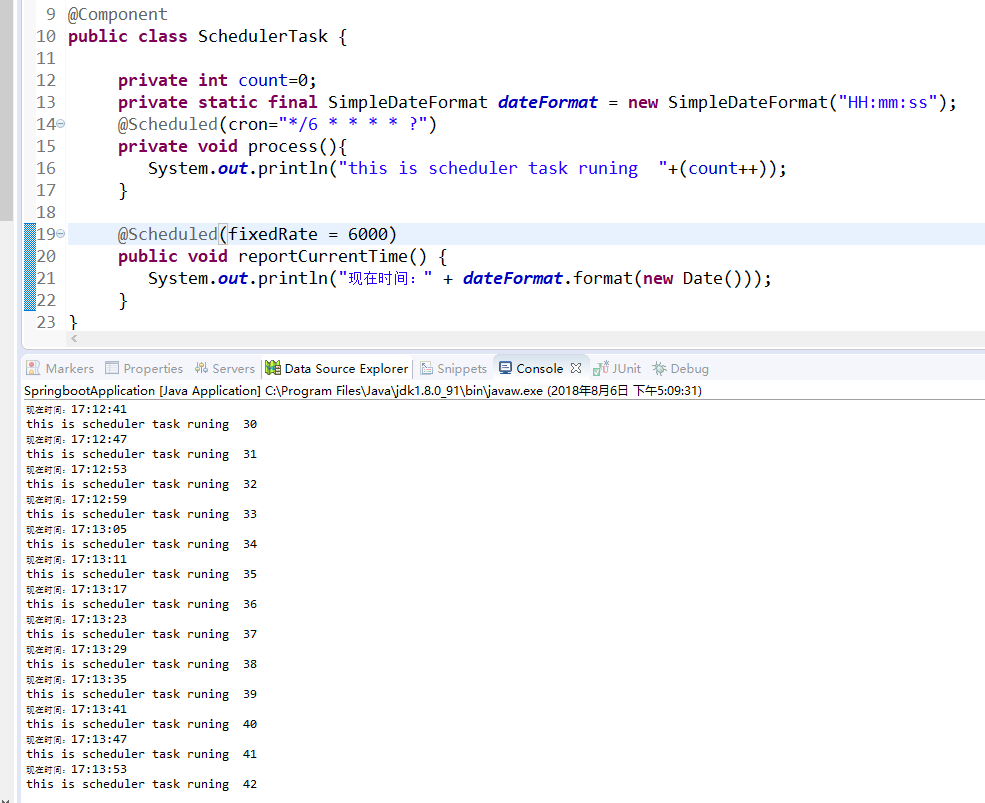
如果使用static变量,假设 private static boolean isStop=false;
在定时器的方法中首行加一行代码:if(isStop) return;
如果需要停止定时器,你写个页面,控制isStop的值就可以开关定时器了。
⑤SpringBoot之定时任务的更多相关文章
- 玩转SpringBoot之定时任务详解
序言 使用SpringBoot创建定时任务非常简单,目前主要有以下三种创建方式: 一.基于注解(@Scheduled) 二.基于接口(SchedulingConfigurer) 前者相信大家都很熟悉, ...
- SpringBoot 配置定时任务
SpringBoot启用定时任务,其内部集成了成熟的框架,因此我们可以很简单的使用它. 开启定时任务 @SpringBootApplication //设置扫描的组件的包 @ComponentScan ...
- SpringBoot - 添加定时任务
SpringBoot 添加定时任务 EXample1: import org.slf4j.Logger; import org.slf4j.LoggerFactory; import org.spri ...
- springboot之定时任务
定时线程 说到定时任务,通常会想到JDK自带的定时线程来执行,定时任务. 回顾一下定时线程池. public static ScheduledExecutorService newScheduledT ...
- SpringBoot整合定时任务和异步任务处理 3节课
1.SpringBoot定时任务schedule讲解 定时任务应用场景: 简介:讲解什么是定时任务和常见定时任务区别 1.常见定时任务 Java自带的java.util.Timer类 ...
- 十三、springboot集成定时任务(Scheduling Tasks)
定时任务(Scheduling Tasks) 在springboot创建定时任务比较简单,只需2步: 1.在程序的入口加上@EnableScheduling注解. 2.在定时方法上加@Schedule ...
- SpringBoot创建定时任务
之前总结过spring+quartz实现定时任务的整合http://www.cnblogs.com/gdpuzxs/p/6663725.html,而springboot创建定时任务则是相当简单. (1 ...
- springboot开启定时任务 添加定时任务 推送
最近在自学Java的springboot框架,要用到定时推送消息.参考了网上的教程,自己调试,终于调好了.下面将网上的教程归纳下,总结复习下. springboot开启定时任务 在SpringBo ...
- (入门SpringBoot)SpringBoot结合定时任务task(十)
SpringBoot整合定时任务task 使用注解EnableScheduling在启动类上. 定义@Component作为组件被容器扫描. 表达式生成地址:http://cron.qqe2.com ...
- SpringBoot整合定时任务和异步任务处理
SpringBoot定时任务schedule讲解 简介:讲解什么是定时任务和常见定时任务区别 1.常见定时任务 Java自带的java.util.Timer类 timer:配置比较麻烦,时间延后问题, ...
随机推荐
- TensorFlow实现CNN
TensorFlow是目前深度学习最流行的框架,很有学习的必要,下面我们就来实际动手,使用TensorFlow搭建一个简单的CNN,来对经典的mnist数据集进行数字识别. 如果对CNN还不是很熟悉的 ...
- AppLocker Pro FAQ
How to use AppLocker Pro: 1. Start AppLocker Pro, create a password.2. In the main console, click &q ...
- IntelliJ IDEA 2017 创建SpringBoot项目, 及.jar没有主清单属性解决办法
1. 创建项目: File >> New >> Spring Initializr 选好 SDK, 及 依赖包(比如 Web >> Web ) . 需要使用 ...
- Spring Boot 中修改端口和上下文路径
通过修改application.properties内容来改变访问的端口号和上下文路径(很简单!) spring.mvc.view.prefix=/WEB-INF/jsp/ spring.mvc.vi ...
- linux tzselect 设置时区
date -R 检查时间 tzselect 按照提示逐步设置 //这里演示的是设置东八区 TZ='Asia/Shanghai'; export TZ 添加到/etc/profile source pr ...
- ubuntu 支持中文
1.cat /usr/share/i18n/SUPPORTED 说明:查看系统支持的字符集,你需要注意的是支持字符集的格式,如对中文会有以下一些显示(我的系统如此,我不知是否普遍) zh_CN.GB1 ...
- MQ 个人小结
在PCS项目: talking 发送队列1.1 创建@Beanpublic Queue orderTakingQueue() { return createQueue(orderTakingQueue ...
- Spring -- spring结合aop 进行 tx&aspectj事务管理配置方法
1. tx 配置方法, 代码示例 javabean及其映射文件省略,和上篇的一样 CustomerDao.java, dao层接口 public interface CustomerDao { pub ...
- mysql 导入表数据中文乱码
方法一: 先在命令行设置为utf8,再导入 1. use database_name; 2. set names utf8; (或其他需要的编码) 3. source example.sql (sql ...
- No mojo definitions
pom.xml <build> <plugins> <plugin> <groupId>org.apache.maven.plugins</gro ...